1. ບົດແນະນຳ
The Matterport Pro3 Performance Kit is a professional 3D Lidar digital camera system designed for capturing and creating highly accurate 3D virtual tour experiences of indoor and outdoor spaces. This manual provides essential information for setting up, operating, maintaining, and troubleshooting your Pro3 Performance Kit to ensure optimal performance and longevity.
The Pro3 camera utilizes an ultra-fast, high-precision Lidar sensor to take millions of measurements per scan, enabling quick and accurate capture of complex spaces. It supports an extended scanning range of up to 100m for large areas and completes each sweep in under 20 seconds. The system is designed for continuous scanning with removable batteries and integrates with the Matterport Capture app for iOS or Android devices.
2. ສິ່ງທີ່ຢູ່ໃນກ່ອງ
The Matterport Pro3 Performance Kit includes the following components:
- Matterport Pro3 3D Lidar Digital Camera
- Two (2) Removable Batteries
- ຊຸດສາກແບັດ
- ປ່ອຍດ່ວນ Tripod Mount
- ຂາຕັ້ງໂຕະ
- ລໍ້ Dolly
- Two (2) Door Stops
- Small Hard Case
- ກະເປົ໋າເປ້

Image: All components of the Matterport Pro3 Performance Kit, including the camera, batteries, charger, tripod, dolly, and cases, are displayed.
3. ຕັ້ງຄ່າ
3.1 ການຕິດຕັ້ງ ແລະສາກແບັດ
- Insert a fully charged battery into the battery compartment at the base of the Pro3 camera. Ensure it clicks securely into place.
- To charge a battery, connect the battery to the charging kit and plug the charger into a power outlet. The indicator light on the charger will show the charging status.

Image: A hand inserting a removable battery into the Matterport Pro3 camera, illustrating the battery swap process.
3.2 Camera Assembly and Mounting
- Extend the tripod legs and secure them firmly on a stable surface.
- Attach the quick release tripod mount to the top of the tripod.
- Mount the Pro3 camera onto the quick release tripod mount, ensuring it is securely fastened.
- For enhanced mobility, attach the tripod with the camera to the wheeled dolly.
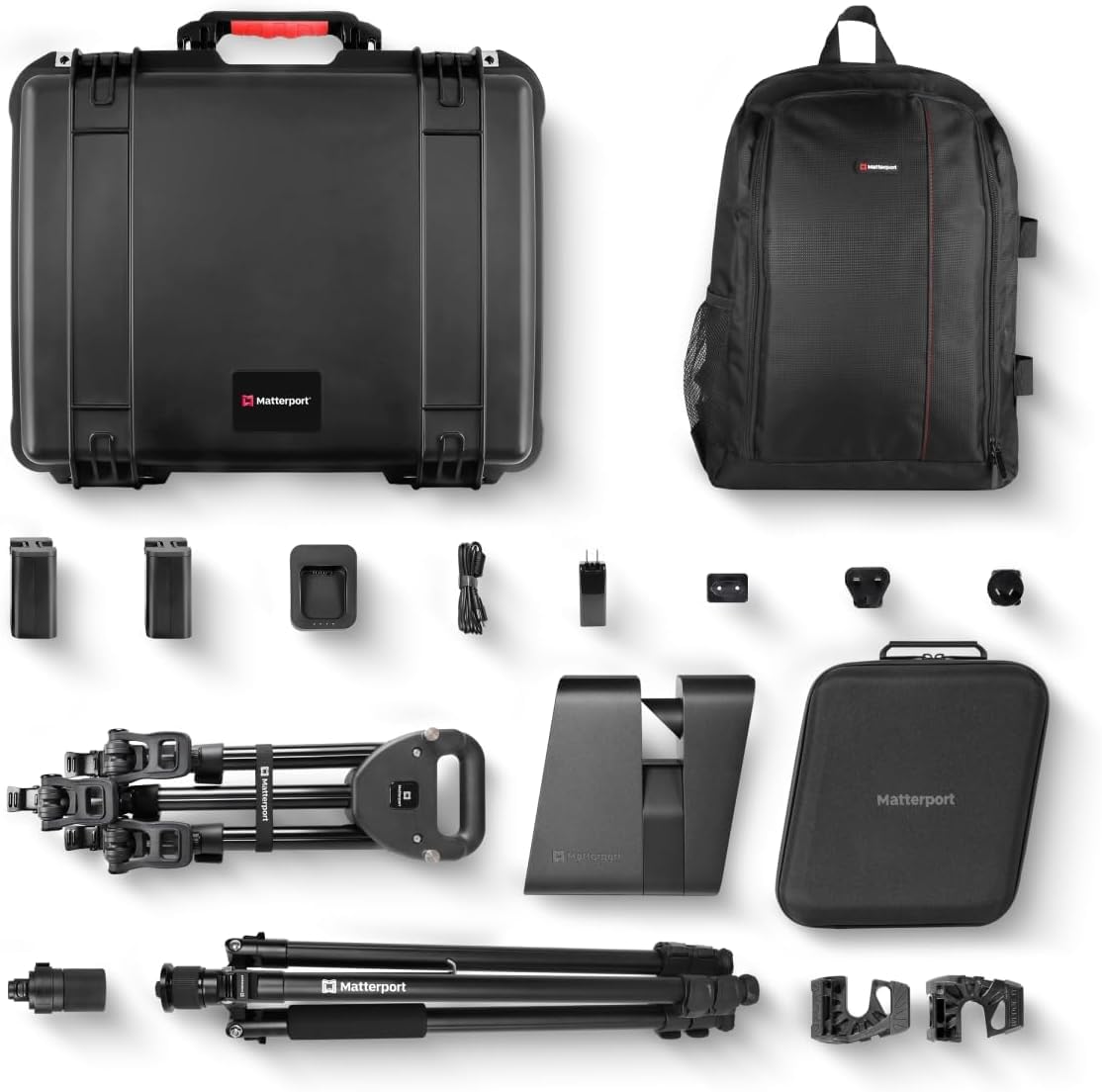
Image: The Matterport Pro3 camera is shown securely mounted on its tripod, ready for scanning operations.
3.3 ການຕິດຕັ້ງແອັບ ແລະ ການເຊື່ອມຕໍ່
- Download the Matterport Capture app from the App Store (iOS) or Google Play Store (Android) on your mobile device.
- Ensure your Pro3 camera is powered on.
- Open the Matterport Capture app and follow the on-screen instructions to connect to your Pro3 camera via Wi-Fi.

Image: A mobile phone displaying the Matterport Capture app interface, indicating a successful connection to the camera and readiness for scanning.
4. ຄໍາແນະນໍາການດໍາເນີນງານ
4.1 Capturing 3D Spaces
- Position the Pro3 camera in the desired starting location within the space to be scanned. Use the door stops to prevent doors from closing during scanning.
- Open the Matterport Capture app on your connected mobile device.
- Select 'New Job' or 'Continue Job' and follow the app's guidance to initiate a scan. The camera will rotate and capture the environment.
- Move the camera to the next scanning position, ensuring sufficient overlap with the previous scan for accurate alignment. Repeat the scanning process.
- The Pro3 can scan both indoor and outdoor environments, including under direct sunlight, with high precision.

Image: The Matterport Pro3 camera is positioned outdoors on a construction site, demonstrating its capability to scan large areas from a distance.

Image: The Matterport Pro3 camera is shown in a space transitioning from dim light to direct sunlight, highlighting its ability to capture seamlessly across different lighting conditions.
4.2 Data Processing and Management
- Once all desired scans are completed, use the Matterport Capture app to upload the data to your Matterport account.
- Matterport's cloud platform will process the raw scan data into a comprehensive 3D model. This process may take some time depending on the size and complexity of the scanned space.
- Access and manage your 3D models through the Matterport cloud platform. Here you can add tags, measurements, and create guided tours.

Image: A collage of four distinct 3D models of different interior spaces, illustrating the variety of environments that can be captured and managed on the Matterport platform.
5. ບໍາລຸງຮັກສາ
5.1 ການທໍາຄວາມສະອາດກ້ອງຖ່າຍຮູບ
- ໃຊ້ຜ້າອ່ອນໆທີ່ບໍ່ມີຂົນເພື່ອເຊັດຕົວກ້ອງຖ່າຍຮູບຄ່ອຍໆ.
- For the lens and Lidar sensor, use a specialized lens cleaning cloth and solution. Avoid abrasive materials or harsh chemicals.
- Ensure no dust or debris obstructs the Lidar sensor or camera lens.
5.2 ການດູແລແລະເກັບຮັກສາຫມໍ້ໄຟ
- ເກັບຮັກສາຫມໍ້ໄຟໃນບ່ອນທີ່ເຢັນ, ແຫ້ງ, ຫ່າງຈາກແສງແດດໂດຍກົງແລະອຸນຫະພູມທີ່ສຸດ.
- Do not fully discharge batteries before recharging.
- If storing the camera for an extended period, remove the battery from the camera body.
5.3 ການເບິ່ງແຍງທົ່ວໄປ
- Always transport the camera in its provided hard case or backpack to protect it from physical damage.
- Avoid exposing the camera to excessive moisture or dust.
- Regularly check all connections and mounts for security before operation.
6. ການແກ້ໄຂບັນຫາ
This section addresses common issues you might encounter with your Matterport Pro3 Performance Kit.
6.1 ບັນຫາການເຊື່ອມຕໍ່
- ກ້ອງຖ່າຍຮູບບໍ່ໄດ້ເຊື່ອມຕໍ່ກັບແອັບຯ: Ensure the camera is powered on and its Wi-Fi is enabled. Check your mobile device's Wi-Fi settings to confirm it's connected to the camera's network. Restart both the camera and the app if necessary.
- ແອັບກວດຫາກ້ອງຖ່າຍຮູບບໍ່ໄດ້: Verify that the Matterport Capture app is updated to the latest version. Ensure your mobile device meets the minimum system requirements for the app.
6.2 Scanning Errors
- Scan alignment failures: Ensure sufficient overlap between scans. Avoid moving objects or people within the scan area during capture. Maintain consistent lighting conditions where possible.
- Poor scan quality: Check the camera lens and Lidar sensor for obstructions or smudges. Ensure the camera is stable on the tripod during scanning.
- ແບັດເຕີຣີໝົດໄວ: Ensure batteries are fully charged before use. Consider carrying spare charged batteries for extended scanning sessions.
6.3 ການປະຕິບັດທົ່ວໄປ
- ກ້ອງຖ່າຍຮູບບໍ່ຕອບສະໜອງ: Power cycle the camera by turning it off and then on again. If the issue persists, contact Matterport support.
For further assistance, please refer to the official Matterport support resources available on their webເວັບໄຊ.
7. ຂໍ້ມູນຈໍາເພາະ
| ຄຸນສົມບັດ | ຂໍ້ມູນຈໍາເພາະ |
|---|---|
| ໝາຍເລກຕົວແບບ | MC3003-X |
| ຂະໜາດແພັກເກັດ | 24.8 x 22.36 x 12.99 ນິ້ວ |
| ນ້ຳໜັກ | 32.32 ປອນ (ລວມຊຸດ) |
| ໝໍ້ໄຟ | 2 ຫມໍ້ໄຟ Lithium Metal (ລວມ) |
| ໂໝດຍິງ | Automatic, Manual, Aperture Priority, Shutter Priority |
| ປະເພດການຄວບຄຸມການຮັບແສງ | Manual or multiple modes including Manual |
| ສີ | ດຳ |
| ຄວາມລະອຽດການຖ່າຍວິດີໂອ | 2160p |
| ປະເພດສື່ | Compact Flash, SD Card, XQD Card |
| Lidar Precision | +/- 20mm @10m |
| Lidar Points per Second | 100K |
| Scan Time per Sweep | <20 ວິນາທີ |
| ໄລຍະການສະແກນ | Up to 100m (extended range in E57 files ເທົ່ານັ້ນ) |
8. ການຮັບປະກັນແລະການສະຫນັບສະຫນູນ
The Matterport Pro3 Performance Kit is covered by a manufacturer's warranty. For specific warranty terms and conditions, please refer to the documentation included with your product or visit the official Matterport website. For technical support, product registration, and access to additional resources, please visit the Matterport Support Page.
Note that the Pro3 camera operates best with a Matterport professional or business plan, which unlocks premium features and access to the Matterport Capture app. Details on plans can be found on the Matterport webເວັບໄຊ.


