1. ບົດແນະນຳ
Thank you for choosing the Baseus AeQur G10 TWS Earphones. This manual provides detailed instructions on how to set up, operate, maintain, and troubleshoot your new earphones. Please read this manual thoroughly before using the product to ensure optimal performance and longevity.
2. ເນື້ອໃນຊຸດ
Carefully unpack the box and ensure all items listed below are present and in good condition. If any items are missing or damaged, please contact your retailer.
- Baseus AeQur G10 TWS Earphones (Left and Right)
- ກ່ອງສາກ
- USB-A/USB-C Wireless Dongle
- ສາຍສາກ USB-C
- ເຄັດລັບຫູຫຼາຍຂະໜາດ
- ຄູ່ມືຜູ້ໃຊ້ (ເອກະສານນີ້)

Image 2.1: Complete package contents of the Baseus AeQur G10 TWS Earphones.
3. ຜະລິດຕະພັນເກີນview
Familiarize yourself with the components of your Baseus AeQur G10 TWS Earphones.
3.1 ຫູຟັງ
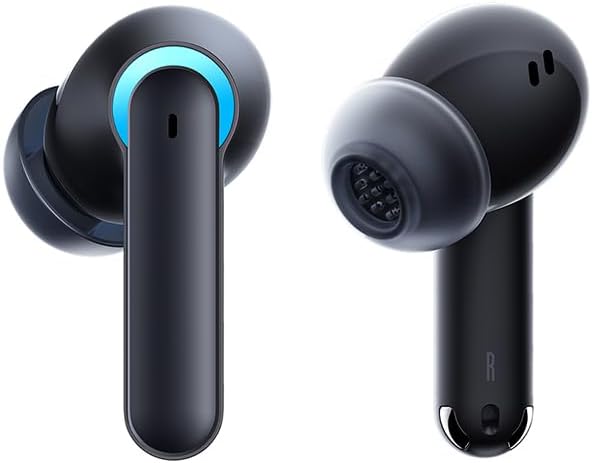
Image 3.1: Left and Right Baseus AeQur G10 Earphones. Each earphone features a touch control area, microphone, and charging contacts.
3.2 ຄະດີສາກໄຟ

Image 3.2: Baseus AeQur G10 Earphones in their charging case with the lid open. The case has charging slots for each earphone and an LED indicator for battery status.
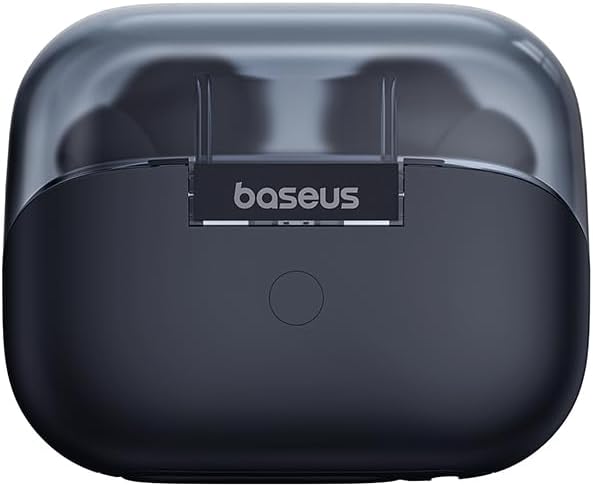
ຮູບພາບ 3.3: ດ້ານຫລັງ view of the Baseus AeQur G10 charging case, displaying the Baseus brand logo and a USB-C charging port (not explicitly visible but implied by common design).
3.3 USB-A/USB-C Wireless Dongle
The included wireless dongle allows for low-latency connection to various devices, including PCs, laptops, gaming consoles, and mobile devices.

Image 3.4: Compatibility diagram for the Baseus AeQur G10, illustrating connections to Type-C Androids & Tablets, Type-C/USB-A PCs & Laptops, PS5/PS4/Switch, Steam Deck, and VR devices.
4. ຕັ້ງຄ່າ
4.1 ການສາກໄຟເບື້ອງຕົ້ນ
- ວາງຫູຟັງທັງສອງໃສ່ໃນຊ່ອງສາກໄຟ.
- ເຊື່ອມຕໍ່ສາຍສາກ USB-C ກັບຜອດສາກໄຟຢູ່ບ່ອນສາກ ແລະອີກສົ້ນກັບແຫຼ່ງໄຟ USB (ເຊັ່ນ: ພອດ USB ຂອງຄອມພິວເຕີ, ອະແດັບເຕີຝາ).
- The LED indicator on the case will show charging status. A full charge typically takes approximately 1.5 hours for the earphones and 2 hours for the case.
4.2 ການຈັບຄູ່ກັບອຸປະກອນ Bluetooth
- ໃຫ້ແນ່ໃຈວ່າຫູຟັງຢູ່ໃນກ່ອງສາກໄຟ ແລະ ກ່ອງມີໄຟພຽງພໍ.
- Open the charging case lid. The earphones will automatically enter pairing mode (indicated by a flashing LED on the earphones or case).
- ໃນອຸປະກອນຂອງທ່ານ (ໂທລະສັບສະຫຼາດ, ແທັບເລັດ, ແລັບທັອບ), ເປີດໃຊ້ Bluetooth ແລະ ຄົ້ນຫາອຸປະກອນໃໝ່.
- Select "Baseus AeQur G10" from the list of available devices.
- Once connected, the LED indicator will stop flashing, and you will hear a confirmation tone.
4.3 Connecting via USB Wireless Dongle
- Insert the USB-A or USB-C end of the wireless dongle into the corresponding port on your device (PC, laptop, gaming console).
- Ensure the earphones are in the charging case and the lid is open.
- The earphones will automatically attempt to connect to the dongle. The dongle's LED indicator will show connection status.
- Once connected, the LED on the dongle will become solid, and you will hear a confirmation tone from the earphones.
5. ຄໍາແນະນໍາການດໍາເນີນງານ
5.1 ເປີດ/ປິດ
- ເປີດ: ເປີດຝາປິດກ່ອງສາກໄຟ ຫຼື ເອົາຫູຟັງອອກຈາກກ່ອງ. ພວກມັນຈະເປີດໂດຍອັດຕະໂນມັດ.
- ປິດພະລັງງານ: Place the earphones back into the charging case and close the lid. They will power off automatically and begin charging.
5.2 ການໃສ່ຫູຟັງ
- Identify the 'L' (left) and 'R' (right) markings on each earphone.
- ຄ່ອຍໆໃສ່ຫູຟັງເຂົ້າໄປໃນຮູຫູຂອງທ່ານ.
- Rotate them slightly to find a comfortable and secure fit. Choose the appropriate ear tip size for optimal sound quality and comfort.
5.3 ແຕະການຄວບຄຸມ
The Baseus AeQur G10 earphones feature touch-sensitive controls on each earbud. The specific functions may vary slightly depending on the device and application.
| ການປະຕິບັດ | ຟັງຊັນ |
|---|---|
| ແຕະຄັ້ງດຽວ (L/R) | ຫຼິ້ນ/ຢຸດເພງ, ຮັບສາຍ/ວາງສາຍ |
| ແຕະສອງເທື່ອ (L) | ເພງກ່ອນໜ້າ |
| ແຕະສອງເທື່ອ (R) | ຕິດຕາມຕໍ່ໄປ |
| ແຕະສາມເທື່ອ (L/R) | ເປີດໃຊ້ຜູ້ຊ່ວຍສຽງ |
| ກົດຄ້າງໄວ້ (L/R, 2ວິ) | ປະຕິເສດການໂທ |
| ກົດຄ້າງໄວ້ (L/R, 3ວິ) | Toggle Gaming/Music Mode (if applicable) |
6. ບໍາລຸງຮັກສາ
6.1 ການທໍາຄວາມສະອາດ
- ໃຊ້ຜ້າແພທີ່ອ່ອນ, ແຫ້ງ, ບໍ່ມີເສັ້ນດ່າງເພື່ອອະນາໄມຫູຟັງ ແລະ ກ່ອງສາກ.
- For earwax or debris in the ear tips, gently remove the ear tips and clean them with a cotton swab lightly dampened with rubbing alcohol. Ensure they are completely dry before reattaching.
- ຫ້າມໃຊ້ເຄື່ອງຊັກຜ້າ, ສານລະລາຍ, ຫຼືສີດ aerosol.
6.2 ການເກັບຮັກສາ
- ເກັບຮັກສາຫູຟັງໄວ້ໃນກະເປົ໋າສາກໄຟທຸກຄັ້ງເມື່ອບໍ່ໄດ້ໃຊ້ເພື່ອປົກປ້ອງພວກມັນ ແລະ ຮັກສາມັນໄວ້.
- ເກັບຮັກສາໄວ້ໃນບ່ອນທີ່ເຢັນ, ແຫ້ງ, ຫ່າງຈາກອຸນຫະພູມສູງສຸດແລະແສງແດດໂດຍກົງ.
6.3 ການດູແລຫມໍ້ໄຟ
- Charge the earphones and case regularly, even if not used frequently, to maintain battery health.
- Avoid fully discharging the batteries for extended periods.
7. ການແກ້ໄຂບັນຫາ
If you encounter issues with your Baseus AeQur G10 earphones, refer to the following common solutions:
7.1 ບໍ່ມີສຽງ ຫຼື ການເຊື່ອມຕໍ່ເປັນໄລຍະໆ
- Ensure earphones are charged and properly connected to your device (Bluetooth or dongle).
- ກວດເບິ່ງລະດັບສຽງໃນທັງຫູຟັງ ແລະອຸປະກອນທີ່ເຊື່ອມຕໍ່ຂອງທ່ານ.
- ຍ້າຍເຂົ້າໃກ້ອຸປະກອນຂອງທ່ານຫຼາຍຂຶ້ນເພື່ອຫຼີກເວັ້ນບັນຫາການລົບກວນ ຫຼື ບັນຫາໄລຍະທາງ.
- Try disconnecting and re-connecting the earphones.
- For Bluetooth, forget the device on your phone and re-pair.
- For dongle, unplug and re-plug the dongle.
7.2 ຫູຟັງບໍ່ສາກ
- ໃຫ້ແນ່ໃຈວ່າສາຍສາກໄດ້ເຊື່ອມຕໍ່ຢ່າງປອດໄພກັບທັງກໍລະນີ ແລະແຫຼ່ງພະລັງງານ.
- ກວດສອບວ່າແຫຼ່ງພະລັງງານມີການເຄື່ອນໄຫວ.
- ເຊັດໜ້າຕัวສຳລີແຫ້ງໃຫ້ສະອາດຢູ່ບໍລິເວນສາຍສາກໄຟທັງຫູຟັງ ແລະ ພາຍໃນເຄສ.
- ລອງສາຍສາກໄຟ ຫຼືອະແດັບເຕີສາຍສາກອື່ນ.
7.3 Only One Earphone Working
- ໃສ່ຫູຟັງທັງສອງຂ້າງກັບຄືນໃສ່ໃນກ່ອງສາກໄຟ, ປິດຝາ, ລໍຖ້າສອງສາມວິນາທີ, ຈາກນັ້ນເປີດຝາແລະເອົາອອກອີກຄັ້ງ.
- ກວດໃຫ້ແນ່ໃຈວ່າໄດ້ສາກຫູຟັງທັງສອງແລ້ວ.
- ລອງຣີເຊັດຫູຟັງ (ເບິ່ງຈາກຜູ້ຜະລິດ webເວັບໄຊສໍາລັບຄໍາແນະນໍາການຕັ້ງຄ່າສະເພາະຖ້າຫາກວ່າຈໍາເປັນ).
8. ຂໍ້ມູນຈໍາເພາະ
Key technical specifications for the Baseus AeQur G10 TWS Earphones:
| ຄຸນສົມບັດ | ຂໍ້ມູນຈໍາເພາະ |
|---|---|
| ຊື່ຕົວແບບ | A00055400111-00 |
| ຍີ່ຫໍ້ | Baseus |
| ສີ | ດຳ |
| ການຈັດວາງຫູ | ໃນຫູ |
| ປັດໄຈແບບຟອມ | ໃນຫູ |
| ເຕັກໂນໂລຊີການເຊື່ອມຕໍ່ | ໄຮ້ສາຍ (Bluetooth) |
| ເຕັກໂນໂລຊີການສື່ສານໄຮ້ສາຍ | Bluetooth |
| ໝໍ້ໄຟ | 1 ແບດເຕີຣີ Lithium Ion ຕ້ອງການ (ລວມ) |
| ຂະໜາດສິນຄ້າ | 10 x 5 x 1.27 cm |
| ນ້ໍາຫນັກລາຍການ | 220 g |
| ຜູ້ຜະລິດ | Baseus |
| ການນໍາໃຊ້ສະເພາະ | ການເດີນທາງ |
9. ການຮັບປະກັນແລະການສະຫນັບສະຫນູນ
Baseus products are designed and manufactured to the highest quality standards. For information regarding warranty coverage, technical support, or service, please refer to the warranty card included with your product or visit the official Baseus webເວັບໄຊ. ຮັກສາຫຼັກຖານການຊື້ຂອງທ່ານສໍາລັບການຮ້ອງຂໍການຮັບປະກັນ.
For further assistance, you may contact Baseus customer support through their official channels.


