1. ບົດແນະນຳ
Thank you for choosing the Baseus Bowie E5x True Wireless Stereo (TWS) Earphones. These earphones are designed to provide a high-quality audio experience with convenient wireless connectivity. This manual will guide you through the setup, operation, and maintenance of your new earphones.

Figure 1: Baseus Bowie E5x TWS Earphones and Charging Case with Retail Packaging
2. ເນື້ອໃນຊຸດ
ກະລຸນາກວດສອບເນື້ອໃນຂອງຊຸດເພື່ອໃຫ້ແນ່ໃຈວ່າລາຍການທັງຫມົດມີຢູ່:
- Baseus Bowie E5x TWS Earphones (Left and Right)
- ກ່ອງສາກ
- ສາຍສາກ USB-C
- ຄູ່ມືຜູ້ໃຊ້ (ເອກະສານນີ້)

Figure 2: Baseus Bowie E5x Charging Case and USB-C Charging Cable
3. ຜະລິດຕະພັນເກີນview
Familiarize yourself with the components of your Baseus Bowie E5x earphones:
- ຕຸ້ມຫູ: Left (L) and Right (R) earbuds with touch control areas and charging contacts.
- ຕູ້ສາກໄຟ: Used for charging the earbuds and for storage. Features a USB-C charging port and LED indicators.
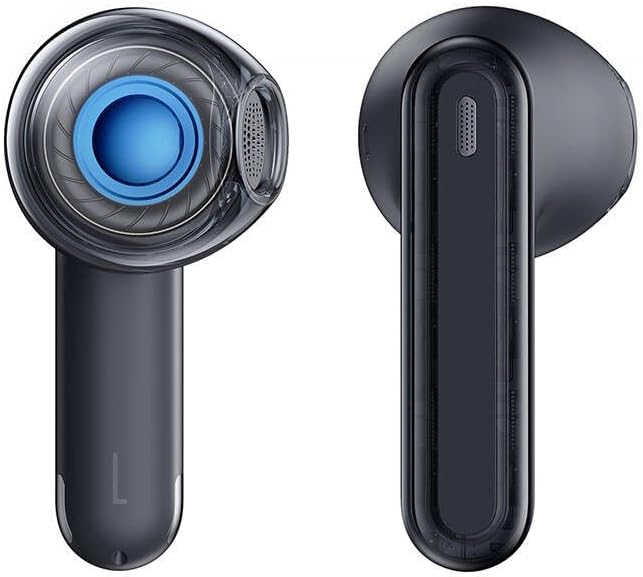
Figure 3: Left and Right Baseus Bowie E5x Earbuds
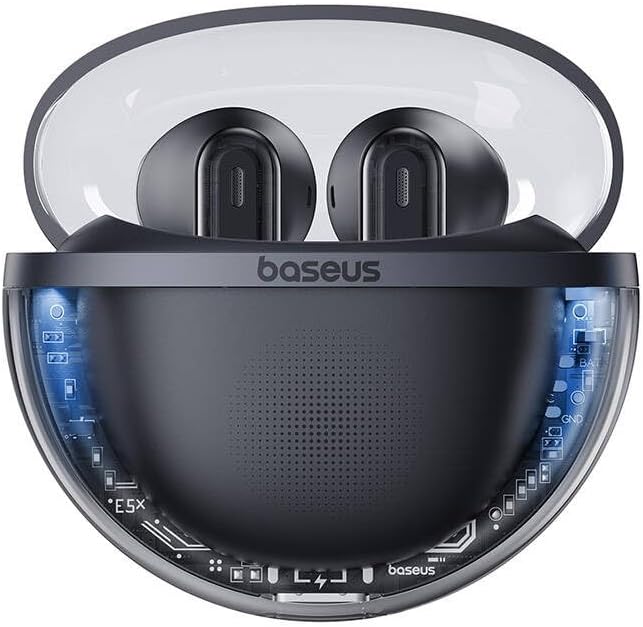
Figure 4: Baseus Bowie E5x Charging Case with Earbuds Inserted
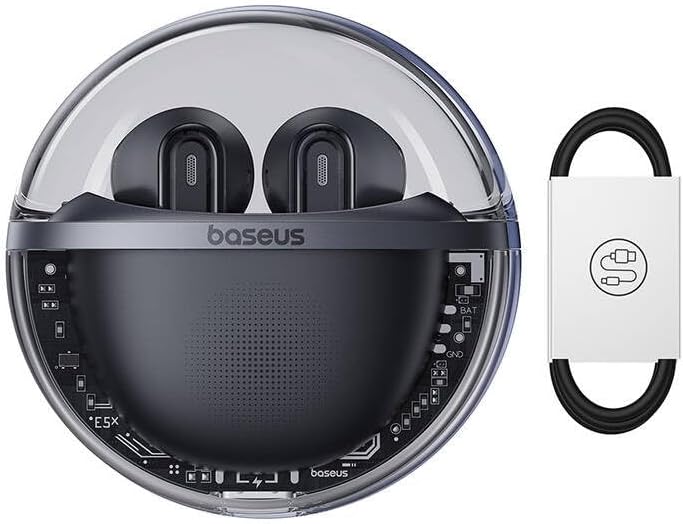
Figure 5: Close-up of an Earbud's Speaker
4. ຕັ້ງຄ່າ
4.1 ການສາກຫູຟັງ ແລະ ເຄສ
- ຄ່າ ທຳ ນຽມ: Before first use, fully charge the charging case and earbuds. Place the earbuds into the charging case.
- ການສາກໄຟກໍລະນີ: Connect the provided USB-C cable to the charging port on the case and the other end to a USB power adapter (not included). The LED indicator on the case will show charging status.
- ກຳລັງສາກຫູຟັງ: When placed in the charging case, the earbuds will automatically begin charging. The case's indicator lights will show the charging status of the earbuds.
4.2 ການຈັບຄູ່ Bluetooth
- ເປີດ: Open the charging case. The earbuds will automatically power on and enter pairing mode (indicated by flashing LED lights on the earbuds).
- ເປີດໃຊ້ Bluetooth: ໃນອຸປະກອນຂອງທ່ານ (ໂທລະສັບສະຫຼາດ, ແທັບເລັດ, ຄອມພິວເຕີ), ເປີດໃຊ້ Bluetooth.
- ເລືອກອຸປະກອນ: In your device's Bluetooth settings, search for available devices and select "Baseus Bowie E5x".
- ເຊື່ອມຕໍ່: Once selected, the earbuds will connect to your device. A voice prompt or steady LED light will confirm successful pairing.
- ເຊື່ອມຕໍ່ຄືນ: ຫຼັງຈາກການຈັບຄູ່ເບື້ອງຕົ້ນ, ຫູຟັງເອຍບັດຈະເຊື່ອມຕໍ່ອັດຕະໂນມັດກັບອຸປະກອນທີ່ຈັບຄູ່ສຸດທ້າຍໃນເວລາທີ່ເອົາອອກຈາກກໍລະນີ, ສະຫນອງໃຫ້ Bluetooth ຖືກເປີດໃຫ້ໃຊ້ໃນອຸປະກອນ.
5. ຄໍາແນະນໍາການດໍາເນີນງານ
The Baseus Bowie E5x earphones feature intuitive touch controls:
| ຟັງຊັນ | ຄຳສັ່ງ (ຫູຟັງຊ້າຍ/ຂວາ) |
|---|---|
| ເປີດເຄື່ອງ | ເປີດກ່ອງສາກໄຟ / ກົດຄ້າງໄວ້ບໍລິເວນສຳຜັດ (ຖ້າປິດ) |
| ປິດເຄື່ອງ | Place earbuds into charging case and close lid / Disconnect Bluetooth and wait |
| ຫຼິ້ນ/ຢຸດຊົ່ວຄາວ | Double tap touch area |
| ຕິດຕາມຕໍ່ໄປ | ແຕະສາມເທື່ອໃສ່ຫູຟັງເບື້ອງຂວາ |
| ເພງກ່ອນໜ້າ | ແຕະສາມເທື່ອໃສ່ຫູຟັງເອຍບັດຊ້າຍ |
| ຕອບ/ວາງສາຍ | Double tap touch area |
| ປະຕິເສດການໂທ | ກົດຄ້າງບໍລິເວນສໍາຜັດເປັນເວລາ 2 ວິນາທີ |
| ເປີດໃຊ້ຜູ້ຊ່ວຍສຽງ | ກົດຄ້າງບໍລິເວນສໍາຜັດເປັນເວລາ 3 ວິນາທີ |
| Switch to Gaming Mode (Low Latency) | Specific gesture (refer to product packaging or Baseus app for exact control) |
ໝາຍເຫດ: Specific touch controls for features like volume adjustment or gaming mode may vary. Refer to the official Baseus app or product packaging for the most accurate and customizable controls.
6. ບໍາລຸງຮັກສາ
To ensure the longevity and optimal performance of your earphones, follow these maintenance tips:
- ທໍາຄວາມສະອາດ: ອະນາໄມຫູຟັງຫູຟັງ ແລະກະເປົ໋າສາກໄຟເປັນປະຈຳດ້ວຍຜ້າແພທີ່ອ່ອນ, ແຫ້ງ, ບໍ່ມີສານຂັດ. ຢ່າໃຊ້ສານເຄມີທີ່ຮຸນແຮງຫຼືວັດສະດຸຂັດ.
- ຕິດຕໍ່ພົວພັນການສາກໄຟ: ໃຫ້ແນ່ໃຈວ່າຈຸດເຊື່ອມຕໍ່ການສາກໄຟຢູ່ທັງຫູຟັງ ແລະ ພາຍໃນເຄສສະອາດ ແລະ ບໍ່ມີສິ່ງເສດເຫຼືອເພື່ອຮັບປະກັນການສາກໄຟທີ່ຖືກຕ້ອງ.
- ການເກັບຮັກສາ: ເມື່ອບໍ່ໄດ້ໃຊ້, ໃຫ້ເກັບຮັກສາຫູຟັງໃສ່ໃນກະເປົ໋າສາກໄຟເພື່ອປົກປ້ອງພວກມັນຈາກຝຸ່ນ ແລະຄວາມເສຍຫາຍ.
- ຫຼີກລ້ຽງສະພາບທີ່ຮ້າຍແຮງ: ຢ່າວາງຫູຟັງໃສ່ກັບອຸນຫະພູມ, ຄວາມຊຸ່ມຊື່ນ, ຫຼືຂອງແຫຼວທີ່ຮຸນແຮງ.
7. ການແກ້ໄຂບັນຫາ
If you encounter issues with your Baseus Bowie E5x earphones, try the following solutions:
- ບໍ່ມີສຽງ:
- ກວດໃຫ້ແນ່ໃຈວ່າໄດ້ສາກຫູຟັງຫູຟັງແລ້ວ.
- Check if Bluetooth is enabled on your device and connected to "Baseus Bowie E5x".
- ປັບລະດັບສຽງທັງໃນອຸປະກອນຂອງທ່ານ ແລະຫູຟັງ.
- ລອງຈັບຄູ່ຫູຟັງກັບອຸປະກອນຂອງທ່ານຄືນໃໝ່.
- ຫູຟັງບໍ່ຈັບຄູ່ກັນ:
- ວາງຫູຟັງຫູຟັງທັງສອງໃສ່ໃນກ່ອງສາກ, ປິດຝາປິດ, ລໍຖ້າສອງສາມວິນາທີ, ຈາກນັ້ນເປີດຝາປິດອີກຄັ້ງ.
- ກວດໃຫ້ແນ່ໃຈວ່າຫູຟັງຫູຟັງທັງສອງມີສາກພຽງພໍ.
- ບັນຫາການສາກໄຟ:
- ກວດເບິ່ງສາຍ USB-C ແລະອະແດັບເຕີໄຟ.
- ເຮັດຄວາມສະອາດລາຍຊື່ຜູ້ຕິດຕໍ່ການສາກໄຟຢູ່ຫູຟັງຫູຟັງ ແລະ ພາຍໃນເຄສ.
- ຮັບປະກັນວ່າກະເປົ໋າສາກໄຟເອງຖືກສາກ.
- Connection Drops/Unstable:
- ຍ້າຍເຂົ້າໄປໃກ້ອຸປະກອນທີ່ເຊື່ອມຕໍ່ຂອງທ່ານ.
- ຫຼີກລ່ຽງສະພາບແວດລ້ອມທີ່ມີການລົບກວນແມ່ເຫຼັກໄຟຟ້າທີ່ຮຸນແຮງ.
- ຕັດການເຊື່ອມຕໍ່ ແລະເຊື່ອມຕໍ່ Bluetooth ຄືນໃໝ່.
If the issue persists, consult the Baseus official website or customer support for further assistance.
8. ຂໍ້ມູນຈໍາເພາະ
| ຄຸນສົມບັດ | ລາຍລະອຽດ |
|---|---|
| ຍີ່ຫໍ້ | Baseus |
| ຕົວແບບ | Bowie E5x |
| ສີ | ດຳ |
| ສ່ວນປະກອບລວມ | 1 package (Earphones, Charging Case, USB-C Cable, Manual) |
| ການເຊື່ອມຕໍ່ | True Wireless Stereo (TWS) |
| ພອດສາກໄຟ | USB-C |
ຫມາຍເຫດ: ຂໍ້ມູນຈໍາເພາະແມ່ນມີການປ່ຽນແປງໂດຍບໍ່ມີການແຈ້ງລ່ວງຫນ້າ.
9. ການຮັບປະກັນແລະການສະຫນັບສະຫນູນ
Baseus products come with a manufacturer's warranty. Please refer to the warranty card included in your package or visit the official Baseus webເວັບໄຊສໍາລັບເງື່ອນໄຂການຮັບປະກັນລາຍລະອຽດສະເພາະກັບພາກພື້ນຂອງທ່ານ.
For technical support, troubleshooting, or service inquiries, please contact Baseus customer support through their official webເວັບໄຊ ຫຼືຂໍ້ມູນການຕິດຕໍ່ທີ່ສະໜອງໃຫ້ຢູ່ໃນການຫຸ້ມຫໍ່ຜະລິດຕະພັນຂອງທ່ານ.
ທາງການ Webເວັບໄຊ: www.baseus.com


