ແນະນຳ
The Aiwa Smart Band ASB-40 is a versatile fitness tracker designed to help you monitor your health and fitness activities. It features a comfortable silicone strap and a 1.1-inch color AMOLED display for clear visibility. This smart band tracks various health metrics including heart rate, blood pressure, and SpO2 levels, alongside fitness activities such as steps taken, calories burned, and distance traveled. It also offers sleep quality tracking and smart features like notification alerts, music and camera remote control, 'find my phone' function, alarm clock, timer, and stopwatch.
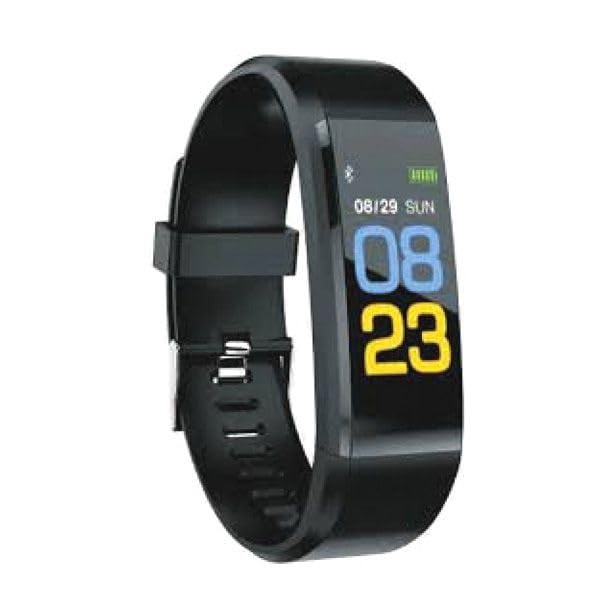
Image: Aiwa Smart Band ASB-40, a sleek black fitness tracker with a clear display.
ຕັ້ງຄ່າ
1. ການແກະກ່ອງ
Carefully remove the Aiwa Smart Band ASB-40 and its accessories from the packaging. The box should contain the smart band and a charging cable.
2. ການສາກອຸປະກອນ
- Connect the charging cable to the charging port on the back of your smart band.
- Plug the other end of the charging cable into a USB power adapter (not included) or a computer's USB port.
- The band's display will show a charging indicator. Allow approximately 2 hours for a full charge before first use.
3. ການຈັບຄູ່ກັບໂທລະສັບສະຫຼາດຂອງທ່ານ
- Download the official Aiwa Smart Band application from your smartphone's app store (iOS or Android).
- ໃຫ້ແນ່ໃຈວ່າ Bluetooth ຖືກເປີດໃຊ້ຢູ່ໃນໂທລະສັບສະຫຼາດຂອງທ່ານ.
- Open the Aiwa Smart Band application and follow the on-screen instructions to create an account or log in.
- ໃນແອັບ, ໃຫ້ໄປທີ່ພາກສ່ວນການຈັບຄູ່ອຸປະກອນ ແລະ ເລືອກ 'ເພີ່ມອຸປະກອນ'.
- The app will search for available devices. Select 'ASB-40' from the list to initiate pairing.
- Confirm the pairing request on both your smartphone and the smart band if prompted.
4. Wearing the Smart Band
Wear the smart band snugly on your wrist, about one finger's width above your wrist bone. Ensure the sensor on the back of the band is in contact with your skin for accurate heart rate and other health measurements.
ຄໍາແນະນໍາການດໍາເນີນງານ
ການນໍາທາງພື້ນຖານ
The Aiwa Smart Band ASB-40 features a touch-sensitive 1.1-inch color AMOLED display. Swipe left/right or up/down to navigate through different menus and functions. Tap the screen to select an option or confirm an action.
ຄຸນນະສົມບັດແລະຫນ້າທີ່ທີ່ສໍາຄັນ
- ການຕິດຕາມການເຄື່ອນໄຫວ: ຕິດຕາມການຍ່າງ, ໄລຍະທາງທີ່ເດີນທາງ, ແລະ ແຄລໍຣີທີ່ເຜົາຜານຕະຫຼອດມື້. View your daily progress directly on the band or in the companion app.
- ຕິດຕາມອັດຕາການເຕັ້ນຫົວໃຈ: Continuously tracks your heart rate. Access real-time readings on the band and historical data in the app.
- Blood Pressure & SpO2 Monitoring: Provides estimates of your blood pressure and blood oxygen saturation (SpO2) levels. These measurements are for reference only and should not be used for medical diagnosis.
- ການຕິດຕາມການນອນ: Automatically monitors your sleep patterns, including deep sleep, light sleep, and awake times. Review ການວິເຄາະຄຸນນະພາບການນອນຂອງທ່ານໃນແອັບ.
- ການແຈ້ງເຕືອນອັດສະລິຍະ: Receive alerts for incoming calls, messages, and app notifications directly on your wrist when connected to your smartphone.
- ເຕືອນປະຈຳຕົວ: The band can remind you to move if you have been inactive for an extended period.
- ການຄວບຄຸມໄລຍະໄກ: Control music playback and trigger your smartphone camera remotely from the smart band.
- ຊອກຫາໂທລະສັບຂອງຂ້ອຍ: Use this function on the band to make your paired smartphone ring, helping you locate it.
- Alarm Clock, Timer, Stopwatch: Access these utility functions directly from the band's menu.
ກັນນ້ຳ (IP67)
The Aiwa Smart Band ASB-40 is IP67 rated, meaning it is protected against dust ingress and can withstand immersion in water up to 1 meter for up to 30 minutes. It is suitable for daily use, such as washing hands or light rain. However, it is not recommended for swimming, showering with hot water, or diving, as steam and prolonged water exposure can damage the device.
ການບໍາລຸງຮັກສາແລະການດູແລ
- ທໍາຄວາມສະອາດ: Regularly clean the smart band, especially the sensor area and the strap, with a soft, damp ຜ້າ. ຫຼີກເວັ້ນການນໍາໃຊ້ສານເຄມີທີ່ຮຸນແຮງຫຼືວັດສະດຸຂັດ.
- ການສາກໄຟ: Use only the provided charging cable. Avoid overcharging the device. Disconnect the charger once the battery is full.
- ການເກັບຮັກສາ: Store the smart band in a cool, dry place when not in use. Avoid extreme temperatures.
- ຫຼີກເວັ້ນຜົນກະທົບ: ປົກປ້ອງອຸປະກອນຈາກຜົນກະທົບທີ່ເຂັ້ມແຂງຫຼືການຫຼຸດລົງ, ເຊິ່ງສາມາດທໍາລາຍຫນ້າຈໍຫຼືອົງປະກອບພາຍໃນ.
ການແກ້ໄຂບັນຫາ
ອຸປະກອນບໍ່ເປີດ
- ກວດໃຫ້ແນ່ໃຈວ່າອຸປະກອນຖືກສາກເຕັມແລ້ວ. ເຊື່ອມຕໍ່ມັນກັບເຄື່ອງສາກຢ່າງໜ້ອຍ 30 ນາທີ.
- If the issue persists, try performing a soft reset (refer to the app for specific instructions, or hold the touch button/area for 10-15 seconds if available).
Unable to Pair with Smartphone
- Make sure Bluetooth is enabled on your smartphone and the smart band is within range.
- Ensure the Aiwa Smart Band app is installed and updated to the latest version.
- Restart both your smartphone and the smart band.
- ຖ້າຈັບຄູ່ກ່ອນໜ້ານີ້, ລອງຍົກເລີກການຈັບຄູ່ອຸປະກອນຈາກການຕັ້ງຄ່າ Bluetooth ຂອງໂທລະສັບຂອງທ່ານ ແລ້ວຈັບຄູ່ຄືນໃໝ່ຜ່ານແອັບ.
ການອ່ານທີ່ບໍ່ຖືກຕ້ອງ (ອັດຕາການເຕັ້ນຂອງຫົວໃຈ, ກ້າວຍ່າງ)
- Ensure the band is worn snugly on your wrist, with the sensor in full contact with your skin.
- Clean the sensor on the back of the band to remove any dirt or sweat.
- ໃຫ້ແນ່ໃຈວ່າຂໍ້ມູນສ່ວນຕົວຂອງທ່ານ (ສ່ວນສູງ, ນ້ຳໜັກ, ອາຍຸ) ຖືກປ້ອນເຂົ້າໃນແອັບເສີມຢ່າງຖືກຕ້ອງ.
ອາຍຸແບັດເຕີຣີສັ້ນ
- Reduce screen brightness or screen-on time settings in the app.
- ປິດການຕິດຕາມກວດກາອັດຕາການເຕັ້ນຂອງຫົວໃຈຢ່າງຕໍ່ເນື່ອງ ຖ້າບໍ່ຈຳເປັນຢູ່ຕະຫຼອດເວລາ.
- Limit the number of notifications received on the band.
ຂໍ້ມູນຈໍາເພາະ
| ໝາຍເລກຕົວແບບ | ASB-40 |
| ຍີ່ຫໍ້ | ໄອວາ |
| ຈໍສະແດງຜົນ | 1.1-inch Color AMOLED |
| ການເຊື່ອມຕໍ່ | Bluetooth V4.0 |
| ວັດສະດຸສາຍ | TPU |
| ການປະເມີນກັນນ້ໍາ | IP67 |
| ການຕິດຕາມສຸຂະພາບ | Heart Rate, Blood Pressure, SpO2 |
| ການຕິດຕາມກິດຈະກໍາ | Steps, Calories, Distance, Sleep |
| ຄຸນສົມບັດອັດສະລິຍະ | Notifications, Sedentary Reminder, Music/Camera Control, Find Phone, Alarm, Timer, Stopwatch |
| ຂະໜາດແພັກເກັດ | 15 x 8.2 x 3.2 cm |
| ນ້ໍາຫນັກລາຍການ | 60 g |
| ປະເທດຕົ້ນກໍາເນີດ | ຈີນ |
| ວັນທີທີ່ມີໃຫ້ທໍາອິດ | 19 ຕຸລາ 2023 |
ການຮັບປະກັນແລະການສະຫນັບສະຫນູນ
For detailed warranty information, please refer to the warranty card included with your purchase or visit the official Aiwa website. If you encounter any issues not covered in this manual or require further assistance, please contact Aiwa customer support through their official channels.