ແນະນຳ
This manual provides essential instructions for the setup, operation, and maintenance of your Telefunken TDV-322 DVD Player. Please read this manual thoroughly before using the device to ensure proper functionality and to prevent damage.
The Telefunken TDV-322 is designed to play various disc formats, offering versatile entertainment options for your home. It includes multiple output options for connecting to different television and audio systems.
ສິນຄ້າເກີນview
The Telefunken TDV-322 DVD Player is a compact device for playing DVDs and CDs. It features a front-loading disc tray, a digital display, and front-panel controls. Connectivity options are located on the rear panel.
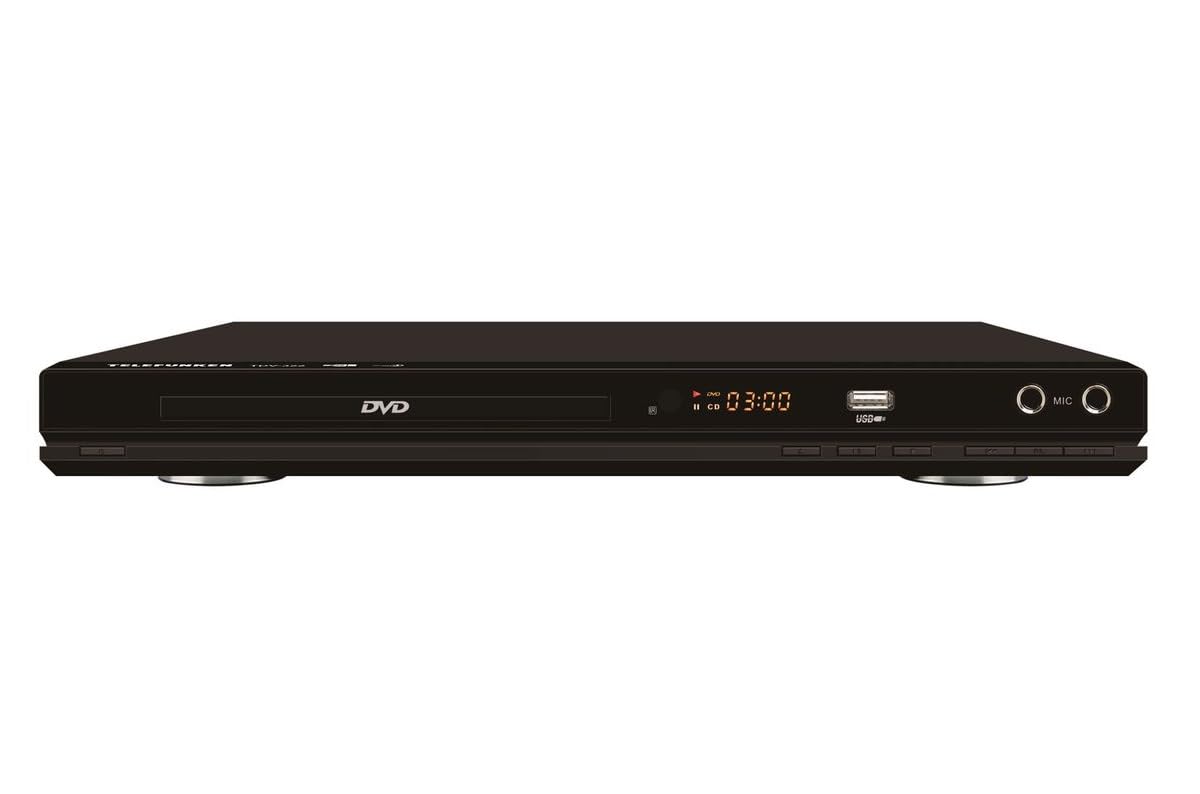
ຮູບທີ 1: ດ້ານໜ້າ view of the Telefunken TDV-322 DVD Player. The image displays the black unit with a central disc tray, a digital time display, a USB port, and two microphone input jacks on the right side. Below the disc tray are several control buttons.
ຄຸນນະສົມບັດທີ່ສໍາຄັນ
- Full DVD player functionality for various disc types.
- ການຄວບຄຸມຫ່າງໄກສອກຫຼີກງ່າຍທີ່ຈະນໍາໃຊ້ສໍາລັບການດໍາເນີນງານສະດວກ.
- Component video output for standard-definition television connections.
- Composite video output for older television models.
- Coaxial and optical digital audio outputs for surround sound system integration.
- Parental control features for content management.
- Compatibility with DVD, DVD-R, DVD-RW, VCD, SVCD, CD, CD-R, CD-RW, MP3, WMA, JPEG, and MPEG4 files.
ຄໍາແນະນໍາການຕິດຕັ້ງ
1. ການຫຸ້ມຫໍ່
Carefully remove the DVD player and all accessories from the packaging. Retain the packaging for future transport or storage.
2. ການເຊື່ອມຕໍ່ກັບໂທລະພາບ
The TDV-322 offers several video output options:
- ຜົນຜະລິດວິດີໂອແບບປະກອບ: Use a component video cable (red, green, blue connectors) to connect the DVD player's component output jacks to the corresponding input jacks on your standard-definition TV.
- ຜົນຜະລິດວິດີໂອ Composite: Use a composite video cable (yellow connector) to connect the DVD player's composite video output jack to the video input jack on an older TV.
Note: This DVD player does not feature an HDMI port. Ensure your television has compatible input ports.
3. ການເຊື່ອມຕໍ່ກັບລະບົບສຽງ
For enhanced audio, connect the DVD player to an external audio system:
- ຜົນຜະລິດສຽງດິຈິຕອນ Coaxial: Use a coaxial digital audio cable to connect the DVD player's coaxial output to a compatible input on your surround sound receiver.
- Optical Digital Audio Output: Use an optical digital audio cable to connect the DVD player's optical output to a compatible input on your surround sound receiver.
4. ການເຊື່ອມຕໍ່ພະລັງງານ
Connect the power cord to the DVD player's power input and then plug it into a standard electrical outlet.
ຄໍາແນະນໍາການດໍາເນີນງານ
1. ການຫຼິ້ນພື້ນຖານ
- ກົດ ພະລັງງານ ປຸ່ມເທິງແຜງດ້ານໜ້າ ຫຼືການຄວບຄຸມໄລຍະໄກເພື່ອເປີດເຄື່ອງຫຼິ້ນ.
- ກົດ ເປີດ/ປິດ ກົດປຸ່ມເພື່ອເປີດຖາດແຜ່ນ.
- ວາງແຜ່ນ (DVD, CD, ແລະອື່ນໆ) ຄ່ອຍໆໃສ່ຖາດແຜ່ນໂດຍໃຫ້ດ້ານຂອງປ້າຍຊື່ຫັນຂຶ້ນ.
- ກົດ ເປີດ/ປິດ ປຸ່ມອີກເທື່ອຫນຶ່ງເພື່ອປິດຖາດ.
- The player will automatically begin playback or display a menu.
- ໃຊ້ ຫຼິ້ນ/ຢຸດຊົ່ວຄາວ, ຢຸດ, ສົ່ງຕໍ່, ແລະ ກັບຄືນ buttons on the remote control or front panel to manage playback.
2. ການນໍາໃຊ້ການຄວບຄຸມໄລຍະໄກ
The included remote control provides full functionality for the DVD player. Refer to the remote control diagram (not provided in this manual) for specific button layouts. Ensure batteries are correctly inserted.
3. ການຫຼິ້ນ USB
Insert a USB flash drive into the USB port on the front panel. The player will detect the drive and allow you to browse and play compatible media files (MP3, WMA, JPEG, MPEG4).
4. ການຄວບຄຸມຂອງພໍ່ແມ່
The DVD player includes parental control features to restrict playback of certain content. Access these settings through the system menu using the remote control. A password may be required to enable or disable these features.
ບໍາລຸງຮັກສາ
- ທໍາຄວາມສະອາດຫນ່ວຍບໍລິການ: Wipe the exterior of the DVD player with a soft, dry cloth. Do not use liquid cleaners or abrasive materials.
- ການດູແລແຜ່ນ: ຈັດການແຜ່ນໂດຍແຄມຂອງພວກມັນ. ຮັກສາໃຫ້ເຂົາເຈົ້າສະອາດແລະບໍ່ມີຮອຍຂີດຂ່ວນ. ໃຊ້ຜ້າແພທີ່ອ່ອນນຸ້ມ, ບໍ່ມີເສັ້ນດ່າງເພື່ອເຊັດແຜ່ນດິດຈາກສູນກາງອອກໄປຂ້າງນອກ.
- ການລະບາຍອາກາດ: Ensure the DVD player has adequate ventilation. Do not block any ventilation openings.
- ການເກັບຮັກສາ: ເມື່ອບໍ່ໄດ້ໃຊ້ງານເປັນເວລາດົນ, ໃຫ້ຖອດສາຍໄຟອອກ ແລະ ເກັບຮັກສາໄວ້ໃນບ່ອນທີ່ເຢັນ ແລະ ແຫ້ງ.
ການແກ້ໄຂບັນຫາ
| ບັນຫາ | ສາເຫດທີ່ເປັນໄປໄດ້ | ການແກ້ໄຂ |
|---|---|---|
| ບໍ່ມີພະລັງງານ | ສາຍໄຟບໍ່ໄດ້ເຊື່ອມຕໍ່; ປລັກສຽບໄຟບໍ່ເຮັດວຽກ. | Ensure power cord is securely connected. Check power outlet with another device. |
| ບໍ່ມີຜົນຜະລິດວິດີໂອ | Video cables incorrectly connected; Incorrect TV input selected. | Verify component or composite video cables are securely connected to the correct input on your TV. Select the correct input source on your TV. |
| ບໍ່ມີສຽງອອກ | Audio cables incorrectly connected; Incorrect audio input selected on receiver/TV; Volume too low. | Check coaxial/optical audio connections. Ensure the correct audio input is selected on your audio system or TV. Increase volume. |
| ແຜ່ນບໍ່ຫຼິ້ນ | Disc is dirty or scratched; Disc is inserted incorrectly; Unsupported disc format. | Clean the disc. Reinsert the disc with the label side up. Verify the disc format is supported (DVD, CD, VCD, SVCD). |
| ການຄວບຄຸມໄລຍະໄກບໍ່ເຮັດວຽກ | ແບັດເຕີຣີໝົດ ຫຼື ໃສ່ບໍ່ຖືກຕ້ອງ; ມີສິ່ງກີດຂວາງລະຫວ່າງຣີໂໝດ ແລະ ເຄື່ອງຫຼິ້ນ. | Replace batteries. Ensure correct battery polarity. Remove any obstructions. Point remote directly at the player's sensor. |
ຂໍ້ມູນຈໍາເພາະ
| ຄຸນສົມບັດ | ລາຍລະອຽດ |
|---|---|
| ໝາຍເລກຕົວແບບ | TDV-322 |
| ຍີ່ຫໍ້ | Telefunken |
| ສີ | ດຳ |
| ຮູບແບບແຜ່ນທີ່ຮອງຮັບ | DVD, DVD-R, DVD-RW, VCD, SVCD, CD, CD-R, CD-RW |
| ສະຫນັບສະຫນູນ File ຮູບແບບ | MP3, WMA, JPEG, MPEG4 (via USB) |
| ຜົນຜະລິດວິດີໂອ | ວິດີໂອອົງປະກອບ, ວິດີໂອປະກອບ |
| ຜົນໄດ້ຮັບສຽງ | Coaxial Digital Audio, Optical Digital Audio |
| ພອດເພີ່ມເຕີມ | USB port, Microphone inputs |
ຂໍ້ມູນການຮັບປະກັນ
The Telefunken TDV-322 DVD Player comes with a 1 ປີຮັບປະກັນຜູ້ຜະລິດ. Please retain your proof of purchase for warranty claims. For details regarding warranty terms and conditions, refer to the warranty card included with your product or contact Telefunken customer support.
ການຊ່ວຍເຫຼືອລູກຄ້າ
If you encounter any issues not covered in the troubleshooting section or require further assistance, please contact Telefunken customer support. Contact information can typically be found on the product packaging, the official Telefunken webສະຖານທີ່, ຫຼື ເອກະສານການຮັບປະກັນ.
When contacting support, please have your model number (TDV-322) and purchase details ready.


