1. ບົດແນະນຳ
The Qolsys IQ Lock-PG Push Button Deadbolt provides enhanced security and convenient access to your property. This smart motorized deadbolt integrates PowerG wireless communication for reliable and stable connectivity, compatible with IQ Panel 4, IQ4 Hub, and IQ4 NS systems. It offers multiple access methods, including a pushbutton keypad, traditional key, thumb-turn, and remote control via the Alarm.com app.
Designed for durability, the IQ Lock-PG meets ANSI Grade 2 certifications and features an attractive oil-rubbed bronze finish to complement various door styles.
2. ຄຸນນະສົມບັດທີ່ສໍາຄັນ
- Motorized Deadbolt: Push button operation with an attractive finish.
- ວິທີການເຂົ້າເຖິງຫຼາຍ: Lock/unlock via PowerG wireless communication (App and Panel), user code, thumb-turn, or physical key.
- User Code Capacity: Supports up to 250 user codes (4 to 8 digits) for family, friends, or temporary guests.
- ການຄຸ້ມຄອງໄລຍະໄກ: Create or remove individual codes remotely via the Alarm.com app.
- ການຕິດຕັ້ງງ່າຍດາຍ: Battery-powered (AA batteries, not included), requiring no complex wiring.
- ການກໍ່ສ້າງທົນທານ: ANSI/BHMA Grade 2 certified for strong, reliable security.
3. ເນື້ອໃນຊຸດ
ກວດສອບວ່າທຸກລາຍການມີຢູ່ໃນຊຸດກ່ອນທີ່ຈະເລີ່ມການຕິດຕັ້ງ:
- Qolsys IQ Lock-PG Deadbolt Assembly
- (2) ການບໍລິການແບບຄົບວົງຈອນ
- ຮາດແວຕິດຕັ້ງ
- ຄູ່ມືແນະ ນຳ (ເອກະສານນີ້)
4. ການຕິດຕັ້ງແລະການຕິດຕັ້ງ
The Qolsys IQ Lock-PG motorized deadbolt is designed for straightforward installation. All necessary hardware and detailed instructions are included. Please read these instructions carefully before proceeding.
4.1 Compatibility and Requirements
- ຄວາມໜາຂອງປະຕູ: Installs on standard doors measuring 1-3/8 inches to 2-1/4 inches (35-58mm) thick.
- backset: Adjustable latch fits existing backsets of either 2-3/8 inches or 2-3/4 inches (60/70mm).
- ມືປະຕູ: Suitable for both right-handed and left-handed door operations.
- ການເຊື່ອມໂຍງລະບົບ: Requires an IQ Panel 4, IQ4 Hub, or IQ4 NS (sold separately) and an active Internet connection for smart features.
- ພະລັງງານ: Requires four (4) AA alkaline batteries (not included).
4.2 ຂັ້ນຕອນການຕິດຕັ້ງ (ຫຼາຍກວ່າview)
While detailed steps are provided in the included physical manual, here is a general overview:
- Prepare the door: Ensure the door bore holes and backset are compatible with the lock.
- Install the latch and strike plate.
- ຕິດຕັ້ງຊຸດແປ້ນພິມພາຍນອກ.
- ຕິດຕັ້ງແຜ່ນຕິດຕັ້ງພາຍໃນ.
- ເຊື່ອມຕໍ່ສາຍຈາກອຸປະກອນພາຍນອກກັບອຸປະກອນປະກອບພາຍໃນ.
- ຕິດຕັ້ງອຸປະກອນພາຍໃນ.
- ໃສ່ແບັດເຕີຣີອາກາລີນ AA ຈຳນວນສີ່ (4) ກ້ອນເຂົ້າໄປໃນຊ່ອງໃສ່ແບັດເຕີຣີ.
- ປະຕິບັດຂະບວນການມອບປະຕູ (ການປັບອັດຕະໂນມັດ).
- Test the lock's functionality with the keypad and thumb-turn.
- Pair the lock with your IQ Panel system and Alarm.com app for smart features.

ຮູບ 4.1: ດ້ານຫນ້າ view of the Qolsys IQ Lock-PG Deadbolt, showcasing ແປ້ນພິມ ແລະ ຮູກະແຈ.
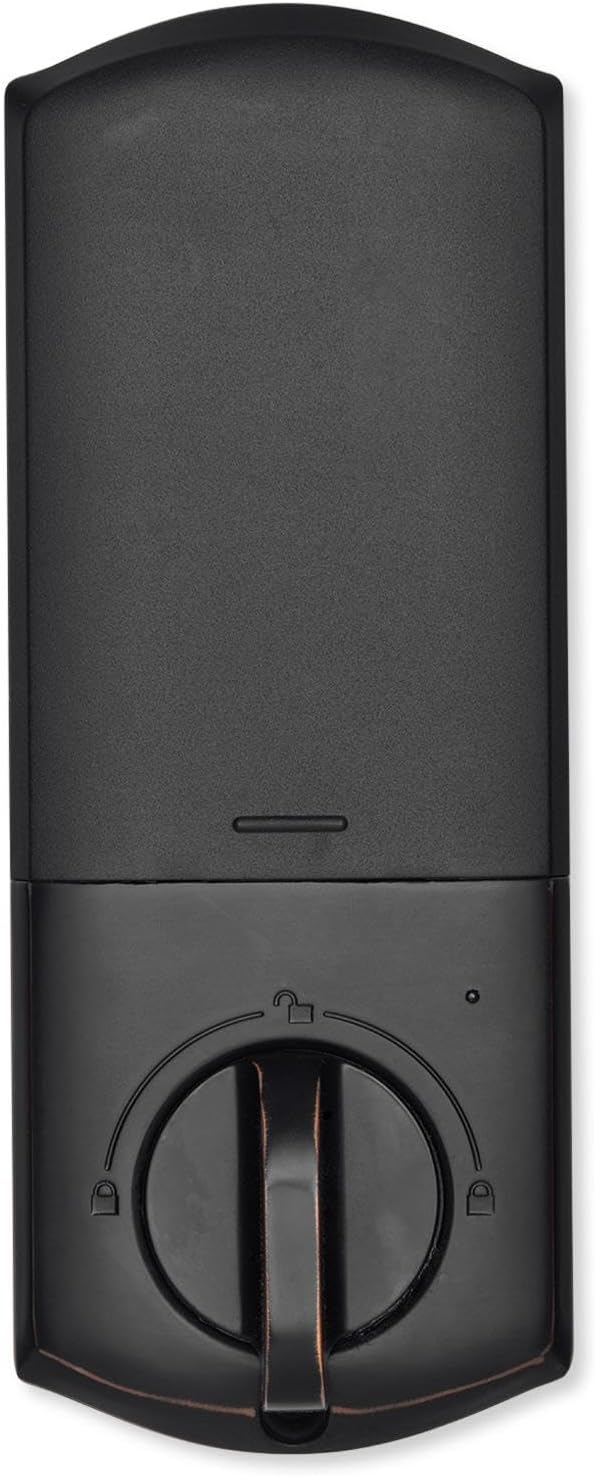
ຮູບ 4.2: ພາຍໃນ view of the Qolsys IQ Lock-PG Deadbolt, highlighting the thumb-turn and battery cover.

Figure 4.3: Qolsys IQ Lock-PG Deadbolt installed on a door, illustrating its appearance in a real-world setting.
5. ຄໍາແນະນໍາການດໍາເນີນງານ
ລັອກ Qolsys IQ Lock-PG ມີຫຼາຍວິທີທີ່ສະດວກສະບາຍໃນການລັອກ ແລະ ປົດລັອກປະຕູຂອງທ່ານ.
5.1 ວິທີການເຂົ້າເຖິງ
- Pushbutton Keypad: Enter a valid 4-to-8 digit user code on the exterior keypad to unlock the deadbolt. The lock will automatically engage when closed.
- ກະແຈທາງດ້ານຮ່າງກາຍ: Use one of the provided turnkeys in the exterior key cylinder for manual unlocking and locking.
- Thumb-Turn: From the interior, rotate the thumb-turn to manually lock or unlock the deadbolt.
- PowerG Wireless Communication (Alarm.com App/Panel):
The Alarm.com mobile app allows for remote monitoring and control of your Qolsys devices. Once paired with your IQ Panel, you can:
- Lock or unlock your smart doors from anywhere.
- Create, modify, or delete up to 250 individual user codes. User codes are managed through the Alarm.com app and sent to the lock.
- Receive notifications regarding lock status and activity.
The Alarm.com app is available for Android, iOS, Windows, and Blackberry devices.
6. ບໍາລຸງຮັກສາ
Regular maintenance ensures the longevity and optimal performance of your Qolsys IQ Lock-PG deadbolt.
6.1 ການທົດແທນຫມໍ້ໄຟ
The deadbolt is powered by four (4) AA alkaline batteries. Battery life is approximately 12 months, based on typical usage (6 user code unlock events and 10 locking/unlocking cycles per day). The lock features a low battery alarm to notify you when replacement is needed.
- When the low battery alarm sounds or is indicated, replace all four AA batteries simultaneously.
- Remove the interior cover to access the battery compartment.
- ຖອດແບັດເຕີຣີເກົ່າອອກ ແລະ ກຳຈັດພວກມັນຕາມລະບຽບຂອງທ້ອງຖິ່ນ.
- ໃສ່ແບັດເຕີຣີອາຄາລາຍ AA ໃໝ່, ຮັບປະກັນວ່າຂົ້ວຖືກຕ້ອງ.
- Replace the interior cover.
6.2 ການທໍາຄວາມສະອາດ
Clean the exterior and interior surfaces of the lock with a soft, damp ຜ້າ. ຫຼີກລ່ຽງການໃຊ້ນໍ້າຢາທໍາຄວາມສະອາດທີ່ມີສີຂັດ ຫຼື ຕົວລະລາຍ, ເພາະວ່າສິ່ງເຫຼົ່ານີ້ສາມາດທໍາລາຍສີໄດ້.
7. ການແກ້ໄຂບັນຫາ
This section addresses common issues you might encounter with your Qolsys IQ Lock-PG deadbolt.
7.1 ການລັອກປຸ່ມກົດ
If 10 consecutive invalid user codes are entered, the keypad will enter a lockout mode for 3 minutes. During this time, no codes can be entered. Wait for the lockout period to expire before attempting to enter a valid code again.
7.2 ລັອກບໍ່ຕອບສະໜອງ
- Check the batteries: Ensure they are correctly installed and not depleted. Replace all four AA batteries if necessary.
- Verify connection to IQ Panel: Ensure the lock is properly paired with your IQ Panel 4, IQ4 Hub, or IQ4 NS. Check the panel's status for the lock.
- Check door alignment: Ensure the door and frame are properly aligned and there is no obstruction preventing the deadbolt from extending or retracting smoothly.
7.3 Issues with Alarm.com App Control
- Ensure your IQ Panel has an active Internet connection.
- Verify your smartphone or tablet has a stable internet connection.
- Log out and log back into the Alarm.com app.
- Ensure the lock is properly enrolled in your Alarm.com account.
8. ຂໍ້ກໍານົດດ້ານວິຊາການ
| ຄຸນສົມບັດ | ຂໍ້ມູນຈໍາເພາະ |
|---|---|
| ສ່ວນຜູ້ຜະລິດ # | IQ Lock-PGK-ORB |
| UPC | 7290109986104 |
| ຈົບ | ທອງສຳລິດດ້ວຍນ້ຳມັນ |
| ການມອບມືດ້ວຍຕົນເອງ | ສະຫນັບສະຫນູນ |
| ປະເພດ Bolt | ສະກູລັອກແບບມໍເຕີ/ມາດຕະຖານ |
| ແບບຫລັງ | 2-3/8" / 2-3/4" ສາມາດປັບໄດ້ (60/70 ມມ) |
| ການກະກຽມປະຕູ | 1-1/2" / 2-1/8" (38/54mm) |
| ຄວາມໜາຂອງປະຕູ | ການປັບອັດຕະໂນມັດ 1-3/8" ຫາ 2-1/4" (35-58 ມມ) |
| ວິທີການປົດລັອກ | PowerG wireless communication (App and Panel), Button keypad, key, thumb-turn |
| ຄວາມອາດສາມາດຂອງລະຫັດ | ລະຫັດຜູ້ໃຊ້ x 250 |
| ຄວາມຍາວລະຫັດ | 4-8 ຕົວເລກ |
| ກະບອກກະແຈ Override | ແມ່ນແລ້ວ |
| ກະບອກສູບ | ກະແຈ KW1 |
| ການເຮັດວຽກ Voltage | DC 6V |
| ແບັດເຕີຣີ (ບໍ່ລວມ) | AA x 4 |
| ອຸນຫະພູມການເຮັດວຽກພາຍນອກ | -31°F ຫາ 150°F (-35°C ຫາ 65°C) |
| ອຸນຫະພູມເຮັດວຽກພາຍໃນ | 32°F ຫາ 140°F (0°C ຫາ 60°C) |
| ການຈັດອັນດັບ IP ການປະກອບພາຍນອກ | IP54 |
| ໂໝດລັອກ (ຂີດຈຳກັດການເຂົ້າຜິດ) | ແປ້ນພິມລັອກເປັນເວລາ 3 ນາທີຫຼັງຈາກໃສ່ລະຫັດຜູ້ໃຊ້ບໍ່ຖືກຕ້ອງ 10 ຄັ້ງ |
| ສັນຍານເຕືອນແບັດເຕີຣີຕໍ່າ | ແມ່ນແລ້ວ |
| ຊີວິດຫມໍ້ໄຟ | ຢ່າງໜ້ອຍ 12 ເດືອນ (6 ເຫດການປົດລັອກລະຫັດຜູ້ໃຊ້, ແລະ 10 ຮອບວຽນການປົດລັອກ ແລະ ລັອກສຳລັບແຕ່ລະມື້) |
| ການຢັ້ງຢືນ | FCC, IC, ANSI BHMA A156.36 ຊັ້ນ 2, UL10C (ລະດັບການທົນໄຟ 20 ນາທີ) |
| ການເຊື່ອມຕໍ່ IoT | PowerG |
| ນ້ຳໜັກສິນຄ້າ | 1.6KG (3.6 LB) |
| ຄວາມຊຸ່ມຊື່ນໃນການໃຊ້ງານພາຍນອກ | 100% condensing |
| ຄວາມຊຸ່ມຊື່ນໃນການໃຊ້ງານພາຍໃນ | 20% ~ 95% ບໍ່ condensing |
9. ການຮັບປະກັນແລະການສະຫນັບສະຫນູນ
9.1 ຂໍ້ມູນການຮັບປະກັນ
The Qolsys IQ Lock-PG Push Button Deadbolt comes with a warranty of Twelve months from the date of purchase. ກະລຸນາຮັກສາຫຼັກຖານການຊື້ຂອງທ່ານສໍາລັບການຮຽກຮ້ອງການຮັບປະກັນ.
9.2 ສະຫນັບສະຫນູນລູກຄ້າ
For technical assistance, troubleshooting beyond this manual, or warranty inquiries, please contact Qolsys customer support. Refer to the Qolsys official webເວັບໄຊທ໌ຫຼືການຫຸ້ມຫໍ່ຜະລິດຕະພັນຂອງທ່ານສໍາລັບຂໍ້ມູນຕິດຕໍ່ໃນປະຈຸບັນຫຼາຍທີ່ສຸດ.


