1. ຜະລິດຕະພັນເກີນview
The SYLVOX 75-inch Deck Pro 2.0 Smart Outdoor TV is designed for outdoor entertainment, offering a 4K Ultra HD display with 1000 nits brightness for clear viewing in partial sun and shaded areas. It features an IP55 waterproof rating and a durable all-metal casing to withstand various outdoor conditions. Powered by Android 11.0, it provides access to a wide range of applications and supports Google Assistant and Chromecast for seamless content streaming.

ຮູບ 1.1: ດ້ານຫນ້າ view of the SYLVOX 75-inch Deck Pro 2.0 Smart Outdoor TV.
2. ຂໍ້ມູນຄວາມປອດໄພ
ກະລຸນາອ່ານຄໍາແນະນໍາດ້ານຄວາມປອດໄພທັງໝົດຢ່າງລະມັດລະວັງກ່ອນການຕິດຕັ້ງ ແລະການດໍາເນີນງານ. ການບໍ່ປະຕິບັດຕາມຄໍາແນະນໍາເຫຼົ່ານີ້ອາດຈະເຮັດໃຫ້ເກີດການຊ໊ອກໄຟຟ້າ, ໄຟໄຫມ້, ຫຼືຄວາມເສຍຫາຍຕໍ່ຜະລິດຕະພັນ.
- ຄວາມປອດໄພທາງໄຟຟ້າ: Ensure the power outlet meets the TV's voltage requirements. Do not overload power outlets. Disconnect power during lightning storms or when unused for long periods.
- ການຕິດຕັ້ງ: Use appropriate mounting hardware and ensure the mounting surface can support the TV's weight. Professional installation is recommended for outdoor wall mounts.
- ການລະບາຍອາກາດ: Do not block ventilation openings. Ensure adequate airflow around the TV to prevent overheating.
- ອຸນຫະພູມ: The TV is designed to operate within a specific temperature range (-22°F to 122°F). Avoid exposing it to temperatures outside this range.
- ທໍາຄວາມສະອາດ: ຕັດການເຊື່ອມຕໍ່ໄຟຟ້າກ່ອນທີ່ຈະທໍາຄວາມສະອາດ. ໃຊ້ອ່ອນ, ງamp ຜ້າ. ຫຼີກເວັ້ນການສານເຄມີທີ່ຮຸນແຮງຫຼືເຄື່ອງເຮັດຄວາມສະອາດຂັດ.
3. ສິ່ງທີ່ຢູ່ໃນກ່ອງ
ກວດສອບວ່າມີສ່ວນປະກອບທັງຫມົດກ່ອນທີ່ຈະດໍາເນີນການຕິດຕັ້ງ.
- 75-inch Outdoor Smart TV
- ການຄວບຄຸມທາງໄກດ້ວຍສຽງ (2 ຫມໍ້ໄຟ AAA ລວມ)
- ຄູ່ມືຜູ້ໃຊ້
- ບັດຮັບປະກັນ
- ສາຍໄຟ
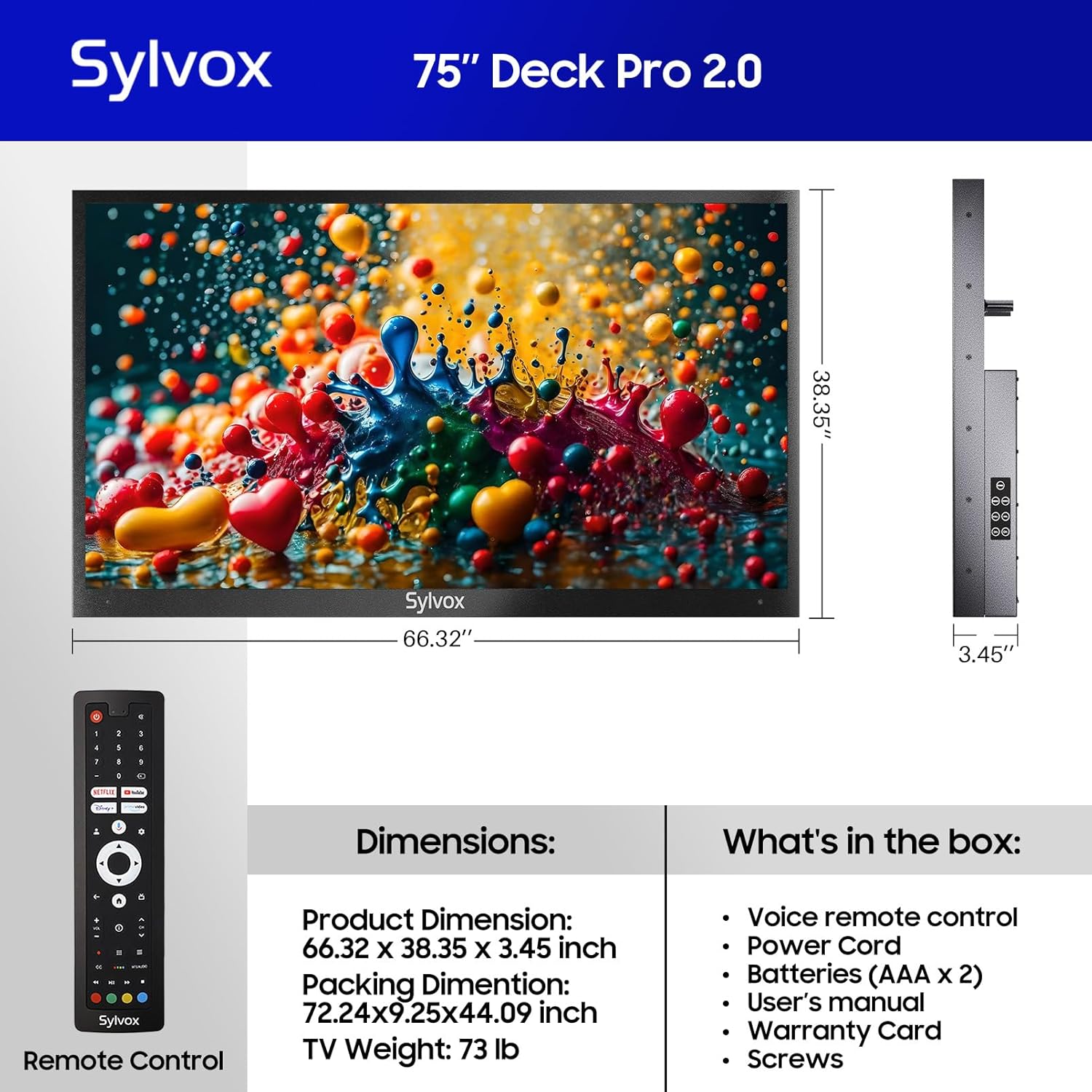
Figure 3.1: Included components and dimensions of the TV.
Video 3.1: Unboxing the Deck Pro 2.0 Series Outdoor TV, showing how components are packaged.
4. ຕັ້ງຄ່າ
4.1 ການຕິດຕັ້ງທາງດ້ານຮ່າງກາຍ
The SYLVOX Deck Pro 2.0 TV is designed for outdoor installation. It features a robust all-metal body for enhanced durability and weather resistance.

ຮູບ 4.1: ຂ້າງ view illustrating the durable all-metal casing.
For wall mounting, ensure you use a compatible VESA mount (not included) and secure it to a sturdy structure. The TV's back panel is designed to accommodate standard VESA mounting patterns.

ຮູບ 4.2: ກັບຄືນໄປບ່ອນ view of the TV with VESA mounting points.
4.2 ການເຊື່ອມຕໍ່
The TV offers multiple connectivity options. Access the ports by removing the protective cover on the back of the unit.
- HDMI: For connecting external devices like gaming consoles or media players.
- USB: ສໍາລັບການຫຼິ້ນສື່ຈາກໄດ USB.
- ອີເທີເນັດ: ສໍາລັບການເຊື່ອມຕໍ່ອິນເຕີເນັດແບບມີສາຍ.
- ໄຮ້ສາຍ: Built-in WiFi and Bluetooth for network and accessory connections.

Figure 4.3: Rear input panel with various connectivity ports.
4.3 ການເປີດເຄື່ອງເບື້ອງຕົ້ນ
Connect the power cord to the TV and a suitable outdoor-rated power outlet. Press the power button on the remote control or the TV's side panel to turn on the unit. Follow the on-screen instructions to complete the initial setup, including network connection and Google account login.
5. ຄໍາແນະນໍາການດໍາເນີນງານ
5.1 ການຄວບຄຸມໄລຍະໄກ
The included voice remote control allows for easy navigation and control of your TV. It features dedicated buttons for popular streaming services and Google Assistant.

Figure 5.1: Voice remote control for the SYLVOX Outdoor TV.
5.2 ການໂຕ້ຕອບ Google TV
The TV runs on the Android 11.0 system with the Google TV interface, offering personalized recommendations and easy access to over 10,000 apps including YouTube, Netflix, Prime Video, Hulu, and Disney+.

Figure 5.2: Google TV interface with access to numerous applications.
Video 5.1: Demonstration of the Sylvox Smart Google Outdoor TV interface and features.
5.3 ລັກສະນະທີ່ສໍາຄັນ
- ຄວາມລະອຽດ 4K Ultra HD: Enjoy crystal-clear images with stunning detail.
- Dolby Atmos: Immerse yourself in a panoramic sound experience.
- ຄວາມສະຫວ່າງ 1000 Nits: Provides optimal visibility in outdoor environments with partial sun.
- Chromecast ໃນຕົວ: Easily cast content from your mobile devices to the TV.
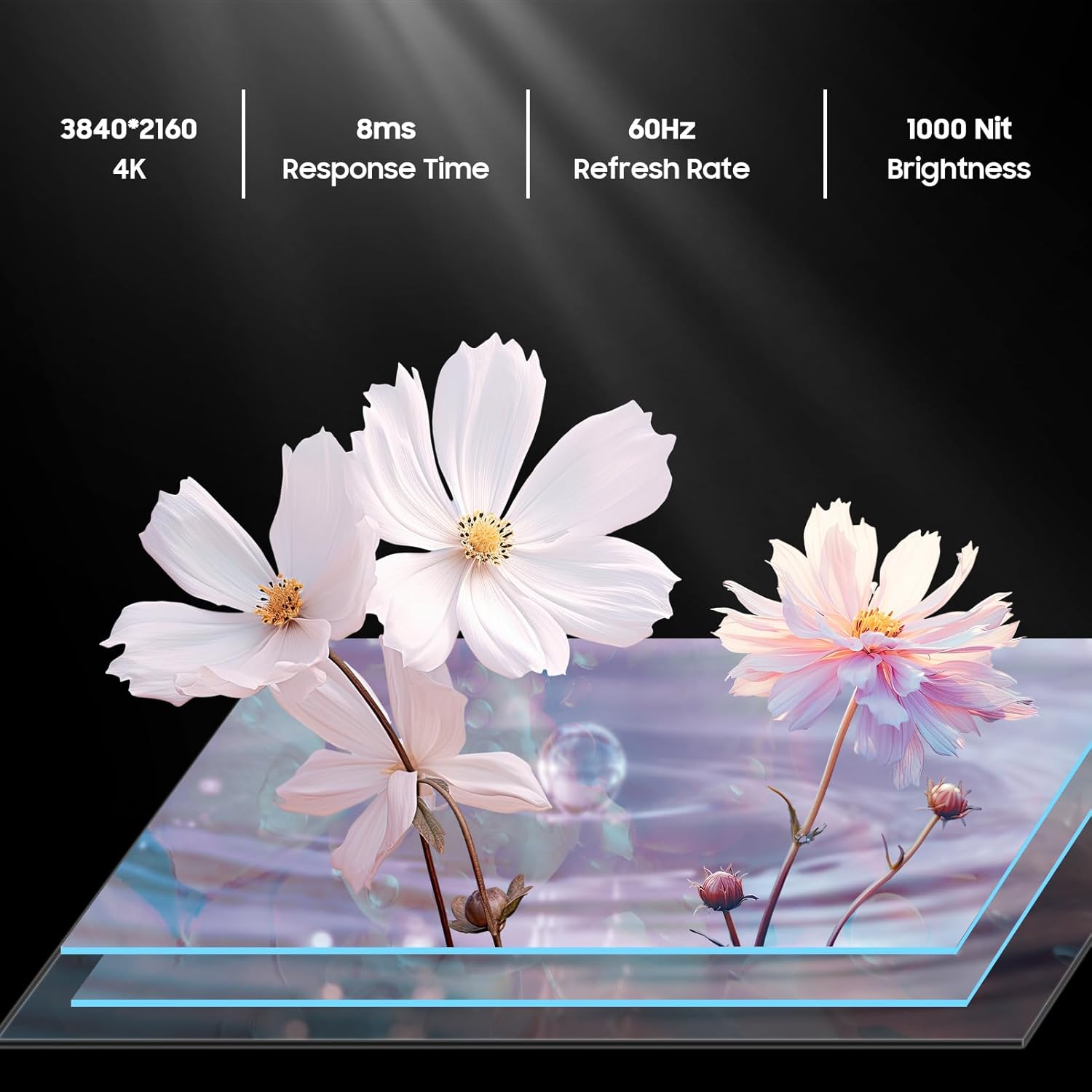
Figure 5.3: Visual representation of 4K resolution and 1000 nit brightness.
ວິດີໂອ 5.2: ຫຼາຍກວ່າview of the Deck Pro 2.0 Outdoor TV, highlighting Google TV and Dolby Atmos features.
5.4 Outdoor Use Considerations
The TV is IP55 waterproof, meaning it is protected against dust and low-pressure water jets from any direction. This makes it suitable for use in various outdoor weather conditions, including rain and snow.

Figure 5.4: The TV operating effectively during rainfall, showcasing its IP55 waterproof rating.
Video 5.3: A short clip demonstrating the TV's ability to function in various weather conditions.
6. ບໍາລຸງຮັກສາ
- ທໍາຄວາມສະອາດຫນ້າຈໍ: ເຊັດໜ້າຈໍຢ່າງອ່ອນໂຍນດ້ວຍຜ້າອ່ອນໆ, ບໍ່ມີເຈັ້ຍ. ສໍາລັບຮອຍແຂງ, ເລັກນ້ອຍ dampລ້າງຜ້າດ້ວຍນໍ້າ. ຢ່າສີດນໍ້າຢາທໍາຄວາມສະອາດໃສ່ໜ້າຈໍໂດຍກົງ.
- ທໍາຄວາມສະອາດ Casing: ໃຊ້ອ່ອນ, ງamp cloth to clean the all-metal casing. Avoid abrasive materials that could scratch the surface.
- ຝາປິດພອດ: Ensure all port covers on the back of the TV are securely closed when not in use to maintain its waterproof rating.
- ການເກັບຮັກສາຕາມລະດູການ: While designed for all-weather use, consider covering the TV during prolonged periods of extreme weather or when not in use for extended periods to prolong its lifespan.
7. ການແກ້ໄຂບັນຫາ
- ບໍ່ມີພະລັງງານ: ກວດສອບວ່າສາຍໄຟໄດ້ເຊື່ອມຕໍ່ກັບທັງໂທລະພາບ ແລະ ປລັກໄຟຢ່າງແໜ້ນໜາແລ້ວຫຼືບໍ່. ໃຫ້ແນ່ໃຈວ່າປລັກໄຟໃຊ້ງານໄດ້.
- ບໍ່ມີຮູບພາບ/ສຽງ: ກວດສອບວ່າໄດ້ເລືອກແຫຼ່ງສັນຍານເຂົ້າທີ່ຖືກຕ້ອງແລ້ວ. ກວດສອບການເຊື່ອມຕໍ່ສາຍທັງໝົດ (HDMI, ແລະອື່ນໆ).
- ໄລຍະໄກບໍ່ຕອບສະໜອງ: ປ່ຽນແບັດ AAA ໃນການຄວບຄຸມໄລຍະໄກ. ໃຫ້ແນ່ໃຈວ່າບໍ່ມີສິ່ງກີດຂວາງລະຫວ່າງຣີໂໝດ ແລະໂທລະພາບ.
- ການເຊື່ອມຕໍ່ Wi-Fi ບໍ່ດີ: Ensure the TV is within range of your Wi-Fi router. Try restarting your router.
- Image Glare in Sunlight: While the TV has 1000 nits brightness, direct, intense sunlight can still cause glare. Adjust the TV's position or consider additional shading for optimal viewing.
8. ຂໍ້ມູນຈໍາເພາະ
| ຄຸນສົມບັດ | ລາຍລະອຽດ |
|---|---|
| ຍີ່ຫໍ້ | SYLVOX |
| ຊື່ຕົວແບບ | Deck Pro 2.0 |
| ຂະໜາດໜ້າຈໍ | 75 ນິ້ວ |
| ຄວາມລະອຽດ | 4K Ultra HD (3840x2160) |
| ຄວາມສະຫວ່າງ | 1000 nits |
| ອັດຕາການໂຫຼດຂໍ້ມູນຄືນໃໝ່ | 60 Hz |
| ລະບົບປະຕິບັດການ | Android 11.0 with Google TV |
| ການປະເມີນກັນນ້ໍາ | IP55 |
| ຄຸນນະສົມບັດພິເສດ | Dolby Atmos, Google Assistant, Chromecast Built-in |
| ການເຊື່ອມຕໍ່ | Ethernet, Wireless (Wi-Fi), Bluetooth, HDMI, USB |
| ຂະໜາດສິນຄ້າ | 3.45"D x 66.32"W x 38.35"H |
| ນ້ໍາຫນັກລາຍການ | 100.8 ປອນ |
| ສີ | ດຳ |
| ໝໍ້ໄຟ | ຕ້ອງໃຊ້ແບັດເຕີຣີ AAA 2 ອັນ (ລວມ) |
9. ການຮັບປະກັນແລະການສະຫນັບສະຫນູນ
The SYLVOX 75-inch Deck Pro 2.0 Smart Outdoor TV comes with a one-year warranty. For technical assistance, troubleshooting, or warranty claims, please contact SYLVOX customer service. Keep your purchase receipt and warranty card for reference.
ບໍລິການລູກຄ້າ: Available 24/7. Refer to the warranty card for contact details or visit the official SYLVOX webເວັບໄຊ.


