ແນະນຳ
This manual provides essential instructions for the installation, operation, and maintenance of your Fermax Sup Milo Digital Intercom System. Please read this manual thoroughly before installation and use to ensure proper function and safety. Keep this manual for future reference.
The Fermax Sup Milo Digital Intercom System is designed to provide clear communication and enhanced security for residential and commercial premises. It integrates advanced technology with a robust design to offer reliable access control and communication solutions.
ຂໍ້ມູນຄວາມປອດໄພ
Always follow basic safety precautions to reduce the risk of fire, electric shock, and injury to persons. This product should only be installed and serviced by qualified personnel.
- ຕັດການເຊື່ອມຕໍ່ໄຟຟ້າກ່ອນທີ່ຈະຕິດຕັ້ງຫຼືໃຫ້ບໍລິການ.
- ຫ້າມບໍ່ໃຫ້ອຸປະກອນຖືກຝົນ ຫຼື ຄວາມຊຸ່ມຊື່ນ.
- ໃຫ້ແນ່ໃຈວ່າການເຊື່ອມຕໍ່ສາຍໄຟທັງຫມົດແມ່ນປອດໄພແລະປະຕິບັດຕາມລະຫັດໄຟຟ້າທ້ອງຖິ່ນ.
- ຢ່າພະຍາຍາມສ້ອມແປງເຄື່ອງດ້ວຍຕົນເອງ. ອ້າງອີງການບໍລິການທັງໝົດໃຫ້ກັບພະນັກງານບໍລິການທີ່ມີຄຸນວຸດທິ.
ເນື້ອໃນຊຸດ
ກວດສອບວ່າມີອົງປະກອບທັງໝົດຢູ່ກ່ອນເລີ່ມການຕິດຕັ້ງ. ແພັກເກດໂດຍປົກກະຕິແລ້ວຈະປະກອບມີ:
- Fermax Sup Milo Digital Intercom Unit (Aluminum Plate)
- ຮາດແວຕິດຕັ້ງ
- Connection cables (may vary by kit)
- ຄູ່ມືຜູ້ໃຊ້ (ເອກະສານນີ້)
Note: Specific components may vary based on the purchased kit.
ການຕິດຕັ້ງແລະການຕິດຕັ້ງ
This section outlines the general steps for installing the Fermax Sup Milo Digital Intercom System. Professional installation is recommended.
1. ການກະກຽມສະຖານທີ່
- Choose a suitable mounting location, typically near an entrance, at an accessible height.
- ໃຫ້ແນ່ໃຈວ່າພື້ນຜິວແມ່ນຮາບພຽງແລະຫມັ້ນຄົງ.
- Verify access to necessary power and communication wiring.
2. ການຕິດຕັ້ງຫນ່ວຍງານ
- Carefully remove the front panel of the intercom unit to access mounting holes.
- Position the unit and mark the drilling points on the wall.
- ເຈາະຮູແລະໃສ່ສະມໍຝາທີ່ເຫມາະສົມຖ້າຈໍາເປັນ.
- Secure the intercom unit to the wall using the provided mounting screws.
3. ການເຊື່ອມຕໍ່ສາຍໄຟ
Refer to the wiring diagram specific to your system configuration. General connections include:
- ການສະຫນອງພະລັງງານ: Connect to a stable 100V power source. Ensure correct polarity.
- Communication Bus: Connect the digital bus lines to the indoor units and central control unit.
- ການປ່ອຍປະຕູ: Connect the door release mechanism (e.g., electric strike) to the designated terminals.
- ວັດສະດຸປ້ອນ/ຜົນຜະລິດຊ່ວຍເຫຼືອ: Connect any additional devices such as external cameras or sensors as required.
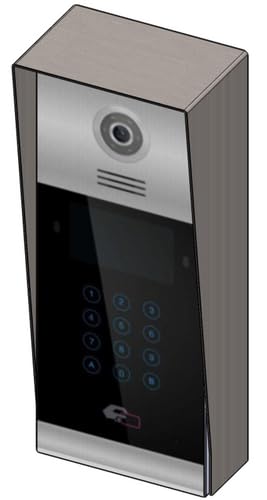 ຮູບພາບ 1: ດ້ານຫນ້າ view of the Fermax Sup Milo Digital Intercom System, showing the aluminum plate and digital keypad. This image illustrates the exterior design of the main unit.
4. Power-Up ແລະການຕັ້ງຄ່າເບື້ອງຕົ້ນ
- ເມື່ອສາຍໄຟທັງໝົດສຳເລັດ ແລະ ແໜ້ນໜາແລ້ວ, ໃຫ້ສົ່ງໄຟຟ້າຄືນໃຫ້ກັບລະບົບ.
- The unit will perform a self-test. Observe any indicator lights or sounds.
- Follow the system's programming guide (usually provided separately or accessible via a master unit) to configure apartment numbers, access codes, and other settings.
ຄໍາແນະນໍາການດໍາເນີນງານ
Making a Call from the Outdoor Panel
- To call an apartment: Enter the apartment number using the digital keypad.
- Press the "Call" button (often represented by a bell icon or similar).
- The indoor unit will ring. Once answered, communication can begin.
Receiving a Call and Opening the Door (Indoor Unit)
- When the indoor unit rings, press the "Answer" button to establish communication with the visitor.
- To open the door, press the "Door Release" button on your indoor unit.
- The door will unlock for a short period.
Using Access Codes
If configured, authorized users can enter a pre-programmed access code on the outdoor digital keypad to unlock the door without needing to call an indoor unit.
- ໃສ່ລະຫັດເຂົ້າເຖິງສ່ວນຕົວຂອງທ່ານໂດຍໃຊ້ແປ້ນພິມດິຈິຕອນ.
- Press the "Enter" or "Door Release" button.
- ປະຕູຈະປົດລັອກ.
ບໍາລຸງຮັກສາ
Regular maintenance ensures the longevity and optimal performance of your Fermax intercom system.
ທໍາຄວາມສະອາດ
- ເຮັດຄວາມສະອາດດ້ານນອກຂອງຫນ່ວຍງານດ້ວຍຄວາມອ່ອນໂຍນ, ງamp ຜ້າ.
- Do not use abrasive cleaners, solvents, or chemical sprays, as these can damage the finish and electronic components.
- ຮັບປະກັນວ່າບໍ່ມີຂອງແຫຼວເຂົ້າໄປໃນຊ່ອງເປີດຂອງເຄື່ອງ.
ການກວດກາ
- Periodically check for any visible damage to the unit or wiring.
- Ensure all mounting screws are tight.
- Test the communication and door release functions regularly.
ອັບເດດຊອບແວ
If applicable, consult your installer or Fermax support for information on firmware updates that may improve performance or add new features.
ການແກ້ໄຂບັນຫາ
ພາກນີ້ແກ້ໄຂບັນຫາທົ່ວໄປທີ່ທ່ານອາດຈະພົບ. ສຳລັບບັນຫາທີ່ສັບສົນກວ່າ, ໃຫ້ຕິດຕໍ່ຝ່າຍຊ່ວຍເຫຼືອດ້ານເຕັກນິກ.
| ບັນຫາ | ສາເຫດທີ່ເປັນໄປໄດ້ | ການແກ້ໄຂ |
|---|---|---|
| No communication with indoor unit. |
|
|
| ການປ່ອຍປະຕູບໍ່ເຮັດວຽກ. |
|
|
| ປຸ່ມກົດບໍ່ຕອບສະໜອງ. |
|
|
ຂໍ້ມູນຈໍາເພາະ
Technical specifications for the Fermax Sup Milo Digital Intercom System (Model: 8424299951713).
- ຕົວແບບ: Fermax Sup Milo Digital Intercom System
- ເລກສ່ວນ: 8424299951713
- ຜູ້ຜະລິດ: ເຟີແມັກ
- ຂະໜາດ (ຊຸດ): ຂະໜາດປະມານ 0.1 x 0.1 x 0.1 cm
- Weight (Unit): 108 ກຣາມ
- ວັດສະດຸ: Metal, Plastic, Polycarbonate (Aluminum Plate)
- ແຫຼ່ງພະລັງງານ: External Power Supply (100V)
- ສະບັບtage: 100V
- ວັດtage: 100W
- ແບັດເຕີຣີທີ່ຕ້ອງການ: ບໍ່
- ສີ: Multicolored (referring to internal components or subtle design elements, main plate is aluminum)
ຂໍ້ມູນການຮັບປະກັນ
Fermax products are manufactured to high-quality standards. For specific warranty terms and conditions, please refer to the warranty card included with your product or visit the official Fermax webເວັບໄຊ. ຮັກສາຫຼັກຖານການຊື້ຂອງທ່ານສໍາລັບການຮ້ອງຂໍການຮັບປະກັນ.
Typically, warranty covers manufacturing defects for a specified period from the date of purchase. Damage due to improper installation, misuse, or unauthorized repairs is generally not covered.
ການຊ່ວຍເຫຼືອລູກຄ້າ
If you require technical assistance, have questions about your product, or need to report a problem, please contact your local Fermax distributor or visit the official Fermax webເວັບໄຊສໍາລັບການສະຫນັບສະຫນູນ.
Webເວັບໄຊ: www.fermax.com
ກະລຸນາມີໝາຍເລກຕົວແບບຂອງເຈົ້າ (8424299951713) ແລະລາຍລະອຽດການຊື້ພ້ອມເມື່ອຕິດຕໍ່ກັບຝ່າຍຊ່ວຍເຫຼືອ.


