1. ບົດແນະນຳ
This manual provides detailed instructions for the installation, operation, and maintenance of your EverBrite 88LED Under Cabinet Lighting. This versatile lighting solution features a motion sensor, remote control, adjustable color temperatures, and dimmable brightness, designed to enhance visibility in various indoor spaces.
2. ເນື້ອໃນຊຸດ
ກະລຸນາກວດສອບວ່າລາຍການທັງຫມົດທີ່ລະບຸໄວ້ຂ້າງລຸ່ມນີ້ແມ່ນລວມຢູ່ໃນຊຸດຂອງທ່ານ:
- EverBrite 88LED Under Cabinet Light Bar
- ການຄວບຄຸມໄລຍະໄກ
- ສາຍສາກ USB
- Magnetic Mounting Bracket(s)
- ແຜ່ນຫນຽວ
- Screws ແລະສະມໍຝາ
- ຄູ່ມືຜູ້ໃຊ້

3. ຄຸນລັກສະນະຂອງຜະລິດຕະພັນ
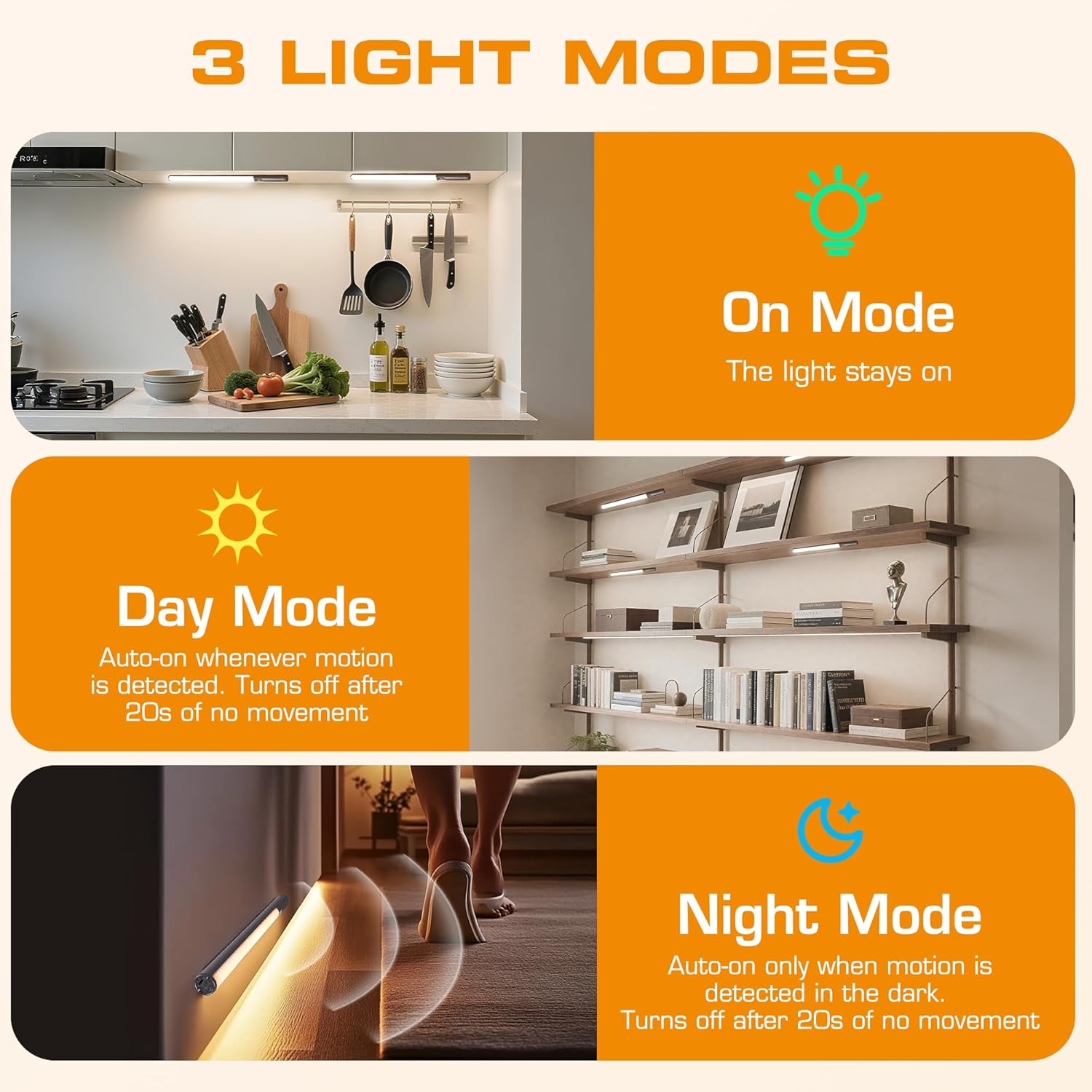
- 3 ໂໝດແສງ: On Mode (light stays on), Day Mode (motion-activated regardless of ambient light), Night Mode (motion-activated only in dark).
- 3 ອຸນຫະພູມສີ: Warm Light (3000K), Natural Light (4000K), Cold Light (6500K).
- Dimmable: 10 brightness levels with short press, stepless dimming with long press.
- ການຄວບຄຸມຄູ່: Operable via remote control or direct touch on the light bar.
- ການຕິດຕັ້ງງ່າຍດາຍ: Multiple mounting options including magnetic, adhesive, and screw-in.
- ແບັດເຕີຣີທີ່ສາມາດສາກໄດ້: 2600mAh capacity for extended use.
- ຄໍາຮ້ອງສະຫມັກກ້ວາງ: Suitable for kitchens, closets, wardrobes, garages, stairwells, and more.
4. ການຕິດຕັ້ງ & ການຕິດຕັ້ງ
The EverBrite Under Cabinet Light offers flexible installation to suit various surfaces and needs.
- ເລືອກວິທີການຕິດຕັ້ງຂອງທ່ານ:
- ໄຟລ໌ແນບແມ່ເຫຼັກ: For iron surfaces, simply attach the light bar directly. The light has built-in magnets.
- ການຕິດຕັ້ງກາວ: For non-iron surfaces, peel the backing from the adhesive pads and attach them to the magnetic mounting bracket. Then, adhere the bracket to your desired surface. The light bar can then be magnetically attached to this bracket.
- Screw Mounting: For a more permanent installation, use the provided screws and wall anchors. Determine the mounting location, drill two holes, insert anchors, and fasten the magnetic mounting bracket with screws. Attach the light bar magnetically.
- ຕຳແໜ່ງ: Ensure the motion sensor is facing the area where movement is expected for optimal detection. The light bar can be rotated up to 90 degrees on its magnetic mount to direct illumination.


5. ການສາກໄຟ
The EverBrite light is equipped with a 2600mAh rechargeable Lithium-Ion battery.
- ຊອກຫາພອດສາກໄຟ USB-C ຢູ່ປາຍແຖບໄຟ.
- Connect the provided USB charging cable to the light bar and a compatible USB power source (e.g., wall adapter, computer USB port).
- ໄຟສະແດງຈະສະແດງສະຖານະການສາກໄຟ (ອ້າງອີງເຖິງຜະລິດຕະພັນສຳລັບພຶດຕິກຳຂອງຕົວຊີ້ບອກສະເພາະ).
- A full charge provides approximately 25 hours of continuous light or up to 25 days in motion sensor mode (based on 1 hour of activation per day).


6. ຄໍາແນະນໍາການດໍາເນີນງານ
Your EverBrite light can be operated using either the manual touch controls on the device or the included remote control.
6.1. Manual Control (On-Device)
The light bar features a switch and a touch sensor on one end for direct control.
- ສະຫຼັບໂໝດ: Slide the switch to select between 'Off', 'Day Mode' (motion sensor always active), 'Night Mode' (motion sensor active only in dark), or 'On Mode' (light stays on continuously).
- ອຸນຫະພູມສີ: In 'On Mode', short press the touch sensor to cycle through the 3 color temperatures: Warm White (3000K), Natural White (4000K), and Cold White (6500K).
- ການປັບຄວາມສະຫວ່າງ: In 'On Mode', long press the touch sensor to activate stepless dimming. Release at your desired brightness level.

6.2. ການຄວບຄຸມໄລຍະໄກ
The remote control provides convenient access to all light functions from a distance.
- ເປີດ/ປິດ: ກົດ ປິດ button to turn the light off. Press the ON ປຸ່ມເພື່ອເປີດມັນ.
- ໂໝດແສງ: Use the dedicated buttons for ON (continuous light), ວັນ (motion sensor always active), or ກາງຄືນ (motion sensor active only in dark).
- ອຸນຫະພູມສີ: ເລືອກ WW (Warm White), NW (Natural White), or CW (Cold White) to change the light color.
- ການປັບຄວາມສະຫວ່າງ: Short press the brightness buttons (sun icons) to cycle through 10 preset brightness levels. Long press for stepless dimming.
- ການຕັ້ງເວລາຈັບເວລາ: ກົດ 15 ນທ, 30 ນທ, ຫຼື 60 ນທ to set an automatic shut-off timer. Press the ປິດໂມງນັບຖອຍຫຼັງ button to cancel any active timer.

6.3. ໂໝດເຊັນເຊີການເຄື່ອນໄຫວ
The integrated motion sensor provides hands-free illumination.
- ໂໝດມື້: The light will turn on automatically when motion is detected, regardless of the ambient light level. It will turn off after 20 seconds of no movement.
- ໂໝດກາງຄືນ: The light will turn on automatically only when motion is detected in dark conditions. It will turn off after 20 seconds of no movement.

7. ຂໍ້ມູນຈໍາເພາະ
| ຄຸນສົມບັດ | ຂໍ້ມູນຈໍາເພາະ |
|---|---|
| ຍີ່ຫໍ້ | EverBrite |
| ໝາຍເລກຕົວແບບ | E101115A |
| ແຫຼ່ງພະລັງງານ | ແບດເຕີຣີ້ໃຊ້ພະລັງງານ (ມີຫມໍ້ໄຟ Lithium Ion 1 ໜ່ວຍ) |
| ຄວາມອາດສາມາດຫມໍ້ໄຟ | 2600mAh |
| ປະເພດແຫຼ່ງແສງ | LED |
| ອຸນຫະພູມສີ | 3000K (Warm Light), 4000K (Natural Light), 6500K (Cold Light) |
| ວິທີການຄວບຄຸມ | ແຕະ, ການຄວບຄຸມໄລຍະໄກ |
| ຄຸນນະສົມບັດພິເສດ | Cordless, Motion Sensor, Dimmable |
| ປະເພດການຕິດຕັ້ງ | Surface Mount (Magnetic, Adhesive, Screws) |
| ວັດສະດຸ | ອາລູມີນຽມ |
| ນ້ໍາຫນັກລາຍການ | 9.9 ອອນ |
| ຂະໜາດແພັກເກັດ | 16.3 x 1.97 x 1.65 ນິ້ວ |
| ການນຳໃຊ້ພາຍໃນ/ນອກ | ພາຍໃນ |
8. ບໍາລຸງຮັກສາ
To ensure the longevity and optimal performance of your EverBrite Under Cabinet Light, follow these simple maintenance guidelines:
- ທໍາຄວາມສະອາດ: Wipe the light bar and remote control with a soft, dry cloth. Avoid using abrasive cleaners or solvents, as these may damage the finish or electronic components.
- ການດູແລຫມໍ້ໄຟ: Recharge the battery when the light output diminishes. Avoid fully depleting the battery frequently to prolong its lifespan. Store the device in a cool, dry place if not in use for extended periods.
- ການບຳລຸງຮັກສາເຊັນເຊີ: ຮັກສາເລນເຊັນເຊີກວດຈັບການເຄື່ອນໄຫວໃຫ້ສະອາດ ແລະບໍ່ມີສິ່ງກີດຂວາງເພື່ອຮັບປະກັນການກວດຫາທີ່ຖືກຕ້ອງ.
9. ການແກ້ໄຂບັນຫາ
If you encounter any issues with your EverBrite Under Cabinet Light, please refer to the following common problems and solutions:
- ແສງບໍ່ເປີດ:
- ໃຫ້ແນ່ໃຈວ່າໄດ້ສາກໄຟແລ້ວ.
- Check the mode switch on the light bar; it should be set to 'On', 'Day Mode', or 'Night Mode'.
- If using the remote, ensure the light bar's main switch is in an active mode (not 'Off').
- ເຊັນເຊີກວດຈັບການເຄື່ອນໄຫວບໍ່ເຮັດວຽກ:
- Verify the light is set to 'Day Mode' or 'Night Mode'.
- In 'Night Mode', ensure the environment is sufficiently dark.
- Check for any obstructions blocking the sensor lens.
- Ensure the motion is within the 9.8ft (3m) detection range and 120-degree angle.
- ການຄວບຄຸມໄລຍະໄກບໍ່ຕອບສະໜອງ:
- Ensure the light bar's main switch is in an active mode (not 'Off').
- ກວດເບິ່ງຫມໍ້ໄຟຄວບຄຸມໄລຍະໄກ.
- Ensure there are no obstructions between the remote and the light bar.
- Light is not charging:
- ໃຫ້ແນ່ໃຈວ່າສາຍ USB ໄດ້ເຊື່ອມຕໍ່ກັບທັງແຖບໄຟ ແລະ ແຫຼ່ງພະລັງງານຢ່າງແໜ້ນໜາແລ້ວ.
- ລອງໃຊ້ສາຍ USB ຫຼືອະແດັບເຕີໄຟອື່ນ.
10. ການຮັບປະກັນແລະການສະຫນັບສະຫນູນ
ສຳລັບຂໍ້ມູນການຮັບປະກັນ, ການຊ່ວຍເຫຼືອດ້ານເຕັກນິກ, ຫຼື ການຊ່ວຍເຫຼືອເພີ່ມເຕີມ, ກະລຸນາອ້າງອີງເຖິງເຈົ້າໜ້າທີ່ຂອງຜູ້ຜະລິດ webເວັບໄຊ ຫຼືຕິດຕໍ່ບໍລິການລູກຄ້າຂອງເຂົາເຈົ້າໂດຍກົງ. ຮັກສາໃບຮັບເງິນການຊື້ຂອງທ່ານສໍາລັບການຮ້ອງຂໍການຮັບປະກັນ.


