ແນະນຳ
This manual provides detailed instructions for the installation, operation, and maintenance of your WONDOM ADAU1701 DSP Preamp. This unit is designed for advanced audio signal processing, offering a 2-input, 4-output configuration with digital crossover capabilities and support for SigmaStudio programming.
ຄຸນນະສົມບັດທີ່ສໍາຄັນປະກອບມີ:
- Powered by ADAU1701 DSP, a 28/56bit Digital Signal Processor Engine.
- 24bit ADC/DAC Resolution Ratio with a 48kHz Sampອັດຕາການ.
- Unbalanced 2-Input, 4-Output Preamp ໜ່ວຍ.
- USB Type-C Port for DC 5V Power.
- Four Potentiometers for High-Pass Filter (HPF), Low-Pass Filter (LPF), and Volume Control.
- Integrated Mute & Phase Switches.
- Supports SigmaStudio Programming when connected with an ICP5 programmer.
- Open-sourced Demo Program & HEX Files are provided for restoring factory settings.
ເນື້ອໃນຊຸດ
ກະລຸນາກວດສອບວ່າລາຍການທັງໝົດມີຢູ່ໃນຊຸດ:
- WONDOM ADAU1701 DSP Preamp ໜ່ວຍ
- USB Type-C Cable (for power)
- ຄູ່ມືຜູ້ໃຊ້ (ເອກະສານນີ້)
- (Optional: ICP5 Programmer, sold separately for advanced programming)
ຂໍ້ມູນຄວາມປອດໄພ
- Ensure the power supply matches the device's requirements (DC 5V, 1A via USB Type-C).
- ຢ່າເຮັດໃຫ້ເຄື່ອງນີ້ມີຄວາມຊຸ່ມຊື່ນ ຫຼືອຸນຫະພູມສູງສຸດ.
- Avoid opening the enclosure unless you are a qualified technician.
- ຮັກສາໃຫ້ໄກຈາກເດັກນ້ອຍ.
ຕັ້ງຄ່າ
1. ການເຊື່ອມຕໍ່ທາງດ້ານຮ່າງກາຍ
Refer to the diagrams below for proper connection of audio inputs, outputs, and power.

ຮູບທີ 1: ການເຊື່ອມຕໍ່ແຜງດ້ານຫຼັງ. This image shows the rear panel of the ADAU1701 DSP Preamp, highlighting the DC Input (5V, 1A), ICP Port, Line In (ADC0 Left, ADC1 Right), and Line Out (DAC0 Right, DAC1 Left, DAC2 Right, DAC3 Left) RCA jacks.
- ການເຊື່ອມຕໍ່ພະລັງງານ: Connect a DC 5V, 1A power supply to the USB Type-C port labeled "DC INPUT 5V, 1A" on the rear panel.
- ການປ້ອນຂໍ້ມູນສຽງ: Connect your audio source (e.g., media player, pre-amplifier) to the "LINE IN" RCA jacks (ADC0 Left, ADC1 Right).
- ສຽງອອກ: ເຊື່ອມຕໍ່ຂອງທ່ານ amplifiers or powered speakers to the "LINE OUT" RCA jacks. The default configuration provides 2-channel mid-range output (DAC2 Right, DAC3 Left) and 2-channel bass output (DAC0 Right, DAC1 Left) for a 2-way digital crossover setup.
- ICP Port: This port is used for connecting an ICP5 programmer (sold separately) for advanced SigmaStudio programming.
2. ການເປີດເຄື່ອງເບື້ອງຕົ້ນ
Once all connections are secure, apply power to the unit. The "POWER" LED on the front panel should illuminate, indicating the device is operational.
ຄໍາແນະນໍາການດໍາເນີນງານ
The WONDOM ADAU1701 DSP Preamp features several controls on its front panel for direct adjustment, as well as advanced programming capabilities via SigmaStudio.

Figure 2: Front Panel Controls. This image displays the front panel, showing the Power LED, Busy LED, SW1 (Mute) and SW2 (Phase) switches, and four potentiometers (POT1, POT2, POT3, POT4) for various audio adjustments.
ແຜງຄວບຄຸມດ້ານໜ້າ:
- ພະລັງງານໄຟ LED: ຊີ້ບອກວ່າໜ່ວຍເປີດຢູ່.
- BUSY LED: Indicates DSP activity.
- SW1 (Mute Switch): Toggles audio output mute on/off.
- SW2 (Phase Switch): Adjusts the phase of the audio output.
- POT1 (MP3 / ADC2): Controls the High-Pass Filter (HPF) for Bank B (3kHz-20kHz).
- POT2 (MP8 / ADC3): Controls the Low-Pass Filter (LPF) for Bank A (210Hz-3kHz).
- POT3 (MP9 / ADC0): Controls the High-Pass Filter (HPF) for Bank A (10Hz-310Hz).
- POT4 (VOL): ຄວບຄຸມປະລິມານລວມ.
Digital Crossover Configuration:
The unit's default output is configured as a 2-way digital crossover, providing dedicated outputs for bass and mid-range frequencies.
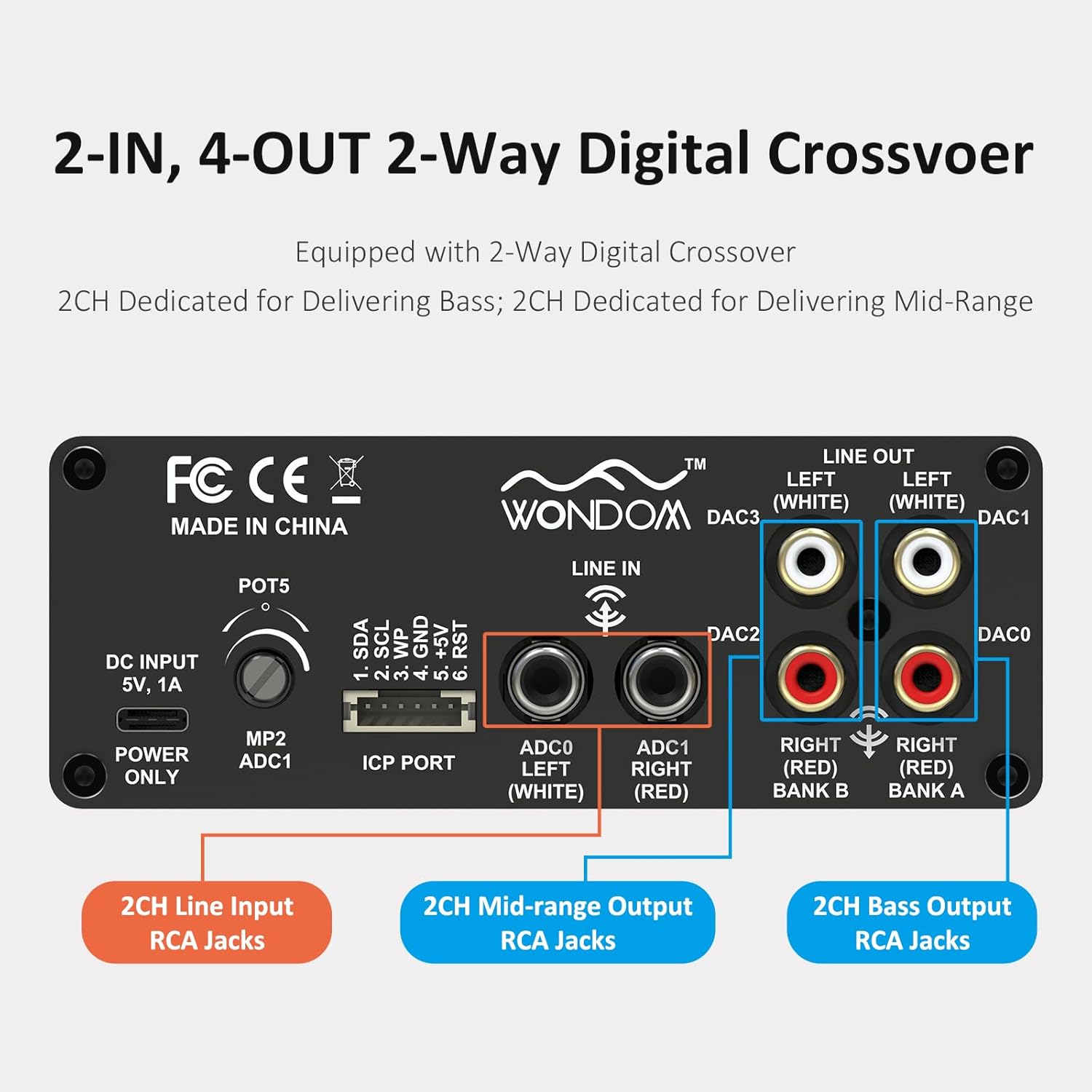
Figure 3: 2-In, 4-Out Digital Crossover. This diagram shows the RCA jack assignments for 2-channel Line Input, 2-channel Mid-range Output, and 2-channel Bass Output, facilitating a 2-way digital crossover setup.
- 2CH Line Input: ADC0 Left (White), ADC1 Right (Red).
- 2CH Mid-range Output: DAC2 Right (Red), DAC3 Left (White).
- 2CH Bass Output: DAC0 Right (Red), DAC1 Left (White).
SigmaStudio Programming:
For advanced customization and fine-tuning of the DSP functions, the unit supports programming via Analog Devices' SigmaStudio software. An ICP5 programmer (sold separately) is required to connect the DSP unit to your computer.

Figure 4: SigmaStudio Programming Setup. This image illustrates the connection between the DSP unit and an ICP5 programmer, along with a visual representation of the SigmaStudio graphical programming interface.
- ຊອບແວ: Download and install SigmaStudio from the Analog Devices webເວັບໄຊ.
- ຮາດແວ: Connect the ICP5 programmer to the ICP Port on the DSP unit and to your computer via USB.
- ການຂຽນໂປຣແກຣມ: Utilize the open-sourced demo program and HEX files provided by WONDOM to get started or to restore factory settings. All terminal functions can be tailored to specific needs using SigmaStudio.
ບໍາລຸງຮັກສາ
- ຮັກສາເຄື່ອງໃຫ້ສະອາດໂດຍການເຊັດດ້ວຍຜ້າອ່ອນ, ແຫ້ງ.
- ຫຼີກເວັ້ນການນໍາໃຊ້ສານເຄມີທີ່ຮຸນແຮງຫຼືເຄື່ອງເຮັດຄວາມສະອາດຂັດ.
- ຮັບປະກັນການລະບາຍອາກາດຢ່າງພຽງພໍຮອບໜ່ວຍເພື່ອປ້ອງກັນຄວາມຮ້ອນເກີນ.
- ກວດສອບການເຊື່ອມຕໍ່ສາຍໄຟທັງໝົດເປັນປະຈຳເພື່ອຄວາມແໜ້ນໜາ.
ການແກ້ໄຂບັນຫາ
| ບັນຫາ | ສາເຫດທີ່ເປັນໄປໄດ້ | ການແກ້ໄຂ |
|---|---|---|
| ບໍ່ມີໄຟ / ໄຟ LED ປິດ | Incorrect power supply, loose connection, faulty cable. | Verify DC 5V, 1A power supply. Check USB Type-C cable connection. Try a different power source or cable. |
| ບໍ່ມີສຽງອອກ | Incorrect input/output connections, Mute switch engaged, volume too low, faulty audio cables. | Check all RCA connections. Ensure SW1 (Mute) is disengaged. Increase POT4 (Volume). Test with different audio cables. |
| Audible hiss or noise | Ground loop, interference, power supply noise, high gain settings. | Ensure all components are properly grounded. Use a high-quality, stable 5V power supply (a separate USB power bank/battery can help reduce noise from PC USB). Reduce gain settings if applicable. |
| Cannot connect to SigmaStudio | ICP5 programmer not connected or faulty, DSP not powered, incorrect software drivers. | Ensure ICP5 programmer is correctly connected to the DSP and computer. Verify DSP unit is powered on. Install SigmaStudio drivers in administrator mode (as suggested by user reviews). |
ຂໍ້ມູນຈໍາເພາະ
| ຄຸນສົມບັດ | ລາຍລະອຽດ |
|---|---|
| ຊິບ DSP | ADAU1701 (28/56bit Digital Signal Processor) |
| ADC/DAC Resolution | 24-ບິດ |
| Sampອັດຕາການລິງ | 48 kHz |
| Input Configuration | 2-Input (Unbalanced RCA) |
| Output Configuration | 4-Output (Unbalanced RCA, default 2-way digital crossover) |
| ການສະຫນອງພະລັງງານ | DC 5V, 1A (via USB Type-C) |
| ການຄວບຄຸມ | 4 Potentiometers (HPF/LPF/Volume), Mute Switch, Phase Switch |
| Programming Support | SigmaStudio (requires ICP5 programmer, sold separately) |
| ຂະໜາດ (L x W x H) | 4.72 x 4.72 x 1.77 ນິ້ວ |
| ນ້ຳໜັກ | 1.23 ປອນ |
| ທີ່ຢູ່ອາໄສ | Sleek Aluminum Enclosure |
ການຮັບປະກັນແລະການສະຫນັບສະຫນູນ
WONDOM products are manufactured by Sure Electronics. For warranty information, technical support, and further assistance, please refer to the official Sure Electronics webເວັບໄຊ ຫຼືຕິດຕໍ່ບໍລິການລູກຄ້າຂອງເຂົາເຈົ້າໂດຍກົງ. ຮັກສາໃບຮັບເງິນການຊື້ຂອງທ່ານໄວ້ເປັນຫຼັກຖານການຊື້ສໍາລັບການຮ້ອງຂໍການຮັບປະກັນ.
Manufacturer: Sure Electronics
For additional resources and community support regarding SigmaStudio programming, online forums and tutorials can be a valuable resource.


