1. ຜະລິດຕະພັນເກີນview
The charmast 20000mAh Portable Charger (Model C2065) is a high-capacity power bank designed to charge multiple devices on the go. It features built-in USB-C, Lightning, and Micro-USB cables, along with additional USB-A and USB-C ports, providing versatile charging options for a wide range of electronic devices. A digital display indicates the remaining battery percentage.

Image 1.1: The charmast 20000mAh Portable Charger (Model C2065) in Navy.
2. ສິ່ງທີ່ຢູ່ໃນກ່ອງ
ເມື່ອເປີດແພັກເກັດ, ກວດເບິ່ງວ່າສິນຄ້າທັງໝົດມີຢູ່:
- 1 x charmast 20000mAh Portable Charger (Model C2065)
- 1 x ຄູ່ມືຜູ້ໃຊ້
- ກະເປົາເດີນທາງ 1 x
3. ຂໍ້ມູນຈໍາເພາະ
| ຄຸນສົມບັດ | ລາຍລະອຽດ |
|---|---|
| ໝາຍເລກຕົວແບບ | C2065 |
| ຄວາມອາດສາມາດຫມໍ້ໄຟ | 20000 ລ້ານamp ຊົ່ວໂມງ (mAh) |
| ຂະໜາດສິນຄ້າ | 6.3 x 2.85 x 0.75 ນິ້ວ |
| ນ້ໍາຫນັກລາຍການ | 12 ອອນ |
| ພອດຂາອອກ | Built-in USB-C, Lightning, Micro-USB cables; 2x USB-A ports; 1x USB-C port (Input/Output) |
| ການສາກໄວ | ການສາກໄຟໄວ PD 22.5W |
| ຄຸນນະສົມບັດພິເສດ | Built-in cables, Digital Display, Fast Charging, High Capacity, Slim design |
4. ຕັ້ງຄ່າ
4.1 ການສາກໄຟເບື້ອງຕົ້ນຂອງ Power Bank
Before first use, fully charge the power bank. The digital display will show the charging progress from 0% to 100%.
- ການໃຊ້ສາຍ USB-C ໃນຕົວ: Connect the built-in USB-C cable to a compatible USB wall adapter (not included). Charging time is approximately 6 hours.
- ການໃຊ້ສາຍ USB-A ໃນຕົວ: Connect the built-in USB-A cable to a compatible USB wall adapter (not included). Charging time is approximately 12 hours.
- Using an External Cable (USB-C Input): Connect a USB-C cable (not included) to the power bank's USB-C input port and a compatible 18W PD/QC wall adapter. Charging time is approximately 6 hours.
- Using an External Cable (Micro-USB Input): Connect a Micro-USB cable (not included) to the power bank's Micro-USB input port and a compatible 18W PD/QC wall adapter. Charging time is approximately 6 hours.

Image 4.1: Methods for recharging the power bank.
5. ຄໍາແນະນໍາການດໍາເນີນງານ
5.1 ອຸປະກອນສາກໄຟ
ພາວເວີແບນໃຫ້ຫຼາຍວິທີໃນການສາກອຸປະກອນຂອງທ່ານ:
- ການນໍາໃຊ້ສາຍໄຟໃນຕົວ: The power bank includes built-in Lightning, USB-C, and Micro-USB cables. Simply pull out the appropriate cable and connect it directly to your device.
- ການໃຊ້ພອດ USB-A: Connect your device's USB-A charging cable to one of the two USB-A output ports on the power bank.
- ໃຊ້ພອດ USB-C: Connect your device's USB-C charging cable to the USB-C output port on the power bank. This port also supports input for recharging the power bank.

Image 5.1: Built-in cables for various devices.
5.2 ການສາກໄຟພ້ອມໆກັນ
The power bank can charge up to six devices simultaneously using a combination of its built-in cables and external USB ports.

Image 5.2: Charging multiple devices.
5.3 ການສາກໄວ
The power bank supports 22.5W PD fast charging. When connected to a compatible device, it can charge up to 50% in approximately 30 minutes. Ensure your device and cable support fast charging for optimal performance.
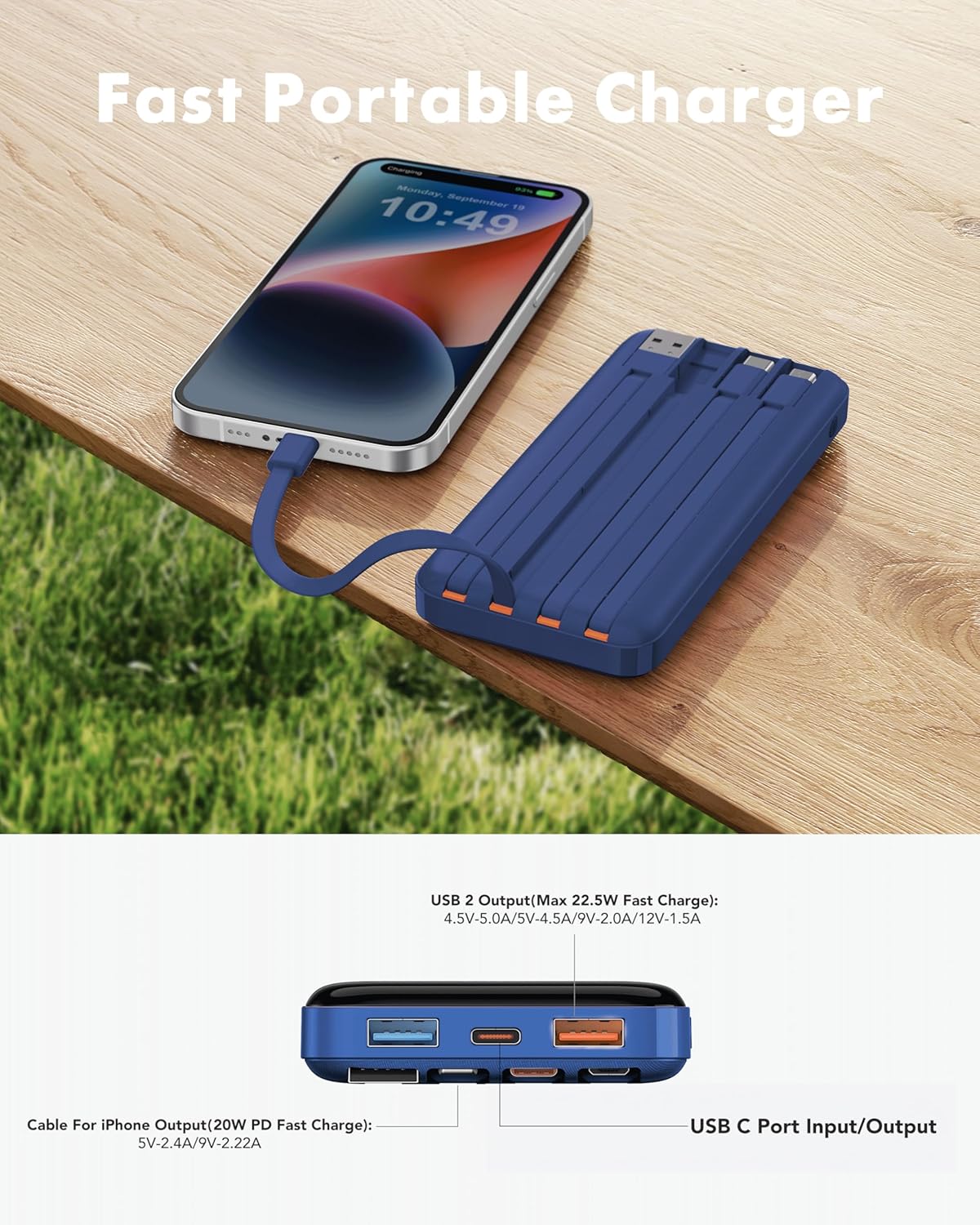
Image 5.3: Fast charging in action.
5.4 ຈໍດິຈິຕອນ
The integrated digital display shows the precise remaining battery percentage (0-100%) of the power bank. This allows for accurate monitoring of the power bank's charge level.

Image 5.4: Digital display showing battery percentage.
5.5 Low-Current Mode
For charging low-power devices such as Bluetooth earphones, smartwatches, or fitness trackers, activate the low-current mode. Press and hold the power button for 5 seconds to engage this mode, ensuring safe and efficient charging for smaller electronics.
6. ຂໍ້ມູນຄວາມປອດໄພ
- ຢ່າໃຫ້ Power Bank ຖືກອຸນຫະພູມສູງ ຫຼື ຕ່ຳເກີນໄປ, ແສງແດດໂດຍກົງ ຫຼື ໄຟ.
- ຫຼີກເວັ້ນການຫຼຸດລົງ, disassembled, ຫຼືແກ້ໄຂອຸປະກອນ.
- ຮັກສາໃຫ້ຫ່າງຈາກນໍ້າ ແລະ ຄວາມຊຸ່ມຊື່ນສູງ.
- ເກັບຮັກສາໄວ້ໃນບ່ອນທີ່ເຢັນ, ແຫ້ງໃນເວລາທີ່ບໍ່ໄດ້ໃຊ້.
- ຮັກສາໃຫ້ໄກຈາກເດັກນ້ອຍ.
- Flight Travel: This power bank meets airline safety standards for carry-on luggage. Always pack it in your carry-on bag; never place it in checked luggage.

Image 6.1: The power bank is flight-friendly.
7. ບໍາລຸງຮັກສາ
- ເຮັດຄວາມສະອາດ power bank ດ້ວຍຜ້າອ່ອນ, ແຫ້ງ. ຢ່າໃຊ້ສານເຄມີທີ່ຮຸນແຮງຫຼືວັດສະດຸຂັດ.
- ຖ້າບໍ່ໄດ້ໃຊ້ພາວເວີແບງເປັນເວລາດົນນານ, ໃຫ້ສາກໄຟໃຫ້ປະມານ 50-75% ທຸກໆສາມເດືອນເພື່ອຮັກສາສຸຂະພາບຂອງແບັດເຕີຣີ.
- Avoid storing the power bank in extreme temperatures or direct sunlight.
8. ການແກ້ໄຂບັນຫາ
8.1 Power Bank ບໍ່ສາກໄຟ
- Ensure the charging cable is securely connected to both the power bank's input port/built-in cable and the wall adapter.
- Verify that the wall adapter is functioning correctly and plugged into a live power outlet.
- ລອງສາຍສາກອື່ນ ຫຼື ອະແດັບເຕີຝາ.
8.2 ອຸປະກອນບໍ່ໄດ້ສາກຈາກ Power Bank
- Check if the power bank has sufficient charge (refer to the digital display).
- Ensure the cable connecting the device to the power bank is securely plugged in at both ends.
- Try a different output port or built-in cable on the power bank.
- ກວດສອບວ່າພອດສາກໄຟຂອງອຸປະກອນຂອງທ່ານສະອາດ ແລະ ບໍ່ມີສິ່ງເສດເຫຼືອ.
- If charging a low-power device, ensure Low-Current Mode is activated (press and hold power button for 5 seconds).
8.3 ການສາກໄຟຊ້າ
- ຮັບປະກັນວ່າທັງ power bank ແລະອຸປະກອນຂອງທ່ານຮອງຮັບໂປຣໂຕຄໍການສາກໄວ.
- ໃຊ້ສາຍສາກໄວທີ່ມີຄຸນະພາບສູງ.
- Avoid charging multiple devices simultaneously if you require maximum speed for a single device.
9. ການຮັບປະກັນແລະການສະຫນັບສະຫນູນ
The charmast 20000mAh Portable Charger comes with 24 months of support and lifetime technical support. For assistance, please refer to the contact information provided in your product packaging or visit the official charmast webເວັບໄຊ.


