ແນະນຳ
Welcome to the user manual for your Infinity Smartwatch, Model NX 10. This device is designed to enhance your daily life with advanced fitness tracking, communication features, and smart notifications. Featuring a vibrant 1.43" AMOLED screen and robust IP68 water resistance, your smartwatch is built for both everyday use and active lifestyles. Please read this manual carefully to ensure proper operation and maintenance of your device.

Figure 1: Infinity Smartwatch NX 10. This image shows the smartwatch from an angled perspective, highlighting its round AMOLED display, black silicone strap, and two side buttons.
ຕັ້ງຄ່າ
1. Unboxing ແລະຄ່າເລີ່ມຕົ້ນ
Upon unboxing, ensure all components are present: the Infinity Smartwatch NX 10 and the charging cable.
- ເຊື່ອມຕໍ່ສາຍສາກໄຟແມ່ເຫຼັກເຂົ້າກັບຈຸດສາກໄຟຢູ່ດ້ານຫຼັງຂອງໂມງອັດສະລິຍະ.
- ສຽບປາຍ USB ຂອງສາຍເຂົ້າໃສ່ອະແດັບເຕີໄຟ USB ມາດຕະຖານ (ບໍ່ລວມ) ຫຼືພອດ USB ຂອງຄອມພິວເຕີ.
- The watch display will show a charging indicator. Fully charge the device before first use, which typically takes approximately 2 hours.

Figure 2: Smartwatch charging. The image illustrates the smartwatch being charged magnetically, with a green lightning bolt icon on the screen indicating charging status and a "400mAh Battery Capacity" label.
2. ການຕິດຕັ້ງແອັບ ແລະ ການຈັບຄູ່
To unlock the full potential of your Infinity Smartwatch, download and install the companion application, Fit Cloud Pro, ໃນໂທລະສັບສະຫຼາດຂອງທ່ານ.
- Scan the QR code provided in the quick start guide (if available) or search for "Fit Cloud Pro" in your smartphone's app store (Google Play Store for Android, Apple App Store for iOS).
- ຕິດຕັ້ງແອັບພລິເຄຊັນ.
- Open the Fit Cloud Pro app and follow the on-screen instructions to create an account or log in.
- ໃຫ້ແນ່ໃຈວ່າ Bluetooth ຖືກເປີດໃຊ້ຢູ່ໃນໂທລະສັບສະຫຼາດຂອງທ່ານ.
- In the app, navigate to the device pairing section and search for your smartwatch (e.g., "NX 10" or similar Bluetooth name).
- Select your smartwatch from the list to initiate pairing. Confirm the pairing request on both your phone and the smartwatch if prompted.
- Once paired, the app will synchronize data with your smartwatch, and you can customize settings.
ຄໍາແນະນໍາການດໍາເນີນງານ
1. ການນໍາທາງພື້ນຖານ
- ໜ້າຈໍສຳຜັດ: Swipe left/right to navigate between main screens (e.g., activity, heart rate, weather). Swipe up/down to access quick settings or notifications. Tap to select an option.
- ປຸ່ມຂ້າງ: The top button typically acts as a power button (long press) or a back/home button (short press). The bottom button may be customizable or provide quick access to sports modes.

Figure 3: 1.43" AMOLED Screen. This image highlights the vibrant display of the smartwatch, showing a detailed watch face with various data points like time, date, steps, and heart rate.
2. ການໂທອອກ ແລະ ຮັບສາຍ
Your Infinity Smartwatch supports Bluetooth calling, allowing you to make and receive calls directly from your wrist when connected to your smartphone.
- ໂທອອກ: Access the dialer or contacts list on your smartwatch. You can dial a number directly or select a contact to call.
- ເພື່ອຮັບສາຍ: When a call comes in, the smartwatch will display the caller ID. Tap the green answer icon to accept the call or the red icon to decline.

Figure 4: Stay Connected On The Go. This image shows a user interacting with the smartwatch to make a call, illustrating the microphone, dialing, call records, and contacts features.
3. Fitness and Health Tracking
The smartwatch is equipped with multiple sensors to monitor your health and fitness activities.
- Pedometer: Automatically tracks your steps, distance, and calories burned throughout the day.
- ການກວດສອບອັດຕາການເຕັ້ນຫົວໃຈ: Provides real-time heart rate data. Access this feature from the main menu or set up continuous monitoring in the app.
- ການຕິດຕາມຄວາມດັນເລືອດ: Offers blood pressure readings. For accurate results, ensure the watch is worn correctly and remain still during measurement. Note: This feature is for reference only and should not be used for medical diagnosis.
- ການຕິດຕາມການນອນ: ຕິດຕາມຮູບແບບການນອນຂອງທ່ານ, ລວມທັງການນອນເລິກ, ນອນອ່ອນ, ແລະເວລາຕື່ນນອນ. View detailed analysis in the Fit Cloud Pro app.
- ໂໝດກິລາ: Supports over 100 sports modes, including running, cycling, swimming, and more. Select your desired activity to track specific metrics.

Figure 5: Track Every Move. This image displays the smartwatch tracking a swimming activity, with additional visuals of rock climbing and cycling, indicating its multi-sport tracking capabilities.

Figure 6: More than 110 sports modes. This image shows a variety of colorful icons representing different sports activities supported by the smartwatch, overlaid on a background of a person cycling.
4. ການປັບແຕ່ງ
Personalize your smartwatch experience through the Fit Cloud Pro app.
- ເບິ່ງ ໜ້າ: Choose from a wide range of pre-installed watch faces or download new ones via the app. You can also create custom watch faces using your own photos.
- ການແຈ້ງເຕືອນ: Configure which app notifications you wish to receive on your smartwatch (e.g., calls, SMS, social media alerts).
- ໂມງປຸກ ແລະການແຈ້ງເຕືອນ: Set alarms, sedentary reminders, and hydration reminders through the app.
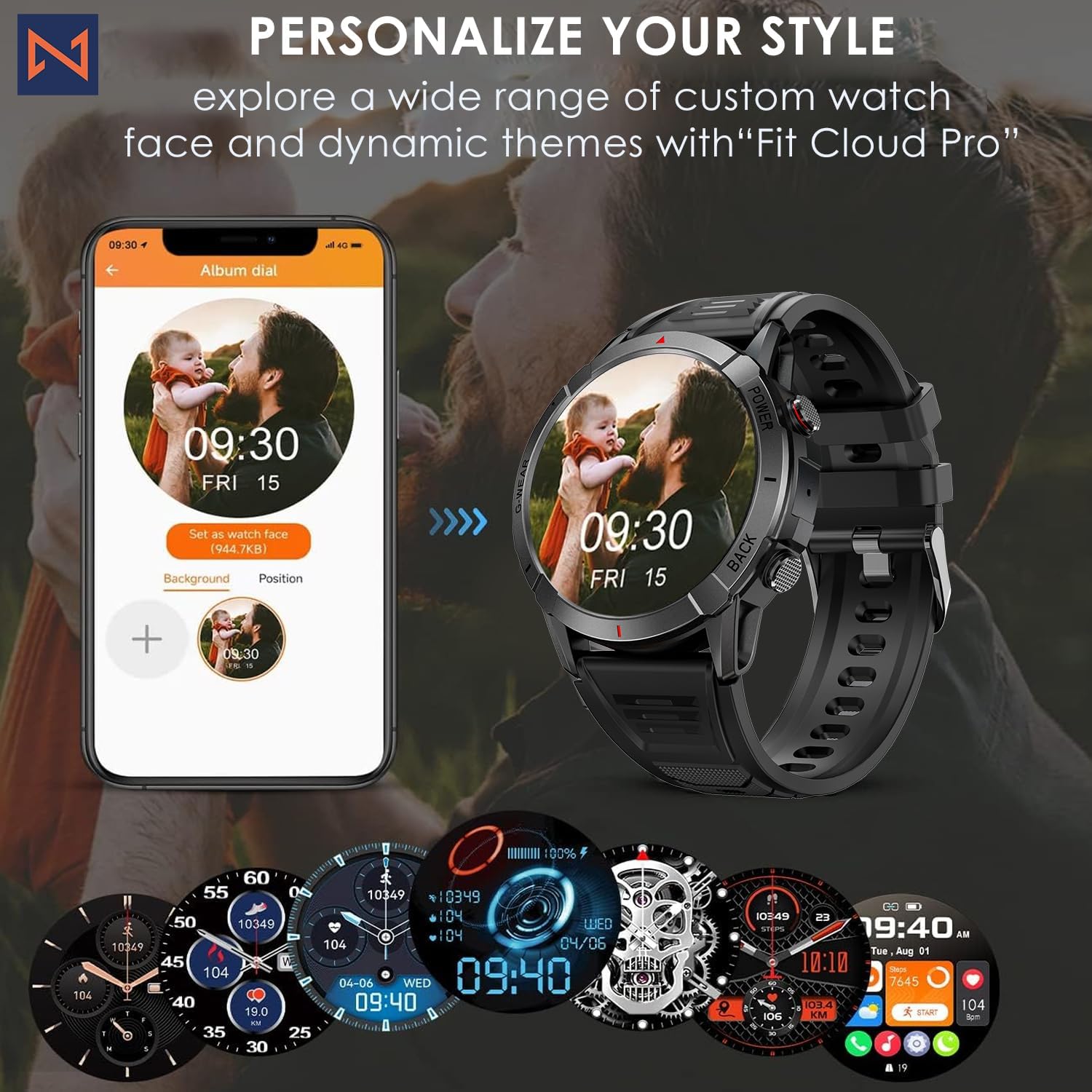
Figure 7: Personalize Your Style. This image demonstrates how to customize watch faces using the "Fit Cloud Pro" app, showing various digital and analog watch face options.
ບໍາລຸງຮັກສາ
1. ທໍາຄວາມສະອາດ Smartwatch ຂອງທ່ານ
ການທຳຄວາມສະອາດເປັນປະຈຳຈະຊ່ວຍຮັກສາຮູບລັກສະນະ ແລະ ການເຮັດວຽກຂອງອຸປະກອນຂອງທ່ານ.
- ເຊັດໜ້າຈໍ ແລະ ຮ່າງກາຍດ້ວຍຜ້າອ່ອນໆ, ທີ່ບໍ່ມີເສັ້ນດ່າງ.
- ສຳລັບຮອຍເປື້ອນທີ່ຝັງແໜ້ນ, dampen ຜ້າເລັກນ້ອຍດ້ວຍນ້ໍາ. ຫຼີກເວັ້ນການນໍາໃຊ້ສານເຄມີທີ່ຮຸນແຮງຫຼືວັດສະດຸຂັດ.
- Clean the charging contacts periodically to ensure proper connection.
2. ກັນນ້ຳ (IP68)
Your Infinity Smartwatch is rated IP68, meaning it is resistant to dust and can withstand immersion in water up to 1.5 meters for up to 30 minutes.
- ມັນເໝາະສົມສຳລັບການນຳໃຊ້ປະຈຳວັນ, ລ້າງມື, ແລະ ຝົນຕົກເບົາບາງ.
- Avoid prolonged immersion, hot water, steam, or high-pressure water jets (e.g., showering, sauna, diving).
- If the watch gets wet, dry it thoroughly before charging or operating buttons.

Figure 8: Engineered for Adventure. This image highlights the smartwatch's durability features, including waterproof, dustproof, anti-magnetic, and shockproof capabilities, with corresponding icons.
3. ການດູແລຫມໍ້ໄຟ
- ເພື່ອຍືດອາຍຸແບັດເຕີຣີ, ຫຼີກເວັ້ນອຸນຫະພູມທີ່ຮຸນແຮງ.
- ສາກໄຟໂມງເປັນປະຈຳ; ຫຼີກລ່ຽງການປ່ອຍໃຫ້ແບັດເຕີຣີໝົດເປັນເວລາດົນ.
- ໃຊ້ພຽງແຕ່ສາຍສາກທີ່ໃຫ້ມາ.
ການແກ້ໄຂບັນຫາ
| ບັນຫາ | ການແກ້ໄຂທີ່ເປັນໄປໄດ້ |
|---|---|
| ໂມງບໍ່ເປີດ | ກວດໃຫ້ແນ່ໃຈວ່າໂມງຖືກສາກເຕັມແລ້ວ. ເຊື່ອມຕໍ່ກັບສາຍສາກ ແລະລໍຖ້າສອງສາມນາທີກ່ອນທີ່ຈະພະຍາຍາມເປີດເຄື່ອງ. |
| ບໍ່ສາມາດຈັບຄູ່ກັບສະມາດໂຟນໄດ້ |
|
| ຂໍ້ມູນສຸຂະພາບບໍ່ຖືກຕ້ອງ |
|
| ບໍ່ໄດ້ຮັບການແຈ້ງເຕືອນ |
|
| ອາຍຸແບັດເຕີຣີສັ້ນ |
|
ຂໍ້ມູນຈໍາເພາະ
| ຄຸນສົມບັດ | ລາຍລະອຽດ |
|---|---|
| ໝາຍເລກຕົວແບບ | NX 10 |
| ຈໍສະແດງຜົນ | 1.43" AMOLED Screen |
| ຄວາມລະອຽດການສະແດງ | 466x466 HD |
| ຄວາມອາດສາມາດຫມໍ້ໄຟ | 400 mAh Lithium Polymer |
| ການຕໍ່ຕ້ານນ້ໍາ | IP68 |
| ການເຊື່ອມຕໍ່ | Bluetooth |
| ລະບົບປະຕິບັດການ | Android (ເຂົ້າກັນໄດ້ກັບ iOS) |
| ວັດສະດຸສາຍ | 22mm Silicon Belt |
| ວັດສະດຸສະແດງ | ສັງກະສີໂລຫະປະສົມ |
| ນ້ໍາຫນັກລາຍການ | 1.76 ອອນ |
| ຄວາມອາດສາມາດເກັບຮັກສາຫນ່ວຍຄວາມຈໍາ | 128 MB |
ການຮັບປະກັນແລະການສະຫນັບສະຫນູນ
For warranty information and technical support, please refer to the documentation included with your purchase or visit the official Infinity webເວັບໄຊ.
Manufacturer: Infiniity
For further assistance, you may contact Infiniity customer service through the contact information provided on their official website or within the Fit Cloud Pro application.


