ແນະນຳ
This manual provides detailed instructions for the installation, operation, and maintenance of your Feit Electric 46-inch LED Utility Light. This fixture features a motion sensor, multiple operating modes, a timer, and remote control functionality, designed for use in various indoor environments such as garages, workshops, and storage areas.

Image: The Feit Electric 46-inch LED Utility Light, shown with hanging chains attached.
ຂໍ້ມູນຄວາມປອດໄພ
Please read and understand all safety instructions before installing or operating this product. Failure to do so may result in electric shock, fire, or other hazards.
- ໃຫ້ແນ່ໃຈວ່າໄດ້ຕັດການເຊື່ອມຕໍ່ໄຟຟ້າກ່ອນທີ່ຈະຕິດຕັ້ງຫຼືບໍາລຸງຮັກສາ.
- ຜະລິດຕະພັນນີ້ແມ່ນສໍາລັບການນໍາໃຊ້ພາຍໃນເຮືອນເທົ່ານັ້ນ.
- ຢ່າພະຍາຍາມດັດແປງອຸປະກອນ.
- ປຶກສາຊ່າງໄຟຟ້າທີ່ມີຄຸນວຸດທິຖ້າທ່ານບໍ່ແນ່ໃຈກ່ຽວກັບສ່ວນໃດໜຶ່ງຂອງການຕິດຕັ້ງ.
ເນື້ອໃນຊຸດ
ກວດສອບວ່າອົງປະກອບທັງຫມົດແມ່ນມີຢູ່ກ່ອນທີ່ຈະເລີ່ມຕົ້ນການຕິດຕັ້ງ:
- 1 x Feit Electric 46" LED Utility Light
- 1 x ການຄວບຄຸມໄລຍະໄກ
- Mounting Hardware (chains, screws, anchors)
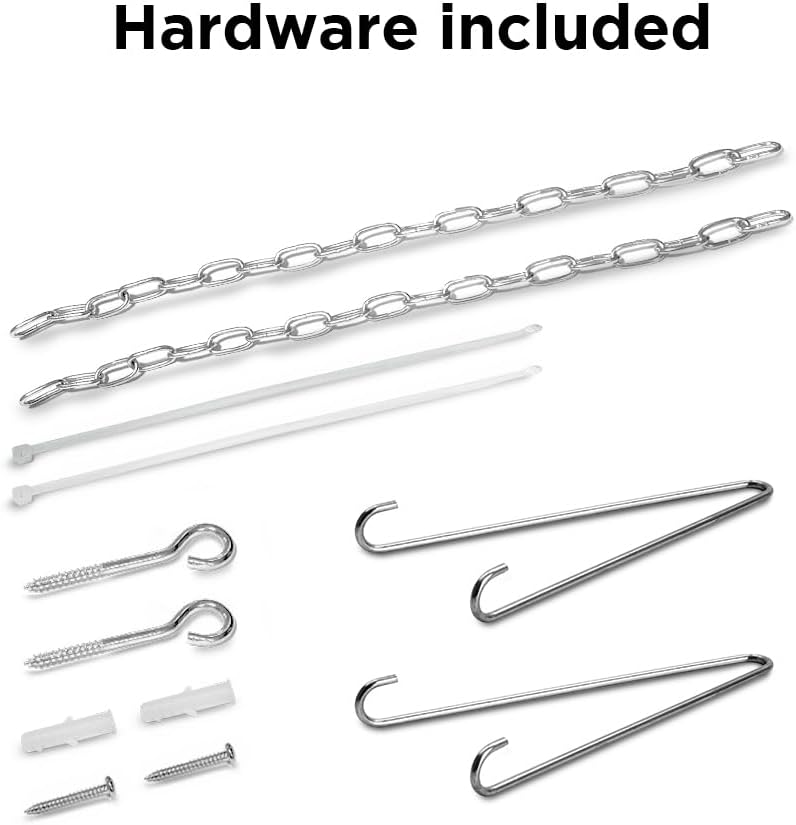
Image: A collection of mounting hardware including chains, screws, and anchors.
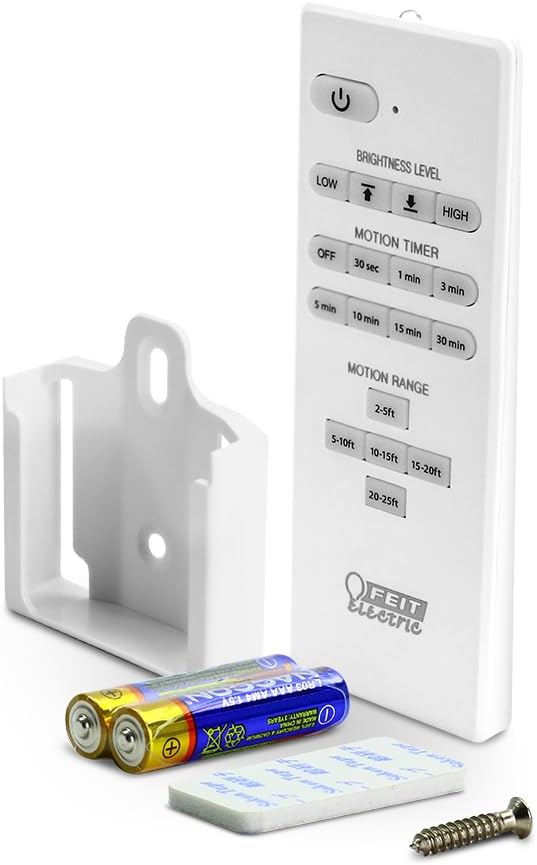
Image: The remote control, a wall mount bracket, and batteries for the utility light.
ຂໍ້ມູນຈໍາເພາະ
| ຄຸນສົມບັດ | ຂໍ້ມູນຈໍາເພາະ |
|---|---|
| ໝາຍເລກຕົວແບບ | SHOP/4/840/MM |
| ຂະໜາດ (L x W x H) | 46.2" x 2.1" x 2.2" |
| ວັດtage | 55W |
| ຄວາມສະຫວ່າງ | 5000 Lumens |
| ອຸນຫະພູມສີ | ສີຂາວ 4000K |
| ສະບັບtage | 120 ໂວນ |
| ອາຍຸຍືນ | ສູງສຸດ 50,000 ຊົ່ວໂມງ |
| ຄຸນນະສົມບັດພິເສດ | Motion Sensor, Remote Controlled |
| ປະເພດການຕິດຕັ້ງ | Flush Mount, Hanging |
| ການນຳໃຊ້ພາຍໃນ/ນອກ | ພາຍໃນ |
| ວັດສະດຸ | ພາດສະຕິກ |
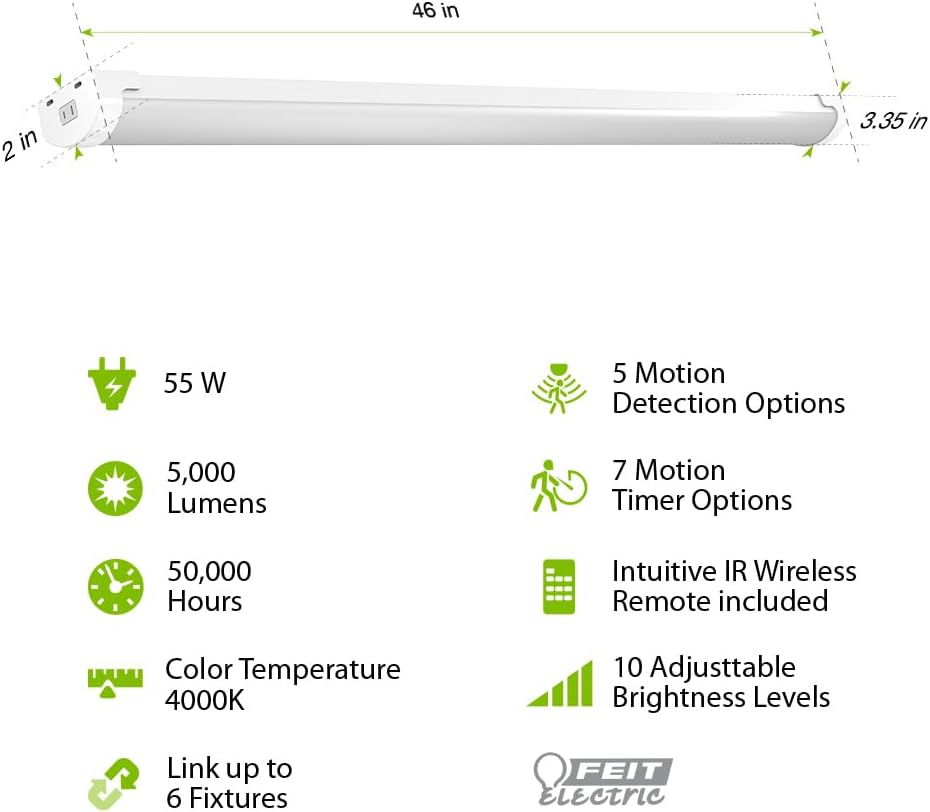
Image: Diagram illustrating the 46-inch length, 2-inch width, and 3.35-inch height of the light, along with icons for 55W, 5000 Lumens, 50,000 Hours, 4000K Color Temperature, Link up to 6 Fixtures, 5 Motion Detection Options, 7 Motion Timer Options, Intuitive IR Wireless Remote included, and 10 Adjustable Brightness Levels.
ການຕິດຕັ້ງແລະການຕິດຕັ້ງ
The Feit Electric LED Utility Light offers versatile installation options: hanging or flush mount. Ensure the power source is off before installation.
ການຕິດຕັ້ງຫ້ອຍ
- Attach the hanging chains to the designated points on the fixture.
- Securely fasten the other end of the chains to a sturdy ceiling structure using the provided hooks and screws.
- Adjust the chain length to achieve the desired height.
ການຕິດຕັ້ງ Flush Mount
- Position the fixture against the ceiling at the desired location.
- Mark the mounting points through the fixture's mounting holes.
- ເຈາະຮູນັກບິນ ແລະ ໃສ່ບ່ອນຍຶດຕິດຝາ ຖ້າຈຳເປັນ.
- ຍຶດອຸປະກອນຕິດໃສ່ເພດານໂດຍໃຊ້ສະກູທີ່ໃຫ້ໄວ້.
After mounting, plug the 5-ft. cord into a standard electrical outlet.

Image: A visual comparison showing how to perform a flush mount installation with screws and a hanging installation with chains and hooks.
ຄໍາແນະນໍາການດໍາເນີນງານ
The utility light can be operated manually or via the included remote control.
ຟັງຊັນການຄວບຄຸມໄລຍະໄກ
The remote control allows for comprehensive management of the light's features:
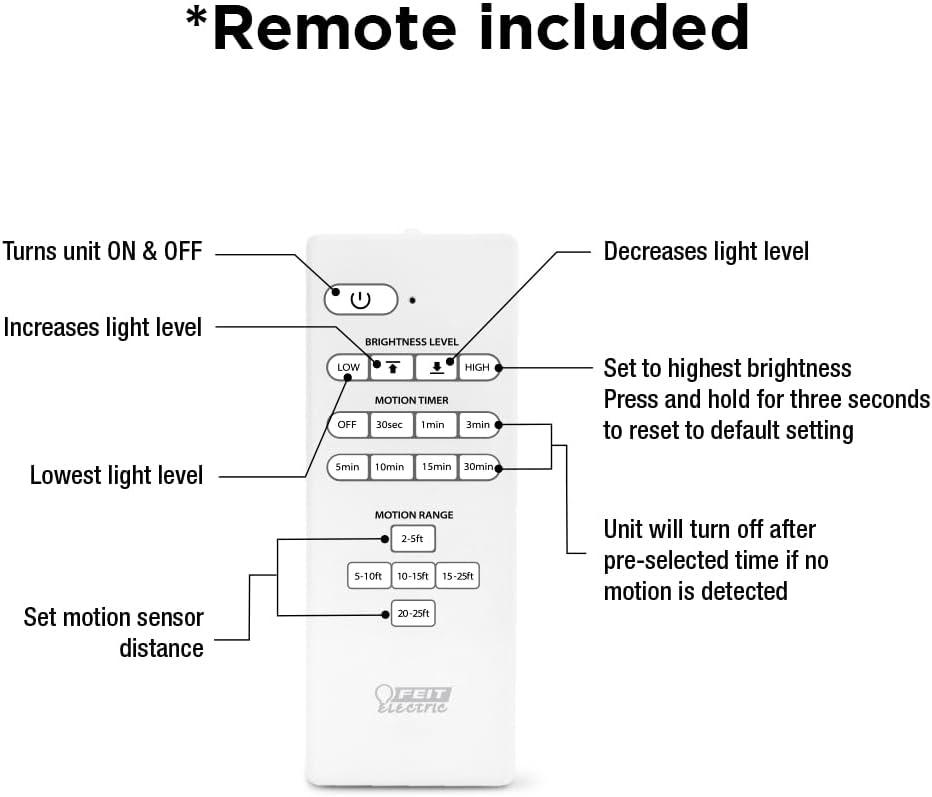
Image: A detailed diagram of the remote control, labeling buttons for ON/OFF, increasing/decreasing light level, setting to highest brightness, resetting to default, setting lowest light level, motion timer options (30s, 1min, 3min, 5min, 10min, 15min, 30min), and motion range settings (2-5ft, 5-10ft, 10-15ft, 15-25ft, 20-25ft).
- ປຸ່ມເປີດປິດ: ເປີດ ຫຼື ປິດເຄື່ອງ.
- ລະດັບຄວາມສະຫວ່າງ: Use the up/down arrows to increase or decrease light intensity.
- ສູງ/ຕ່ຳ: Quickly set to highest or lowest brightness. Press and hold HIGH for three seconds to reset to default settings.
- Motion Timer: Select from 30 seconds, 1 minute, 3 minutes, 5 minutes, 10 minutes, 15 minutes, or 30 minutes. The light will turn off after the pre-selected time if no motion is detected.
- ຊ່ວງການເຄື່ອນໄຫວ: Set the motion sensor detection distance to 2-5ft, 5-10ft, 10-15ft, 15-25ft, or 20-25ft.
ການເຄື່ອນໄຫວເຊັນເຊີປະຕິບັດງານ
The built-in PIR motion sensor detects movement and can automatically activate the light. There are 5 convenient lighting modes:
- ເປີດສະເໝີ: ໄຟຍັງເປີດຢູ່ຕະຫຼອດເວລາ.
- Motion Sensor On/Off: Light turns on when motion is detected and off when no motion is detected for a set period.
- Motion Sensor with Timer: Light turns on with motion and stays on for the selected timer duration.
- ໂໝດຫຼຸດແສງ: Light operates at a reduced brightness level.
- ໂໝດກາງຄືນ: Specific setting for low-light conditions.
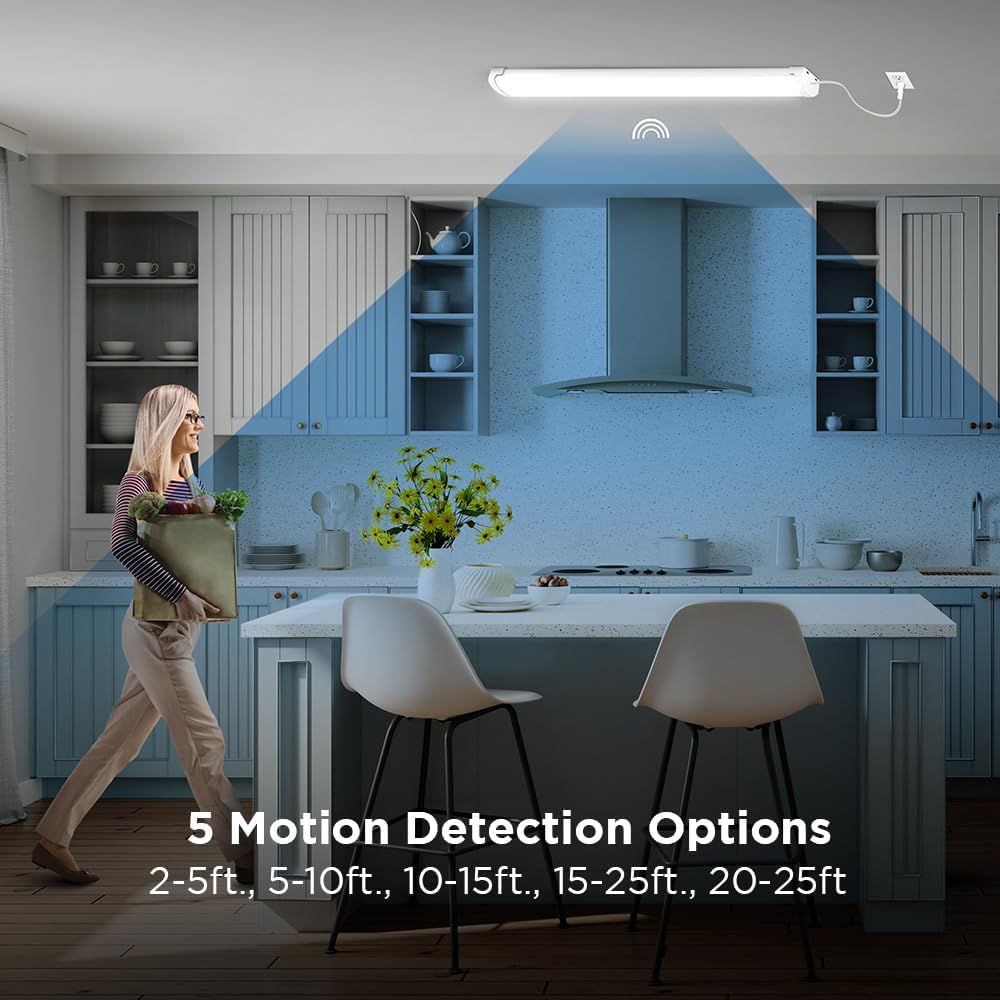
Image: A woman walking in a kitchen, illustrating the motion detection range with options from 2-5ft to 20-25ft.
ບໍາລຸງຮັກສາ
This LED utility light is designed for long-lasting, maintenance-free operation. To ensure optimal performance:
- ທໍາຄວາມສະອາດ: ຕັດການເຊື່ອມຕໍ່ໄຟກ່ອນທຳຄວາມສະອາດ. ເຊັດອຸປະກອນດ້ວຍຜ້າອ່ອນ, ແຫ້ງ ຫຼື ເຊັດເບົາໆamp ຜ້າ. ຢ່າໃຊ້ເຄື່ອງເຮັດຄວາມສະອາດຂັດຫຼືສານລະລາຍ.
- ການທົດແທນດອກໄຟ: The integrated LEDs are designed to last up to 50,000 hours and are not user-replaceable.
- ການກວດກາ: Periodically check the mounting hardware for tightness and ensure the power cord is free from damage.
ການແກ້ໄຂບັນຫາ
If you experience issues with your utility light, refer to the following common solutions:
| ບັນຫາ | ສາເຫດທີ່ເປັນໄປໄດ້ | ການແກ້ໄຂ |
|---|---|---|
| ແສງບໍ່ເປີດ | No power, loose connection, remote battery dead | Check power outlet, ensure cord is securely plugged in, replace remote batteries. |
| ເຊັນເຊີການເຄື່ອນໄຫວບໍ່ເຮັດວຽກ | Incorrect motion range setting, obstruction, ambient light too high | Adjust motion range on remote, clear obstructions, ensure sensor is not in direct bright light. |
| ແສງກະພິບ ຫຼື ມືດລົງໂດຍບໍ່ຄາດຄິດ | Unstable power supply, faulty unit | ກວດສອບແຫຼ່ງພະລັງງານ. ຖ້າບັນຫາຍັງຄົງຢູ່, ໃຫ້ຕິດຕໍ່ຫາຝ່າຍສະໜັບສະໜູນລູກຄ້າ. |
ຮັບປະກັນ
This Feit Electric LED Utility Light is covered by a ການຮັບປະກັນຂອງຜູ້ຜະລິດ 5 ປີ. Please retain your proof of purchase for warranty claims. For detailed warranty information, refer to the official Feit Electric webເວັບໄຊທ໌ຫຼືຕິດຕໍ່ສະຫນັບສະຫນູນລູກຄ້າ.
ການຊ່ວຍເຫຼືອລູກຄ້າ
ສຳລັບການຊ່ວຍເຫຼືອລູກຄ້າ 24/7 ແລະຊັບພະຍາກອນເພີ່ມເຕີມ, ກະລຸນາເຂົ້າເບິ່ງສູນຊ່ວຍເຫຼືອ Feit Electric:

Image: A graphic indicating 24/7 help and directing users to feit.com/help, accompanied by a QR code.