1. ບົດແນະນຳ
The Zebronics Astra 30 is a portable Bluetooth speaker designed for a versatile audio experience. It features 14W output, dual 52mm drivers, dual passive radiators for enhanced bass, and multiple connectivity options including Bluetooth v5.3, FM radio, AUX, USB, and mSD card support. This manual provides instructions for setting up, operating, and maintaining your speaker.
2. ເນື້ອໃນຊຸດ
ກະລຸນາກວດເບິ່ງຊຸດສຳລັບລາຍການຕໍ່ໄປນີ້:
- Speaker - 1 unit
- Charging cable - 1 unit
- User manual - 1 unit
3. ຜະລິດຕະພັນເກີນview
ເຮັດຄວາມຄຸ້ນເຄີຍກັບອົງປະກອບ ແລະການຄວບຄຸມຂອງລຳໂພງ.

ຮູບພາບ 3.1: ດ້ານໜ້າ view of the Zebronics Astra 30 speaker, showcasinການອອກແບບສີດຳທີ່ທັນສະໄໝ ແລະ ກະจังໜ້າລຳໂພງ.
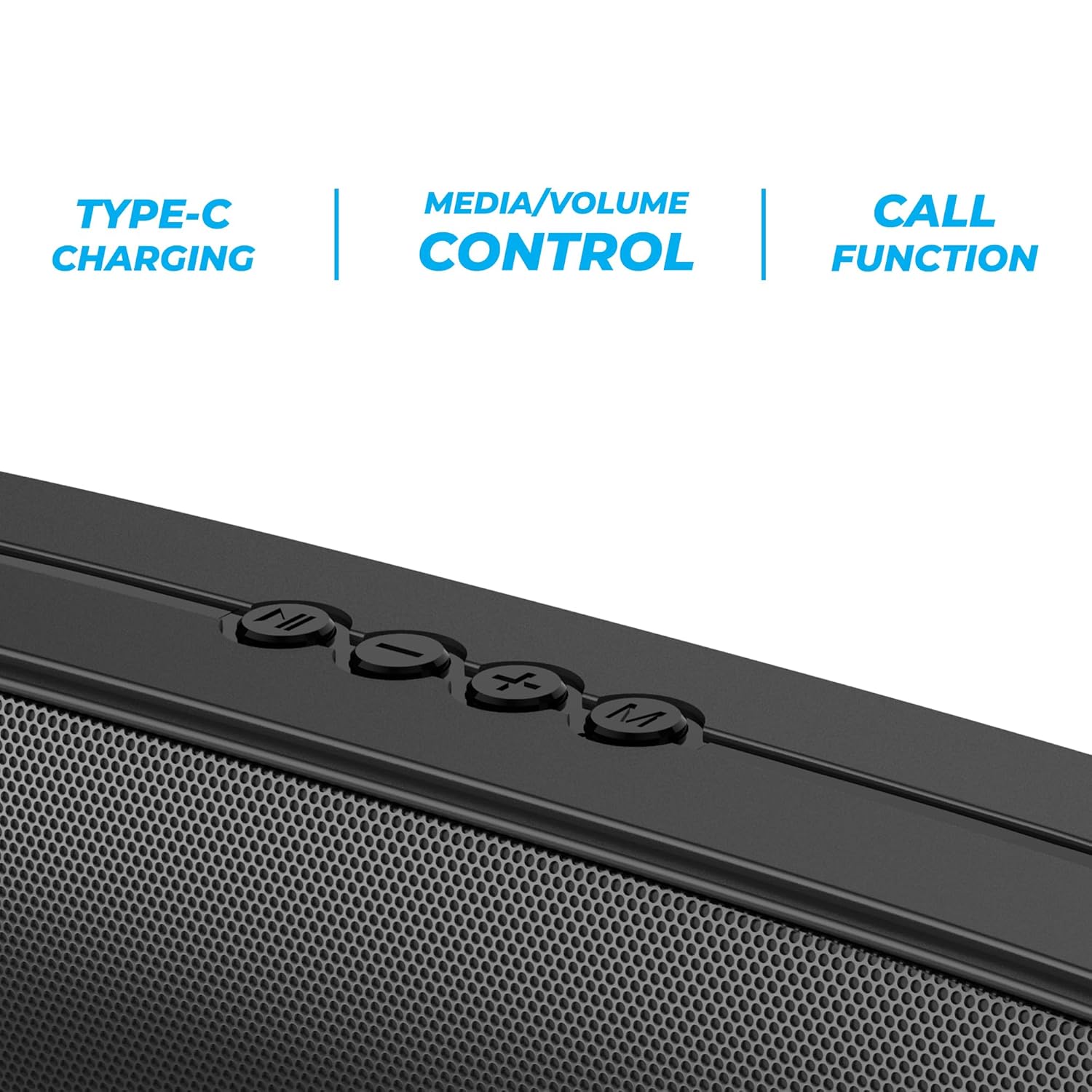
ຮູບພາບ 3.2: Close-up of the control panel buttons on the top of the speaker, including power, volume, and mode controls.

ຮູບພາບ 3.3: ຫລັງ view of the speaker showing the multi-connectivity ports: USB, Micro SD slot, AUX input, and Type-C charging port.
4. ຕັ້ງຄ່າ
4.1 ກຳລັງສາກລຳໂພງ
Before initial use, fully charge the speaker. The Zebronics Astra 30 features a built-in rechargeable battery with Type-C charging.
- ເຊື່ອມຕໍ່ສາຍສາກໄຟ Type-C ທີ່ໃຫ້ມາເຂົ້າກັບພອດສາກໄຟໃນລຳໂພງ.
- ເຊື່ອມຕໍ່ອີກສົ້ນຂອງສາຍກັບອະແດັບເຕີໄຟ USB (ບໍ່ລວມ) ຫຼືພອດ USB ຂອງຄອມພິວເຕີ.
- The charging indicator will illuminate during charging and turn off once fully charged.
A full charge takes approximately 4 hours and provides up to 12 hours of playback time at 50% volume.

ຮູບພາບ 4.1: Illustration indicating the speaker's 12-hour playback capability on a single charge.
4.2 ການເປີດ/ປິດ
To power on or off the speaker, press and hold the power button located on the control panel until you hear an audible prompt or see the indicator light change.
5. ຄໍາແນະນໍາການດໍາເນີນງານ
5.1 ການຈັບຄູ່ Bluetooth
The Zebronics Astra 30 uses Bluetooth v5.3 for wireless audio streaming.
- ເປີດລຳໂພງ. ມັນຈະເຂົ້າສູ່ໂໝດຈັບຄູ່ Bluetooth ໂດຍອັດຕະໂນມັດ, ໂດຍສະແດງດ້ວຍໄຟ LED ກະພິບ.
- ເປີດໃຊ້ Bluetooth ໃນໂທລະສັບສະຫຼາດ, ແທັບເລັດ, ຫຼືອຸປະກອນອື່ນໆຂອງທ່ານ.
- ຊອກຫາ "ZEB-ASTRA 30" in the list of available Bluetooth devices.
- Select "ZEB-ASTRA 30" to connect. Once paired, the speaker will confirm with an audible tone, and the LED will stop flashing.
- ຖ້າຖືກຖາມຫາລະຫັດຜ່ານ, ໃສ່ "0000".
5.2 ຟັງຊັນສະເຕີລິໂອໄຮ້ສາຍແທ້ (TWS)
Connect two Zebronics Astra 30 speakers for a true wireless stereo experience.
- Ensure both ZEB-ASTRA 30 speakers are powered on and not connected to any Bluetooth device.
- On one of the speakers (this will be the primary speaker), press and hold the TWS button (often combined with the Mode button) until you hear a pairing tone.
- ລໍາໂພງທັງສອງຈະເຊື່ອມຕໍ່ກັນໂດຍອັດຕະໂນມັດ. ເມື່ອເຊື່ອມຕໍ່ແລ້ວ, ທ່ານຈະໄດ້ຍິນສຽງຢືນຢັນ.
- ຕອນນີ້, ເຊື່ອມຕໍ່ອຸປະກອນຂອງທ່ານກັບລຳໂພງຫຼັກຜ່ານ Bluetooth ຕາມທີ່ໄດ້ອະທິບາຍໄວ້ໃນພາກ 5.1. ສຽງຈະຫຼິ້ນເປັນສະເຕີລິໂອຜ່ານລຳໂພງທັງສອງ.

ຮູບພາບ 5.1: Visual representation of two Zebronics Astra 30 speakers connected via TWS for stereo sound.
ໂໝດວິທະຍຸ 5.3 FM
ເພື່ອໃຊ້ວິທະຍຸ FM ໃນຕົວ:
- ພະລັງງານໃສ່ ລຳ ໂພງ.
- ກົດປຸ່ມ 'M' (ໂໝດ) ເພື່ອສະຫຼັບໄປໃຊ້ໂໝດວິທະຍຸ FM.
- To auto-scan and save available FM stations, press and hold the Play/Pause button. The speaker will scan and store stations automatically.
- ໃຊ້ປຸ່ມເພງກ່ອນໜ້ານີ້/ຕໍ່ໄປເພື່ອນຳທາງລະຫວ່າງສະຖານີທີ່ບັນທຶກໄວ້.
- For optimal reception, ensure the charging cable is connected as an antenna.
5.4 ໂໝດປ້ອນຂໍ້ມູນ AUX
Connect external audio devices using the AUX input:
- ພະລັງງານໃສ່ ລຳ ໂພງ.
- ກົດປຸ່ມ 'M' (ໂໝດ) ເພື່ອປ່ຽນໄປໃຊ້ໂໝດ AUX.
- ເຊື່ອມຕໍ່ປາຍໜຶ່ງຂອງສາຍສຽງ 3.5 ມມ (ບໍ່ລວມ) ກັບພອດ AUX ຢູ່ລຳໂພງ.
- Connect the other end to the audio output of your device (e.g., smartphone, MP3 player).
- ດຽວນີ້ສຽງຈະຫຼິ້ນຜ່ານລຳໂພງຈາກອຸປະກອນທີ່ເຊື່ອມຕໍ່ຂອງທ່ານ.
5.5 USB and Micro SD Card Playback
ຫຼິ້ນສຽງ files directly from a USB pen drive or Micro SD card:
- ພະລັງງານໃສ່ ລຳ ໂພງ.
- Insert a USB pen drive (up to 32GB) or a Micro SD card into the respective slot.
- ລຳໂພງຈະກວດຫາອຸປະກອນເກັບຂໍ້ມູນໂດຍອັດຕະໂນມັດ ແລະ ເລີ່ມຫຼິ້ນສຽງ files. If not, press the 'M' (Mode) button to switch to USB or SD card mode.
- ໃຊ້ປຸ່ມຫຼິ້ນ/ຢຸດຊົ່ວຄາວ ແລະ ເພງກ່ອນໜ້ານີ້/ຕໍ່ໄປ ເພື່ອຄວບຄຸມການຫຼິ້ນຄືນ.
5.6 ຟັງຊັນການໂທ
ເມື່ອເຊື່ອມຕໍ່ຜ່ານ Bluetooth ກັບສະມາດໂຟນ, ລໍາໂພງສາມາດໃຊ້ສໍາລັບການໂທແບບແຮນຟຣີ.
- ຮັບ/ສາຍໂທ: ກົດປຸ່ມຫຼິ້ນ/ຢຸດຊົ່ວຄາວໜຶ່ງຄັ້ງ.
- ປະຕິເສດການໂທ: ກົດປຸ່ມຫຼິ້ນ/ຢຸດຄ້າງໄວ້.
- ໂທຫາເບີສຸດທ້າຍ: ກົດປຸ່ມຫຼິ້ນ/ຢຸດຊົ່ວຄາວສອງເທື່ອ.
5.7 Volume and Media Control
The speaker features integrated controls for audio playback:
- ປະລິມານຂຶ້ນ: ກົດປຸ່ມ '+'.
- ປະລິມານລົງ: ກົດປຸ່ມ '-'.
- ເພງຕໍ່ໄປ: ກົດປຸ່ມ '+' ຄ້າງໄວ້.
- ຕິດຕາມກ່ອນ ໜ້າ ນີ້: ກົດປຸ່ມ '-' ຄ້າງໄວ້.
- ຫຼິ້ນ/ຢຸດ: ກົດປຸ່ມຫຼິ້ນ/ຢຸດຊົ່ວຄາວ.
6. ບໍາລຸງຮັກສາ
- ເຊັດລຳໂພງດ້ວຍຜ້າອ່ອນໆແຫ້ງ. ຢ່າໃຊ້ສານເຄມີທີ່ຮຸນແຮງ ຫຼື ນໍ້າຢາທຳຄວາມສະອາດທີ່ມີສານຂັດ.
- ຮັກສາລຳໂພງໃຫ້ຫ່າງຈາກອຸນຫະພູມທີ່ຮຸນແຮງ, ແສງແດດໂດຍກົງ, ແລະ ຄວາມຊຸ່ມ.
- ຫຼີກລ່ຽງການລຸດລົງ ຫຼື ວາງລຳໂພງຕໍ່ກັບຜົນກະທົບທີ່ຮຸນແຮງ.
- ເກັບຮັກສາລຳໂພງໄວ້ໃນບ່ອນເຢັນ ແລະແຫ້ງເມື່ອບໍ່ໄດ້ໃຊ້ເປັນເວລາດົນ.
- The speaker is rated as waterproof. However, avoid submerging it in water for prolonged periods. Ensure the port cover is securely closed to maintain water resistance.
7. ການແກ້ໄຂບັນຫາ
| ບັນຫາ | ການແກ້ໄຂທີ່ເປັນໄປໄດ້ |
|---|---|
| ລຳໂພງບໍ່ເປີດ. | ໃຫ້ແນ່ໃຈວ່າໄດ້ສາກໄຟແລ້ວ. ເຊື່ອມຕໍ່ລຳໂພງກັບແຫຼ່ງພະລັງງານໂດຍໃຊ້ສາຍ Type-C. |
| ບໍ່ສາມາດຈັບຄູ່ຜ່ານ Bluetooth ໄດ້. |
|
| ບໍ່ມີສຽງ ຫຼືສຽງຕໍ່າ. |
|
| ການຮັບວິທະຍຸ FM ແມ່ນບໍ່ດີ. | Ensure the Type-C charging cable is connected to act as an antenna. Try repositioning the speaker. |
| ການຈັບຄູ່ TWS ລົ້ມເຫລວ. |
|
8. ຂໍ້ມູນຈໍາເພາະ
| ຄຸນສົມບັດ | ລາຍລະອຽດ |
|---|---|
| ຊື່ຕົວແບບ | ZEB-ASTRA 30 |
| ພະລັງງານຜົນຜະລິດ | 14 ວັດ |
| ຂະໜາດຄົນຂັບ | Dual 52mm |
| ລຸ້ນ Bluetooth | v5.3 |
| ຕົວເລືອກການເຊື່ອມຕໍ່ | Bluetooth, FM, AUX, USB, Micro SD |
| USB/Micro SD Max Capacity | 32GB |
| ຊີວິດຫມໍ້ໄຟ | ສູງສຸດເຖິງ 12 ຊົ່ວໂມງ (ໃນລະດັບສຽງ 50%) |
| ເວລາສາກໄຟ | 4 ຊົ່ວໂມງ |
| ປະເພດການສາກໄຟ | ປະເພດ-C |
| ການຕໍ່ຕ້ານນ້ໍາ | ກັນນ້ຳ |
| ຂະໜາດສິນຄ້າ (ກວ້າງ x ຍາວ x ສູງ) | 5.7 x 35.4 x 6.5 ຊັງຕີແມັດ |
| ນ້ໍາຫນັກລາຍການ | 645 ກຣາມ |
| impedance | 3 ໂອມ |
| ອັດຕາສ່ວນສັນຍານເຖິງສຽງດັງ | 75 dB |

ຮູບພາບ 8.1: Graphic highlighting the 14W RMS output and dual 52mm drivers of the Zebronics Astra 30 speaker.
9. ການຮັບປະກັນແລະການສະຫນັບສະຫນູນ
The Zebronics Astra 30 speaker comes with a ຮັບປະກັນ 1 ປີຈໍາກັດ ຈາກວັນທີ່ຊື້. ກະລຸນາເກັບຮັກສາໃບຮັບການຊື້ຂອງທ່ານສໍາລັບການຮຽກຮ້ອງການຮັບປະກັນ.
For technical support, service, or warranty inquiries, please contact Zebronics customer service. Contact details can typically be found on the official Zebronics webເວັບໄຊ ຫຼືການຫຸ້ມຫໍ່ຜະລິດຕະພັນຂອງທ່ານ.
Manufacturer: Zebronics India Private Limited
Address: 13/7, Smith Road, Royapettah, Chennai-600002


