1. ບົດແນະນຳ
This manual provides detailed instructions for the setup, operation, and maintenance of your boAt Aavante Bar 490 Bluetooth Soundbar. Please read this manual thoroughly before using the product to ensure proper functionality and to maximize your audio experience.

Image 1.1: The boAt Aavante Bar 490 Bluetooth Soundbar in Classic Black.
2. ເນື້ອໃນຊຸດ
ກວດສອບວ່າລາຍການທັງຫມົດທີ່ລະບຸໄວ້ຂ້າງລຸ່ມນີ້ແມ່ນລວມຢູ່ໃນຊຸດຂອງທ່ານ:
- boAt Aavante Bar 490 Soundbar
- ສາຍສາກ
- ຄູ່ມືຜູ້ໃຊ້ (ເອກະສານນີ້)
- ບັດຮັບປະກັນ
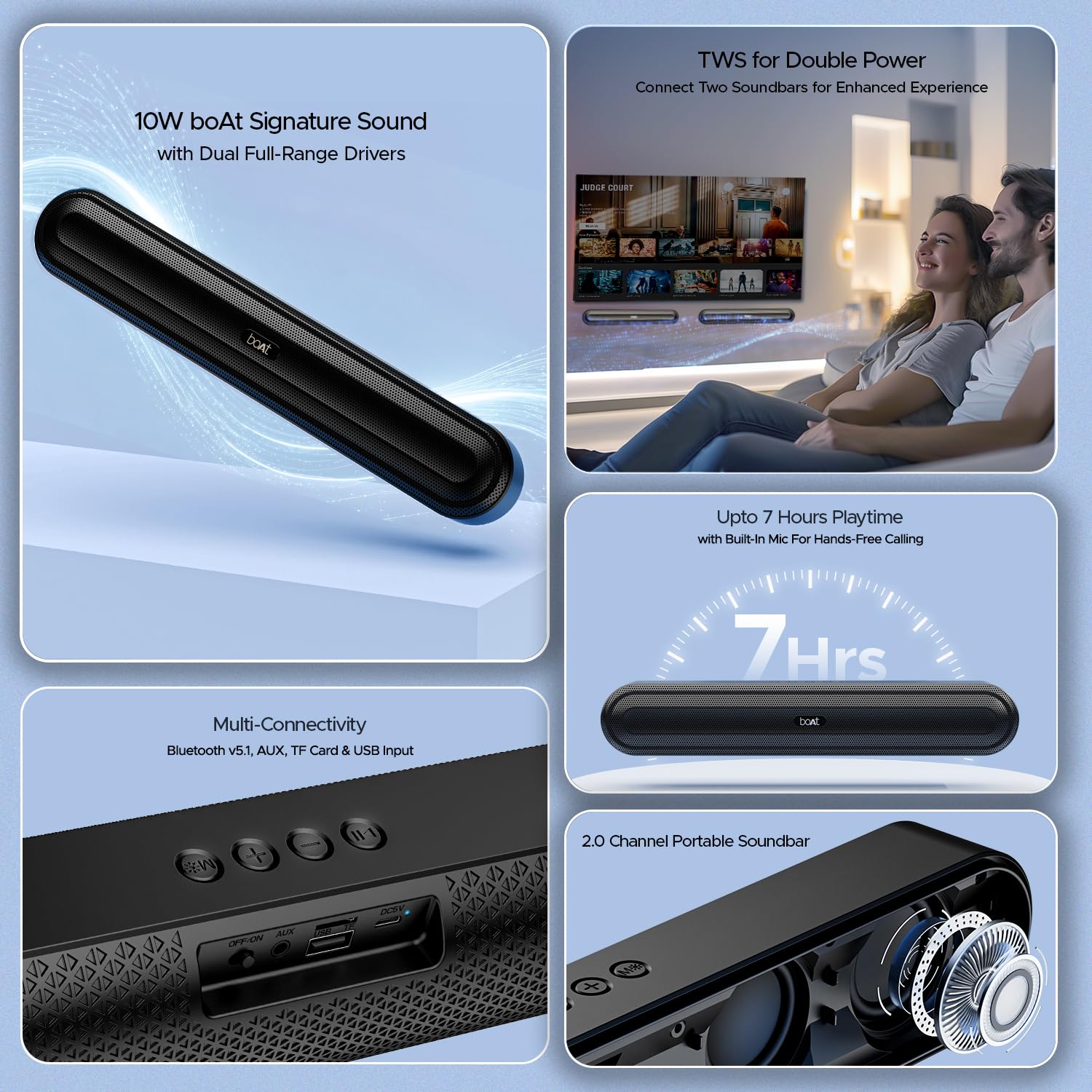
ຮູບພາບ 2.1: ຫຼາຍກວ່າview of the boAt Aavante Bar 490 and its key features, including package contents.
3. ຜະລິດຕະພັນເກີນview
3.1. ການຄວບຄຸມແລະພອດ
Familiarize yourself with the control buttons and connectivity ports on your Aavante Bar 490.

ຮູບພາບທີ 3.1: ໄລຍະໃກ້ view of the control buttons and multi-connectivity ports (Bluetooth v5.1, AUX, TF Card, USB Input) on the soundbar.
- ປຸ່ມເປີດປິດ: Press and hold to power on/off. Short press to switch modes.
- ປະລິມານລົງ (-): ຫຼຸດສຽງລົງ.
- ປະລິມານຂຶ້ນ (+): ເພີ່ມປະລິມານ.
- ປຸ່ມຫຼິ້ນ/ຢຸດຊົ່ວຄາວ: Play or pause music. Answer/end calls.
- ປຸ່ມໂໝດ (M): Switch between input modes (Bluetooth, AUX, USB, TF Card).
- ປຸ່ມປິດ/ເປີດ: ສະຫຼັບພະລັງງານຫຼັກ.
- ພອດ AUX: ສໍາລັບການເຊື່ອມຕໍ່ສຽງມີສາຍ.
- ພອດ USB: ສໍາລັບການຫຼິ້ນ USB drive.
- ສະລັອດຕິງບັດ TF: ສຳລັບການຫຼິ້ນບັດ TF.
- ຜອດ DC5V: ສໍາລັບການສາກໄຟອຸປະກອນ.
4. ຕັ້ງຄ່າ
4.1. Charging the Soundbar
Before first use, fully charge the soundbar. Connect the provided charging cable to the DC5V port on the soundbar and the other end to a compatible USB power adapter (not included). The LED indicator will show charging status and turn off when fully charged. A full charge provides up to 7 hours of playback.

Image 4.1: The boAt Aavante Bar 490 highlighting its up to 7 hours of playtime on a single charge.
4.2. ເປີດ/ປິດ
- Ensure the OFF/ON switch at the back is in the "ON" position.
- Press and hold the Power button on the top panel for 3 seconds to power on the soundbar.
- To power off, press and hold the Power button again for 3 seconds.
4.3. ການຈັບຄູ່ Bluetooth
- Power on the soundbar. It will automatically enter Bluetooth pairing mode (indicated by a flashing LED).
- ໃນອຸປະກອນຂອງທ່ານ (ໂທລະສັບສະຫຼາດ, ແທັບເລັດ, ແລະອື່ນໆ), ເປີດໃຊ້ Bluetooth ແລະຊອກຫາອຸປະກອນທີ່ມີຢູ່.
- Select "Aavante Bar 490" from the list.
- ເມື່ອຈັບຄູ່ແລ້ວ, ໄຟ LED ຈະປ່ຽນເປັນສີຟ້າເຕັມ, ແລະທ່ານຈະໄດ້ຍິນສຽງຢືນຢັນ.
The soundbar supports Bluetooth v5.1 for stable and efficient wireless connection up to 10 meters.
4.4. ການຈັບຄູ່ TWS (ສະເຕຣິໂອໄຮ້ສາຍແທ້).
For an enhanced stereo experience, you can pair two Aavante Bar 490 soundbars together.
- Ensure both Aavante Bar 490 units are powered on and in Bluetooth pairing mode (not yet connected to any device).
- On one of the soundbars, double-press the Mode button (M). It will search for the other unit.
- Once successfully paired, you will hear a confirmation tone, and the LED indicators on both units will synchronize.
- Now, connect your device to one of the paired soundbars via Bluetooth as described in Section 4.3. Both soundbars will play audio in stereo.

Image 4.2: Illustration of two boAt Aavante Bar 490 soundbars connected via TWS for an enhanced audio experience.
4.5. Other Connectivity Modes
Press the Mode button (M) to cycle through the following input options:
- ແບບ AUX: ເຊື່ອມຕໍ່ອຸປະກອນສຽງໂດຍໃຊ້ສາຍ AUX 3.5 ມມ ເຂົ້າກັບພອດ AUX.
- ແບບ USB: Insert a USB flash drive into the USB port. The soundbar will automatically play audio files.
- ຮູບແບບບັດ TF: Insert a TF (microSD) card into the TF card slot. The soundbar will automatically play audio files.
5. ຄໍາແນະນໍາການດໍາເນີນງານ
5.1. ການຫຼິ້ນເພງ
- ຫຼິ້ນ/ຢຸດ: ກົດປຸ່ມຫຼິ້ນ/ຢຸດຊົ່ວຄາວ.
- ການປັບລະດັບສຽງ: ກົດສັ້ນປຸ່ມ Volume Up (+) ຫຼື Volume Down (-).
- ເພງຕໍ່ໄປ: ກົດປຸ່ມ Volume Up (+) ຄ້າງໄວ້.
- ຕິດຕາມກ່ອນ ໜ້າ ນີ້: ກົດປຸ່ມ Volume Down (-) ຄ້າງໄວ້.
5.2. ໂທຟຣີ
ເມື່ອເຊື່ອມຕໍ່ຜ່ານ Bluetooth, ໄມໂຄຣໂຟນໃນຕົວຈະຊ່ວຍໃຫ້ສາມາດໂທອອກໄດ້ໂດຍບໍ່ຕ້ອງໃຊ້ມື.
- ຮັບສາຍ: ກົດປຸ່ມຫຼິ້ນ/ຢຸດຊົ່ວຄາວ.
- ສິ້ນສຸດການໂທ: ກົດປຸ່ມຫຼິ້ນ/ຢຸດຊົ່ວຄາວໃນລະຫວ່າງການໂທ.
- ປະຕິເສດການໂທ: ກົດປຸ່ມຫຼິ້ນ/ຢຸດຊົ່ວຄາວ.
6. ບໍາລຸງຮັກສາ
- Keep the soundbar away from water, moisture, and extreme temperatures.
- ເຮັດຄວາມສະອາດອຸປະກອນດ້ວຍຜ້າອ່ອນໆ, ແຫ້ງ. ຢ່າໃຊ້ເຄື່ອງເຮັດຄວາມສະອາດຂັດຫຼືສານລະລາຍ.
- ຫຼີກລ່ຽງການລຸດລົງ ຫຼື ວາງແຖບສຽງໃຫ້ມີຜົນກະທົບທີ່ຮຸນແຮງ.
- ເກັບຮັກສາໄວ້ໃນບ່ອນທີ່ເຢັນ, ແຫ້ງເມື່ອບໍ່ໄດ້ໃຊ້ເປັນເວລາດົນນານ.
7. ການແກ້ໄຂບັນຫາ
| ບັນຫາ | ສາເຫດທີ່ເປັນໄປໄດ້ | ການແກ້ໄຂ |
|---|---|---|
| Soundbar does not power on. | Low battery; OFF/ON switch is off. | Charge the soundbar; ensure OFF/ON switch is in the "ON" position. |
| ບໍ່ສາມາດຈັບຄູ່ຜ່ານ Bluetooth ໄດ້. | Soundbar not in pairing mode; device Bluetooth is off; too far from device. | Ensure soundbar is in pairing mode; enable Bluetooth on your device; move closer to the soundbar (within 10m). |
| ບໍ່ມີສຽງ. | ລະດັບສຽງຕໍ່າເກີນໄປ; ຮູບແບບການປ້ອນຂໍ້ມູນບໍ່ຖືກຕ້ອງ; ສາຍບໍ່ໄດ້ເຊື່ອມຕໍ່ຢ່າງຖືກຕ້ອງ. | Increase volume; switch to correct input mode (Bluetooth, AUX, USB, TF); check cable connections. |
| ການຈັບຄູ່ TWS ລົ້ມເຫລວ. | One or both units already connected to a device; units too far apart. | Disconnect both units from any Bluetooth devices; ensure they are close to each other during TWS pairing. |
8. ຂໍ້ມູນຈໍາເພາະ
- ຊື່ຕົວແບບ: Aavante Bar 490
- ປະເພດລຳໂພງ: ແຖບສຽງ
- ສຽງອອກ: 2.0 ຊ່ອງ
- ພະລັງງານອອກ: 10W RMS
- ຄົນຂັບລົດ: Dual Full-Range Drivers
- ລຸ້ນ Bluetooth: v5.1
- ລະດັບ Bluetooth: ເຖິງ 10 ແມັດ
- ການເຊື່ອມຕໍ່: Bluetooth, AUX, USB, TF Card
- ຊີວິດຫມໍ້ໄຟ: ສູງສຸດ 7 ຊົ່ວໂມງ
- ປະເພດຫມໍ້ໄຟ: Lithium Polymer (ລວມເອົາ 1 x 12V)
- ໄມໂຄຣໂຟນໃນຕົວ: ແມ່ນແລ້ວ (ສຳລັບການໂທແບບບໍ່ຕ້ອງໃຊ້ມື)
- ວິທີການຄວບຄຸມ: ແຕະປຸ່ມ
- ຂະໜາດຜະລິດຕະພັນ: 38.7D x 6.5W x 5.5H ຊມ
- ນ້ໍາຫນັກລາຍການ: 650 ກຣາມ

Image 8.1: Dimensions of the boAt Aavante Bar 490 soundbar.
9. ການຮັບປະກັນແລະການສະຫນັບສະຫນູນ
The boAt Aavante Bar 490 comes with a standard ຮັບປະກັນ 1 ປີຈໍາກັດ ຈາກວັນທີ່ຊື້. ກະລຸນາອ້າງອີງໃສ່ບັດຮັບປະກັນທີ່ປະກອບມີສໍາລັບຂໍ້ກໍານົດແລະເງື່ອນໄຂລະອຽດ.
For technical support, service, or warranty claims, please contact boAt customer service:
- ອີເມວ: info@imaginemarketingindia.com
- ຜູ້ຜະລິດ: ຈິນຕະນາການການຕະຫຼາດຈໍາກັດ
- ທີ່ຢູ່: ຫນ່ວຍງານເລກທີ. 204 & 205, ຊັ້ນ 2, D-wing & E-wing, Corporate Avenue, Andheri Ghatkopar Link Road, Mumbai, Maharashtra-400093, India
You can also download the boAt Hearables App for additional features and user guides. Scan the QR code below:

Image 9.1: QR code to download the boAt Hearables App for additional features and support.
10. ວິດີໂອຜະລິດຕະພັນ
ວິດີໂອທີ 10.1: ຫຍໍ້ກ່ອນview showcasing the boAt Aavante Bar 490 Bluetooth Soundbar's features, including 10W RMS sound, dual full-range drivers, 7 hours playback, multi-connectivity, and hands-free calling. This video is provided by the seller.
ວິດີໂອທີ 10.2: ສະຫຼຸບໂດຍຫຍໍ້view of the boAt Aavante Bar 490, highlighting its 10W RMS Signature Sound, dual drivers, and Bluetooth 5.1 connectivity. This video is provided by the seller.


