1. ບົດແນະນຳ
The LAUNCH X431 PRO Dyno 2025 is a state-of-the-art bidirectional scan tool designed for comprehensive vehicle diagnostics. This manual provides detailed instructions for setting up, operating, maintaining, and troubleshooting your device to ensure optimal performance and longevity.
Key features include advanced ECU Coding, OE-Level All System Diagnostics, Bi-directional Active Tests, and over 38 special functions. It supports modern automotive protocols like CAN-FD and DoIP, offering extensive vehicle coverage.
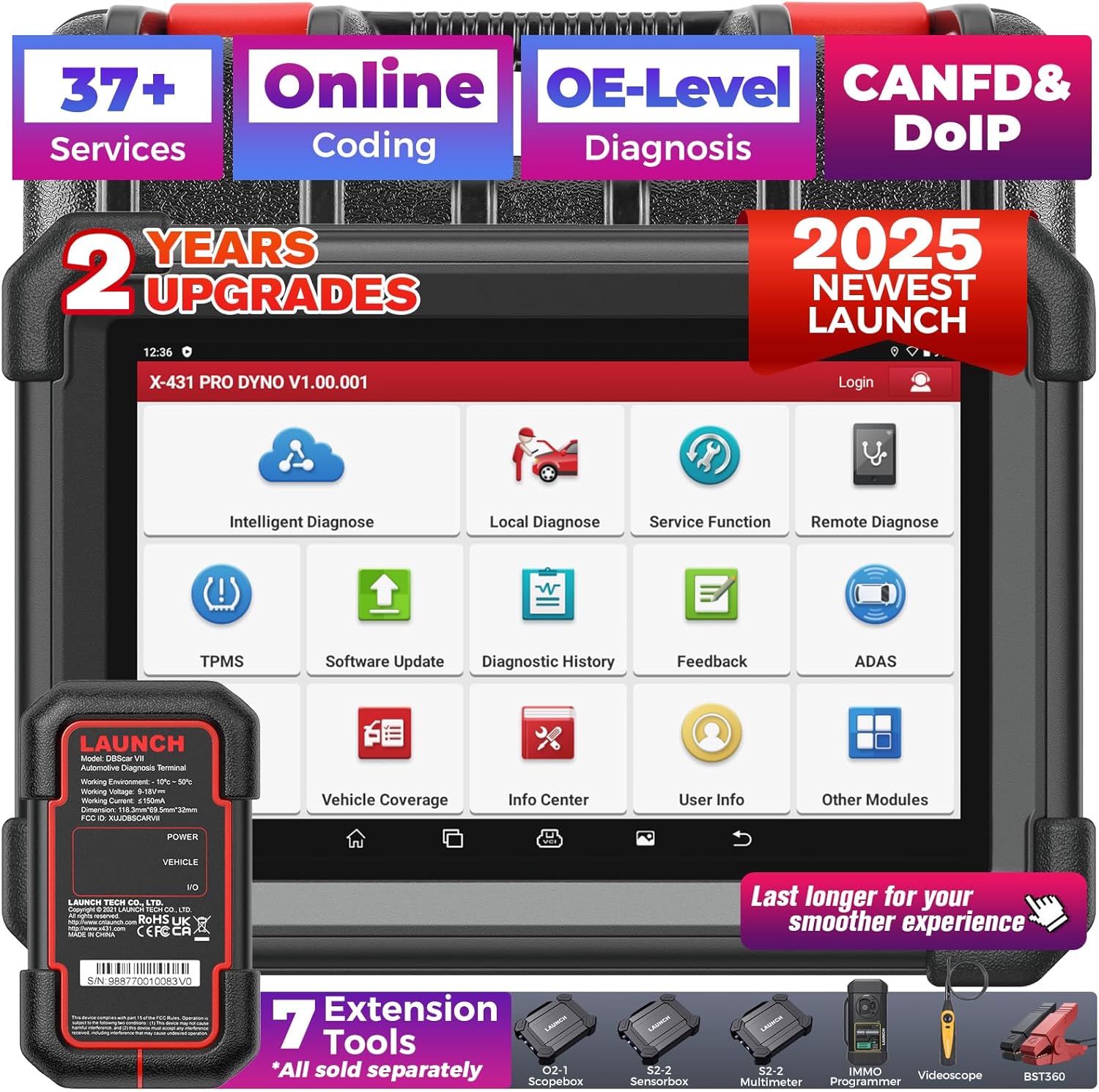
Figure 1.1: LAUNCH X431 PRO Dyno 2025 Scan Tool and its components.
2. ສິ່ງທີ່ຢູ່ໃນກ່ອງ
ເມື່ອເປີດຊຸດ, ກວດເບິ່ງວ່າອົງປະກອບທັງຫມົດມີຢູ່ແລະຢູ່ໃນສະພາບດີ:
- X-431 PRO fifth generation tablet
- DBSCAR VII diagnostic connector
- Power adapter, 5V / 5A, wire length 1.2m
- Various OBD-II and non-OBD-II adapters (as shown in product images)
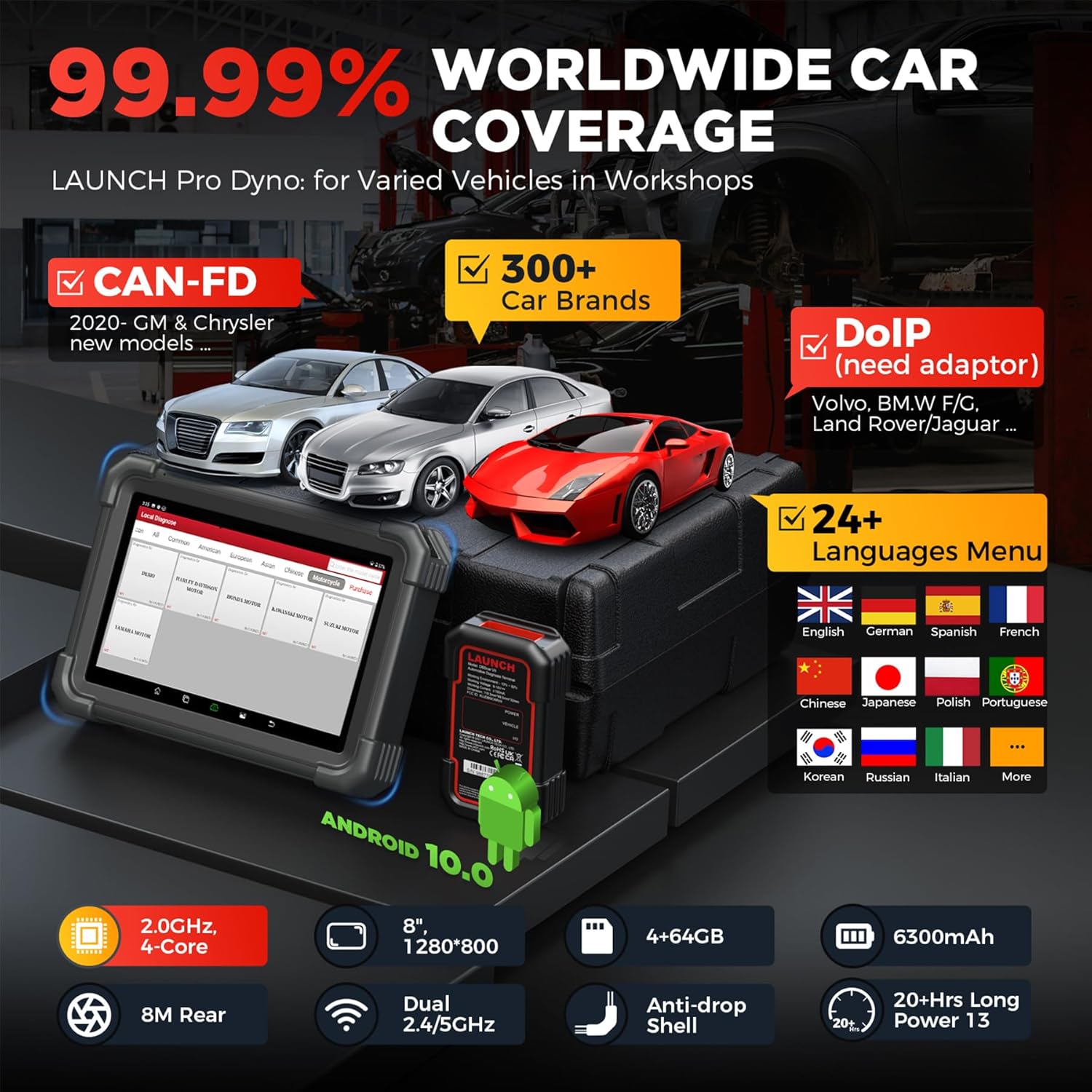
Figure 2.1: The LAUNCH X431 PRO Dyno 2025 scan tool and its comprehensive set of adapters and cables.
3. ຄູ່ມືການຕິດຕັ້ງ
3.1 ການເປີດເຄື່ອງ ແລະ ການຕັ້ງຄ່າເບື້ອງຕົ້ນ
- ສາກອຸປະກອນ: Connect the provided power adapter to the X-431 PRO Dyno tablet and a power outlet. Allow the device to fully charge before first use. The 6300mAh battery provides over 21 hours of continuous use.
- ເປີດ: Press and hold the power button until the LAUNCH logo appears on the 8-inch 1280x800 display.
- ການເລືອກພາສາ: Follow the on-screen prompts to select your preferred language. The device supports 24 languages including English, French, Spanish, German, and more.
- ການເຊື່ອມຕໍ່ Wi-Fi: Connect the device to a stable Wi-Fi network. This is crucial for software updates and online features.
- ອັບເດດຊອບແວ: Navigate to the "Software Update" section. Perform a one-touch smart update to ensure all diagnostic software and vehicle data are current. Regular updates are provided for 2 years free of charge.

Figure 3.1: The software update interface on the LAUNCH X431 PRO Dyno 2025, showing the progress of an update.
3.2 ການເຊື່ອມຕໍ່ກັບພາຫະນະ
- Locate OBD-II Port: Identify the vehicle's OBD-II diagnostic port, typically located under the dashboard on the driver's side.
- Connect DBSCAR VII: Plug the DBSCAR VII diagnostic connector into the vehicle's OBD-II port. Ensure a secure connection.
- ສ້າງການສື່ສານ: The DBSCAR VII connects wirelessly via Bluetooth (up to 33ft range) or via Type-C wired connection for stable data transmission. The tablet will automatically detect the VCI.
- ເປີດໄຟ: ຫັນການຕິດໄຟຂອງລົດໄປຫາຕໍາແຫນ່ງ "ON" (ເຄື່ອງຈັກປິດ).

Figure 3.2: The DBSCAR VII diagnostic connector (VCI) connected to a vehicle's OBD-II port, illustrating wireless communication with the tablet.
4. ຄໍາແນະນໍາການດໍາເນີນງານ
4.1 All System Diagnostics
The LAUNCH X431 PRO Dyno performs OE-level diagnostics across all accessible vehicle systems (e.g., PCM, ECM, EPS, PDM, BCM, TPMS, SCCM, RADIO, ABS, SRS, etc.).
- AutoVIN & Scan: From the main menu, select "Intelligent Diagnose" or "Local Diagnose" and then "AutoVIN" (for 2006+ models) to automatically identify the vehicle. Alternatively, manually select vehicle make, model, and year.
- ບົດລາຍງານສຸຂະພາບ: Initiate a "Health Report" scan to quickly identify all system fault codes (DTCs). The scan tool will display a progress bar and list detected issues.
- ອ່ານ/ລຶບລ້າງ DTC: View detailed descriptions of Diagnostic Trouble Codes. Use the "Clear Codes" function to erase DTCs after repairs are completed.
- ການຖ່າຍທອດຂໍ້ມູນສົດ: Access real-time data parameters from various sensors and modules. Data can be displayed in graphical format for easier analysis.

ຮູບ 4.1: ເກີນview of the all-system diagnostic capabilities, including AutoVIN, Clear Codes, Read Codes, AutoScan, Live Data, and ECU Info.
4.2 Bi-directional Active Tests
This function allows sending commands from the scan tool to vehicle ECUs to test specific components or systems.
- Access Active Test: From the diagnostic menu, select "Active Test" or "Bi-directional Control."
- Select Component: Choose the component you wish to test (e.g., radiator fan, fuel pump, windows, lights, etc.).
- Execute Test: Send commands to activate or deactivate the component and observe its response. This helps in quickly pinpointing faulty parts.

Figure 4.2: Demonstrates the bi-directional control feature, allowing the user to send commands to vehicle components like parking brake, AC clutch, headlamps, ABS pump, and windows/doors.
4.3 ການເຂົ້າລະຫັດ ECU
ECU Coding allows for customization, matching, and recalibration of ECU components.
- Access ECU Coding: Select "ECU Coding" from the main menu or diagnostic functions.
- Perform Operations:
- Setup New ECU Modules: Match, learn, or code new ECU modules after replacement.
- ການປັບແຕ່ງສ່ວນຕົວ: Customize vehicle functions (e.g., auto engine start-stop, flashing headlights on alarm, auto side mirrors folding, change dashboard brightness, fuel consumption display, auto door).
- Fix Complex Issues: Recode or calibrate ECUs to resolve performance issues.
- ໝາຍເຫດ: Available coding operations vary by vehicle make, model, and year.

Figure 4.3: The ECU Coding interface, showing options for personalizing car settings and optimizing driving experience.
4.4 ໜ້າທີ່ພິເສດ (38+)
The device offers over 38 commonly used special functions for various maintenance and reset services.
- Oil Reset Service: Reset engine oil life system.
- ຣີເຊັດ EPB: Electronic Parking Brake reset.
- SAS Calibration: Steering Angle Sensor calibration.
- ABS ເລືອດອອກ: Bleed the Anti-lock Braking System.
- Injector Coding: Write adaptive code for injectors.
- TPMS ຣີເຊັດ: Tire Pressure Monitoring System reset.
- ການຕັ້ງຄ່າ BMS ຄືນໃໝ່: Battery Management System reset.
- Throttle Adaptation: Adapt throttle position.
- Suspension Matching: Adjust suspension parameters.
- And many more, including Gear Learning, Windows Calibration, Sunroof Initialization, AFS Reset, etc.

Figure 4.4: A visual representation of some of the 38+ special functions available, such as Oil Reset, EPB Reset, SAS Calibration, Airbag Reset, BMS Reset, Brake Bleed, TPMS, and Injector Coding.
4.5 ຄຸນສົມບັດເພີ່ມເຕີມ
- CAN-FD & DoIP Support: Covers modern vehicles using these protocols. A DoIP adapter may be required for some models.
- ການອະນຸມັດອັດຕະໂນມັດ FCA: Provides secure gateway access for 2018+ FCA vehicles.
- Remote Diagnosis: Allows for remote technical assistance.
- ບົດລາຍງານການວິນິດໄສ: ສ້າງແລະພິມບົດລາຍງານການວິນິດໄສທີ່ສົມບູນແບບ.
- ຄຳຕິຊົມທາງອອນລາຍ: Direct communication channel for operational and diagnostic tips.

Figure 4.5: Highlights various features including AutoAuth for FCA SGM, V.A.G Guided Function, CAN-FD & DoIP support, Remote Diagnostic, Online Repair Resources, 8-in-1 Live Data Stream, and Diagnostic Report Print & Share.
5. ບໍາລຸງຮັກສາ
Proper maintenance ensures the longevity and optimal performance of your LAUNCH X431 PRO Dyno.
- ອັບເດດຊອບແວ: Regularly check for and install software updates to ensure compatibility with new vehicle models and access to the latest features. Updates are free for 2 years.
- ທໍາຄວາມສະອາດ: Use a soft, dry cloth to clean the tablet screen and body. Avoid abrasive cleaners or solvents.
- ການເກັບຮັກສາ: Store the device in its protective case in a cool, dry place when not in use. Avoid extreme temperatures.
- ການດູແລຫມໍ້ໄຟ: ເພື່ອຍືດອາຍຸແບັດເຕີລີ, ຫຼີກເວັ້ນການຖອດແບດເຕີລີ່ເຕັມເລື້ອຍໆ. ສາກອຸປະກອນເປັນປົກກະຕິ, ເຖິງແມ່ນວ່າບໍ່ໄດ້ຢູ່ໃນການນໍາໃຊ້.
- ການດູແລ VCI: Keep the DBSCAR VII connector clean and free of debris. Ensure pins are not bent or damaged.

Figure 5.1: The device and its protective case, emphasizing the importance of proper storage and care.
6. ການແກ້ໄຂບັນຫາ
ພາກນີ້ເວົ້າເຖິງບັນຫາທົ່ວໄປ ແລະວິທີແກ້ໄຂບັນຫາຂອງເຂົາເຈົ້າ.
| ບັນຫາ | ສາເຫດທີ່ເປັນໄປໄດ້ | ການແກ້ໄຂ |
|---|---|---|
| ອຸປະກອນບໍ່ເປີດ. | ຫມໍ້ໄຟຕ່ໍາ; ປຸ່ມເປີດປິດບໍ່ໄດ້ກົດປຸ່ມດົນພໍ. | ສາກອຸປະກອນຢ່າງໜ້ອຍ 30 ນາທີ. ກົດປຸ່ມເປີດປິດຄ້າງໄວ້ 3-5 ວິນາທີ. |
| ບໍ່ສາມາດເຊື່ອມຕໍ່ກັບພາຫະນະໄດ້. | VCI not properly connected; Ignition off; Bluetooth/Wi-Fi issue. | Ensure VCI is securely plugged into OBD-II port. Turn ignition to ON. Check Bluetooth/Wi-Fi connection on tablet. |
| ການອັບເດດຊອບແວລົ້ມເຫລວ. | Unstable Wi-Fi; Insufficient storage. | Ensure strong Wi-Fi signal. Clear some data to free up storage (4+64GB ROM/RAM). |
| Specific function not available for vehicle. | Function not supported by vehicle's ECU; Outdated software. | Verify vehicle compatibility for the specific function. Perform a software update. |
For further assistance, utilize the "Online Feedback" or "Remote Diagnosis" features on the device, or contact customer support.
7. ຂໍ້ມູນຈໍາເພາະ
| ຄຸນສົມບັດ | ລາຍລະອຽດ |
|---|---|
| ຕົວແບບ | X 431 PRO DYNO |
| ລະບົບປະຕິບັດການ | Android 10.0 |
| ໂຮງງານຜະລິດ | 4-Core 2.0GHz |
| Memory (ROM/RAM) | RAM 4GB + ROM 64GB |
| ຈໍສະແດງຜົນ | 8-inch, 1280x800 resolution |
| ແບັດເຕີຣີ | 6300mAh (21+ hours continuous use) |
| ການເຊື່ອມຕໍ່ | Bluetooth (33ft wireless range), Type-C wired, Wi-Fi (Dual 2.4/5GHz) |
| ກ້ອງຖ່າຍຮູບ | 8M Rear |
| ອະນຸສັນຍາທີ່ຮອງຮັບ | CAN-FD, DoIP (with adapter) |
| ການຄຸ້ມຄອງຍານພາຫະນະ | 100+ brands, 10000+ models (1996-2025 cars) |
| ຂະໜາດ | 17.32"L x 12.2"W x 14.57"H |
| ນ້ໍາຫນັກລາຍການ | 15.98 ປອນ |
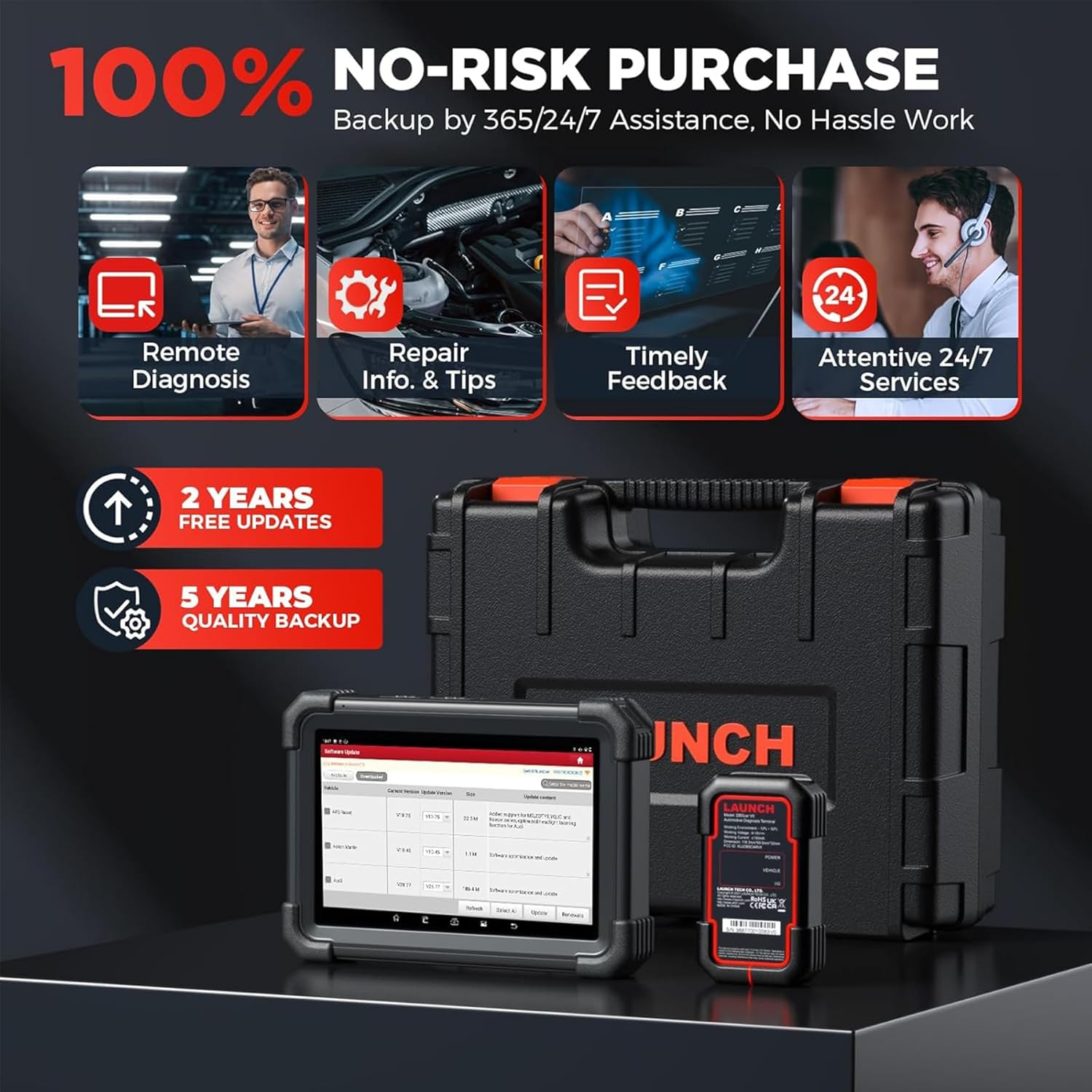
Figure 7.1: Key specifications and worldwide car coverage details for the LAUNCH X431 PRO Dyno 2025.
8. ການຮັບປະກັນແລະການສະຫນັບສະຫນູນ
The LAUNCH X431 PRO Dyno comes with a commitment to customer satisfaction and long-term support.
- ການອັບເດດຊອບແວຟຣີ: Enjoy 2 years of subscription-free software updates.
- Quality Backup: The product includes a 5-year quality backup.
- Lifetime Technical Assistance: Reliable lifetime technical assistance is offered by a team of experts, available 24/7/365.
- ຕິດຕໍ່ສະຫນັບສະຫນູນ: For any issues or inquiries, you can contact customer support at 1-888-756-2936 (Mon-Fri 9:00 AM–6:00 PM EST) or use the "Online Feedback" feature on the device.

ຮູບ 8.1: ເກີນview of the LAUNCH X431 PRO Dyno's main features and support offerings.
9. ວິດີໂອຜະລິດຕະພັນຢ່າງເປັນທາງການ
Watch these official videos for a visual guide on using your LAUNCH X431 PRO Dyno.
9.1 LAUNCH X431 PRO DYNO Overview
ວິດີໂອ 9.1: ວິດີໂອນີ້ສະຫນອງໃຫ້ຫຼາຍກວ່າview of the LAUNCH X431 PRO Dyno, highlighting its comprehensive features and wide car model coverage. It demonstrates how the tool can cover more than 98% of car models in the market.


