Introduction to Your Pixel 8 Pro
The Google Pixel 8 Pro is an advanced Android smartphone designed by Google, featuring a powerful Google Tensor G3 chip, a sophisticated triple camera system, and intelligent AI capabilities. This manual provides essential information for setting up, operating, maintaining, and troubleshooting your device.
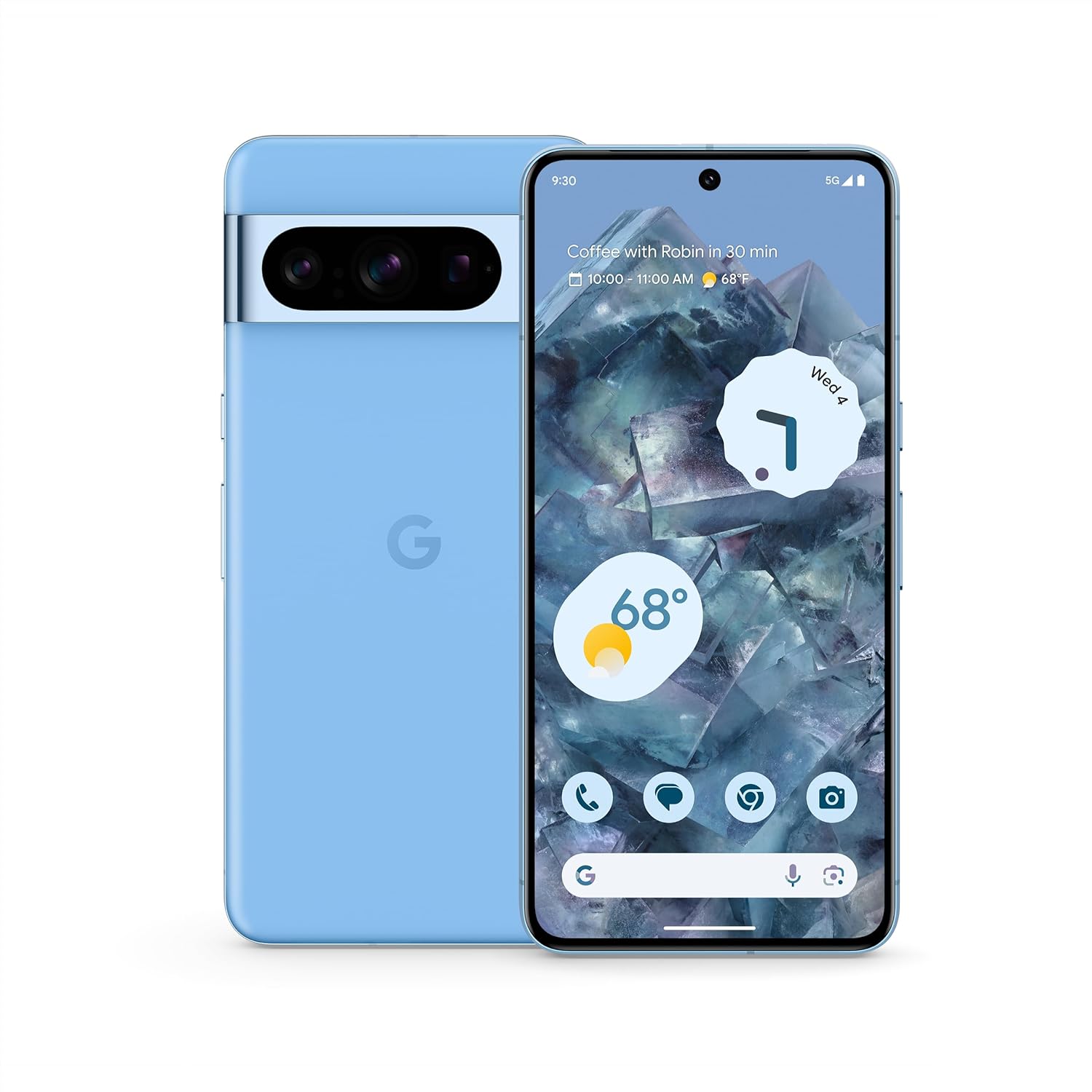
ຮູບພາບ: ດ້ານຫນ້າແລະດ້ານຫລັງ view of the Google Pixel 8 Pro in Bay color, showcasing ການອອກແບບທີ່ທັນສະໄໝ ແລະ ແຖບກ້ອງຖ່າຍຮູບຂອງມັນ.
Video: A quick overview of the Google Pixel 8 Pro, highlighting its key features and design elements.
ແມ່ນຫຍັງຢູ່ໃນກ່ອງ
ຊຸດ Google Pixel 8 Pro ຂອງທ່ານປະກອບມີລາຍການຕໍ່ໄປນີ້:
- ໂທລະສັບສະຫຼາດ Google Pixel 8 Pro
- ຕົວຖອດຖາດຊິມ
- ສາຍ USB (USB-C ຫາ USB-C)
- ອະແດບເຕີສະວິດໄວ (USB-A ຫາ USB-C)
ຕັ້ງຄ່າ
ການຕິດຕັ້ງເບື້ອງຕົ້ນ
- ໃສ່ຊິມກາດ: Use the provided SIM tray ejector tool to open the SIM tray. Place your nano-SIM card into the tray and reinsert it into the phone.
- ເປີດ: ກົດປຸ່ມເປີດປິດຢູ່ດ້ານຂ້າງຂອງອຸປະກອນຄ້າງໄວ້ຈົນກວ່າໂລໂກ້ Google ຈະປາກົດ.
- ປະຕິບັດຕາມການເຕືອນໃນຫນ້າຈໍ: The phone will guide you through selecting your language, connecting to a Wi-Fi network, and signing in with your Google Account.
- ປົດລັອກລາຍນິ້ວມື: Set up your fingerprint for secure and convenient unlocking.
- ການໂອນຂໍ້ມູນ: If you're switching from another device, use the Quick Switch Adapter and follow the prompts to transfer your data, contacts, and apps.
ການໃຊ້ Pixel 8 Pro ຂອງທ່ານ
ການນໍາທາງພື້ນຖານ
Your Pixel 8 Pro uses intuitive gesture navigation. Swipe up from the bottom to go home, swipe up and hold to view ແອັບຫຼ້າສຸດ, ແລະ ປັດຈາກຂອບຊ້າຍ ຫຼື ຂວາເພື່ອກັບຄືນ.
ຄຸນນະສົມບັດກ້ອງຖ່າຍຮູບ
The Pixel 8 Pro features a triple camera system with a dedicated 5x telephoto lens, improved autofocus, and advanced photography controls.

Image: Detailed breakdown of the Pixel 8 Pro's camera system, including megapixel counts for main, ultrawide, telephoto, and front cameras.
- Pro Controls: Access advanced settings for full-resolution photos, including shutter speed, ISO, and focus.
- Audio Magic Eraser: Utilize Google AI to reduce distracting noises in your videos, such as wind or traffic.
Video: Demonstrates how to edit videos on your Pixel phone, including trimming, adjusting, and applying effects like Audio Magic Eraser.
ຄຸນນະສົມບັດ AI
Google AI enhances your Pixel 8 Pro experience with smart features designed for convenience and efficiency.
- Call Assist: Get help making and screening calls.
- ແປພາສາສົດ: Translate languages in real-time.
- Circle ເພື່ອຊອກຫາ: Instantly search what you see on your phone by circling, highlighting, or scribbling on images, text, or videos.

ຮູບພາບ: Visual examples of the Pixel 8 Pro's AI capabilities, including call screening, Google Assistant integration, and real-time language translation.
ເຊັນເຊີອຸນຫະພູມ
The Pixel 8 Pro includes a dedicated temperature sensor for measuring the surface temperature of everyday objects.
Video: Instructions on how to use the Pixel 8 Pro's temperature sensor to measure the temperature of objects around you.
ບໍາລຸງຮັກສາ
ອັບເດດຊອບແວ
Google provides 7 years of security updates and OS upgrades for your Pixel 8 Pro to ensure your device remains secure and up-to-date with the latest features.
- Ensure your device is connected to Wi-Fi and has sufficient battery life before initiating updates.
- ທ່ອງໄປຫາ ການຕັ້ງຄ່າ > ລະບົບ > ການປັບປຸງລະບົບ ເພື່ອກວດສອບ ແລະຕິດຕັ້ງການອັບເດດທີ່ມີຢູ່.
ການດູແລຫມໍ້ໄຟ
The Pixel 8 Pro features an all-day battery (5050 mAh) with fast charging and wireless charging capabilities.
- Use certified chargers and cables for optimal charging performance and safety.
- Avoid extreme temperatures, as they can affect battery life and performance.
- Enable Adaptive Battery in settings to optimize battery usage based on your habits.
ທໍາຄວາມສະອາດ
To keep your Pixel 8 Pro clean and in good condition:
- ເຊັດໜ້າຈໍ ແລະ ຮ່າງກາຍດ້ວຍຜ້າອ່ອນໆ, ທີ່ບໍ່ມີເສັ້ນດ່າງ.
- ຫຼີກເວັ້ນການນໍາໃຊ້ສານເຄມີທີ່ຮຸນແຮງຫຼືວັດສະດຸຂັດ.
ການແກ້ໄຂບັນຫາ
If you encounter issues with your Pixel 8 Pro, refer to the common solutions below:
| ສະບັບ | ການແກ້ໄຂທີ່ເປັນໄປໄດ້ |
|---|---|
| ໂທລະສັບບໍ່ເປີດ | ໃຫ້ແນ່ໃຈວ່າແບັດເຕີຣີສາກແລ້ວ. ກົດປຸ່ມເປີດປິດຄ້າງໄວ້ປະມານ 10-15 ວິນາທີເພື່ອບັງຄັບໃຫ້ເປີດຄືນໃໝ່. |
| ແອັບຂັດຂ້ອງ ຫຼືຄ້າງ | Clear app cache/data (Settings > Apps > [App Name] > Storage). Update the app or uninstall/reinstall. |
| ຊີວິດຫມໍ້ໄຟບໍ່ດີ | Check battery usage in settings to identify draining apps. Reduce screen brightness, disable unnecessary features (GPS, Bluetooth, Wi-Fi when not in use). |
| ບັນຫາການເຊື່ອມຕໍ່ (Wi-Fi/Bluetooth) | Toggle Wi-Fi/Bluetooth off and on. Restart the phone. Forget and reconnect to the network/device. |
| ເຄື່ອງສະແກນລາຍນິ້ວມືບໍ່ເຮັດວຽກ | Ensure your finger is clean and dry. Re-register your fingerprints in settings. |
ຂໍ້ມູນຈໍາເພາະ
| ຄຸນສົມບັດ | ລາຍລະອຽດ |
|---|---|
| ຊື່ຕົວແບບ | Pixel 8 Pro |
| ຂະໜາດ | 6.4 x 3.01 x 0.35 ນິ້ວ |
| ນ້ໍາຫນັກລາຍການ | 7.5 ອອນ |
| ຂະຫນາດຈໍສະແດງຜົນ | ຈໍສະແດງຜົນ Super Actua ຂະໜາດ 6.7 ນິ້ວ |
| ຄວາມລະອຽດ | 1344 x 2992 |
| ອັດຕາການໂຫຼດຂໍ້ມູນຄືນໃໝ່ | 1-120 Hz adaptive |
| ລະບົບປະຕິບັດການ | Android 13.0 (ships with) |
| ໂຮງງານຜະລິດ | Google Tensor G3 |
| RAM | 12 GB |
| ຄວາມອາດສາມາດເກັບຮັກສາ | 128 GB (as per current product) |
| ຄວາມອາດສາມາດຫມໍ້ໄຟ | 5050 mAh |
| ກ້ອງຖ່າຍຮູບ | Triple Camera System (50MP Main, 48MP Ultrawide, 48MP Telephoto), 10.5MP Front |
| ການເຊື່ອມຕໍ່ | 5G, Wi-Fi, Bluetooth, NFC |
ຂໍ້ມູນຄວາມປອດໄພແລະລະບຽບການ
For detailed safety, regulatory, and warranty information, please refer to the official Google Pixel support website or the documentation included with your device.
ການຮັບປະກັນແລະການສະຫນັບສະຫນູນ
Your Google Pixel 8 Pro comes with a manufacturer's warranty. For warranty details, technical support, or service inquiries, please visit the official Google Support webເວັບໄຊ: