1. ບົດແນະນຳ
ຂອບໃຈສໍາລັບການຊື້asing the PPLEE RGB Digital Alarm Clock, Model CR1008R. This clock is designed to provide accurate timekeeping, customizable alarm functions, and convenient charging options. Please read this manual thoroughly before use to ensure proper operation and to maximize your product experience.
2. ຂໍ້ມູນຄວາມປອດໄພ
- Ensure the power adapter is compatible with your local power supply (100-240V).
- ຢ່າປ່ອຍໃຫ້ອຸປະກອນຖືກນ້ໍາຫຼືຄວາມຊຸ່ມຊື່ນຫຼາຍເກີນໄປ.
- ຫຼີກລ່ຽງການວາງໂມງໄວ້ໃກ້ແຫຼ່ງຄວາມຮ້ອນ ຫຼື ແສງແດດໂດຍກົງ.
- ໃຊ້ພຽງແຕ່ອະແດັບເຕີໄຟທີ່ໃຫ້ມາ.
- ຮັກສາໃຫ້ໄກຈາກເດັກນ້ອຍ.
- Insert AAA batteries correctly for backup function (not included).
3. ເນື້ອໃນຊຸດ
ກວດສອບວ່າລາຍການທັງຫມົດແມ່ນມີຢູ່ໃນຊຸດຂອງທ່ານ:
- 1 x PPLEE RGB Digital Clock
- 1 x Power Adapter
- ສາຍໄຟຟ້າ 1 x
- 1 x ຄູ່ມືຜູ້ໃຊ້ (ເອກະສານນີ້)

Image: The package includes the RGB digital clock, power adapter, power cord, and user manual.
4. ຜະລິດຕະພັນເກີນview
Familiarize yourself with the main components of your alarm clock.

ຮູບພາບ: ທາງຫນ້າ view of the PPLEE RGB Digital Alarm Clock displaying time with RGB digits and a smartphone charging via its USB port.
ແຜງໜ້າ: Large LED display for time, AM/PM indicator, DST indicator, Alarm indicator.
ກະດານຊັ້ນຍອດ: Snooze/Light bar, Hour button, Minute button.
ກະດານດ້ານຫລັງ:
- DC IN Port: For power adapter connection.
- USB Charging Port: For charging external devices.
- Type-C Charging Port: For charging external devices.
- Alarm ON/OFF Switch.
- Alarm Volume Control (Low/Med/High).
- Dimmer Control (for display brightness).
- Time Format Switch (12H/24H).
- DST (Daylight Saving Time) Switch.
- Set Time Button.
- Set Alarm Button.
- Multi-Color Button (for display and night light).
- Battery Compartment (for 2x AAA backup batteries).

ຮູບພາບ: ດ້ານຫລັງ view of the alarm clock highlighting the various control buttons and charging ports, including dimmer, alarm volume, time/alarm set, and time format switches.
5. ຕັ້ງຄ່າ
5.1 ການເຊື່ອມຕໍ່ພະລັງງານ
- Connect the power cord to the DC IN port on the back of the clock.
- Plug the power adapter into a standard electrical outlet (AC 100-240V).
- The clock display will light up.
5.2 ການຕິດຕັ້ງແບັດສຳຮອງ
For battery backup, which saves settings during power outages and can trigger the alarm, install 2 AAA batteries (not included) into the battery compartment on the back of the clock.
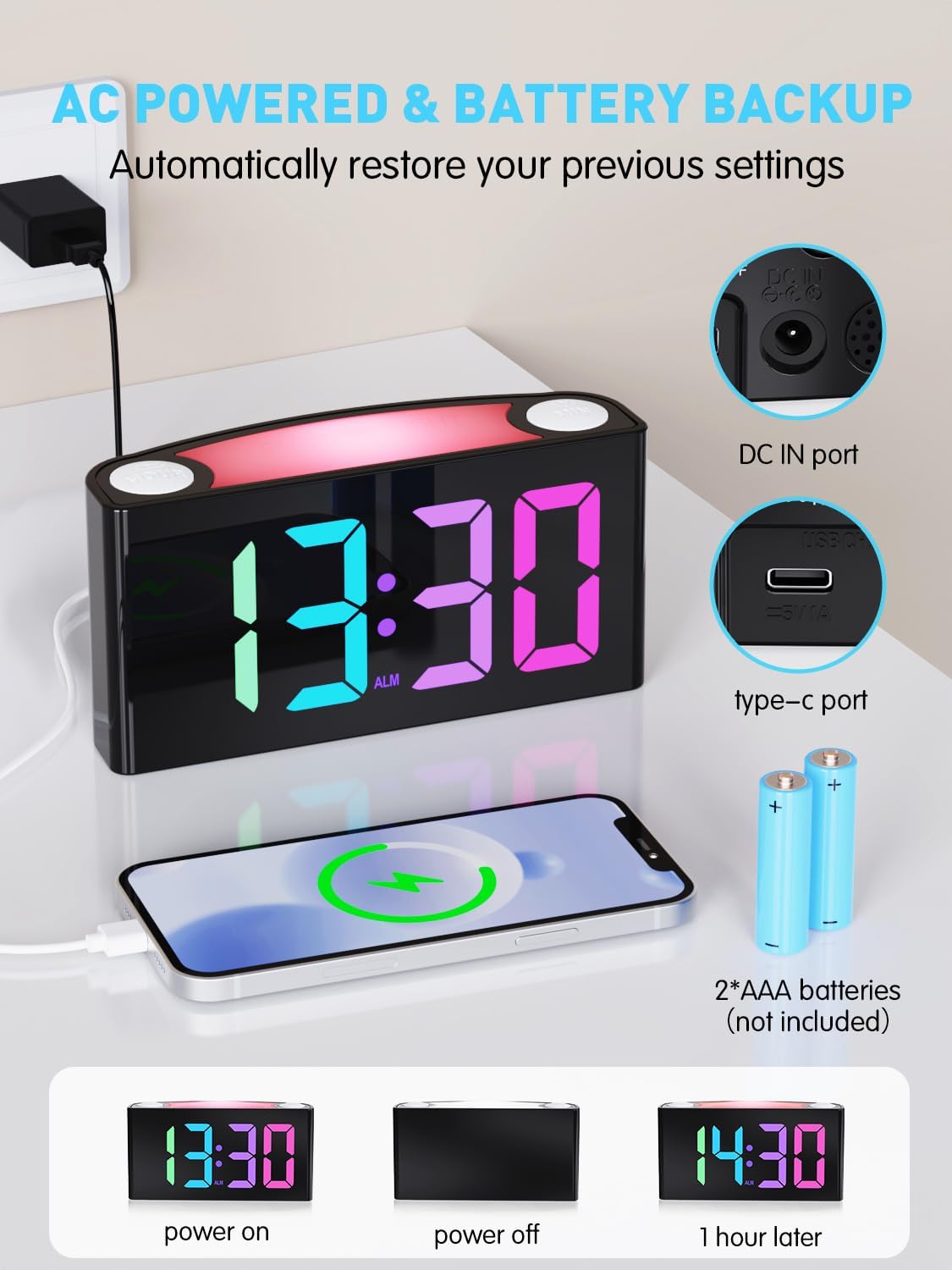
Image: The alarm clock is shown connected to AC power, with an open battery compartment indicating where to insert 2 AAA batteries for backup. The display shows "13:30" (power on), a blank screen (power off), and "14:30" (1 hour later, demonstrating time retention).
ໝາຍເຫດ: The clock's main functions (display, USB charging, alarm) require AC power. Batteries only provide backup for time memory and alarm trigger during power interruptions.
6. ຄໍາແນະນໍາການດໍາເນີນງານ
6.1 ການ ກຳ ນົດເວລາ
- ກົດ "SET TIME" button on the rear panel. The display will start flashing.
- ກົດ "HOUR" button (on top) to adjust the hour.
- ກົດ "MIN" button (on top) to adjust the minute.
- ກົດ "SET TIME" again to save, or wait 5 seconds for automatic confirmation.
Video: Demonstrates how to set the time on the PPLEE RGB Digital Alarm Clock, including adjusting hours and minutes and confirming the setting.
6.2 ການຕັ້ງໂມງປຸກ
- ເລື່ອນໄດ້ "ALARM ON/OFF" switch to the "ON" position. The alarm indicator will light up.
- ກົດ "SET ALARM" button on the rear panel. The alarm time display will start flashing.
- ກົດ "HOUR" button (on top) to adjust the alarm hour.
- ກົດ "MIN" button (on top) to adjust the alarm minute.
- ກົດ "SET ALARM" again to save, or wait 5 seconds for automatic confirmation.
ເພື່ອປິດໂມງປຸກ, ໃຫ້ເລື່ອນປຸ່ມ "ALARM ON/OFF" switch to the "OFF" position. The alarm indicator will disappear.
6.3 ຄວາມສະຫວ່າງຂອງໜ້າຈໍ (ດິມເມີ)
The clock features a 7-level dimmer for the time display (0%-100% brightness).
- ໃຊ້ "DIMMER" button on the rear panel to cycle through brightness levels.

Image: The alarm clock display shows various brightness levels from 0% to 100%, illustrating the 7-level dimmer function.
6.4 ໂໝດແສງກາງຄືນ
The clock includes an 8-mode/7-color night light with 3 adjustable brightness settings.
- ກົດ "SNOOZE/LIGHT" bar on top to turn the night light on/off and cycle through colors/modes.
- To adjust night light brightness, press and hold the "SNOOZE/LIGHT" ບາ.

Image: A person sleeping next to the alarm clock, which emits a soft yellow night light from its top bar. Below are icons indicating 3-level adjustable brightness for the night light.
6.5 ລະດັບສຽງປຸກ
Adjust the alarm volume to your preference (Low, Medium, High).
- ໃຊ້ "ALARM VOLUME" switch on the rear panel to select the desired volume level.

Image: A person reaching for the snooze bar on the alarm clock, which displays "8:30". The image also illustrates the 3-level adjustable alarm volume (90db, 103db, 110db).
6.6 Snooze ຟັງຊັນ
ເມື່ອສຽງປຸກດັງຂຶ້ນ, ກົດປຸ່ມໃຫຍ່ "SNOOZE/LIGHT" bar on top to activate snooze for 9 extra minutes of sleep.
The alarm will sound again after 9 minutes. To completely turn off the alarm, use the "ALARM ON/OFF" ສະຫຼັບ.
6.7 12/24 Hour Format and DST
- ໃຊ້ "TIME FORMAT" switch on the rear panel to toggle between 12-hour and 24-hour display.
- ໃຊ້ "DST" switch on the rear panel to enable or disable Daylight Saving Time (adjusts time by 1 hour).
6.8 Dual Charging Ports
The clock is equipped with a Type-C output port and a USB output port for charging your devices.

Image: The alarm clock with its display showing "12:00" and two smartphones connected to its USB and Type-C charging ports, indicating active charging.
Simply connect your device's charging cable to the appropriate port on the back of the clock.
7. ບໍາລຸງຮັກສາ
- ເຮັດຄວາມສະອາດໂມງດ້ວຍຜ້າອ່ອນໆ, ແຫ້ງ. ຢ່າໃຊ້ເຄື່ອງເຮັດຄວາມສະອາດຂັດຫຼືສານລະລາຍ.
- ໃຫ້ແນ່ໃຈວ່າໂມງໄດ້ຖືກຖອດປລັກອອກກ່ອນທຳຄວາມສະອາດ.
- ຖ້າບໍ່ໄດ້ໃຊ້ເປັນເວລາດົນ, ໃຫ້ຖອດແບັດເຕີຣີສຳຮອງອອກ.
8. ການແກ້ໄຂບັນຫາ
| ບັນຫາ | ການແກ້ໄຂ |
|---|---|
| ໜ້າຈໍໂມງວ່າງເປົ່າ. | Check if the power adapter is securely plugged into both the clock and the wall outlet. Ensure the outlet has power. |
| ໂມງປຸກບໍ່ມີສຽງ. | Verify the "ALARM ON/OFF" switch is in the "ON" position. Check the alarm volume setting. Ensure the alarm time is correctly set. |
| ເວລາບໍ່ຖືກຕ້ອງຫຼັງຈາກພະລັງງານ outage. | Ensure 2 AAA batteries are installed in the battery compartment for backup. If batteries were not present or depleted, reset the time manually. |
| Devices not charging via USB/Type-C. | Confirm the clock is connected to AC power. Check the charging cable and the device being charged. |
| ແສງກາງຄືນບໍ່ເຮັດວຽກ. | Press the "SNOOZE/LIGHT" bar to cycle through modes and turn on the light. Check if the clock is powered. |
9. ຂໍ້ມູນຈໍາເພາະ
| ໝາຍເລກຕົວແບບ | CR1008R |
| ຍີ່ຫໍ້ | PPLEE |
| ປະເພດການສະແດງ | Digital LED (RGB) |
| ຂະໜາດສິນຄ້າ | 6.46"W x 3.39"H |
| ແຫຼ່ງພະລັງງານ | ໄຟຟ້າສາຍ (AC 100-240V) |
| ແບັດເຕີຣີສຳຮອງ | 2 x ຫມໍ້ໄຟ AAA (ບໍ່ລວມ) |
| ພອດສາກໄຟ | 1 x USB, 1 x Type-C |
| ຄວາມສະຫວ່າງຂອງຈໍສະແດງຜົນ | 7-level adjustable dimmer |
| ແສງກາງຄືນ | 8 modes / 7 colors, 3-level adjustable brightness |
| ລະດັບສຽງປຸກ | 3-level adjustable (Low, Medium, High) |
| ເລື່ອນໄລຍະເວລາ | 9 ນາທີ |
10. ການຮັບປະກັນແລະການສະຫນັບສະຫນູນ
For warranty information or technical support, please refer to the contact details provided with your purchase or visit the official PPLEE webເວັບໄຊ. ຮັກສາໃບຮັບເງິນການຊື້ຂອງທ່ານສໍາລັບການຮ້ອງຂໍການຮັບປະກັນ.
ອີເມວ: support@pplec.net


