ແນະນຳ
The Coby Ultimate Wireless Speaker is designed to deliver a powerful and immersive audio experience, complemented by dynamic light-up modes. This portable speaker is engineered for high-fidelity sound, ensuring crisp highs, rich mids, and deep bass. With its travel-friendly design and extended battery life, it is suitable for various environments, from personal listening to social gatherings.

Image: The Coby Ultimate Wireless Speaker, showcasing its vibrant, multi-color light display on the front grille. The speaker is black with a robust, portable design.
ສິນຄ້າເກີນview ແລະການຄວບຄຸມ
Familiarize yourself with the speaker's layout and controls for optimal use.
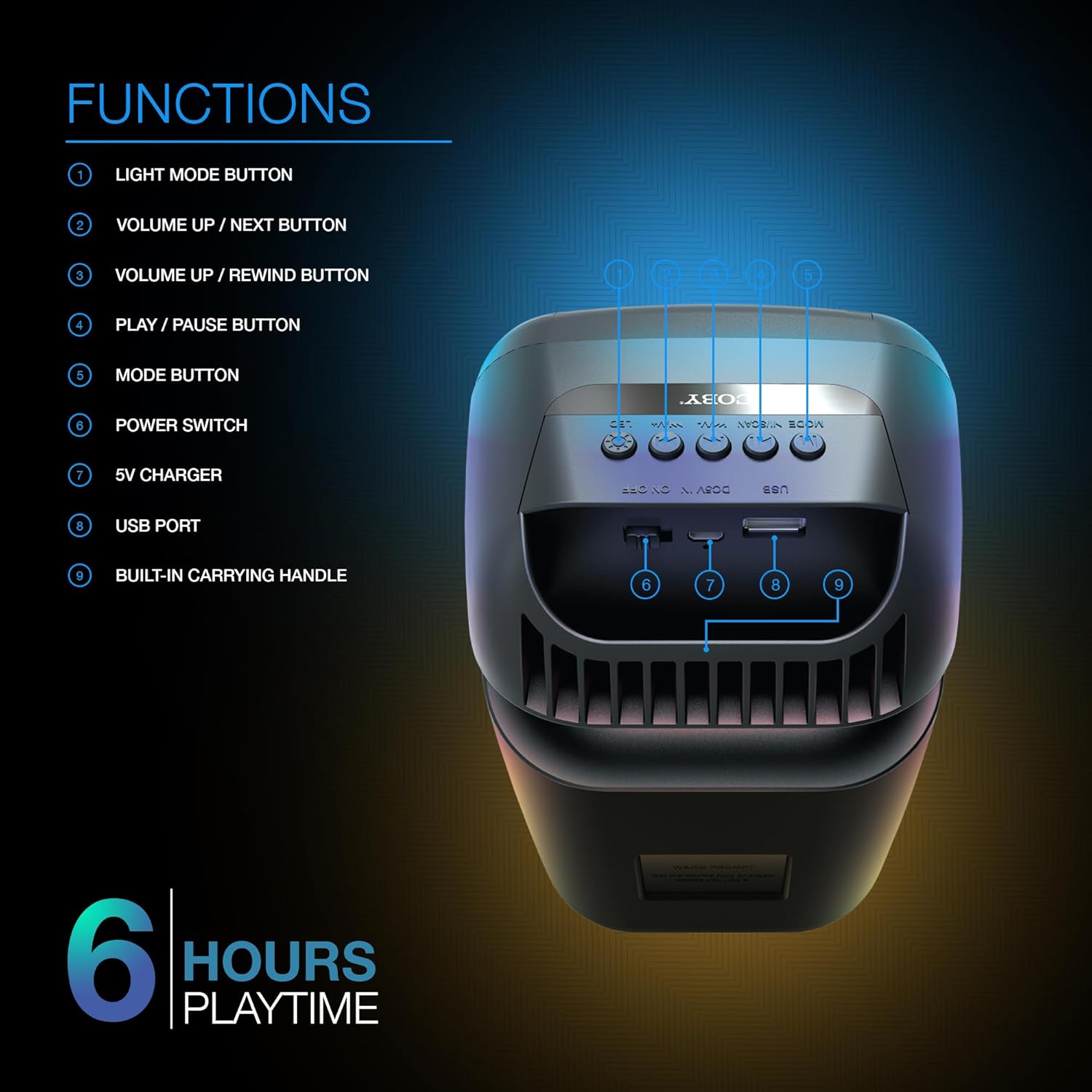
Image: A detailed diagram illustrating the top and rear controls of the Coby Ultimate Wireless Speaker. Numbered labels point to each function: Light Mode Button, Volume Up/Next, Volume Up/Rewind, Play/Pause, Mode Button, Power Switch, 5V Charger Port, USB Port, and Built-in Carrying Handle.
ຟັງຊັນການຄວບຄຸມ:
- ປຸ່ມແບບ Light: Cycles through the 5 dazzling light-up modes.
- Volume Up / Next Button: ເພີ່ມປະລິມານ ຫຼືຂ້າມໄປຫາເພງຕໍ່ໄປ.
- Volume Up / Rewind Button: Decreases volume or rewinds the current track.
- ຫຼີ້ນ / ປຸ່ມພັກໄວ້: ເລີ່ມ ຫຼື ຢຸດການຫຼິ້ນສຽງຊົ່ວຄາວ.
- ປຸ່ມໂໝດ: Switches between different input modes (e.g., Bluetooth, FM Radio).
- ສັບປ່ຽນພະລັງງານ: ເປີດ ຫຼືປິດລຳໂພງ.
- ເຄື່ອງສາກ 5V: Port for connecting the charging cable.
- ພອດ USB: For USB media playback or charging external devices (if supported).
- Built-in Carrying Handle: ສໍາລັບການພົກພາງ່າຍ.
ຕັ້ງຄ່າ
1. ການສາກໄຟ ລຳ ໂພງ
Before first use, fully charge the speaker. Connect the provided 5V charging cable to the 5V Charger port on the speaker and plug the other end into a compatible USB power adapter (not included). The charging indicator light will show the charging status. A full charge provides up to 6 hours of playtime.
2. ເປີດ / ປິດພະລັງງານ
Locate the Power Switch on the speaker. Slide the switch to the 'ON' position to power on the device. Slide it to the 'OFF' position to power off.
3. ການຈັບຄູ່ Bluetooth
- Ensure the speaker is powered on and in Bluetooth mode (indicated by the Mode button).
- ໃນອຸປະກອນມືຖືຂອງທ່ານ (ໂທລະສັບສະຫຼາດ, ແທັບເລັດ, ແລະອື່ນໆ), ເປີດໃຊ້ Bluetooth ແລະຄົ້ນຫາອຸປະກອນທີ່ມີຢູ່.
- Select "Coby CPA9000" or a similar name from the list of found devices.
- Once connected, the speaker will emit an audible confirmation, and you can begin streaming audio.
The speaker features Bluetooth version 5.3 for fast pairing and stable audio streaming.
ການດໍາເນີນງານ
1. ເຄື່ອງຫຼີ້ນສຽງ
- ຫຼິ້ນ/ຢຸດ: Press the Play/Pause button to start or pause the current track.
- ການປັບລະດັບສຽງ: Use the Volume Up / Next and Volume Up / Rewind buttons to adjust the playback volume.
- ຕິດຕາມການນໍາທາງ: Briefly press the Volume Up / Next button to skip to the next track. Briefly press the Volume Up / Rewind button to go to the previous track.
2. Light-Up Modes
The speaker features 5 dazzling light-up modes that synchronize with your music. Press the Light Mode Button to cycle through the available light patterns and effects. Choose the mode that best suits your mood or environment.
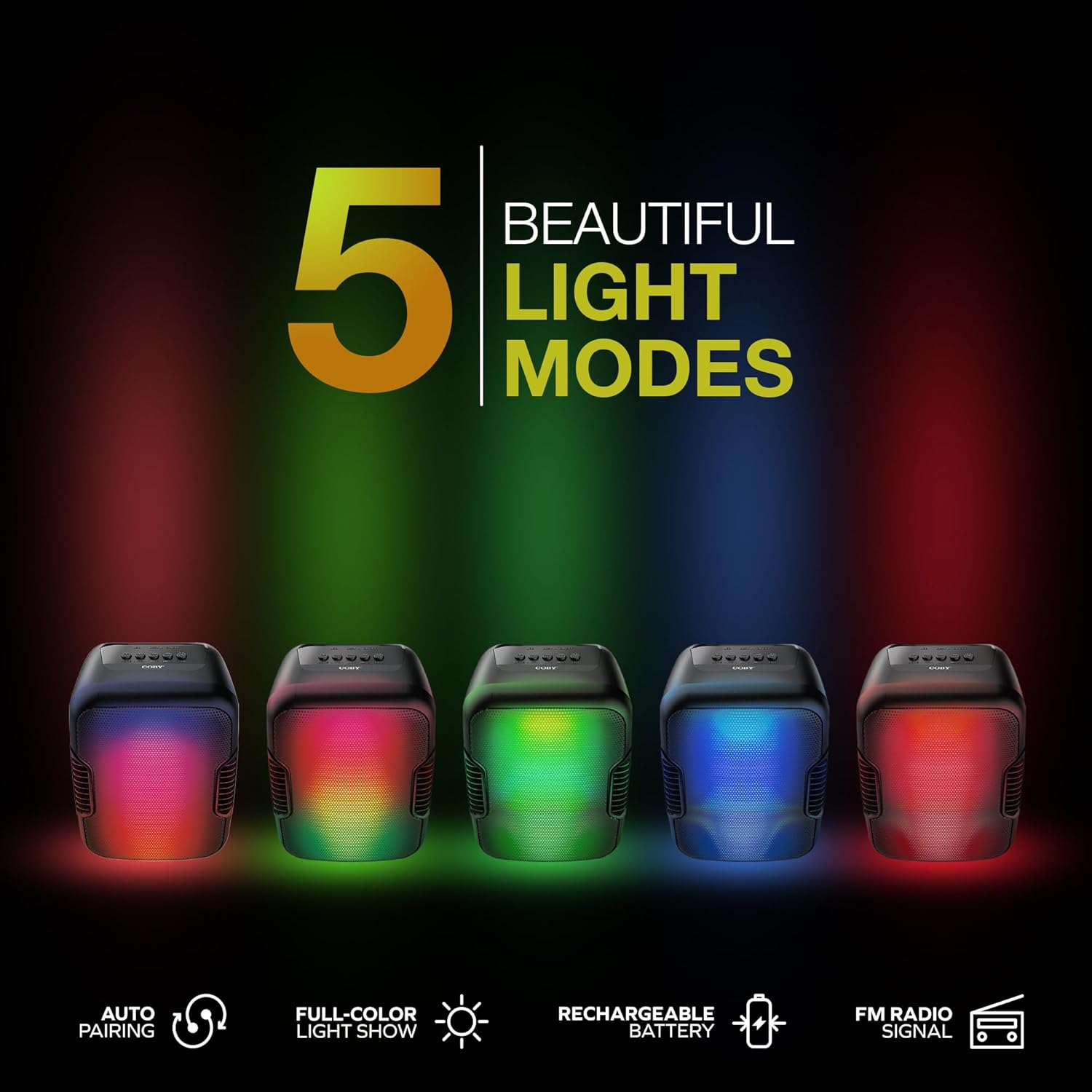
Image: Five Coby Ultimate Wireless Speakers arranged in a row, each displaying a different vibrant light mode, illustrating the variety of visual effects available.
3. ຟັງຊັນວິທະຍຸ FM
To use the FM Radio, press the Mode button until you hear the FM radio signal. The speaker will automatically scan and tune into available stations. Use the Volume Up / Next and Volume Up / Rewind buttons to navigate between stations.
ບໍາລຸງຮັກສາ
- ທໍາຄວາມສະອາດ: ໃຊ້ຜ້າປຽກແຫ້ງເພື່ອເຮັດຄວາມສະອາດດ້ານນອກຂອງລຳໂພງ. ຢ່າໃຊ້ເຄື່ອງເຮັດຄວາມສະອາດຂັດຫຼືສານລະລາຍ.
- ການເກັບຮັກສາ: ເກັບຮັກສາລຳໂພງໄວ້ໃນບ່ອນທີ່ເຢັນ, ແຫ້ງ, ຫ່າງຈາກແສງແດດໂດຍກົງ ແລະ ອຸນຫະພູມສູງສຸດເມື່ອບໍ່ໄດ້ໃຊ້ເປັນເວລາດົນ.
- ການດູແລຫມໍ້ໄຟ: ເພື່ອຍືດອາຍຸການໃຊ້ງານຂອງແບັດເຕີຣີ, ໃຫ້ຫຼີກລ່ຽງການສາກແບັດເຕີຣີຈົນໝົດເລື້ອຍໆ. ໃຫ້ສາກລຳໂພງເປັນປະຈຳ, ເຖິງແມ່ນວ່າຈະບໍ່ໄດ້ໃຊ້ຢູ່ຕະຫຼອດເວລາກໍຕາມ.
ການແກ້ໄຂບັນຫາ
| ບັນຫາ | ສາເຫດທີ່ເປັນໄປໄດ້ | ການແກ້ໄຂ |
|---|---|---|
| ລຳໂພງບໍ່ເປີດ. | ແບັດເຕີຣີໝົດ. | ສາກລຳໂພງໃຫ້ເຕັມໂດຍໃຊ້ສາຍສາກທີ່ໃຫ້ມາ. |
| ບໍ່ມີສຽງຈາກລຳໂພງ. | Volume is too low or muted; Device not paired correctly; Incorrect mode selected. | Increase volume on both speaker and connected device. Re-pair Bluetooth. Press Mode button to select correct input. |
| ການເຊື່ອມຕໍ່ Bluetooth ບໍ່ສະຖຽນ. | Device is out of range; Interference from other devices. | Move the connected device closer to the speaker. Avoid placing speaker near other wireless devices. |
| Light modes are not working. | Light mode feature is off. | Press the Light Mode Button to activate and cycle through modes. |
ຂໍ້ມູນຈໍາເພາະ

Image: The Coby Ultimate Wireless Speaker shown with its dimensions: 9.46 inches height, 4.92 inches width, and 4.33 inches depth.
| ຄຸນສົມບັດ | ລາຍລະອຽດ |
|---|---|
| ຊື່ຕົວແບບ | CPA9000 FLAME |
| ປະເພດລຳໂພງ | Subwoofer |
| ເຕັກໂນໂລຊີການເຊື່ອມຕໍ່ | Bluetooth |
| ເຕັກໂນໂລຊີການສື່ສານໄຮ້ສາຍ | Bluetooth 5.3 |
| ຮູບແບບການອອກສຽງ | ສະເຕຣິໂອ |
| ຊີວິດຫມໍ້ໄຟ | ສູງສຸດ 6 ຊົ່ວໂມງ |
| ແຫຼ່ງພະລັງງານ | ແບດເຕີຣີ້ໃຊ້ພະລັງງານ (ມີຫມໍ້ໄຟ Lithium Ion 1 ໜ່ວຍ) |
| ຂະໜາດສິນຄ້າ (ກວ້າງ x ຍາວ x ສູງ) | 4.33" x 4.92" x 9.46" |
| ນ້ໍາຫນັກລາຍການ | 14.1 ອອນ |
| ຄຸນນະສົມບັດພິເສດ | USB Port, Light-Up Modes, Built-in Handle, FM Radio |
| ອຸປະກອນທີ່ເຂົ້າກັນໄດ້ | ໂທລະສັບສະຫຼາດ, ແທັບເລັດ |
| ວິທີການຄວບຄຸມ | ປຸ່ມໃນອຸປະກອນ |
| ແມ່ນກັນນ້ໍາ | ຜິດ |
| UPC | 810071493751 |
ການຮັບປະກັນແລະການສະຫນັບສະຫນູນ
The Coby Ultimate Wireless Speaker comes with a limited warranty. For specific warranty terms and conditions, please refer to the documentation included with your purchase or visit the official Coby website. For technical support or further assistance, please contact Coby customer service.


