1. ບົດແນະນຳ
ຂອບໃຈສໍາລັບການຊື້asing the ANJANK 4-in-1 Wireless Charging Station with Alarm Clock. This device is designed to simplify your charging experience by providing a centralized solution for your iPhone, Apple Watch, and AirPods, along with an integrated digital alarm clock. Please read this manual carefully to ensure proper setup and operation.
2. ເນື້ອໃນຊຸດ
ກະລຸນາກວດເບິ່ງຊຸດສຳລັບລາຍການຕໍ່ໄປນີ້:
- 1 x ANJANK 4-in-1 Wireless Charging Station with Alarm Clock
- ຕົວແປງໄຟ 1 x 18W
- 1 x ສາຍ Type-C
- 1 x ຄູ່ມືຜູ້ໃຊ້
3. ຜະລິດຕະພັນເກີນview
The ANJANK 4-in-1 Wireless Charging Station integrates multiple functions into a compact design, featuring dedicated charging areas for your smartphone, Apple Watch, and AirPods, alongside a digital alarm clock display.


4. ຄໍາແນະນໍາການຕິດຕັ້ງ
- ເຊື່ອມຕໍ່ພະລັງງານ: Insert the Type-C cable into the charging port on the back of the station. Connect the other end of the cable to the provided 18W power adapter, then plug the adapter into a wall outlet.
- ເປີດ: The digital clock display will illuminate, indicating the device is powered on and ready for use.
- ການຈັດວາງເບື້ອງຕົ້ນ: Place the charging station on a stable, flat surface, such as a nightstand or desk.
5. ຄໍາແນະນໍາການດໍາເນີນງານ
5.1. ການສາກໂທລະສັບແບບໄຮ້ສາຍ
Place your compatible smartphone on the vertical charging pad. Ensure the phone is centered on the pad for optimal charging. The charging indicator light on the station will illuminate to confirm charging is active.
- The station supports both vertical and horizontal phone placement for charging.
- Phone cases up to 3mm (0.12 inch) thick are generally supported. Cases with magnetic or metal attachments should be removed to prevent interference.


5.2. ການສາກ Apple Watch
Place your Apple Watch on the dedicated magnetic charging module. Ensure the watch is properly aligned and secured to initiate charging.
5.3. ການສາກ AirPods
Place your AirPods charging case on the flat wireless charging pad located at the base of the station. The charging indicator will confirm active charging.
5.4. Alarm Clock Functions
The integrated digital alarm clock offers adjustable settings for time, alarm, brightness, and volume.
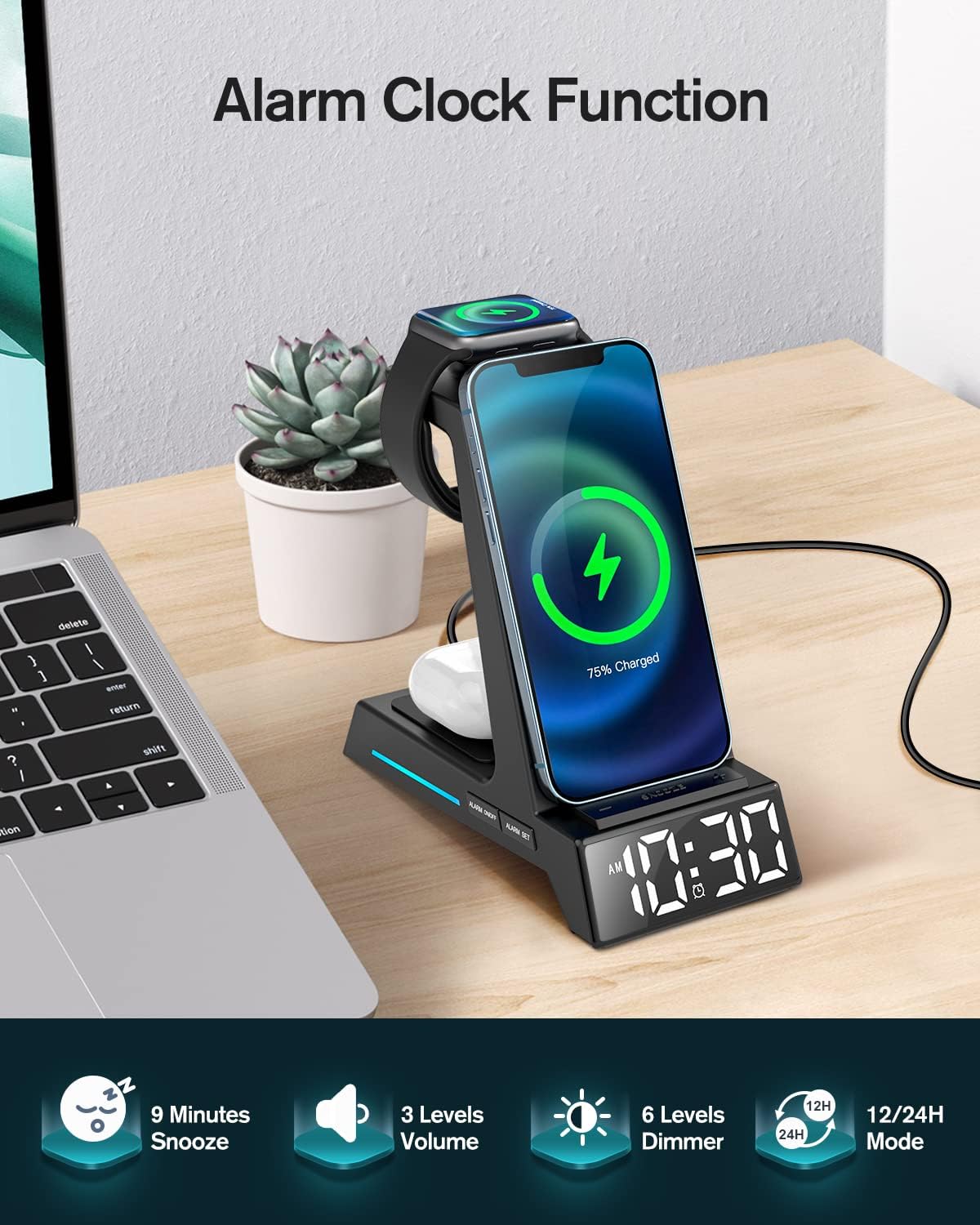
- ຕັ້ງເວລາ: Use the 'TIME' button to enter time setting mode. Use the '+' and '-' buttons to adjust hours and minutes. Press 'TIME' again to confirm.
- ຕັ້ງຄ່າໂມງປຸກ: Use the 'ALARM' button to enter alarm setting mode. Use the '+' and '-' buttons to adjust the alarm time. Press 'ALARM' again to confirm.
- ຟັງຊັນ Snooze: When the alarm sounds, press the 'SNOOZE' button to activate a 9-minute snooze.
- ການປັບຄວາມສະຫວ່າງ: Use the 'DIMMER' button to cycle through 6 levels of display brightness.
- ປັບລະດັບສຽງ: Use the 'VOLUME' button to cycle through 3 levels of alarm volume.
- ໂໝດເວລາ: Press the '12/24H' button to switch between 12-hour (with AM/PM indicator) and 24-hour time formats.
6. ຄວາມເຂົ້າກັນໄດ້
The ANJANK 4-in-1 Wireless Charging Station is compatible with a wide range of devices:

- iPhones: iPhone 16/16 Plus/16 Pro/16 Pro Max, 15/15 Plus/15 Pro/15 Pro Max, 14/14 Plus/14 Pro/14 Pro Max, 13/13 Mini/13 Pro/13 Pro Max, 12/12 Mini/12 Pro/12 Pro Max, 11/11 Pro/11 Pro Max, X/XR/XS/XS Max, 8/8 Plus.
- Apple Watch: iWatch Ultra 9/8/7/6/5/4/3/2/SE. Note: Not compatible with Samsung Watch.
- AirPods: AirPods Pro/Pro 2/3/2.
- Other Qi-enabled Phones: Compatible with LG (VS980/G3/G6/G6+/G7/G7 ThinQ/G7+ ThinQ/G8/G8 ThinQ), Google (Pixel 3/3XL, NEXUS 4/5/6), Sony (Xperia Z3v/XZ2/XZ2 Premium/XZ3), Nokia (Lumia 720/735/810/820/822/830), HTC (PH98100/PG32100/PJ53100/PL83200/PM23100), and other devices supporting wireless charging.
7. ບໍາລຸງຮັກສາ
To ensure the longevity and optimal performance of your charging station, follow these maintenance guidelines:
- ທໍາຄວາມສະອາດ: Disconnect the power before cleaning. Use a soft, dry cloth to wipe the surface of the device. Avoid using abrasive cleaners, solvents, or harsh chemicals.
- ການກະຈາຍຄວາມຮ້ອນ: The ANJANK charging station features cooling holes on its back and bottom for efficient heat dissipation. Ensure these vents are not blocked to maintain optimal operating temperature.

8. ການແກ້ໄຂບັນຫາ
If you encounter issues with your ANJANK charging station, refer to the following common problems and solutions:
| ບັນຫາ | ສາເຫດທີ່ເປັນໄປໄດ້ | ການແກ້ໄຂ |
|---|---|---|
| ອຸປະກອນບໍ່ໄດ້ສາກໄຟ | Incorrect placement, phone case too thick, power not connected, incompatible device. | Ensure device is centered on the charging pad. Remove phone case if thicker than 3mm or if it has metal/magnetic attachments. Verify power adapter is securely plugged in. Check device compatibility. |
| Alarm clock not working/display issues | Incorrect settings, power interruption. | Refer to Section 5.4 for detailed instructions on setting time and alarm. Ensure continuous power supply. |
| Flashing blue light on base | Indicates full charge or a connection issue (e.g., device not properly aligned, foreign object detected). | This can indicate your device is fully charged. If it flashes while charging, reposition your device on the pad. Ensure no foreign objects are between the device and the charging pad. |
| ການສາກໄຟຊ້າ | Using a non-18W power adapter, device misalignment, background apps. | Use the provided 18W power adapter. Ensure proper alignment of the device on the charging pad. Close unnecessary background applications on your device. |
9. ຂໍ້ມູນຈໍາເພາະ
| ຄຸນສົມບັດ | ລາຍລະອຽດ |
|---|---|
| ໝາຍເລກຕົວແບບ | AC199-ດຳ |
| ການປ້ອນຂໍ້ມູນ Voltage | 5 ໂວນ |
| ວັດtage | 18 ວັດ |
| ປະເພດຕົວເຊື່ອມຕໍ່ | USB ປະເພດ C |
| ນ້ໍາຫນັກລາຍການ | 14.9 ອອນ |
| ຂະໜາດແພັກເກັດ | 6.5 x 6.1 x 3.31 ນິ້ວ |
| ຄຸນນະສົມບັດພິເສດ | 3-in-1 Wireless Charging (Phone+AirPods+Apple Watch), Alarm Clock, Display Dimmer, 12/24H Time Mode, Snooze, Adjustable Volume, Charging Indicator, Space-Saving, Easy Setup |
10. ຂໍ້ມູນຄວາມປອດໄພ
ເພື່ອຮັບປະກັນການເຮັດວຽກທີ່ປອດໄພ ແລະປ້ອງກັນຄວາມເສຍຫາຍຂອງອຸປະກອນ ຫຼືການບາດເຈັບ, ກະລຸນາປະຕິບັດຕາມຂໍ້ຄວນລະວັງດ້ານຄວາມປອດໄພຕໍ່ໄປນີ້:
- ຫ້າມຖອດປະກອບ, ແກ້ໄຂ, ຫຼືສ້ອມແປງອຸປະກອນດ້ວຍຕົນເອງ.
- ເກັບຮັກສາອຸປະກອນໃຫ້ຫ່າງຈາກນໍ້າ, ຄວາມຊຸ່ມ ແລະ ອຸນຫະພູມສູງ.
- ຫຼີກເວັ້ນການເປີດອຸປະກອນໃຫ້ຖືກແສງແດດໂດຍກົງເປັນເວລາດົນ.
- Use only the provided power adapter and cable. Using unauthorized accessories may cause damage or fire.
- This device incorporates multiple protection features, including over-current protection, over-voltage protection, and over-charging protection, to ensure safe charging.
- Ensure proper ventilation by not blocking the cooling holes on the device.
11. ການຮັບປະກັນແລະການສະຫນັບສະຫນູນ
ANJANK products come with a standard manufacturer's warranty. If you have any questions, concerns, or require technical assistance, please do not hesitate to contact our customer service team. We are committed to providing the best solution within 24 hours.
For support, please refer to the contact information provided on the product packaging or the official ANJANK webເວັບໄຊ.


