1. ຂໍ້ມູນຄວາມປອດໄພທີ່ສໍາຄັນ
Please read this manual carefully before using the Midea M9 Robot Vacuum Cleaner and retain it for future reference. Adhere to all safety warnings and instructions to prevent injury or damage.
- ເຄື່ອງໃຊ້ນີ້ສາມາດໃຊ້ໄດ້ກັບເດັກນ້ອຍອາຍຸ 8 ປີຂຶ້ນໄປ ແລະຜູ້ທີ່ມີຄວາມສາມາດທາງຮ່າງກາຍ, ຄວາມຮູ້ສຶກ ຫຼື ຈິດໃຈຫຼຸດລົງ ຫຼື ຂາດປະສົບການ ແລະ ຄວາມຮູ້ ຖ້າພວກເຂົາໄດ້ຮັບການຊີ້ນຳ ຫຼື ຄຳແນະນຳກ່ຽວກັບການນຳໃຊ້ເຄື່ອງດັ່ງກ່າວຢ່າງປອດໄພ ແລະ ເຂົ້າໃຈເຖິງອັນຕະລາຍທີ່ກ່ຽວຂ້ອງ. .
- ເດັກນ້ອຍຄວນໄດ້ຮັບການເບິ່ງແຍງເພື່ອຮັບປະກັນວ່າເຂົາເຈົ້າບໍ່ໄດ້ຫຼິ້ນກັບເຄື່ອງໃຊ້.
- ການທໍາຄວາມສະອາດແລະການບໍາລຸງຮັກສາຜູ້ໃຊ້ຈະຕ້ອງບໍ່ເຮັດໂດຍເດັກນ້ອຍໂດຍບໍ່ມີການຊີ້ນໍາ.
- ໃຊ້ພຽງແຕ່ອະແດບເຕີໄຟຟ້າຕົ້ນສະບັບທີ່ຜູ້ຜະລິດສະໜອງໃຫ້ເທົ່ານັ້ນ.
- ຢ່າໃຊ້ເຄື່ອງດູດຝຸ່ນຫຸ່ນຍົນໃນສະພາບແວດລ້ອມທີ່ປຽກຊຸ່ມ ຫຼືຢູ່ໃກ້ກັບນໍ້າ.
- Ensure the charging base is placed on a level surface against a wall, with clear space around it.
- Remove any loose cables, small objects, or fragile items from the cleaning area before operation.
2. ເນື້ອໃນຊຸດ
Verify that all items are present in the package. If any components are missing or damaged, contact customer support.
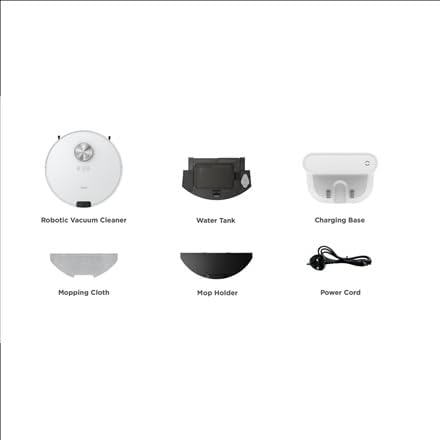
ຮູບພາບ: ເກີນview of the Midea M9 Robot Vacuum Cleaner's package contents. This image displays the main robotic vacuum cleaner unit, a water tank, a charging base, a mopping cloth, a mop holder, and a power cord.
- ເຄື່ອງດູດຝຸ່ນຫຸ່ນຍົນ
- ຖັງນໍ້າ
- ຖານສາກໄຟ
- ເສື້ອຜ້າ Mopping
- ຜູ້ຖື Mop
- ສາຍໄຟ
3. ຜະລິດຕະພັນເກີນview
3.1 ເທິງ View
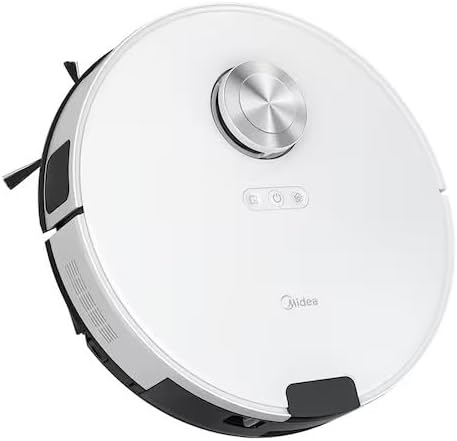
ຮູບພາບ: ເທິງ view of the Midea M9 Robot Vacuum Cleaner. This image shows the circular design of the robot, with a central LiDAR navigation sensor tower, power button, and other control indicators on its surface.
The top of the Midea M9 features the LiDAR navigation sensor, which allows the robot to map your home and navigate efficiently. It also includes control buttons for starting/pausing cleaning and returning to the charging base.
3.2 ລຸ່ມ View

ຮູບພາບ: ລຸ່ມ view of the Midea M9 Robot Vacuum Cleaner. This image displays the two side brushes, the main rolling brush, the driving wheels, and the mopping pad attachment area.
The underside of the robot houses the main rolling brush, two side brushes for edge cleaning, driving wheels, and cliff sensors to prevent falls. The mopping pad attachment area is also visible.
4. ຕັ້ງຄ່າ
4.1 ການວາງຖານສາກໄຟ
- Place the charging base against a wall on a hard, level surface.
- Ensure there is at least 0.5 meters (1.6 feet) of clear space on both sides of the charging base and 1.5 meters (4.9 feet) in front of it.
- Connect the power cord to the charging base and plug it into a power outlet.
4.2 ການສາກໄຟເບື້ອງຕົ້ນ
- Place the robot vacuum onto the charging base, ensuring the charging contacts align.
- Allow the robot to charge completely before its first use. This typically takes 4-6 hours. The indicator light on the robot will change to indicate a full charge.
4.3 ການເຊື່ອມຕໍ່ແອັບ (ທາງເລືອກ)
- Download the Midea Smart app from your mobile device's app store.
- Follow the in-app instructions to connect your Midea M9 Robot Vacuum Cleaner to your home Wi-Fi network. This enables advanced features like remote control, scheduling, and cleaning mode selection.
5. ຄໍາແນະນໍາການດໍາເນີນງານ
5.1 ການເລີ່ມຕົ້ນ/ການຢຸດການທຳຄວາມສະອາດ
- ເພື່ອເລີ່ມຕົ້ນ: Press the power button on the robot or use the Midea Smart app. The robot will begin cleaning in Auto mode.
- ຢຸດຊົ່ວຄາວ: Press the power button again during cleaning.
- ເພື່ອຢຸດ/ກັບຄືນສູ່ຖານ: Press and hold the power button for a few seconds, or use the 'Return to Base' function in the app.
5.2 ຮູບແບບການທໍາຄວາມສະອາດ
The Midea M9 offers various cleaning modes:
- ແບບອັດຕະໂນມັດ: ຫຸ່ນຍົນສາມາດນຳທາງ ແລະ ທຳຄວາມສະອາດເຮືອນທັງໝົດຂອງທ່ານໄດ້ຢ່າງສະຫຼາດ.
- ໂໝດຈຸດ: Cleans a specific area more intensely. Place the robot in the center of the dirty area and activate Spot mode via the app.
- ໂໝດແຂບ: The robot cleans along walls and furniture edges. Activate via the app.
5.3 ຟັງຊັ່ນການຖູ
- Fill the water tank with clean water. Do not use detergents or cleaning solutions not approved by Midea.
- Attach the mopping cloth to the mop holder, then slide the mop holder with the cloth onto the water tank.
- Insert the assembled water tank and mop holder into the robot.
- The robot will automatically switch to mopping mode or combined vacuuming and mopping.
6. ບໍາລຸງຮັກສາ
ການບໍາລຸງຮັກສາເປັນປົກກະຕິຮັບປະກັນການປະຕິບັດທີ່ດີທີ່ສຸດແລະຍືດອາຍຸຂອງເຄື່ອງດູດຝຸ່ນຫຸ່ນຍົນຂອງທ່ານ.
6.1 ການອະນາໄມຖັງຂີ້ຝຸ່ນ ແລະຖັງນໍ້າ
- ລ້າງຖັງຂີ້ຝຸ່ນຫຼັງຈາກໃຊ້ແຕ່ລະຄັ້ງ.
- Rinse the dustbin and filter with water as needed, ensuring they are completely dry before reinstallation.
- Empty and clean the water tank after each mopping session to prevent mold and odors.
6.2 ການເຮັດຄວາມສະອາດແປງ
- ແປງຫຼັກ: Remove the main brush cover and lift out the brush. Use the cleaning tool to remove hair and debris. Clean weekly.
- ແປງດ້ານຂ້າງ: Check for tangled hair or debris. Remove and clean as needed. Replace if worn or damaged. Clean monthly.
6.3 ການເຮັດຄວາມສະອາດເຊັນເຊີ
- Wipe the cliff sensors, wall sensors, and charging contacts with a clean, dry cloth monthly to ensure proper function.
7. ການແກ້ໄຂບັນຫາ
ຖ້າຫາກທ່ານພົບບັນຫາ, ເບິ່ງບັນຫາທົ່ວໄປດັ່ງຕໍ່ໄປນີ້ແລະການແກ້ໄຂ:
| ບັນຫາ | ສາເຫດທີ່ເປັນໄປໄດ້ | ການແກ້ໄຂ |
|---|---|---|
| ຫຸ່ນຍົນບໍ່ຄິດຄ່າບໍລິການ | Charging contacts are dirty; Power adapter not connected; Robot not properly aligned with base. | Clean charging contacts; Ensure power adapter is plugged in; Realign robot on charging base. |
| ຫຸ່ນຍົນຕິດຢູ່ເລື້ອຍໆ | Loose cables or small objects on the floor; Robot stuck on high thresholds. | Clear obstacles from cleaning path; Use virtual walls or no-go zones in the app. |
| ປະສິດທິພາບທໍາຄວາມສະອາດບໍ່ດີ | ຖັງຂີ້ເຫຍື້ອເຕັມ; ແປງ tangled; ການກັ່ນຕອງອຸດຕັນ. | ຖັງຂີ້ຝຸ່ນເປົ່າ; ເຮັດຄວາມສະອາດແປງຕົ້ນຕໍແລະຂ້າງ; ເຮັດຄວາມສະອາດຫຼືປ່ຽນການກັ່ນຕອງ. |
| ຫຸ່ນຍົນບໍ່ສາມາດເຊື່ອມຕໍ່ກັບ Wi-Fi ໄດ້ | ລະຫັດຜ່ານ Wi-Fi ບໍ່ຖືກຕ້ອງ; ເຣົາເຕີ້ໄກເກີນໄປ; ຮອງຮັບພຽງແຕ່ Wi-Fi 2.4GHz ເທົ່ານັ້ນ. | Verify password; Move robot closer to router; Ensure router is set to 2.4GHz. |
8. ຂໍ້ມູນຈໍາເພາະ
| ຄຸນສົມບັດ | ລາຍລະອຽດ |
|---|---|
| ຍີ່ຫໍ້ | Midea |
| ຊື່ຕົວແບບ | Midea M9 |
| ຂະໜາດ (L x W x H) | 32 x 32 x 10 cm |
| ນ້ຳໜັກ | 4 ກິໂລກຣາມ |
| ຄຸນນະສົມບັດພິເສດ | Smart mapping, Portable |
| ຄໍາແນະນໍາດ້ານຫນ້າ | ພົມ |
9. ການຮັບປະກັນແລະການສະຫນັບສະຫນູນ
ສໍາລັບຂໍ້ມູນການຮັບປະກັນ ແລະການຊ່ວຍເຫຼືອດ້ານວິຊາການ, ກະລຸນາເບິ່ງບັດຮັບປະກັນທີ່ລວມຢູ່ໃນຜະລິດຕະພັນຂອງທ່ານ ຫຼືໄປຢ້ຽມຢາມ Midea ຢ່າງເປັນທາງການ webເວັບໄຊ. ຮັກສາໃບຮັບເງິນການຊື້ຂອງທ່ານໄວ້ເປັນຫຼັກຖານການຊື້.


