ຄໍາແນະນໍາຄວາມປອດໄພທີ່ສໍາຄັນ
Please read these instructions carefully before operating the unit and retain them for future reference.
- ຫ້າມບໍ່ໃຫ້ເຄື່ອງໃຊ້ນີ້ຮົ່ວ ຫຼື ນ້ຳແຕກ.
- ຫ້າມວາງສິ່ງຂອງທີ່ເຕັມໄປດ້ວຍນໍ້າເຊັ່ນ: ໂຖໃສ່ເຄື່ອງ.
- ຮັບປະກັນການລະບາຍອາກາດທີ່ເຫມາະສົມ. ຫ້າມປິດຊ່ອງລະບາຍອາກາດໃດໆ.
- ຫ້າມຕິດຕັ້ງໃກ້ກັບແຫຼ່ງຄວາມຮ້ອນເຊັ່ນລັງສີ, ເຄື່ອງບັນທຶກຄວາມຮ້ອນ, ເຕົາຫຼືອຸປະກອນອື່ນໆ (ລວມທັງ. amplifiers) ທີ່ຜະລິດຄວາມຮ້ອນ.
- ໃຊ້ໄຟລ໌ແນບ/ອຸປະກອນເສີມທີ່ຜູ້ຜະລິດລະບຸໄວ້ເທົ່ານັ້ນ.
- ຖອດປລັກເຄື່ອງນີ້ໃນເວລາມີພາຍຸຟ້າຜ່າ ຫຼືເມື່ອບໍ່ໄດ້ໃຊ້ເປັນເວລາດົນນານ.
- ອ້າງເຖິງການບໍລິການທັງtoົດໃຫ້ກັບພະນັກງານບໍລິການທີ່ມີຄຸນວຸດທິ. ຕ້ອງການການບໍລິການເມື່ອອຸປະກອນໄດ້ຮັບຄວາມເສຍຫາຍໃນທາງໃດທາງ ໜຶ່ງ.
ສິນຄ້າເກີນview
The Muse M17CB is a compact dual PLL FM/MW digital alarm clock radio designed for reliable timekeeping and audio playback. It features a clear 0.9-inch white LED display with a dimmer function and a 24-hour time format. Users can set two independent alarms, choosing to wake up to either the radio or a buzzer. The digital tuner allows for 6 preset stations (3 FM and 3 MW) for quick access to your favorite broadcasts. Additional functions include SNAP, SLEEP, and SNOOZE for enhanced user convenience.
ດ້ານໜ້າ View

ລາຍລະອຽດຮູບພາບ: This image displays the front of the Muse M17CB alarm clock radio. It features a prominent 0.9-inch white LED display showing "12:00". Above the display are various control buttons and two rotary knobs. The buttons include P.1, P.2, P.3, DIM., O/SOURCE, and a large SNOOZE button. The left rotary knob is for VOLUME, and the right is for TUNING/SET. A small "muse" logo tag is visible on the left side.
ການຄວບຄຸມກະດານເທິງ

ລາຍລະອຽດຮູບພາບ: ຮູບພາບນີ້ສະຫນອງເທິງລົງລຸ່ມ view of the Muse M17CB alarm clock radio, highlighting the control panel. It shows two large rotary knobs for Volume and Tuning/Set, along with several push buttons: P.1, P.2, P.3 (for radio presets), DIM. (dimmer), O/SOURCE (power/source selection), and a large circular SNOOZE button. The layout is clear and intuitive.
ການເຊື່ອມຕໍ່ແຜງດ້ານຫລັງ

ລາຍລະອຽດຮູບພາບ: This image shows the rear panel of the Muse M17CB alarm clock radio. It clearly displays the "AC~" power input socket, the "FM ANT." wire antenna, and an "AUX IN" 3.5mm jack for connecting external audio devices. A speaker grille is also visible on the right side.
ຕັ້ງຄ່າ
ການເຊື່ອມຕໍ່ພະລັງງານ
- Unpack the Muse M17CB unit and all accessories.
- Connect the AC power cord to the "AC~" input on the rear of the unit.
- ສຽບປາຍອີກດ້ານໜຶ່ງຂອງສາຍໄຟເຂົ້າກັບປລັກສຽບຝາມາດຕະຖານ.
- ຈໍສະແດງຜົນ LED ຈະສະຫວ່າງຂຶ້ນ, ຊີ້ບອກວ່າເຄື່ອງກຳລັງໄດ້ຮັບພະລັງງານ.
ການຕັ້ງຄ່າເສົາອາກາດ
- For optimal FM reception, fully extend the FM wire antenna located at the back of the unit.
- Adjust the position of the antenna for the best possible signal reception.
ຄໍາແນະນໍາການດໍາເນີນງານ
ກໍານົດເວລາ
- ກວດໃຫ້ແນ່ໃຈວ່າເຄື່ອງເປີດຢູ່.
- ກົດຄ້າງໄວ້ TUNING/SET knob for approximately 2 seconds until the hour digits flash on the display.
- ໝຸນ TUNING/SET ປຸ່ມປັບໂມງ.
- ກົດ TUNING/SET knob once to confirm the hour; the minute digits will flash.
- ໝຸນ TUNING/SET knob to adjust the minutes.
- ກົດ TUNING/SET knob again to confirm the minutes and exit time setting mode.
- ເວລາສະແດງຢູ່ໃນຮູບແບບ 24 ຊົ່ວໂມງ.
Setting the Alarm (Alarm 1 and Alarm 2)
ຫນ່ວຍບໍລິການມີສອງປຸກເອກະລາດ (ປຸກ 1 ແລະປຸກ 2).
- ກົດ ປ .1 ປຸ່ມ (ສໍາລັບການປຸກ 1) ຫຼື ປ .2 button (for Alarm 2) once. The alarm icon and hour digits will flash.
- ໝຸນ TUNING/SET knob to adjust the alarm hour.
- ກົດ TUNING/SET knob to confirm the hour; the minute digits will flash.
- ໝຸນ TUNING/SET knob to adjust the alarm minutes.
- ກົດ TUNING/SET knob to confirm the minutes. The alarm source (radio or buzzer) will flash.
- ໝຸນ TUNING/SET knob to select either ວິທະຍຸ or Buzzer as the alarm sound.
- ກົດ TUNING/SET knob to confirm the alarm source. The alarm volume will flash (if radio is selected).
- ໝຸນ ປະລິມານ knob to set the desired alarm volume (for radio alarm).
- ກົດ TUNING/SET knob to save the alarm settings. The corresponding alarm icon will appear on the display, indicating the alarm is active.
ເພື່ອປິດການປຸກ, ໃຫ້ກົດທີ່ສອດຄ້ອງກັນ ປ .1 or ປ .2 ກົດປຸ່ມຈົນກວ່າໄອຄອນໂມງປຸກຈະຫາຍໄປຈາກຈໍສະແດງຜົນ.
Radio Operation (FM/MW)
- ກົດ O/SOURCE button to turn on the radio. Press it repeatedly to cycle between FM, MW, and AUX modes.
- ໝຸນ TUNING/SET knob to manually tune to a desired frequency.
- ເພື່ອສະແກນຫາສະຖານີອັດຕະໂນມັດ, ໃຫ້ກົດຄ້າງໄວ້ TUNING/SET knob for 2 seconds. The radio will scan and stop at the next available station.
Setting and Recalling Presets (P.1, P.2, P.3)
- ການເກັບຮັກສາໄວ້ລ່ວງຫນ້າ: Tune to the desired station. Press and hold one of the preset buttons (ປ .1, ປ .2, ຫຼື ປ .3) for 2 seconds until the display confirms the preset is saved.
- ເພື່ອຈື່ຈໍາໄວ້ລ່ວງຫນ້າໄດ້: Briefly press the desired preset button (ປ .1, ປ .2, ຫຼື ປ .3) to tune to the stored station.
ຟັງຊັນ Dimmer
ກົດ DIM. button repeatedly to adjust the brightness of the LED display to your preference (e.g., High, Medium, Low, Off).
ຟັງຊັນເລື່ອນ
ເມື່ອມີສຽງປຸກ, ໃຫ້ກົດໃຫຍ່ ງອກ ປຸ່ມເພື່ອປິດສຽງໂມງປຸກຊົ່ວຄາວ. ສັນຍານເຕືອນຈະດັງອີກຄັ້ງຫຼັງຈາກປະມານ 9 ນາທີ.
ຟັງຊັນນອນ
The sleep function allows you to fall asleep to the radio, which will automatically turn off after a set period.
- ໃນຂະນະທີ່ວິທະຍຸກຳລັງຫຼິ້ນຢູ່, ກົດປຸ່ມ ປ .3 button (often doubles as SLEEP function) repeatedly to cycle through available sleep timer durations (e.g., 90, 60, 30, 15 minutes, or OFF).
- ວິທະຍຸຈະປິດອັດຕະໂນມັດຫຼັງຈາກໄລຍະເວລາທີ່ເລືອກ.
SNAP Function
The specific operation of the SNAP function is not detailed in the provided product description. Please refer to the full printed manual included with your device for instructions on using the SNAP feature.
ອິນພຸດຊ່ວຍ (AUX IN)
ເຊື່ອມຕໍ່ອຸປະກອນສຽງພາຍນອກ (ເຊັ່ນ: ຜູ້ນ MP3, ໂທລະສັບສະຫຼາດ) ກັບ AUX ໃນ jack on the rear of the unit using a 3.5mm audio cable. Press the O/SOURCE button repeatedly until "AUX" appears on the display to switch to auxiliary input mode. Audio from the connected device will play through the alarm clock's speaker.
ບໍາລຸງຮັກສາ
- ທໍາຄວາມສະອາດ: ໃຊ້ຜ້າປຽກແຫ້ງເພື່ອເຮັດຄວາມສະອາດດ້ານນອກຂອງເຄື່ອງ. ຢ່າໃຊ້ເຄື່ອງເຮັດຄວາມສະອາດຂັດ, ຂີ້ເຜີ້ງ, ຫຼືສານລະລາຍ.
- ການເກັບຮັກສາ: ຖ້າເຄື່ອງບໍ່ໄດ້ໃຊ້ເປັນເວລາດົນ, ໃຫ້ຖອດປລັກອອກຈາກປລັກສຽບໄຟ ແລະເກັບຮັກສາໄວ້ໃນບ່ອນທີ່ເຢັນ, ແຫ້ງ.
- ຫຼີກເວັ້ນຄວາມຊຸ່ມ: ເກັບຮັກສາເຄື່ອງໃຫ້ຫ່າງຈາກນໍ້າ ແລະ ຄວາມຊຸ່ມຊື່ນສູງ.
ການແກ້ໄຂບັນຫາ
| ບັນຫາ | ສາເຫດທີ່ເປັນໄປໄດ້ | ການແກ້ໄຂ |
|---|---|---|
| ບໍ່ມີໄຟ / ຈໍສະແດງຜົນປິດ | ສາຍໄຟບໍ່ໄດ້ເຊື່ອມຕໍ່ຢ່າງຖືກຕ້ອງ. | Ensure the AC power cord is securely plugged into the unit and a working wall outlet. |
| ການຮັບວິທະຍຸທີ່ບໍ່ດີ | ເສົາອາກາດ FM ບໍ່ໄດ້ຍືດອອກ ຫຼື ບໍ່ໄດ້ວາງຕຳແໜ່ງຢ່າງຖືກຕ້ອງ. | Fully extend and adjust the position of the FM wire antenna for better reception. Try moving the unit to a different location. |
| ໂມງປຸກບໍ່ມີສຽງ | ປຸກບໍ່ໄດ້ເປີດໃຊ້ງານ ຫຼືຕັ້ງບໍ່ຖືກຕ້ອງ. | Verify that the alarm icon is displayed. Recheck alarm time and source settings. Ensure alarm volume is not set to minimum if radio alarm is selected. |
| Display too bright/dim | Dimmer setting needs adjustment. | ກົດ DIM. button repeatedly to cycle through brightness levels. |
ຂໍ້ມູນຈໍາເພາະ
- ຕົວແບບ: M17CB
- ຈໍສະແດງຜົນ: 0.9-inch White LED with Dimmer
- ຮູບແບບເວລາ: 24 ຊົ່ວໂມງ
- ຕົວຈູນເນີ: Digital FM/MW PLL
- presets: 6 (3 FM + 3 MW)
- ການແຈ້ງເຕືອນ: ສັນຍານເຕືອນຄູ່ (ວິທະຍຸ ຫຼື ບັສເຊີ)
- ຟັງຊັນ: SNAP, SLEEP, SNOOZE
- ແຫຼ່ງພະລັງງານ: ໄຟຟ້າ AC
- ຂະໜາດ: 13 ຊມ (ຍາວ) x 11 ຊມ (ກວ້າງ) x 6.5 ຊມ (ລວງສູງ)
- ສີ: Turquoise
- ວັດສະດຸ: Resin or Plastic
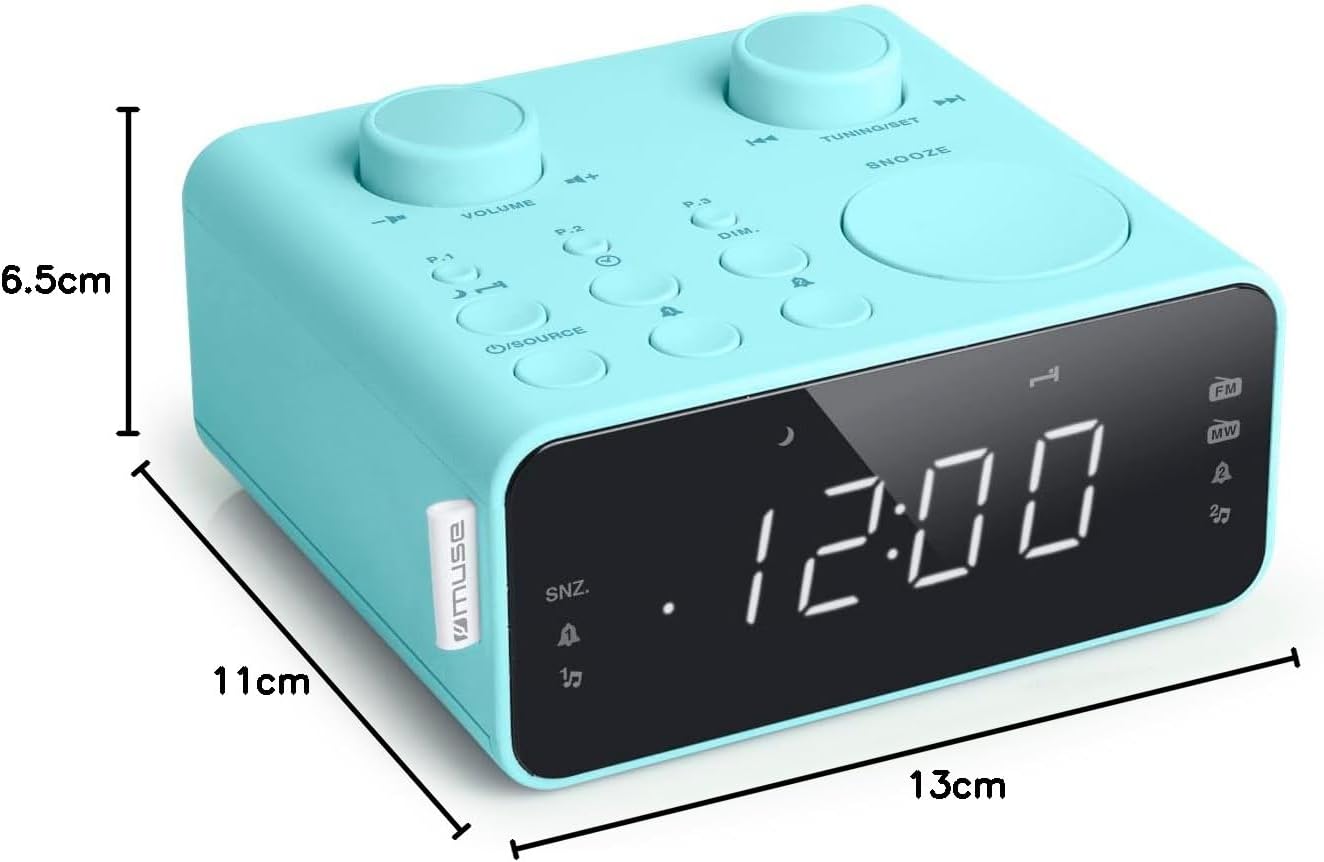
ລາຍລະອຽດຮູບພາບ: This image illustrates the dimensions of the Muse M17CB alarm clock radio. It shows the unit with measurements indicating a length of 13cm, a width of 11cm, and a height of 6.5cm.
ການຮັບປະກັນແລະການສະຫນັບສະຫນູນ
For warranty information and technical support, please refer to the warranty card included with your product or visit the official Muse webເວັບໄຊ. ຮັກສາໃບຮັບເງິນການຊື້ຂອງທ່ານໄວ້ເປັນຫຼັກຖານການຊື້.
The product includes a user manual (as indicated by "Pièces incluses: Manuel du propriétaire").


