1. ບົດແນະນຳ
The Gemini GMU-M100 is a handheld UHF wireless microphone system designed for a variety of audio applications. This system provides wireless freedom, allowing users to move without cable restrictions, and is suitable for performances, presentations, karaoke, and more. The system operates within the 512 to 541.7 MHz frequency range (for the US market) and offers a stable signal transmission.
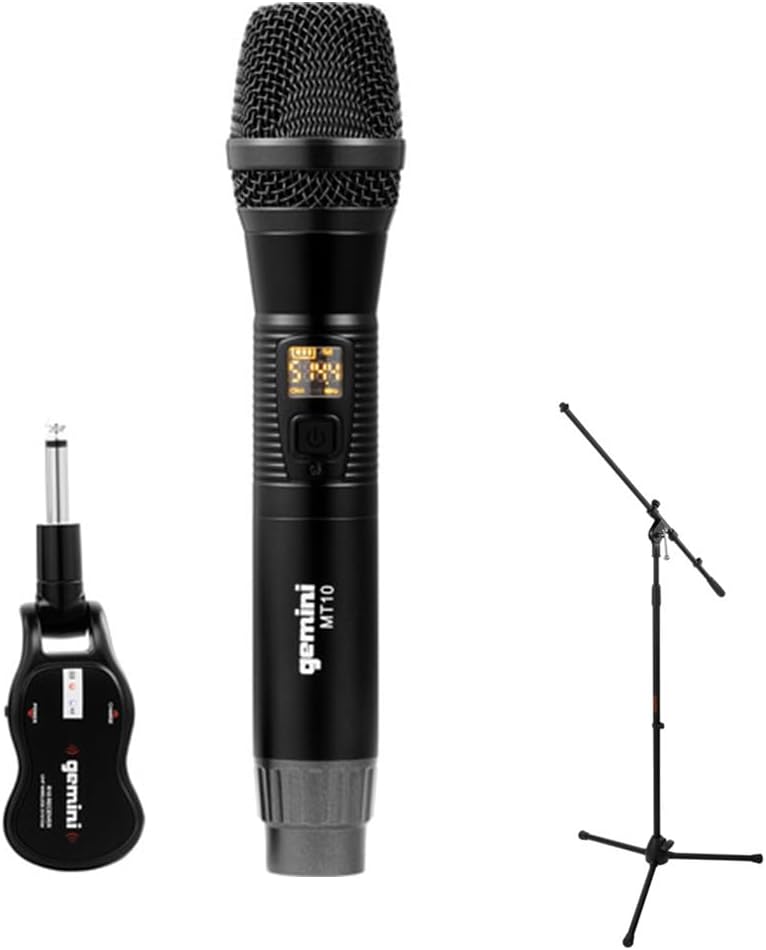
Image 1.1: The Gemini GMU-M100 Handheld UHF Wireless Microphone System, including the handheld microphone, plug-in receiver, and an optional microphone stand.
2. ເນື້ອໃນຊຸດ
ກະລຸນາກວດສອບເນື້ອໃນຂອງກ່ອງເພື່ອຮັບປະກັນວ່າທຸກລາຍການມີຢູ່ ແລະ ຢູ່ໃນສະພາບດີ:
- GMU-M100 Handheld Wireless Microphone
- GMU-M100 Plug-in Wireless Receiver
- Rechargeable Lithium Batteries (pre-installed or included for both units)
- ສາຍສາກ Micro-USB
- ຄູ່ມືຜູ້ໃຊ້ (ເອກະສານນີ້)
Note: Additional accessories such as a microphone stand may be included if purchased as part of a bundle.
3. ຜະລິດຕະພັນເກີນview
3.1 Handheld Microphone (MT10)
The handheld microphone features a dynamic capsule with a cardioid pickup pattern, designed to focus on the sound source while minimizing background noise. It includes an LED screen for displaying battery life and frequency information, and a SET button for frequency adjustment.
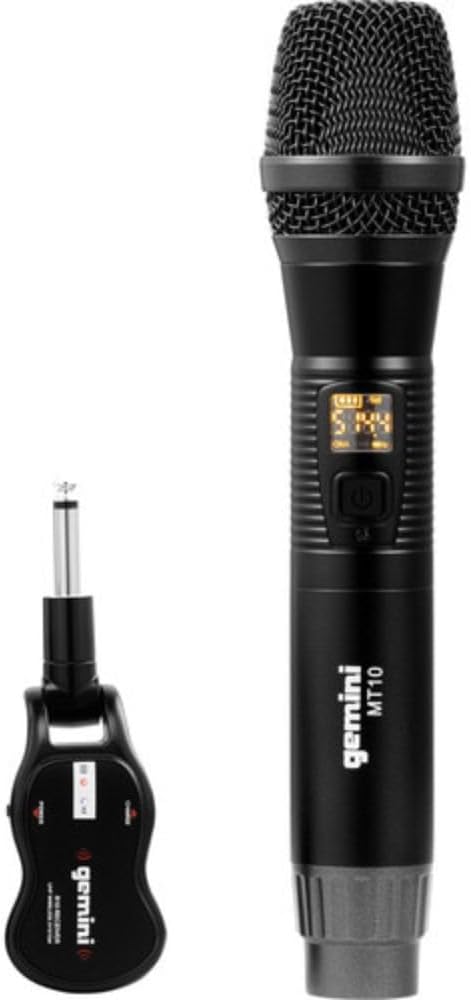
Image 3.1: The GMU-M100 handheld microphone and its compact plug-in receiver.
3.2 Plug-in Receiver (R10)
The compact receiver connects directly to your audio equipment via a standard 1/4" TS plug. It receives the wireless signal from the microphone and outputs it to your PA system, amplifier, or mixer.

ຮູບພາບ 3.2: ມຸມ view highlighting the design of the microphone and receiver.
4. ຕັ້ງຄ່າ
4.1 ການສາກໄຟໜ່ວຍ
Both the microphone and receiver are powered by rechargeable lithium batteries. Before first use, ensure both units are fully charged.
- Locate the Micro-USB charging port on the bottom of the microphone and on the side of the receiver.
- Connect the included Micro-USB cable to the charging port of each unit and plug the other end into a USB power source (e.g., computer USB port, USB wall adapter).
- The LED indicator on each unit will show charging status (refer to the unit's specific LED behavior for full charge indication).

Image 4.1: Close-up of the microphone's Micro-USB charging port (DC-5V).

Image 4.2: The Micro-USB charging cable provided for both units.
4.2 Battery Installation (Microphone)
The microphone uses a user-replaceable 18650 1200mAh battery. If the battery needs replacement or initial installation:
- ຖອດຝາອັດປາກຂຸມລຸ່ມຂອງໄມໂຄຣໂຟນອອກ.
- Insert the 18650 battery, ensuring correct polarity (+/-).
- ຂັນຝາປິດດ້ານລຸ່ມກັບຄືນໃຫ້ແໜ້ນ.

Image 4.3: The microphone with its battery compartment open, revealing the 18650 battery.
4.3 ການເຊື່ອມຕໍ່ຕົວຮັບ
The receiver connects directly to your audio input device.
- Plug the 1/4" TS connector of the receiver into an available 1/4" input jack on your PA speaker, amplifier, mixer, or other audio equipment.
- Ensure the audio equipment is powered off before connecting the receiver.
4.4 ການເປີດ ແລະ ການຈັບຄູ່
The microphone and receiver are designed for automatic pairing.
- Power on your audio equipment.
- Press and hold the power button on the handheld microphone until the LED screen illuminates.
- Press and hold the power button on the plug-in receiver.
- The units will automatically pair. A successful connection is typically indicated by a stable signal icon on the microphone's LED screen.
5. ຄໍາແນະນໍາການດໍາເນີນງານ
5.1 ການຄວບຄຸມປະລິມານ
The output volume can be controlled directly from the handheld microphone using the designated volume buttons (if present) or through the connected audio equipment's input gain/volume controls.
5.2 ການປັບຄວາມຖີ່
If you experience interference, you can change the operating frequency of the microphone system:
- With the microphone powered on, press the SET ປຸ່ມ.
- The microphone will cycle through available UHF frequencies. The receiver will automatically sync to the new frequency.
- Select a clear frequency to ensure optimal performance.
5.3 ຊ່ວງໄຮ້ສາຍ
The GMU-M100 system offers a wireless range of over 164 feet (50 meters) in optimal conditions. Obstacles, other wireless devices, and environmental factors can affect this range.
6. ບໍາລຸງຮັກສາ
6.1 ການດູແລຫມໍ້ໄຟ
- Fully charge batteries before extended storage.
- ຫຼີກເວັ້ນການເປີດເຜີຍແບດເຕີລີ່ກັບອຸນຫະພູມທີ່ຮຸນແຮງ.
- If the microphone will not be used for a long period, remove the 18650 battery.
6.2 ການທໍາຄວາມສະອາດ
- ເຊັດໄມໂຄຣໂຟນ ແລະ ເຄື່ອງຮັບສັນຍານດ້ວຍຜ້າອ່ອນ ແລະ ແຫ້ງ.
- ຢ່າໃຊ້ສານເຄມີທີ່ຮຸນແຮງຫຼືນໍ້າຢາ ທຳ ຄວາມສະອາດທີ່ຫຍາບຄາຍ.
- Avoid moisture contact with electronic components.
7. ການແກ້ໄຂບັນຫາ
| ບັນຫາ | ສາເຫດທີ່ເປັນໄປໄດ້ | ການແກ້ໄຂ |
|---|---|---|
| ບໍ່ມີສຽງອອກ | Microphone or receiver not powered on; low battery; incorrect connection; receiver not paired. | Ensure both units are charged and powered on. Check all cable connections. Verify pairing (power cycle both units). Adjust volume on microphone and audio equipment. |
| ການແຊກແຊງຫຼືສະຖິດ | Operating on a crowded frequency; proximity to other wireless devices; environmental interference. | ກົດ SET button on the microphone to change to a different frequency. Move away from other wireless devices or sources of electromagnetic interference. |
| ໄລຍະໄຮ້ສາຍສັ້ນ | Obstacles between microphone and receiver; low battery; environmental factors. | Ensure a clear line of sight between microphone and receiver. Fully charge batteries. Reduce distance between units. |
| Microphone LED screen off | Microphone is off; battery is depleted. | Press the power button to turn on. Charge the microphone battery. |
8. ຂໍ້ມູນຈໍາເພາະ
| ຄຸນສົມບັດ | ຂໍ້ມູນຈໍາເພາະ |
|---|---|
| ຕົວແບບ | GMU-M100 |
| ຕົວປະກອບແບບຟອມໄມໂຄຣໂຟນ | ລະບົບໄມໂຄຣໂຟນມືຖື |
| ຊ່ວງຄວາມຖີ່ (ສະຫະລັດ) | 512 - 541.7 MHz |
| Range ໄຮ້ສາຍ | ຫຼາຍກວ່າ 164 ຟຸດ (50 ແມັດ) |
| ແຫຼ່ງພະລັງງານ | Rechargeable Lithium Battery (USB Powered) |
| ແບັດເຕີຣີໄມໂຄຣໂຟນ | 18650 1200mAh (user-replaceable) |
| ຕົວເຊື່ອມຕໍ່ຜູ້ຮັບ | 1/4" TS Plug |
| ວັດສະດຸ | ໂລຫະ |
| ຮູບແບບຂົ້ວໂລກ | Unidirectional (Cardioid) |
| ຈໍານວນຊ່ອງ | 16 |
| ນ້ໍາຫນັກລາຍການ | 15.7 ອອນສ໌ (ປະມານ 445g) |
| ຂະໜາດແພັກເກັດ | 13 x 5.6 x 2.6 ນິ້ວ (ປະມານ 33 x 14.2 x 6.6 ຊມ) |
9. ການຮັບປະກັນແລະການສະຫນັບສະຫນູນ
For warranty information, technical support, or service inquiries, please refer to the official Gemini website ຫຼືຕິດຕໍ່ສະຫນັບສະຫນູນລູກຄ້າຂອງເຂົາເຈົ້າໂດຍກົງ. ຮັກສາຫຼັກຖານການຊື້ຂອງທ່ານສໍາລັບການຮຽກຮ້ອງການຮັບປະກັນໃດໆ.
ການຊ່ວຍເຫຼືອລູກຄ້າ Gemini: ກະລຸນາໄປຢ້ຽມຢາມ www.geminisound.com/support ສໍາລັບຂໍ້ມູນການຊ່ວຍເຫຼືອລ້າສຸດ ແລະລາຍລະອຽດການຕິດຕໍ່.


