1. ບົດແນະນຳ
The SCANTECH ID DDG175-01 is a robust 2D barcode scanner designed for various applications including logistics, inventory management, and warehousing. This device is capable of reading a wide range of barcode types, including 1D, 2D, GS1 Databar, and OCR-B characters, even when displayed on LCD screens. Its durable construction ensures reliable performance in demanding environments.
2. ຜະລິດຕະພັນເກີນview
The DDG175-01 scanner features an ergonomic design for comfortable handling and a high-rebound trigger button for efficient operation. Key features include:
- ການສະແກນອະເນກປະສົງ: Supports 1D, 2D, GS1 Databar, and OCR-B character reading.
- Screen Reading Capability: Can read barcodes displayed on labels and digital screens.
- ການກໍ່ສ້າງທົນທານ: IP52 dust and splash protection, with 1.2m drop resistance.
- ການສັ່ນເຕືອນ: Provides tactile confirmation for successful scans.
- ການເຊື່ອມຕໍ່: USB interface for easy integration.
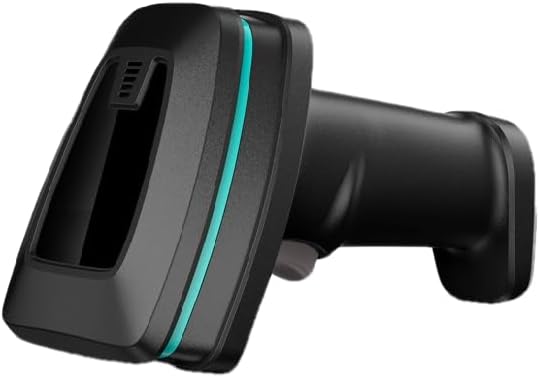
ຮູບພາບ 1: ຂ້າງ view of the SCANTECH ID DDG175-01 Barcode Scanner, showcasing ການອອກແບບທີ່ສະດວກສະບາຍ ແລະ ໜ້າຕ່າງສະແກນ.

Image 2: Two DDG175-01 scanners, illustrating different orientations and the overall form factor.
3. ເນື້ອໃນຊຸດ
ກະລຸນາກວດສອບວ່າລາຍການທັງໝົດມີຢູ່ໃນຊຸດ:
- SCANTECH ID DDG175-01 Barcode Scanner Unit
- ສາຍ USB
- Quick Guide (refer to this manual for detailed instructions)
4. ຕັ້ງຄ່າ
ປະຕິບັດຕາມຂັ້ນຕອນເຫຼົ່ານີ້ເພື່ອຕັ້ງຄ່າເຄື່ອງສະແກນບາໂຄດຂອງທ່ານ:
- Connect the provided USB cable to the scanner's interface port.
- Plug the other end of the USB cable into an available USB port on your computer or host device.
- The scanner is typically plug-and-play and should be recognized by your operating system automatically without requiring additional driver installation.
- Once connected, the scanner will power on and be ready for use.
5. ຄໍາແນະນໍາການດໍາເນີນງານ
To operate the DDG175-01 barcode scanner:
- Hold the scanner comfortably in your hand, ensuring the scanning window is facing the barcode.
- Point the scanner's aimer at the center of the barcode you wish to read.
- Press and hold the trigger button. The scanner will emit a light beam to target the barcode.
- Upon a successful read, the scanner will typically provide an audible beep and/or vibrate (if the vibration function is enabled). The scanned data will be transmitted to your connected device as keyboard input.
- ປ່ອຍປຸ່ມກະຕຸ້ນຫຼັງຈາກການສະແກນສຳເລັດແລ້ວ.
Tips for Optimal Scanning:
- Ensure the barcode is clean and free from obstructions or damage.
- Adjust the distance between the scanner and the barcode. The optimal reading distance can vary depending on the barcode size and type.
- For barcodes on reflective surfaces or screens, try adjusting the scanning angle to minimize glare.
6. ບໍາລຸງຮັກສາ
ການບຳລຸງຮັກສາທີ່ເໝາະສົມຮັບປະກັນອາຍຸການໃຊ້ງານທີ່ຍາວນານ ແລະ ປະສິດທິພາບທີ່ດີທີ່ສຸດຂອງເຄື່ອງສະແກນຂອງທ່ານ:
- ທໍາຄວາມສະອາດ Casing: Use a soft, dry, lint-free cloth to wipe the exterior of the scanner. For stubborn dirt, a slightly damp ສາມາດໃຊ້ຜ້າທີ່ມີນໍ້າຢາທໍາຄວາມສະອາດອ່ອນໆທີ່ບໍ່ຮຸນແຮງໄດ້, ເພື່ອຮັບປະກັນວ່າບໍ່ມີນໍ້າເຂົ້າໄປໃນອຸປະກອນ.
- ການເຮັດຄວາມສະອາດໜ້າຕ່າງການສະແກນ: Gently wipe the scanning window with a soft, lint-free cloth. Avoid using abrasive materials or harsh chemicals that could scratch the surface.
- ການເກັບຮັກສາ: Store the scanner in a clean, dry environment within the recommended storage temperature range of -20°C to 70°C.
- ການຈັດການ: While the scanner is designed to be rugged with 1.2m drop resistance, avoid unnecessary drops or impacts to prevent potential damage.
7. ການແກ້ໄຂບັນຫາ
If you encounter issues with your DDG175-01 scanner, refer to the following common problems and solutions:
- ເຄື່ອງສະແກນບໍ່ໄດ້ອ່ານບາໂຄດ:
- ໃຫ້ແນ່ໃຈວ່າ barcode ສະອາດ, ບໍ່ເສຍຫາຍ, ແລະພິມຢ່າງຊັດເຈນ.
- Verify that the scanner's aimer is centered on the barcode.
- ປັບໄລຍະຫ່າງລະຫວ່າງເຄື່ອງສະແກນ ແລະ ບາໂຄດ.
- ກວດສອບວ່າເຄື່ອງສະແກນຮອງຮັບປະເພດບາໂຄດຫຼືບໍ່ (ອ້າງອີງໃສ່ສະເປັກ).
- No data transmitted to the computer:
- Confirm the USB cable is securely connected to both the scanner and the computer.
- ລອງເຊື່ອມຕໍ່ເຄື່ອງສະແກນກັບພອດ USB ອື່ນໃນຄອມພິວເຕີຂອງທ່ານ.
- Ensure your computer's operating system has recognized the scanner.
- No beep or vibration after scanning:
- This may indicate an unsuccessful scan. Re-attempt scanning, ensuring proper aiming and distance.
- If the scanner has configurable settings for feedback, ensure the beep and vibration functions are enabled.
For further assistance, please contact your vendor or SCANTECH ID support.
8. ຂໍ້ມູນຈໍາເພາະ
Detailed technical specifications for the SCANTECH ID DDG175-01 Barcode Scanner:
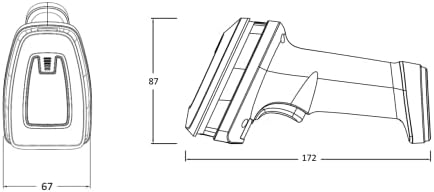
Image 3: Dimensions of the DDG175-01 scanner (Width: 67mm, Height: 87mm, Length: 172mm).

Image 4: Comprehensive table detailing electrical, performance, environmental, and reliability specifications.
| ຄຸນສົມບັດ | ຂໍ້ມູນຈໍາເພາະ |
|---|---|
| ຊື່ຍີ່ຫໍ້ | SCANTECH ID |
| ຕົວແບບ | DDG175-01 |
| ການເຊື່ອມຕໍ່ | ສາຍ USB |
| ນ້ຳໜັກ | 220g |
| ວັດສະດຸ | ຢາງ ABS |
| ຄວາມຍາວສາຍ | 1.8ມ |
| External Dimensions (W x H x L) | 67mm x 87mm x 172mm |
| ການໂຕ້ຕອບ | USB |
| ການສະຫນອງພະລັງງານ | Typ. +5V |
| ກະແສສະແຕນບາຍ | <130 mA |
| ປະຈຸບັນປະຕິບັດງານ | <280 mA |
| ແຫຼ່ງແສງ | White LED, Red (Aimer) |
| ເຊັນເຊີ | 1280(H) x 800(V) ພິກເຊວ |
| ພາກສະຫນາມຂອງ View (FOV) | ລວງນອນ 45°, ຕັ້ງ 36° |
| ອັດຕາການສະແກນ | 60fps |
| Reading Distance (20mil/0.5mm PCS 90% QR) | 450ມມ |
| Print Contrast Ratio (PCS) | 20% |
| Resolution (1D Barcode) | 3mil/0.076mm |
| Resolution (2D Barcode) | 6.67mil/0.2mm |
| Reading Angle (Pitch) | 5° ~ 60° (±5°) |
| Reading Angle (Skew) | 5° ~ 60° (±5°) |
| ແສງແວດລ້ອມອ້ອມຂ້າງ | 100,000 Lux (Max) |
| Dust/Splash Protection | IP52 |
| ອຸນຫະພູມປະຕິບັດການ | 0°C ~ 50°C |
| ອຸນຫະພູມການເກັບຮັກສາ | -20°C ~ 70°C |
| ຄວາມຊຸ່ມຊື່ນ | 20% ~ 95% (ບໍ່ condensing) |
| Trigger Switch Life | 1,000,000 ການດໍາເນີນງານ |
| MTBF (ເວລາສະເລ່ຍລະຫວ່າງຄວາມລົ້ມເຫລວ) | 50,000 ຊົ່ວໂມງ |
| ການຕໍ່ຕ້ານການຫຼຸດລົງ | 1.2m onto concrete |
| ການປ່ອຍອາຍໄຟຟ້າ (ESD) | 8KV (contact), 16KV (air) |
| ບາໂຄດ 1D ທີ່ຮອງຮັບ | UPC-A, UPC-E, EAN-8/JAN-8, EAN-13/JAN-13, ISSN, UCC/EAN-128, Code 39, Code 32, Code 128, Interleaved 25, Industrial 25, Matrix 25, Codabar/NW7, Code 93, Code 11, China Post, MSI, Telepen, GS1 Databar Omnidirectional, GS1 Databar Limited, GS1 Databar Expended |
| ບາໂຄດ 2D ທີ່ຮອງຮັບ | Aztec, Data Matrix, Maxicode, QRCode, PDF417, Micro PDF417, HANXIN, MicroQR Code, Dotcode, Grid Matrix |
| Supported Characters | OCR-B Characters |
9. ການຮັບປະກັນແລະການສະຫນັບສະຫນູນ
For warranty information, please refer to the documentation included with your purchase or visit the official SCANTECH ID webເວັບໄຊ. ຮັກສາໃບຮັບເງິນການຊື້ຂອງທ່ານໄວ້ເປັນຫຼັກຖານການຊື້ສໍາລັບການຮຽກຮ້ອງການຮັບປະກັນໃດໆ.
For technical support, troubleshooting assistance beyond this manual, or service inquiries, please contact your authorized SCANTECH ID dealer or the manufacturer's customer support directly.


