ແນະນຳ
This manual provides detailed instructions for the safe and efficient operation of your CAIWEI X99+ 4K Smart Projector. Please read this manual thoroughly before using the projector and retain it for future reference.
ຂໍ້ມູນຄວາມປອດໄພ
ເພື່ອຮັບປະກັນການດໍາເນີນງານທີ່ປອດໄພແລະປ້ອງກັນຄວາມເສຍຫາຍ, ໃຫ້ສັງເກດເບິ່ງຄວາມລະມັດລະວັງຕໍ່ໄປນີ້:
- Do not place the projector in boxes or cabinets with poor ventilation properties. Ensure adequate airflow around the device to prevent overheating.
- Avoid direct exposure of the projector lens to sunlight.
- ຢ່າປິດຊ່ອງລະບາຍອາກາດ.
- ໃຊ້ພຽງແຕ່ອະແດັບເຕີໄຟທີ່ສະໜອງໃຫ້ກັບໂປເຈັກເຕີເທົ່ານັ້ນ.
- ຮັກສາໂປເຈັກເຕີໃຫ້ຫ່າງຈາກນໍ້າ ຫຼືຂອງແຫຼວອື່ນໆ.
- ຢ່າພະຍາຍາມຖອດປະກອບ ຫຼື ສ້ອມແປງໂປເຈັກເຕີດ້ວຍຕົວທ່ານເອງ. ຕິດຕໍ່ພະນັກງານບໍລິການທີ່ມີຄຸນວຸດທິເພື່ອຂໍຄວາມຊ່ວຍເຫຼືອ.
ເນື້ອໃນຊຸດ
ກວດສອບວ່າລາຍການທັງຫມົດແມ່ນມີຢູ່ໃນຊຸດ:
- CAIWEI X99+ Smart Projector
- ການຄວບຄຸມໄລຍະໄກ
- ສາຍ HDMI
- Power Cable (UK-plug)
- ສາຍ AV
- ຖົງໂປເຈັກເຕີ
- ຄູ່ມືຜູ້ໃຊ້ (ເອກະສານນີ້)
ສິນຄ້າເກີນview
The CAIWEI X99+ is a smart projector designed for versatile entertainment and presentation needs. It features a native 1080P resolution with 4K support, 800 ANSI lumens brightness, and an integrated Android 9.0 operating system.

Figure 1: CAIWEI X99+ Smart Projector front view, showcasing ການອອກແບບທີ່ຫນາແຫນ້ນແລະລັກສະນະທີ່ສໍາຄັນຂອງມັນ.
ຄຸນນະສົມບັດທີ່ສໍາຄັນ:
- ເທັກໂນໂລຍີການສະແດງ: Native 1920x1080P resolution, 4K support, 800 ANSI lumens, 15500:1 contrast ratio.
- ລະບົບປະຕິບັດການອັດສະລິຍະ: Android 9.0 with access to over 6000 authorized apps (Netflix, YouTube, Prime Video, etc.).
- ໜ່ວຍຄວາມຈຳ: 2GB RAM + 16GB ROM.
- ການເຊື່ອມຕໍ່ແບບໄຮ້ສາຍ: Dual 2.4G/5G WiFi, Airplay/DLNA/Miracast support, Bluetooth 5.0.
- ສຽງ: Integrated 10W high-power stereo speakers, Dolby Audio support, 3.5mm audio output.
- ການປັບປຸງຮູບພາບ: HDR10 processing, MEMC technology for smoother motion.
- ການປັບຕົວ: 4D and ±50° vertical/horizontal electronic keystone correction, 40% digital image zoom.
- ຄວາມທົນທານ: Fully sealed optical engine for dust protection and extended lifespan.

Figure 2: Visual representation of the projector's color accuracy, brightness, and image quality in various lighting conditions.
ຕັ້ງຄ່າ
1. ບັນຈຸເຂົ້າຮຽນ
Position the projector on a stable, flat surface or mount it to the ceiling using the four screw holes. Ensure the projector is placed at an appropriate distance from the projection surface to achieve the desired screen size. Maintain adequate ventilation around the unit.
2. ການເຊື່ອມຕໍ່ພະລັງງານ
- ເຊື່ອມຕໍ່ສາຍໄຟເຂົ້າກັບພອດປ້ອນຂໍ້ມູນພະລັງງານຂອງໂປເຈັກເຕີ.
- ສຽບປາຍອື່ນໆຂອງສາຍໄຟເຂົ້າໄປໃນປ່ຽງໄຟຟ້າທີ່ເຫມາະສົມ.
- ກົດປຸ່ມເປີດປິດຢູ່ໂປເຈັກເຕີ ຫຼືຣີໂໝດຄວບຄຸມເພື່ອເປີດອຸປະກອນ.
3. Initial Focus and Keystone Adjustment
Upon initial power-on, the projected image may appear blurry or distorted. Adjust these settings for optimal clarity:
- ຈຸດສຸມ: ໝຸນວົງການໂຟກັສໃສ່ເລນໂປເຈັກເຕີຈົນກວ່າພາບຈະຄົມຊັດ ແລະຊັດເຈນ.
- ການແກ້ໄຂ Keystone: Use the remote control to access the keystone correction settings. The projector supports 4D keystone correction and ±50° vertical/horizontal electronic correction to square the image if the projector is not perfectly perpendicular to the screen.
- ຊູມດິຈິຕອນ: Adjust the image size without moving the projector using the digital zoom function (40% zoom out/in).
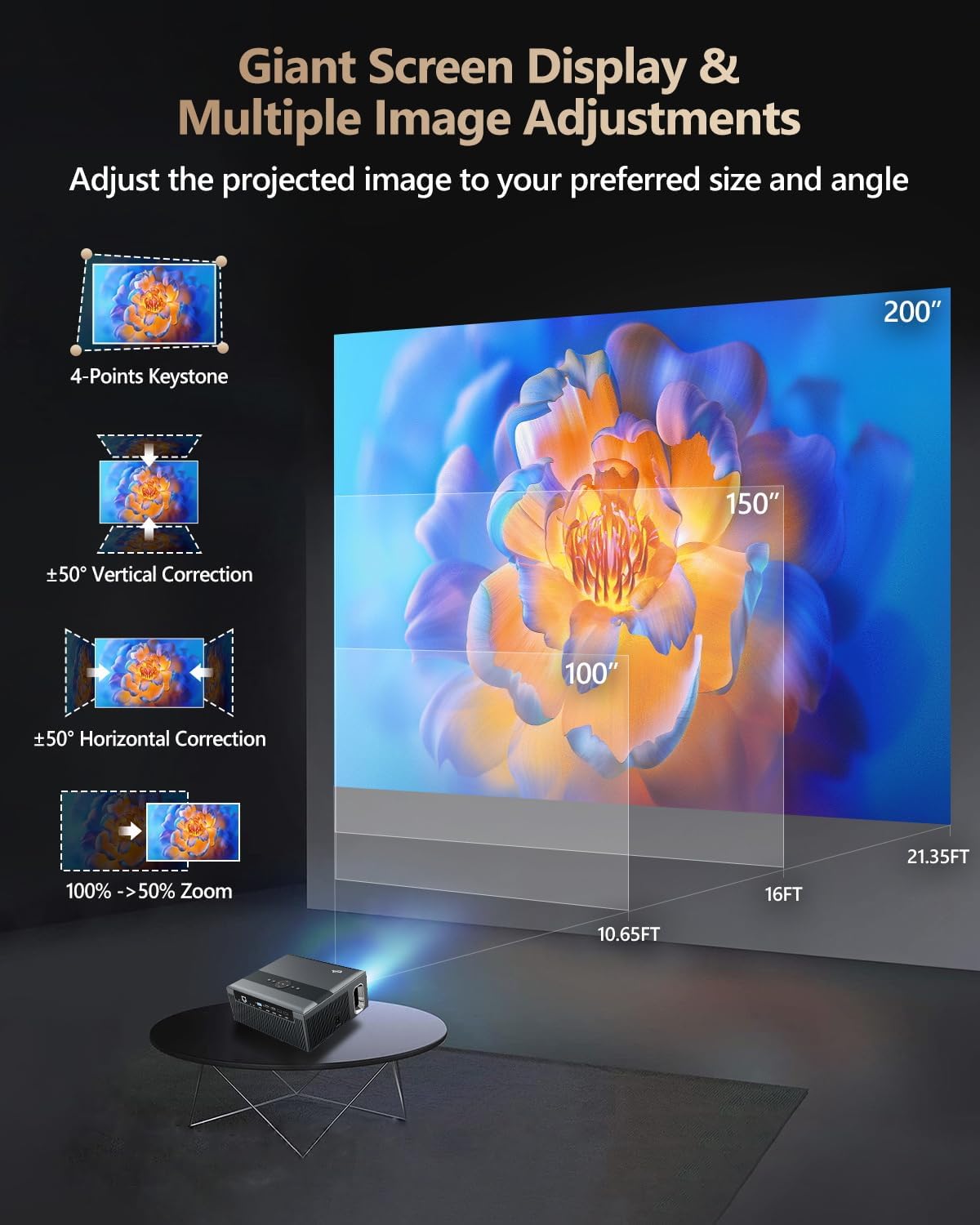
Figure 3: Image adjustment options including keystone correction and digital zoom.
4. ການເຊື່ອມຕໍ່ເຄືອຂ່າຍ
Connect the projector to the internet for access to streaming apps and online content.
- Wi-Fi: Navigate to the network settings in the Android OS. Select your desired 2.4G or 5G Wi-Fi network and enter the password.
- LAN (ອີເທີເນັດ): Connect an Ethernet cable from your router to the RJ45 port on the projector for a wired internet connection.
5. ການຈັບຄູ່ Bluetooth
Pair Bluetooth devices such as external speakers, headphones, mice, keyboards, or gamepads.
- ກວດໃຫ້ແນ່ໃຈວ່າອຸປະກອນ Bluetooth ຢູ່ໃນໂໝດຈັບຄູ່.
- On the projector, go to Bluetooth settings within the Android OS.
- Select the desired device from the list and confirm pairing.

Figure 4: Wireless connectivity for streaming and audio.
ຄໍາແນະນໍາການດໍາເນີນງານ
1. Android TV OS Navigation
Use the remote control to navigate the Android 9.0 interface. The home screen provides access to installed applications, settings, and input sources.

Figure 5: Android TV 9.0 interface with pre-installed and accessible applications.
2. App Installation and Usage
The projector comes with pre-installed apps like Netflix, YouTube, and Prime Video. You can download additional authorized applications from the app store within the Android OS.
- Select an app icon from the home screen to launch it.
- Follow on-screen prompts for login or content selection.
3. Screen Mirroring (Airplay/DLNA/Miracast)
Synchronize your smartphone, tablet, or laptop screen wirelessly to the projector.
- ໃຫ້ແນ່ໃຈວ່າອຸປະກອນຂອງທ່ານ ແລະ ໂປຣເຈັກເຕີໄດ້ເຊື່ອມຕໍ່ກັບເຄືອຂ່າຍ Wi-Fi ດຽວກັນ.
- Select the appropriate mirroring function (Airplay for iOS, Miracast for Android/Windows, DLNA for compatible devices) on the projector's interface.
- Initiate screen mirroring from your source device.
4. ການເຊື່ອມຕໍ່ອຸປະກອນພາຍນອກ
The projector offers multiple ports for connecting various external devices.

Figure 6: Available input and output ports for external devices.
- HDMI: Connect Blu-ray/DVD players, TV sticks, game consoles (PS5), PCs, or laptops using an HDMI cable. Select the corresponding HDMI input from the projector's source menu.
- USB: Insert USB flash drives or hard drives into the USB ports to play media files ໂດຍກົງ.
- VGA: Connect older PCs or laptops using a VGA cable.
- ຂອງ: Use the AV cable to connect devices with composite video and stereo audio outputs.
5. ສຽງອອກ
The projector features built-in 10W stereo speakers. For alternative audio experiences:
- Bluetooth: Pair with external Bluetooth speakers or headphones as described in the Setup section.
- 3.5mm ສຽງອອກ: Connect wired headphones or external speakers using a 3.5mm audio cable.

Figure 7: Projector's integrated audio system.
ບໍາລຸງຮັກສາ
1. ທໍາຄວາມສະອາດ
- ເລນ: ໃຊ້ຜ້າທີ່ອ່ອນນຸ່ມ, ບໍ່ມີເສັ້ນດ່າງທີ່ອອກແບບມາໂດຍສະເພາະສໍາລັບເລນ optical. ຢ່າໃຊ້ເຄື່ອງເຮັດຄວາມສະອາດຂັດ.
- ພາຍນອກ: ເຊັດດ້ານນອກຂອງໂປເຈັກເຕີດ້ວຍຜ້າອ່ອນໆແລະແຫ້ງ. ສຳລັບຮອຍທີ່ຝັງແໜ້ນ, ໃຫ້ເຊັດອອກເລັກນ້ອຍampen ຜ້າທີ່ມີນ້ໍາ.
- ການເປີດລະບາຍອາກາດ: ກວດສອບ ແລະ ຄ່ອຍໆທຳຄວາມສະອາດຊ່ອງລະບາຍອາກາດເປັນໄລຍະເພື່ອຮັບປະກັນວ່າກະແສລົມບໍ່ມີສິ່ງກີດຂວາງ.
2. ປ້ອງກັນຝຸ່ນ
The CAIWEI X99+ features a fully sealed optical engine and an air purifier filter, which significantly reduces dust accumulation and light decay, contributing to a longer service life.

Figure 8: Dust-proof design of the CAIWEI X99+ projector.
3. ການເກັບຮັກສາ
When not in use for extended periods, store the projector in a cool, dry place, preferably in its original packaging or the provided projector bag, to protect it from dust and physical damage.
ການແກ້ໄຂບັນຫາ
ຖ້າເຈົ້າພົບບັນຫາກັບໂປເຈັກເຕີຂອງເຈົ້າ, ໃຫ້ອ້າງອີງເຖິງບັນຫາ ແລະວິທີແກ້ໄຂບັນຫາທົ່ວໄປຕໍ່ໄປນີ້:
| ບັນຫາ | ສາເຫດທີ່ເປັນໄປໄດ້ | ການແກ້ໄຂ |
|---|---|---|
| ບໍ່ມີຮູບພາບຫຼືຂໍ້ຄວາມ "ບໍ່ມີສັນຍານ". | Incorrect input source selected; loose cable connection; device not powered on. |
|
| ຮູບມົວ | Focus not adjusted; keystone correction needed. |
|
| ບໍ່ມີສຽງ | Volume too low; incorrect audio output selected; external device audio issue. |
|
| ບັນຫາການເຊື່ອມຕໍ່ Wi-Fi | ລະຫັດຜ່ານບໍ່ຖືກຕ້ອງ; ຢູ່ນອກຂອບເຂດ; ມີບັນຫາເຣົາເຕີ. |
|
| ການຄວບຄຸມໄລຍະໄກບໍ່ເຮັດວຽກ | ຫມໍ້ໄຟທີ່ຕາຍແລ້ວ; ຂັດຂວາງ; ບັນຫາການຈັບຄູ່. |
|
ຂໍ້ມູນຈໍາເພາະ
| ຍີ່ຫໍ້ | CAIWEI |
| ຕົວແບບ | X99+ |
| ຄວາມລະອຽດການສະແດງ | Native 1920 x 1080 (Supports 4K) |
| ຄວາມສະຫວ່າງ | 800 ANSI Lumens (12000 LED Lumens) |
| ອັດຕາສ່ວນກົງກັນຂ້າມ | 15500:1 |
| ລະບົບປະຕິບັດການ | Android 9.0 |
| ຄວາມຊົງຈໍາ | RAM 2GB + ROM 16GB |
| ເຕັກໂນໂລຊີການເຊື່ອມຕໍ່ | Bluetooth 5.0, Dual-band Wi-Fi (2.4G/5G), USB, HDMI, VGA, AV, LAN (RJ45) |
| ຄຸນນະສົມບັດພິເສດ | Built-In Wi-Fi, Portable, Wireless, HDR10, MEMC, Dolby Audio, Sealed Optical Engine, 4D Keystone Correction, Digital Zoom |
| ສຽງ | 10W High Power Stereo Speakers, 3.5mm Audio Output |
| ຂະໜາດສິນຄ້າ | 10.55 x 9.25 x 4.92 ນິ້ວ |
| ນ້ໍາຫນັກລາຍການ | 7.48 ປອນ |
ການຮັບປະກັນແລະການສະຫນັບສະຫນູນ
For warranty information and technical support, please refer to the warranty card included with your product or visit the official CAIWEI webເວັບໄຊທ໌. ຕິດຕໍ່ບໍລິການລູກຄ້າເພື່ອຂໍຄວາມຊ່ວຍເຫຼືອກ່ຽວກັບບັນຫາຕ່າງໆທີ່ບໍ່ໄດ້ລະບຸໄວ້ໃນຄູ່ມືນີ້.
ຜູ້ຜະລິດ: CAIWEI
Webເວັບໄຊ: CAIWEI Official Store on Amazon


