ແນະນຳ
Thank you for choosing Kinganda Bluetooth Headphones. This user manual provides detailed instructions on how to set up, operate, and maintain your new headphones. Please read this manual thoroughly before use to ensure optimal performance and longevity of your device.
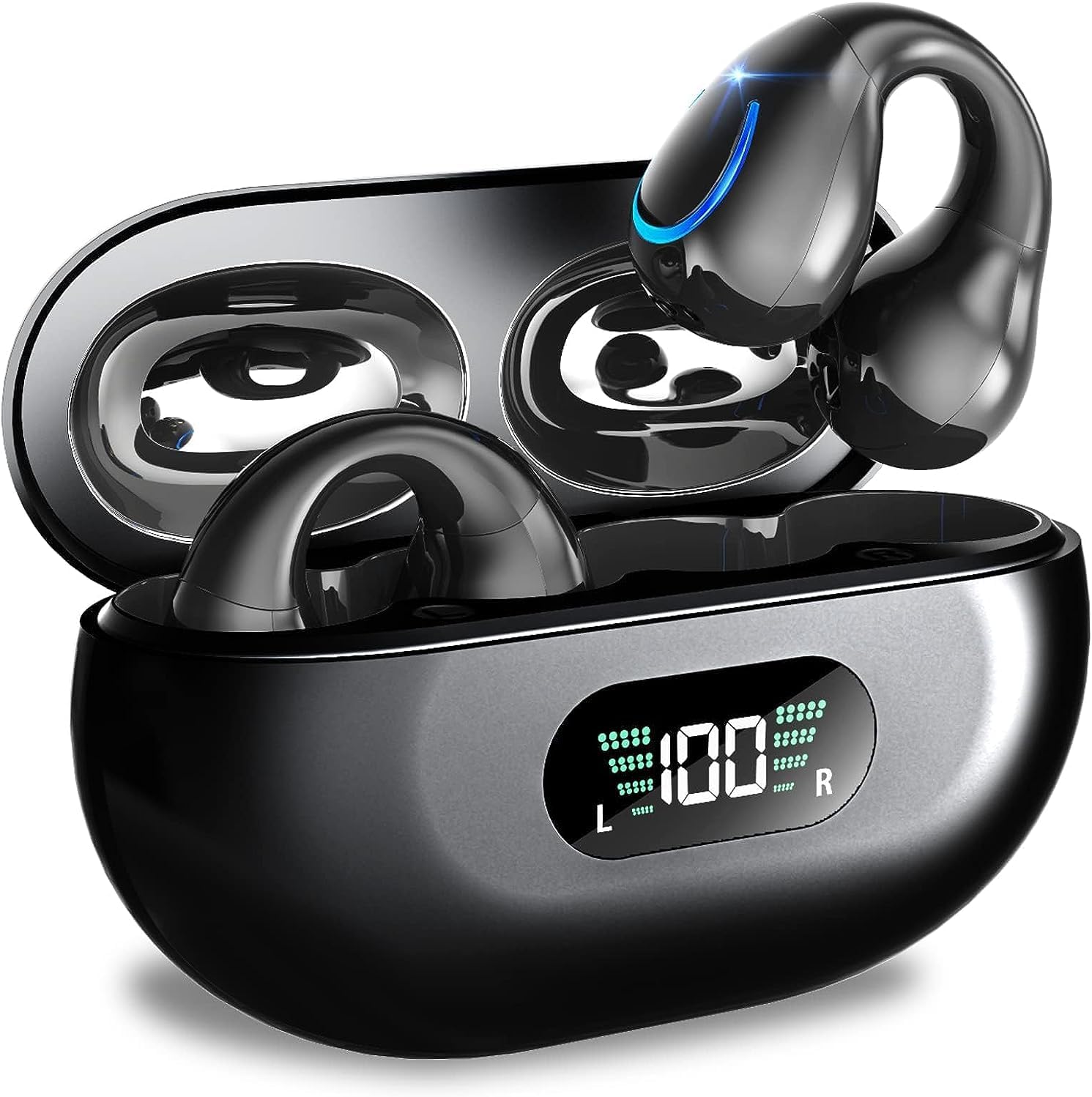
Image: Kinganda Bluetooth Headphones (Model Q71) in their charging case, showcasing the sleek design and LED display.
ແມ່ນຫຍັງຢູ່ໃນກ່ອງ
ກະລຸນາກວດສອບເນື້ອໃນຂອງຊຸດເພື່ອໃຫ້ແນ່ໃຈວ່າລາຍການທັງຫມົດມີຢູ່:
- Wireless Headphones (Left and Right)
- ກໍລະນີສາກໄຟໄຮ້ສາຍ
- ສາຍສາກ USB-C
- ຄູ່ມືຜູ້ໃຊ້

Image: An illustration showing the Kinganda headphones, charging case, USB-C cable, and user manual, representing the package contents.
ຂໍ້ມູນຄວາມປອດໄພ
To ensure safe operation and prevent damage to your headphones, please observe the following safety guidelines:
- Do not swim underwater or take hot baths with the headphones. Exposure to high temperatures or prolonged submersion can cause damage to the internal components.
- Keep the headphones and charging case away from extreme temperatures, direct sunlight, and high humidity.
- ຫຼີກລ້ຽງການຫຼຸດລົງຫຼືການອຸປະກອນທີ່ມີຜົນກະທົບທີ່ເຂັ້ມແຂງ.
- Do not attempt to disassemble, repair, or modify the headphones yourself. Contact qualified service personnel for any repairs.
- ຮັກສາໃຫ້ໄກຈາກເດັກນ້ອຍ ແລະສັດລ້ຽງ.
ສິນຄ້າເກີນview ແລະຄຸນສົມບັດ
The Kinganda Q71 headphones are designed for comfort and high-quality audio, featuring advanced technology for an enhanced listening experience.
ຄຸນນະສົມບັດທີ່ສໍາຄັນ:
- ເຕັກໂນໂລຊີ Bluetooth 5.3 ຂັ້ນສູງ: Ensures a stable, low-latency connection with lower power consumption and faster transmission.
- Comfortable Open Ear Clip Design: Ergonomically designed to fit the contours of the ear, providing a secure and comfortable fit without entering the ear canal. This design allows you to remain aware of your surroundings.
- ເວລາຫຼິ້ນ 36 ຊົ່ວໂມງ: Enjoy up to 6 hours of continuous playback on a single charge, with an additional 30 hours provided by the compact magnetic charging case.
- ຈໍສະແດງຜົນ LED ດິຈິຕອລ: The charging case features an LED screen that clearly shows the remaining power of both the headphones and the charging case.
- ລະດັບກັນນໍ້າ IPX7: Designed to withstand sweat and light rain, making them suitable for various activities.
- ໄດເວີ 10mm: Deliver deep bass and stereo sound for a rich audio experience.
- Built-in ENC Mic: Enhanced Noise Cancellation microphone for clear calls.
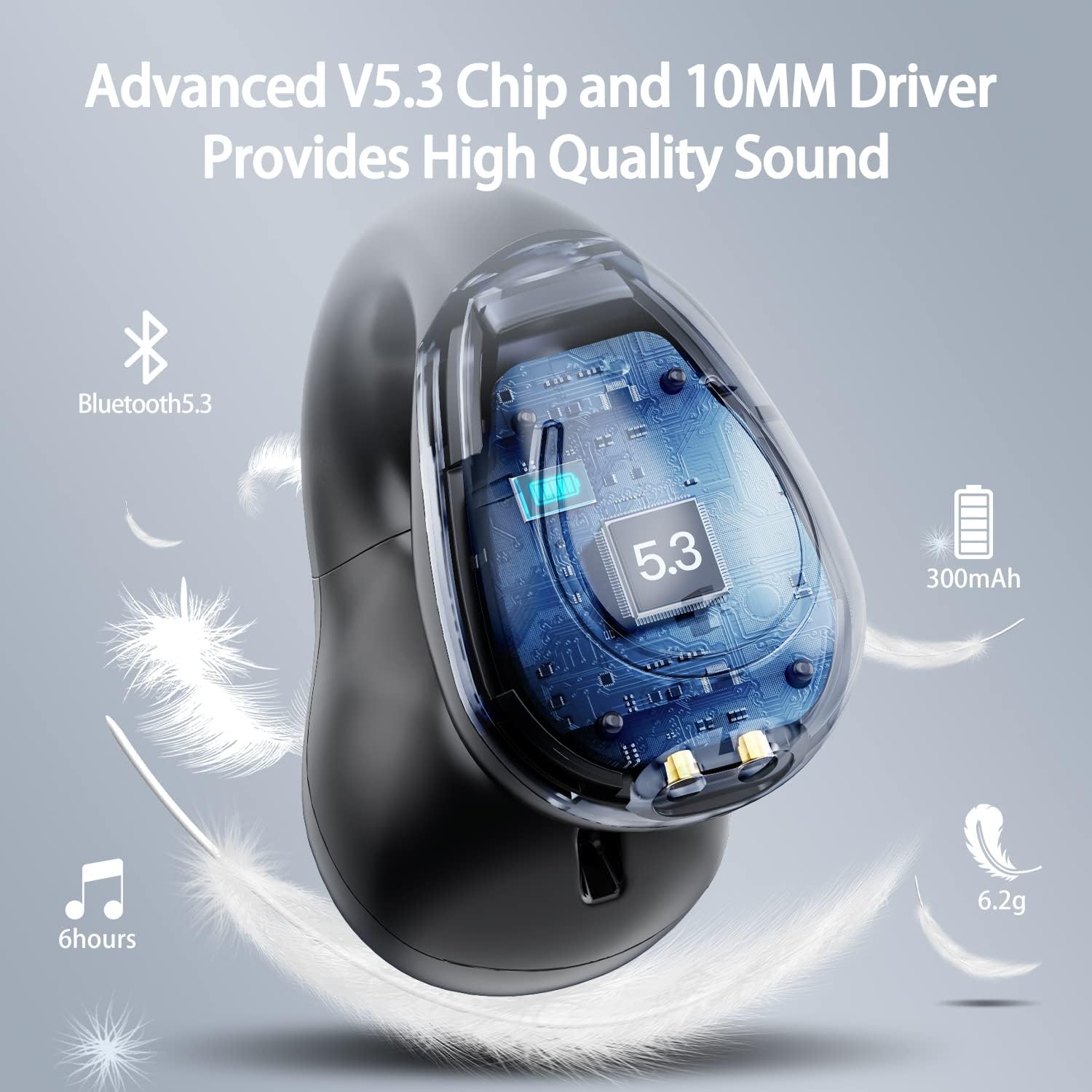
ຮູບພາບ: A cutaway view of the Kinganda earbud, highlighting the advanced V5.3 chip and 10mm driver for high-quality sound.

Image: A person wearing the Kinganda Q71 headphones, demonstrating the comfortable and secure open-ear clip design.
ຕັ້ງຄ່າ
Pairing Your Headphones:
- ສາກຫູຟັງ: Before first use, ensure both the headphones and the charging case are fully charged. Place the earbuds into the charging case and connect the USB-C cable to a power source. The LED display on the case will indicate charging status.
- ເປີດ: ເປີດກ່ອງສາກໄຟ. ຫູຟັງຈະເປີດເຄື່ອງອັດຕະໂນມັດ ແລະເຂົ້າສູ່ໂໝດຈັບຄູ່.
- ເປີດໃຊ້ Bluetooth: ໃນອຸປະກອນຂອງທ່ານ (ໂທລະສັບສະຫຼາດ, ແທັບເລັດ, ແລັບທັອບ, ແລະອື່ນໆ), ໄປທີ່ການຕັ້ງຄ່າ Bluetooth ແລະເປີດ Bluetooth.
- ເລືອກອຸປະກອນ: In the list of available Bluetooth devices, look for "YYK-Q71" and select it to connect.
- ການຢືນຢັນ: Once connected, you will hear an audio prompt from the headphones, and the device will show "YYK-Q71" as connected.
The headphones are widely compatible with iOS, Android, and Windows devices.

Image: An illustration demonstrating the simple one-step pairing process and wide compatibility of the Kinganda Q71 headphones with various devices.
ຄໍາແນະນໍາການດໍາເນີນງານ
ການສາກຫູຟັງ ແລະ ເຄສ:
- ການສາກຫູຟັງ: Place the earbuds back into the charging case. They will automatically begin charging. The LED display on the case will show the charging status of each earbud.
- ຄ່າບໍລິການຄະດີ: Connect the provided USB-C cable to the charging port on the case and the other end to a USB power adapter (not included). The LED display will show the battery percentage of the case.
- A full charge of the earbuds provides approximately 6 hours of playtime. The charging case provides an additional 30 hours of battery life, allowing for multiple recharges on the go.
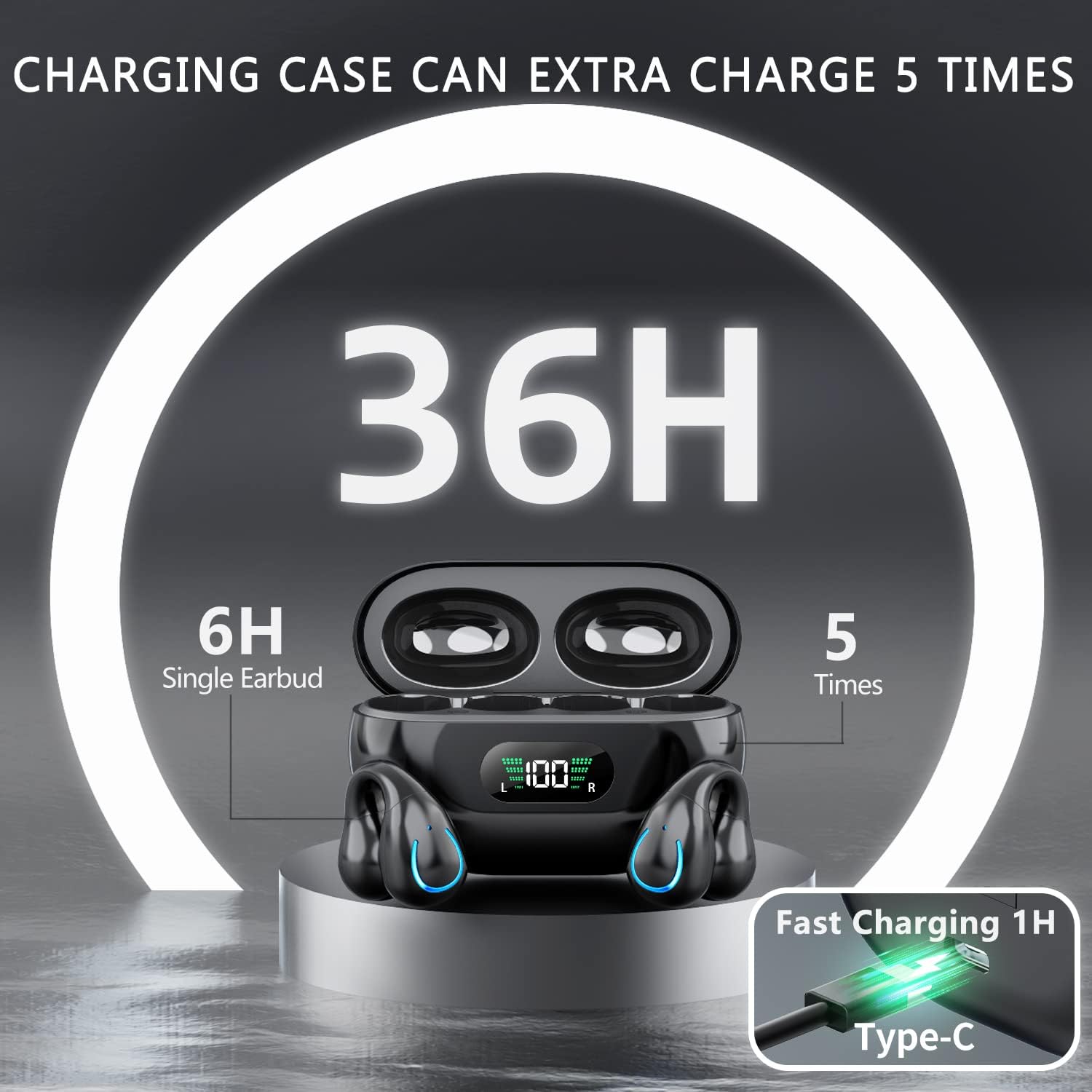
Image: The Kinganda charging case displaying "36H" total playtime, indicating 6 hours from a single earbud charge and 5 additional charges from the case.
ການຄວບຄຸມການສໍາພັດ:
The Kinganda Q71 headphones feature physical buttons for precise control, preventing accidental touches.
| ການປະຕິບັດ | ການຄວບຄຸມ |
|---|---|
| ເປີດ/ປິດ | Automatically On/Off when taken out/put into case. |
| ຕອບ/ວາງສາຍ | Click 1 time (either earbud) |
| ປະຕິເສດການໂທ | ກົດຄ້າງໄວ້ (ຫູຟັງຂ້າງໃດກໍໄດ້) |
| ຫຼິ້ນ/ຢຸດດົນຕີ | Click 1 time (either earbud) |
| ຕິດຕາມຕໍ່ໄປ | Click Right earbud 2 times |
| ເພງກ່ອນໜ້າ | Click Left earbud 2 times |
| ເປີດໃຊ້ Voice Assistant (Siri, Google Assistant) | Click 3 times (either earbud) |

Image: Diagram illustrating the one-button physical controls for the Kinganda headphones, including call management, music playback, and voice assistant activation.
ບໍາລຸງຮັກສາ
Proper maintenance will extend the life of your Kinganda headphones:
- ທໍາຄວາມສະອາດ: ໃຊ້ຜ້າແພທີ່ອ່ອນ, ແຫ້ງ, ບໍ່ມີເສັ້ນດ່າງເພື່ອທຳຄວາມສະອາດຫູຟັງຫູຟັງ ແລະ ກ່ອງສາກ. ຢ່າໃຊ້ສານເຄມີທີ່ຮຸນແຮງ, ສານລະລາຍທໍາຄວາມສະອາດ, ຫຼືຢາຊັກຟອກທີ່ເຂັ້ມແຂງ.
- ການເກັບຮັກສາ: ເມື່ອບໍ່ໄດ້ໃຊ້ງານ, ໃຫ້ເກັບຮັກສາຫູຟັງໄວ້ໃນກ່ອງສາກໄຟເພື່ອປົກປ້ອງພວກມັນຈາກຝຸ່ນ ແລະ ຄວາມເສຍຫາຍ. ເກັບຮັກສາໄວ້ໃນບ່ອນທີ່ເຢັນ ແລະ ແຫ້ງ.
- ຄວາມຕ້ານທານນ້ໍາ: While the headphones are IPX7 waterproof (resistant to sweat and light rain), they are not designed for swimming or submersion in water. Avoid exposure to hot water or steam.
- ການດູແລຫມໍ້ໄຟ: To preserve battery life, charge the headphones regularly, even if not used for extended periods. Avoid fully draining the battery frequently.
ການແກ້ໄຂບັນຫາ
ຖ້າທ່ານພົບບັນຫາໃດໆກັບຫູຟັງຂອງທ່ານ, ກະລຸນາເບິ່ງບັນຫາ ແລະວິທີແກ້ໄຂບັນຫາທົ່ວໄປຕໍ່ໄປນີ້:
ຫູຟັງບໍ່ໄດ້ຈັບຄູ່:
- ກວດໃຫ້ແນ່ໃຈວ່າຫູຟັງຫູຟັງທັງສອງສາກເຕັມແລ້ວ.
- ໃຫ້ແນ່ໃຈວ່າ Bluetooth ຖືກເປີດໃຊ້ຢູ່ໃນອຸປະກອນຂອງທ່ານ.
- Place the earbuds back into the charging case, close the lid, wait a few seconds, then open the lid again to re-enter pairing mode.
- Forget "YYK-Q71" from your device's Bluetooth list and try pairing again.
- Ensure the headphones are within the effective Bluetooth range (typically 10 meters/33 feet) of your device.
ມີຫູຟັງຫູຟັງອັນດຽວເທົ່ານັ້ນທີ່ເຮັດວຽກ:
- Place both earbuds back into the charging case and ensure they are charging correctly.
- Take both earbuds out simultaneously. They should automatically connect to each other.
- If the issue persists, try resetting the headphones (refer to the manufacturer's website or contact support for specific reset instructions if not detailed here).
ຄຸນນະພາບສຽງບໍ່ດີ ຫຼືການຕັດການເຊື່ອມຕໍ່:
- ໃຫ້ແນ່ໃຈວ່າບໍ່ມີສິ່ງກີດຂວາງລະຫວ່າງອຸປະກອນຂອງທ່ານ ແລະ ຫູຟັງ.
- ຍ້າຍໄປໃກ້ອຸປະກອນຂອງທ່ານເພື່ອຫຼຸດຜ່ອນການລົບກວນ.
- ກວດສອບວ່າຫູຟັງສະອາດ ແລະ ບໍ່ມີສິ່ງເສດເຫຼືອຫຼືບໍ່.
- ລອງຫຼິ້ນສຽງຈາກແຫຼ່ງ ຫຼືແອັບພລິເຄຊັນອື່ນ.
ຫູຟັງບໍ່ສາກ:
- Ensure the USB-C charging cable is securely connected to both the case and the power source.
- ລອງໃຊ້ສາຍ USB-C ອື່ນ ຫຼືອະແດັບເຕີໄຟ.
- ເຮັດຄວາມສະອາດແຜ່ນຕິດຕໍ່ການສາກໄຟທັງຫູຟັງຫູຟັງ ແລະພາຍໃນກ່ອງສາກດ້ວຍຜ້າຝ້າຍແຫ້ງ.
ຂໍ້ມູນຈໍາເພາະ
| ຄຸນສົມບັດ | ລາຍລະອຽດ |
|---|---|
| ໝາຍເລກຕົວແບບ | Q71 (YYK-Q71) |
| ຍີ່ຫໍ້ | ຄິງດາ |
| ເຕັກໂນໂລຊີການເຊື່ອມຕໍ່ | ໄຮ້ສາຍ (Bluetooth 5.3) |
| ການຈັດວາງຫູ | ເປີດຫູ |
| ປັດໄຈແບບຟອມ | ເປີດຄລິບ |
| ການຄວບຄຸມສິ່ງລົບກວນ | Sound Isolation (via ENC Mic) |
| ຂະໜາດສິນຄ້າ | 3 x 3 x 3 cm; 6.2 g (per earbud) |
| ໝໍ້ໄຟ | ແບັດເຕີຣີ Lithium Polymer 2 ໜ່ວຍ (ລວມ) |
| ອົງປະກອບລວມ | Wireless Headphones, User Manual, USB-C Charging Cable, Wireless Charging Case |
| ສີ | ດຳ |
| ຜູ້ຜະລິດ | ຄິງດາ |
ການຮັບປະກັນແລະການສະຫນັບສະຫນູນ
Kinganda products are manufactured to the highest quality standards. For any warranty claims or technical support, please contact your original retailer or the manufacturer directly. Please retain your proof of purchase for warranty service.
For further assistance, please refer to the contact information provided with your purchase or visit the official Kinganda webເວັບໄຊ.


