1. ບົດແນະນຳ
This manual provides detailed instructions for the proper use and maintenance of your Arlec Remote SS3136. This remote control is specifically designed to operate the Arlec Wall Fan AWDC001HA, offering convenient and effortless control over your fan's functions. Please read this manual thoroughly before first use to ensure optimal performance and longevity of your device.
2. ຄຸນລັກສະນະຂອງຜະລິດຕະພັນ
- ການຄວບຄຸມງ່າຍ: Utilizes Infrared technology for seamless communication with your Arlec Wall Fan AWDC001HA from up to 10 meters away.
- ພະລັງງານຍາວນານ: Requires 3 alkaline batteries for extended use.
- ການອອກແບບ Sleek: Finished in a sophisticated black color.
- ຄວາມເຂົ້າກັນໄດ້ອະເນກປະສົງ: Designed to control Arlec Wall Fans, specifically model AWDC001HA.
- ການດໍາເນີນງານງ່າຍດາຍ: Features 3 intuitive buttons for easy fan control.
3. ເນື້ອໃນຊຸດ
ກວດສອບວ່າລາຍການທັງຫມົດແມ່ນມີຢູ່ໃນຊຸດ:
- 1 x Arlec Remote SS3136
- 1 x ຕົວຍຶດຕິດຝາ
- 2 x screws mounting
- ປລັກສຽບໃສ່Wallາ 2 ອັນ
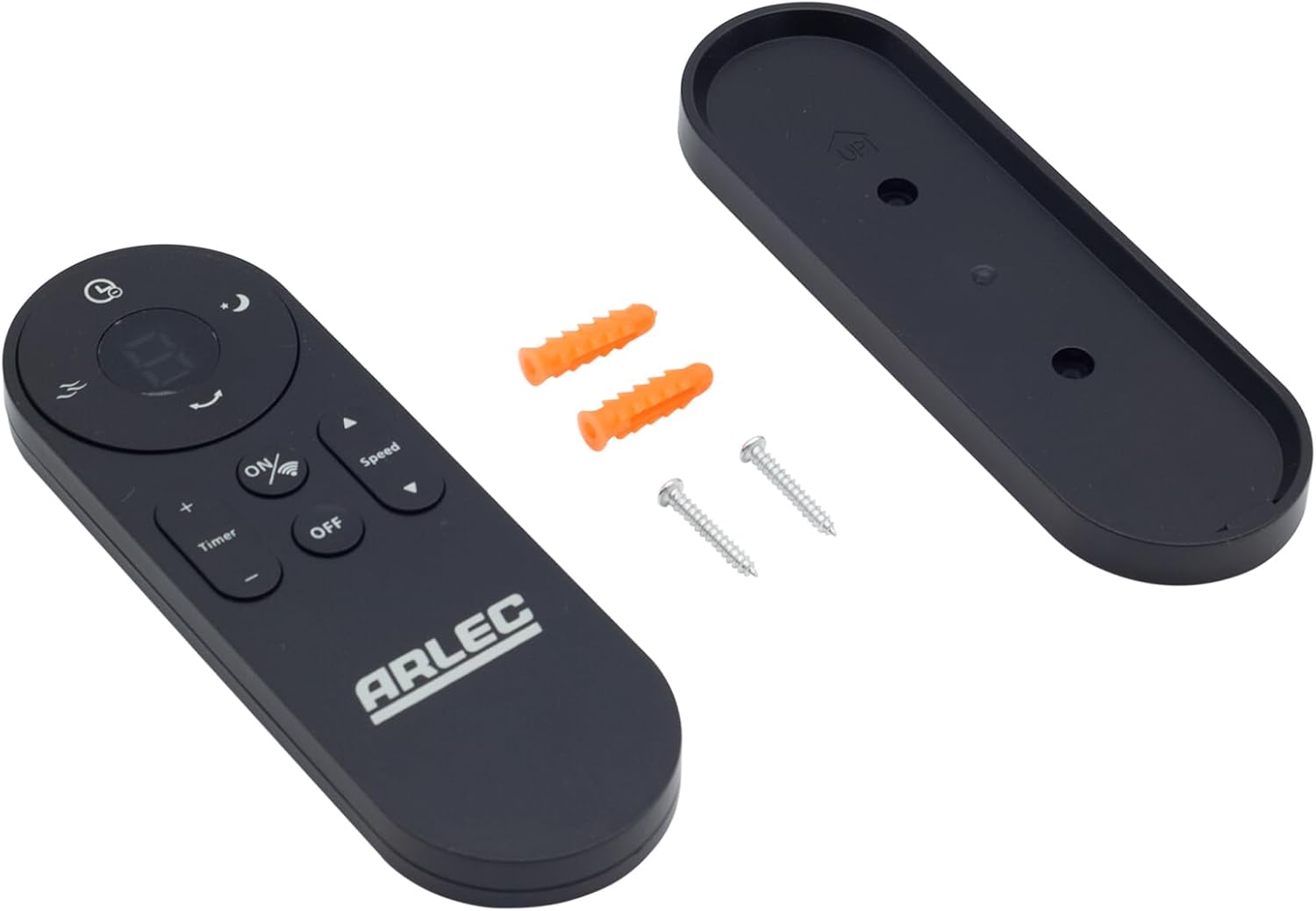
Image: Arlec Remote SS3136 shown with its included wall mount holder, two mounting screws, and two wall plugs, indicating the complete package contents.
4. ຕັ້ງຄ່າ
4.1 ການຕິດຕັ້ງຫມໍ້ໄຟ
- ຊອກຫາຊ່ອງໃສ່ຫມໍ້ໄຟຢູ່ດ້ານຫຼັງຂອງການຄວບຄຸມໄລຍະໄກ.
- ເປີດຝາປິດຊ່ອງໃສ່ຫມໍ້ໄຟ.
- Insert 3 Alkaline batteries (not included) into the compartment, ensuring the correct polarity (+ and -) as indicated inside the compartment. The remote requires 3 Volts (DC).
- ປິດຝາປິດຊ່ອງໃສ່ຫມໍ້ໄຟຢ່າງປອດໄພ.
4.2 ການຕິດຕັ້ງຕິດຝາ (ທາງເລືອກ)
- Choose a suitable location on a wall for the remote holder.
- Mark the positions for the two mounting screws using the holder as a template.
- Drill pilot holes at the marked positions. Insert the wall plugs if drilling into drywall or masonry.
- Secure the wall mount holder to the wall using the provided screws.
- Place the remote control into the installed holder for convenient storage.
5. ຄໍາແນະນໍາການດໍາເນີນງານ
The Arlec Remote SS3136 features a simple 3-button layout for controlling your Arlec Wall Fan AWDC001HA. Ensure there is a clear line of sight between the remote and the fan's infrared receiver for optimal performance.

ຮູບພາບ: ໃກ້ຊິດ view of the Arlec Remote SS3136, highlighting its three main control buttons: ON/OFF, Speed, and Timer.
- ປຸ່ມເປີດ/ປິດ: ກົດປຸ່ມນີ້ເພື່ອເປີດ ຫຼືປິດພັດລົມ.
- ປຸ່ມຄວາມໄວ: Use this button to cycle through the available fan speed settings (e.g., Low, Medium, High).
- ປຸ່ມຈັບເວລາ: Press this button to set or adjust the fan's timer function. Refer to your Arlec Wall Fan AWDC001HA manual for specific timer intervals.
The remote operates using Infrared (IR) technology. Point the remote directly towards the fan's IR receiver. The effective operating range is up to 10 meters (approximately 33 feet).
6. ບໍາລຸງຮັກສາ
- ທໍາຄວາມສະອາດ: ເຊັດການຄວບຄຸມໄລຍະໄກດ້ວຍຜ້າອ່ອນ, ແຫ້ງ. ຢ່າໃຊ້ເຄື່ອງເຮັດຄວາມສະອາດຂັດຫຼືສານລະລາຍ.
- ການປ່ຽນແບັດເຕີຣີ: Replace batteries when the remote's performance degrades or it stops responding. Always replace all 3 batteries at the same time with new alkaline batteries.
- ການເກັບຮັກສາ: ຖ້າບໍ່ໄດ້ໃຊ້ຣີໂໝດເປັນເວລາດົນ, ໃຫ້ຖອດແບັດເຕີຣີອອກເພື່ອປ້ອງກັນການຮົ່ວໄຫຼ. ເກັບຮັກສາໄວ້ໃນບ່ອນທີ່ເຢັນແລະແຫ້ງ.
7. ການແກ້ໄຂບັນຫາ
| ບັນຫາ | ສາເຫດທີ່ເປັນໄປໄດ້ | ການແກ້ໄຂ |
|---|---|---|
| Remote not responding to fan. |
|
|
| ປຸ່ມໜຽວ ຫຼື ບໍ່ຕອບສະໜອງ. | ຝຸ່ນຫຼືສິ່ງເສດເຫຼືອພາຍໃຕ້ປຸ່ມ. | Clean the remote surface with a soft, dry cloth. Avoid liquids. |
8. ຂໍ້ມູນຈໍາເພາະ
| ຄຸນລັກສະນະ | ລາຍລະອຽດ |
|---|---|
| ຕົວແບບ | SS3136 |
| ຜູ້ຜະລິດ | ອາເລັກ |
| ອຸປະກອນທີ່ເຂົ້າກັນໄດ້ | Arlec Wall Fan AWDC001HA |
| ເຕັກໂນໂລຊີການເຊື່ອມຕໍ່ | ອິນຟາເລດ (IR) |
| ຈໍານວນປຸ່ມ | 3 |
| ປະເພດການຄວບຄຸມ | ການຄວບຄຸມປຸ່ມ |
| ປະເພດຫມໍ້ໄຟ | Alkaline (3 required) |
| ສະບັບtage | 3 ໂວນ (DC) |
| ຊ່ວງການດໍາເນີນງານ | ເຖິງ 10 ແມັດ |
9. ການຮັບປະກັນແລະການສະຫນັບສະຫນູນ
For warranty information and technical support, please refer to the documentation provided with your Arlec Wall Fan AWDC001HA or contact Arlec customer service directly. Keep your purchase receipt as proof of purchase.
For further assistance, please visit the manufacturer's official webເວັບໄຊ ຫຼືຕິດຕໍ່ສາຍການຊ່ວຍເຫຼືອລູກຄ້າຂອງເຂົາເຈົ້າ.