ແນະນຳ
ຂອບໃຈສໍາລັບການຊື້asing the eKids iH-B52 Bluetooth Headphones. These headphones are designed for children, offering both wireless Bluetooth connectivity and a wired option for versatile listening. They feature a built-in microphone for communication and a comfortable, adjustable design. This manual provides essential information for safe and effective use, setup, operation, and maintenance of your headphones.

ຮູບພາບ: ທາງຫນ້າ view of the eKids iH-B52 Bluetooth Headphones in white, showcasing ການອອກແບບ sleek ຂອງເຂົາເຈົ້າ.
ຂໍ້ມູນຄວາມປອດໄພ
ກະລຸນາອ່ານ ແລະ ເຂົ້າໃຈຄຳແນະນຳດ້ານຄວາມປອດໄພທັງໝົດກ່ອນທີ່ຈະນຳໃຊ້ຜະລິດຕະພັນນີ້. ການບໍ່ປະຕິບັດຕາມຄຳແນະນຳເຫຼົ່ານີ້ອາດຈະເຮັດໃຫ້ເກີດການບາດເຈັບ ຫຼື ຄວາມເສຍຫາຍ.
- ການຄວບຄຸມລະດັບສຽງ: To prevent hearing damage, do not listen at high volume levels for extended periods. The headphones are designed with reduced volume levels for safe listening.
- ອັນຕະລາຍຕໍ່ເນື່ອງ ຜະລິດຕະພັນນີ້ມີສ່ວນຂະຫນາດນ້ອຍແລະບໍ່ເຫມາະສົມສໍາລັບເດັກນ້ອຍຕ່ໍາກວ່າ 3 ປີ.
- ການເປີດເຜີຍນ້ໍາ: These headphones are not water-resistant. Avoid exposure to water or moisture.
- ທໍາຄວາມສະອາດ: Clean the headphones only with a dry, soft cloth. Do not use liquid cleaners.
- ຄວາມປອດໄພຫມໍ້ໄຟ: Do not attempt to replace the internal battery. Do not expose the battery to excessive heat or fire.
- ການຖິ້ມຂີ້ເຫຍື້ອ: ຖິ້ມຜະລິດຕະພັນ ແລະ ແບດເຕີລີ່ຢ່າງມີຄວາມຮັບຜິດຊອບຕາມລະບຽບການທ້ອງຖິ່ນ.
ເນື້ອໃນຊຸດ
ໃຫ້ແນ່ໃຈວ່າທຸກລາຍການຢູ່ໃນຊຸດ:
- eKids iH-B52 Bluetooth Headphones
- ສາຍສາກ USB
- 3.5mm Audio Cable (Aux Cord)
ສິນຄ້າເກີນview
Familiarize yourself with the headphone's controls and ports:
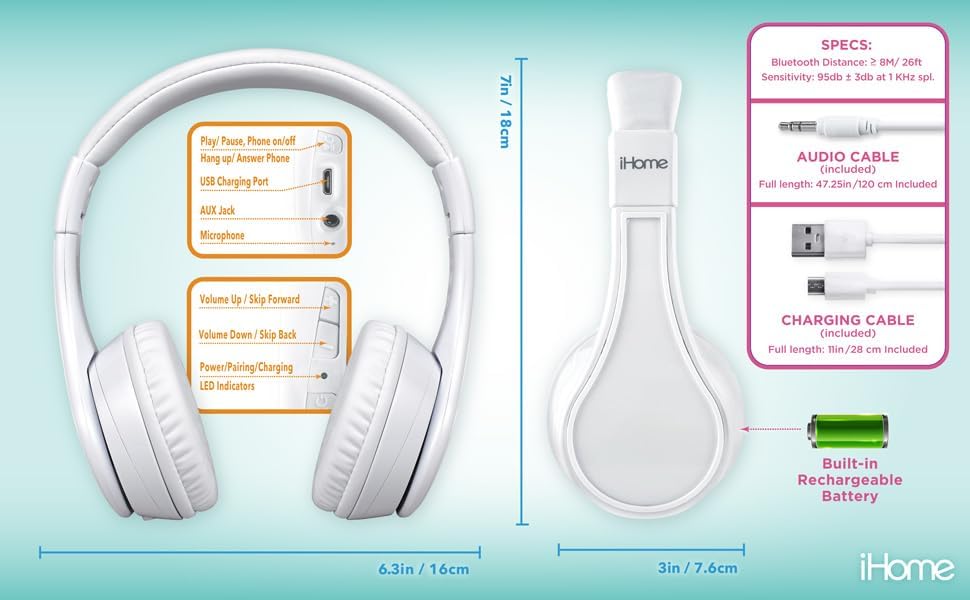
Image: Detailed diagram showing the location of controls, ports (USB charging, AUX jack), microphone, LED indicators, and dimensions of the eKids iH-B52 headphones.
- ປຸ່ມເປີດ/ຫຼິ້ນ/ຢຸດຊົ່ວຄາວ: Used to power the headphones on/off, play/pause audio, and answer/end phone calls.
- Volume Up / Skip Forward Button: ເພີ່ມລະດັບສຽງດ້ວຍການກົດສັ້ນໆ, ຂ້າມໄປຫາເພງຕໍ່ໄປດ້ວຍການກົດຄ້າງໄວ້.
- Volume Down / Skip Back Button: Decreases volume with a short press, skips to the previous track with a long press.
- ພອດສາກໄຟ USB: ສໍາລັບການເຊື່ອມຕໍ່ສາຍສາກ USB.
- Jack AUX: For connecting the 3.5mm audio cable for wired listening.
- ໄມໂຄຣໂຟນ: For hands-free calls and voice commands.
- ຕົວຊີ້ວັດ LED: Display power, pairing, and charging status.
ຕັ້ງຄ່າ
1. ການສາກຫູຟັງ
ກ່ອນການນຳໃຊ້ຄັ້ງທຳອິດ, ໃຫ້ສາກຫູຟັງໃຫ້ເຕັມກ່ອນ.
- Connect the small end of the USB charging cable to the USB Charging Port on the headphones.
- Connect the large end of the USB charging cable to a powered USB port (e.g., computer, USB wall adapter).
- ຕົວຊີ້ວັດ LED ຈະສະຫວ່າງໃນລະຫວ່າງການສາກໄຟ ແລະປິດ ຫຼືປ່ຽນສີເມື່ອສາກເຕັມ.
- ການສາກເຕັມໃຫ້ເວລາຫຼິ້ນ Bluetooth ຢ່າງຕໍ່ເນື່ອງເຖິງ 37 ຊົ່ວໂມງ.
2. ເປີດ / ປິດພະລັງງານ
- ເພື່ອເປີດເຄື່ອງ: Press and hold the Power/Play/Pause button until the LED indicator lights up.
- ປິດເຄື່ອງ: Press and hold the Power/Play/Pause button until the LED indicator turns off.
3. ການຈັບຄູ່ Bluetooth (ໂໝດໄຮ້ສາຍ)
Pair your headphones with a Bluetooth-enabled device.
- ກວດໃຫ້ແນ່ໃຈວ່າປິດຫູຟັງແລ້ວ.
- Press and hold the Power/Play/Pause button for approximately 5-7 seconds until the LED indicator flashes rapidly (usually blue and red), indicating pairing mode.
- ໃນອຸປະກອນຂອງທ່ານ (ໂທລະສັບສະຫຼາດ, ແທັບເລັດ, ຄອມພິວເຕີ), ເປີດ Bluetooth ແລະຊອກຫາອຸປະກອນທີ່ມີຢູ່.
- Select "eKids iH-B52" from the list of found devices.
- Once paired, the LED indicator will flash slowly or turn solid blue.
- ຫູຟັງຈະພະຍາຍາມເຊື່ອມຕໍ່ໃໝ່ກັບອຸປະກອນທີ່ຈັບຄູ່ສຸດທ້າຍໂດຍອັດຕະໂນມັດເມື່ອເປີດເຄື່ອງ.

Image: A child wearing the eKids headphones while looking at a smartphone, illustrating the wireless Bluetooth functionality and key features.
4. ການເຊື່ອມຕໍ່ແບບມີສາຍ (ໂໝດ Aux)
Use the included 3.5mm audio cable for a wired connection, which does not require battery power.
- ເຊື່ອມຕໍ່ປາຍດ້ານໜຶ່ງຂອງສາຍສຽງ 3.5 ມມ ເຂົ້າກັບຊ່ອງສຽບ AUX ເທິງຫູຟັງ.
- Connect the other end of the 3.5mm audio cable to the headphone jack of your audio device.
- ຫູຟັງຈະປ່ຽນເປັນໂໝດມີສາຍໂດຍອັດຕະໂນມັດ.
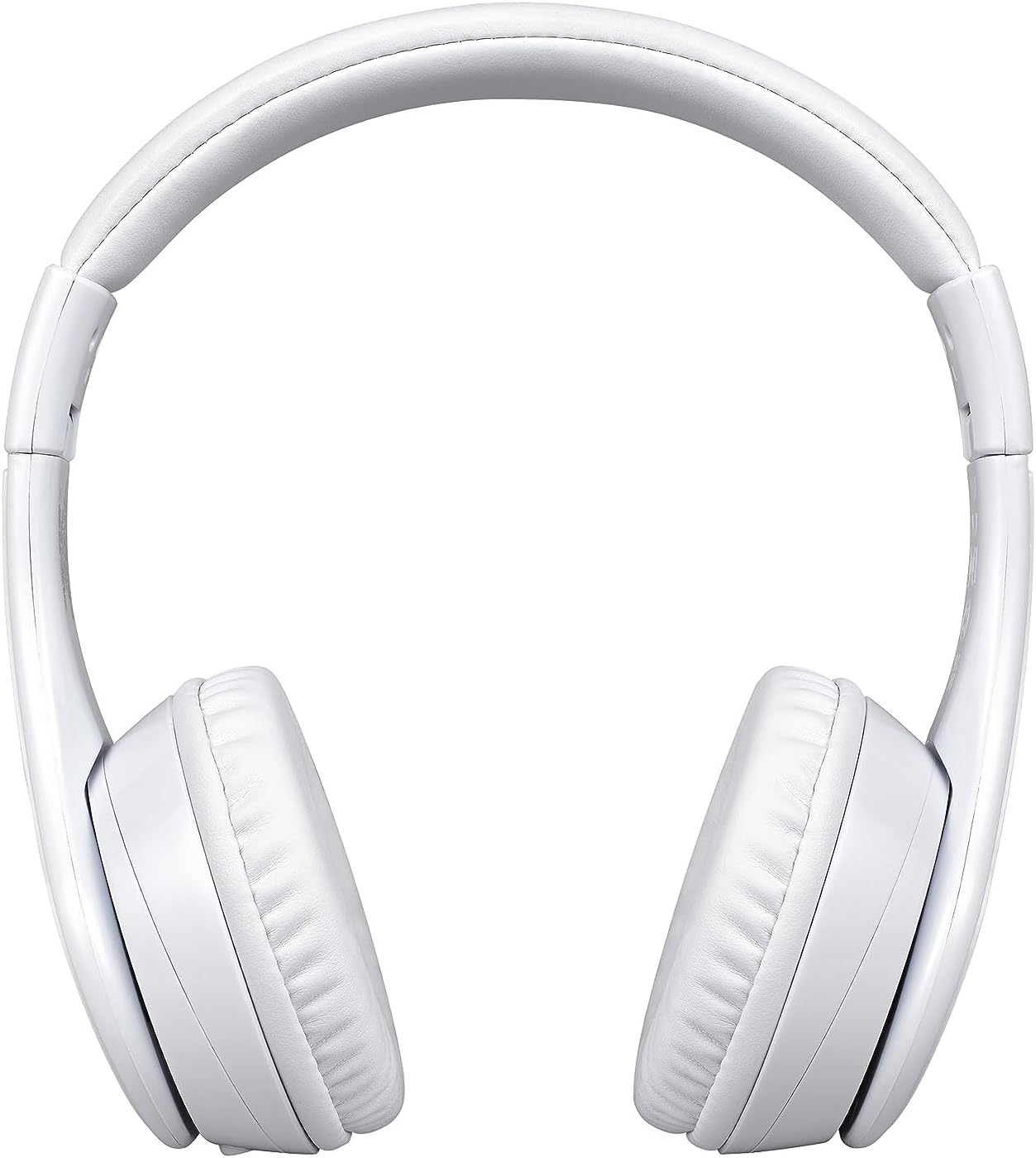
Image: A visual comparison of the wired mode (using a 3.5mm audio cable) and wireless Bluetooth mode, showing how to switch between them.
ປະຕິບັດການ
ການຫຼິ້ນເພງ (ໂໝດ Bluetooth)
- ຫຼິ້ນ/ຢຸດ: ກົດປຸ່ມເປີດ/ຫຼິ້ນ/ຢຸດຊົ່ວຄາວ ໜຶ່ງຄັ້ງ.
- ປະລິມານຂຶ້ນ: ກົດສັ້ນກົດປຸ່ມເພີ່ມສຽງ.
- ປະລິມານລົງ: ກົດສັ້ນ ປຸ່ມປະລິມານລົງ.
- ເພງຕໍ່ໄປ: ກົດປຸ່ມເພີ່ມສຽງຄ້າງໄວ້.
- ຕິດຕາມກ່ອນ ໜ້າ ນີ້: ກົດປຸ່ມ Volume Down ຄ້າງໄວ້.
Phone Calls (Bluetooth Mode)
- ຮັບສາຍ: Press the Power/Play/Pause button once when a call comes in.
- ສິ້ນສຸດການໂທ: Press the Power/Play/Pause button once during a call.
- ປະຕິເສດການໂທ: Press and hold the Power/Play/Pause button for 2 seconds when a call comes in.

Image: An illustration of the eKids headphones alongside various compatible devices, including PCs, smartwatches, gaming devices, mobile phones, tablets, and notebooks.
ບໍາລຸງຮັກສາ
ທໍາຄວາມສະອາດ
- ເຊັດຫູຟັງດ້ວຍຜ້າອ່ອນໆ, ແຫ້ງ, ບໍ່ມີເສັ້ນດ່າງ.
- ຢ່າໃຊ້ເຄື່ອງເຮັດຄວາມສະອາດຂັດ, ເຫຼົ້າ, ຫຼືສານລະລາຍສານເຄມີ.
- ຫຼີກເວັ້ນການໄດ້ຮັບຄວາມຊຸ່ມຊື່ນເຂົ້າໄປໃນຊ່ອງເປີດໃດໆ.
ການເກັບຮັກສາ
- ເກັບຮັກສາຫູຟັງໄວ້ໃນບ່ອນທີ່ເຢັນ, ແຫ້ງ, ຫ່າງຈາກອຸນຫະພູມສູງສຸດ.
- ເມື່ອບໍ່ໄດ້ໃຊ້ງານເປັນເວລາດົນ, ໃຫ້ສາກຫູຟັງເປັນໄລຍະໆເພື່ອຮັກສາສຸຂະພາບຂອງແບັດເຕີຣີ.
- The headphones feature a foldable design for compact storage and travel.
ການແກ້ໄຂບັນຫາ
ຖ້າທ່ານພົບບັນຫາ, ໃຫ້ອ້າງອີງເຖິງຕາຕະລາງຕໍ່ໄປນີ້ສຳລັບບັນຫາ ແລະ ວິທີແກ້ໄຂທົ່ວໄປ:
| ບັນຫາ | ການແກ້ໄຂ |
|---|---|
| ຫູຟັງບໍ່ເປີດ. | ໃຫ້ແນ່ໃຈວ່າຫູຟັງສາກໄຟແລ້ວ. ເຊື່ອມຕໍ່ກັບແຫຼ່ງພະລັງງານໂດຍໃຊ້ສາຍ USB. |
| ບໍ່ສາມາດຈັບຄູ່ຜ່ານ Bluetooth ໄດ້. | Ensure headphones are in pairing mode (LED flashing rapidly). Turn off and on Bluetooth on your device. Move closer to the device. |
| ບໍ່ມີສຽງຢູ່ໃນໂໝດ Bluetooth. | ກວດສອບລະດັບສຽງໃນຫູຟັງທັງສອງ ແລະ ອຸປະກອນທີ່ເຊື່ອມຕໍ່. ໃຫ້ແນ່ໃຈວ່າຫູຟັງຖືກຈັບຄູ່ຢ່າງຖືກຕ້ອງແລ້ວ. |
| ບໍ່ມີສຽງຢູ່ໃນໂໝດມີສາຍ. | Ensure the 3.5mm audio cable is fully inserted into both the headphones and the audio device. Check the audio source device's volume. |
| ໄມໂຄຣໂຟນບໍ່ເຮັດວຽກ. | Ensure headphones are connected via Bluetooth. Check microphone settings on your connected device. |
ຂໍ້ມູນຈໍາເພາະ
| ຄຸນສົມບັດ | ລາຍລະອຽດ |
|---|---|
| ຊື່ຕົວແບບ | iH-B52W |
| ເຕັກໂນໂລຊີການເຊື່ອມຕໍ່ | ໄຮ້ສາຍ (Bluetooth) |
| ເຕັກໂນໂລຊີການສື່ສານໄຮ້ສາຍ | Bluetooth |
| Jack ຫູຟັງ | Jack ຂະ ໜາດ 3.5 ມມ |
| ແບັດເຕີຣີ | ແບັດເຕີຣີ Lithium Ion 1 ອັນ (ລວມ) |
| ເວລາຫຼິ້ນ (Bluetooth) | ສູງສຸດ 37 ຊົ່ວໂມງ |
| ນ້ໍາຫນັກລາຍການ | 8.8 ອອນສ໌ (0.55 ປອນ) |
| ວັດສະດຸ | ພາດສະຕິກ |
| ສີ | ສີຂາວ |
| ຄຸນນະສົມບັດພິເສດ | Detachable Cable, Foldable, Rechargeable Battery |
| ຊ່ວງອາຍຸ (ລາຍລະອຽດ) | ເດັກນ້ອຍ |
| ປະເພດການຄວບຄຸມ | ການຄວບຄຸມສື່ |
| ວິທີການຄວບຄຸມ | ແຕະ |
| impedance | 32 ໂອມ |
| ລະດັບຄວາມຕ້ານທານນ້ໍາ | ບໍ່ທົນທານຕໍ່ນ້ໍາ |
ການຮັບປະກັນແລະການສະຫນັບສະຫນູນ
ສໍາລັບຂໍ້ມູນການຮັບປະກັນ ຫຼືການຊ່ວຍເຫຼືອດ້ານວິຊາການ, ກະລຸນາເບິ່ງເອກະສານທີ່ມາພ້ອມກັບການຊື້ຂອງທ່ານ ຫຼືເຂົ້າໄປທີ່ eKids ຢ່າງເປັນທາງການ webເວັບໄຊ. ຮັກສາຫຼັກຖານການຊື້ຂອງທ່ານສໍາລັບການຮ້ອງຂໍການຮັບປະກັນ.


