ແນະນຳ
ຂອບໃຈສໍາລັບການຊື້asing the JTEMAN Cell Phone Stand with Wireless Bluetooth Speaker and Alarm Clock. This multi-functional device is designed to enhance your daily routine by combining essential features into one compact and stylish unit. It serves as a high-quality Bluetooth speaker, a reliable alarm clock with a clear display, and a stable, adjustable stand for your mobile devices. Please read this manual carefully to ensure proper use and optimal performance.
ຂໍ້ມູນຄວາມປອດໄພ
- ຢ່າເຮັດໃຫ້ອຸປະກອນຢູ່ໃນອຸນຫະພູມທີ່ຮຸນແຮງ, ແສງແດດໂດຍກົງ, ຫຼືຄວາມຊຸ່ມຊື່ນສູງ.
- ຫຼີກລ້ຽງການຫຼຸດລົງຫຼືການອຸປະກອນທີ່ມີຜົນກະທົບທີ່ເຂັ້ມແຂງ.
- Keep away from water and other liquids. If the device comes into contact with liquid, disconnect it immediately and allow it to dry completely before reuse.
- ຢ່າພະຍາຍາມຖອດປະກອບ, ສ້ອມແປງ, ຫຼືແກ້ໄຂອຸປະກອນດ້ວຍຕົວເອງ. ອ້າງອີງການບໍລິການທັງໝົດໃຫ້ກັບບຸກຄະລາກອນທີ່ມີຄຸນວຸດທິ.
- ໃຊ້ພຽງແຕ່ສາຍສາກທີ່ສະໜອງໃຫ້ ຫຼືສາຍທຽບເທົ່າທີ່ໄດ້ຮັບການຮັບຮອງ.
- ຮັກສາໃຫ້ໄກຈາກເດັກນ້ອຍ.
ເນື້ອໃນຊຸດ
- JTEMAN Cell Phone Stand with Wireless Bluetooth Speaker and Alarm Clock (Model: JT-L36)
- ສາຍໄຟແບບ Type-C
- ຄູ່ມືຜູ້ໃຊ້
ສິນຄ້າເກີນview
Familiarize yourself with the components and controls of your JTEMAN device:
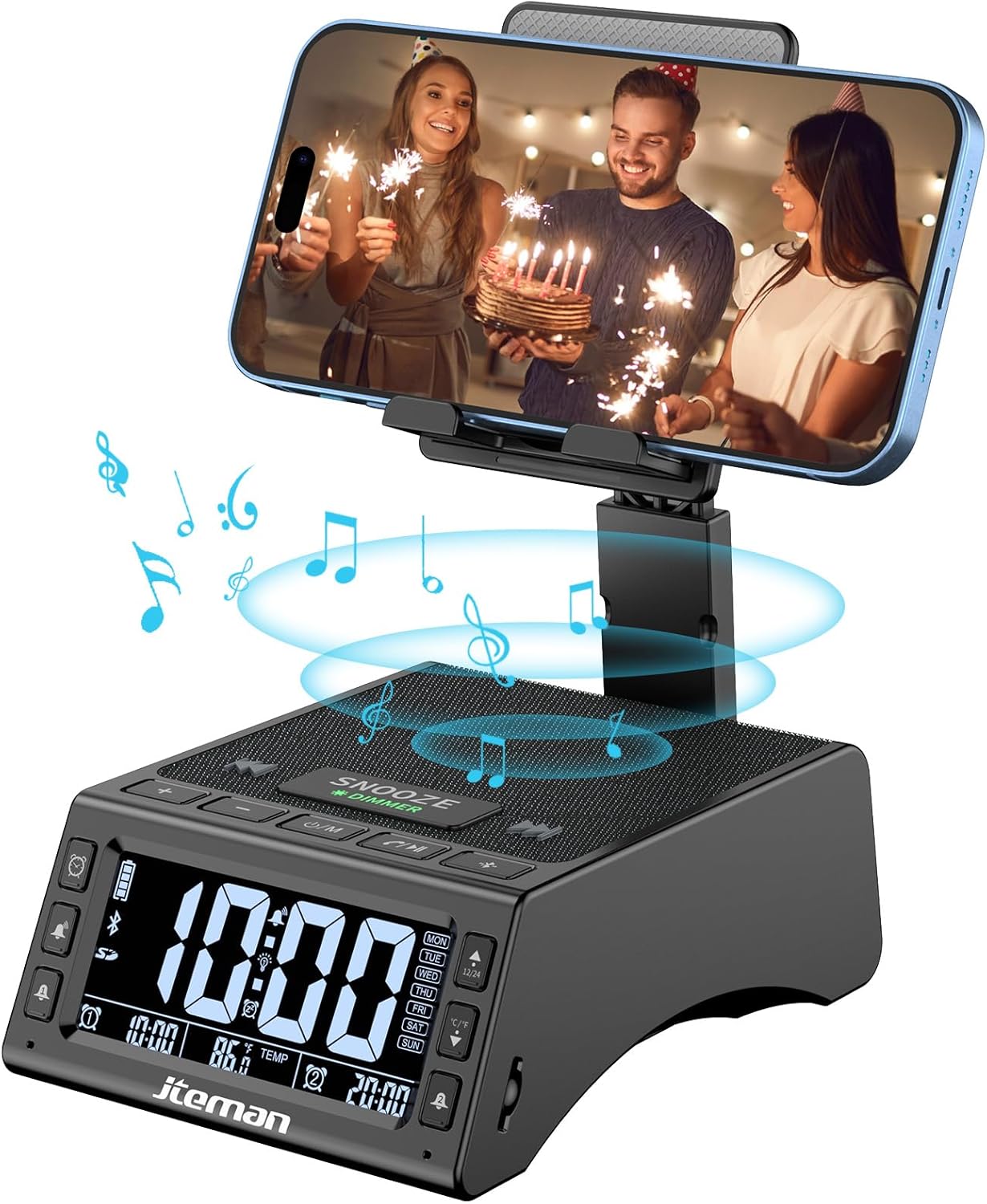
ຮູບ 1: ດ້ານຫນ້າ view of the JTEMAN device with a smartphone on the adjustable stand, displaying the time and temperature.

ຮູບ 2: ເກີນview highlighting the multi-functional aspects including Bluetooth speaker, 12/24H time display, temperature display, foldable phone stand, TF card support, microphone, charging station, dual alarm clocks, and 9 ringtones.
ການຄວບຄຸມ ແລະພອດ:
- ຈໍສະແດງຜົນ: Shows time, temperature, day of the week, and alarm indicators.
- ປຸ່ມ SNOOZE/DIMMER: Press to snooze an active alarm (5 minutes); long press to adjust display brightness (4 levels).
- Power On/Off/Mode Button: Long press to power on/off; short press to cycle through modes (Bluetooth, TF Card).
- Play/Pause/Answer Button: Controls music playback; answers/ends calls.
- ປຸ່ມເພີ່ມສຽງຂຶ້ນ/ຕິດຕາມຕໍ່ໄປ: Increases volume; short press for next track.
- ປະລິມານລົງ/ປຸ່ມຕິດຕາມກ່ອນໜ້າ: Decreases volume; short press for previous track.
- ປຸ່ມຈັບຄູ່ Bluetooth: ເລີ່ມໂໝດການຈັບຄູ່ Bluetooth.
- Alarm 1 & Alarm 2 Buttons: For setting and managing dual alarms.
- ໄມໂຄຣໂຟນ: ສໍາລັບການໂທຫາແບບແຮນຟຣີ.
- ຜອດປ້ອນຂໍ້ມູນ Type-C: ສໍາລັບການສາກໄຟອຸປະກອນ.
- Type-C Output Port: ສໍາລັບການສາກໄຟອຸປະກອນພາຍນອກ.
- ສະລັອດຕິງບັດ TF: For playing music directly from a TF card.
- ຂາຕັ້ງໂທລະສັບທີ່ສາມາດປັບໄດ້: Foldable and extendable for various viewing angles. Features anti-slip pads and base for stability.
ຕັ້ງຄ່າ
1. ການສາກໄຟເບື້ອງຕົ້ນ
- Connect the provided Type-C charging cable to the ຜອດປ້ອນຂໍ້ມູນ Type-C ຢູ່ໃນອຸປະກອນ.
- Connect the other end of the cable to a compatible USB power adapter (not included) and plug it into a wall outlet.
- The display will indicate charging status. Fully charge the device before first use.

Figure 3: The device connected via Type-C for charging itself and an external phone.
2. ກໍານົດເວລາແລະວັນທີ
- Upon powering on, the device should automatically synchronize the current time.
- If manual adjustment is needed, refer to the detailed instructions in the full user manual (included in the package).
- To switch between 12/24 hour format or °F/°C temperature display, use the dedicated buttons or refer to the full manual.

Figure 4: The HD display showing time, temperature, and alarm settings with brightness adjustment levels.
ຄໍາແນະນໍາການດໍາເນີນງານ
1. ການໃຊ້ຂາຕັ້ງໂທລະສັບ
- The integrated phone stand can be pulled up from the back of the unit.
- Adjust the height and angle of the stand to your preferred viewing position. The stand is designed to be stable and strong, accommodating devices from 4.0 to 13 inches.
- When not in use, the stand can be folded back into the unit for a compact form factor.

Figure 5: Demonstrates the adjustable height and angle of the phone stand, along with its anti-slip features and foldable design.
2. ໜ້າທີ່ຂອງລຳໂພງ Bluetooth
- ເປີດ: Long press the Power On/Off/Mode button. The device will enter Bluetooth pairing mode, indicated by a flashing Bluetooth icon on the display.
- ການຈັບຄູ່: On your smartphone or other Bluetooth-enabled device, search for “JT-L36” in the Bluetooth settings and select it to pair. A confirmation sound will indicate successful pairing.
- ການຫຼິ້ນເພງ: Once paired, you can play audio from your device through the JTEMAN speaker. Use the Play/Pause, Volume Up/Next Track, and Volume Down/Previous Track buttons to control playback.
3. ການຫຼິ້ນບັດ TF
- Insert a TF card (not included) with audio files into the TF Card Slot.
- The device will automatically switch to TF Card mode and begin playing music. If not, short press the Mode button to select TF Card mode.
4. Alarm Clock Features
- ການຕັ້ງຄ່າໂມງປຸກ: Use the Alarm 1 and Alarm 2 buttons to set up to two independent alarms. Follow the on-screen prompts to set the time and alarm frequency (e.g., Mon-Fri, Sat-Sun, Mon-Sun).
- ຟັງຊັນ Snooze: When an alarm sounds, press the large SNOOZE button on top to activate a 5-minute snooze.
- ການປັບຄວາມສະຫວ່າງ: Long press the SNOOZE/DIMMER button to cycle through four levels of display brightness, including an off setting for minimal light disturbance.
5. ໂທຟຣີ
- When a call comes in while your phone is connected via Bluetooth, press the Play/Pause/Answer button to answer the call.
- ໃຊ້ໄມໂຄຣໂຟນໃນຕົວເພື່ອການສື່ສານທີ່ຊັດເຈນ.
- Press the Play/Pause/Answer button again to end the call.
6. ກຳລັງສາກອຸປະກອນພາຍນອກ
- Connect your external device (e.g., smartphone, tablet) to the Type-C Output Port on the JTEMAN unit using a compatible charging cable.
- The JTEMAN device will provide power to charge your external device.
ບໍາລຸງຮັກສາ
- ເຮັດຄວາມສະອາດອຸປະກອນດ້ວຍຜ້າອ່ອນໆ, ແຫ້ງ. ຢ່າໃຊ້ເຄື່ອງເຮັດຄວາມສະອາດຂັດຫຼືສານລະລາຍ.
- ໃຫ້ແນ່ໃຈວ່າພອດທັງໝົດບໍ່ມີຝຸ່ນ ແລະ ສິ່ງເສດເຫຼືອ.
- ເກັບຮັກສາອຸປະກອນໄວ້ໃນບ່ອນທີ່ເຢັນ, ແຫ້ງ, ເມື່ອບໍ່ໄດ້ໃຊ້ເປັນເວລາດົນນານ.
ການແກ້ໄຂບັນຫາ
| ບັນຫາ | ສາເຫດທີ່ເປັນໄປໄດ້ | ການແກ້ໄຂ |
|---|---|---|
| ອຸປະກອນບໍ່ເປີດ. | Low battery; power adapter/cable issue. | Charge the device fully. Check power adapter and cable connections. |
| ບໍ່ມີສຽງຈາກລຳໂພງ. | Volume too low; not paired correctly; wrong mode. | Increase volume on both device and connected phone. Re-pair Bluetooth. Ensure correct mode (Bluetooth/TF Card). |
| ການຈັບຄູ່ Bluetooth ລົ້ມເຫລວ. | ອຸປະກອນຢູ່ໄກເກີນໄປ; ໂໝດຈັບຄູ່ບໍ່ໄດ້ເປີດໃຊ້ງານ; ການລົບກວນ. | Ensure device is in pairing mode and within 10 meters. Turn off other Bluetooth devices. Try restarting both devices. |
| ໂມງປຸກບໍ່ມີສຽງ. | Alarm not set; alarm volume too low; alarm disabled. | Verify alarm settings and ensure it's enabled. Increase alarm volume. |
| Phone not charging via output port. | Cable issue; device battery low; incompatible device. | Ensure the JTEMAN device is charged. Try a different charging cable. Confirm your phone is compatible with Type-C charging. |
ຂໍ້ມູນຈໍາເພາະ
| ຍີ່ຫໍ້ | JTEMAN |
| ໝາຍເລກຕົວແບບ | JT-L36 |
| ຂະໜາດສິນຄ້າ | 6.1 x 4.3 x 2.1 ນິ້ວ |
| ນ້ໍາຫນັກລາຍການ | 1.26 ປອນ |
| ສີ | ດຳ |
| ການໂຕ້ຕອບຮາດແວ | USB 2.0 |
| ພອດ USB ທັງໝົດ | 2 (Type-C Input, Type-C Output) |
| ຄວາມເຂົ້າກັນໄດ້ | 4.0-13 inch devices |
ການຮັບປະກັນແລະການສະຫນັບສະຫນູນ
JTEMAN products are manufactured with high standards of quality. For specific warranty information, please refer to the warranty card included in your product packaging or visit the official JTEMAN website. If you encounter any issues or have questions not covered in this manual, please contact JTEMAN customer support through the contact information provided on the product packaging or webເວັບໄຊ.
ກະລຸນາຮັກສາຫຼັກຖານການຊື້ຂອງທ່ານສໍາລັບການຮຽກຮ້ອງການຮັບປະກັນ.


