1. ບົດແນະນຳ
This user manual provides detailed instructions for the installation, operation, and maintenance of your Xprinter XP-D200N Thermal Receipt Printer. The XP-D200N is a high-speed thermal printer designed for reliable and efficient receipt printing in various business environments. Please read this manual thoroughly before using the printer to ensure proper functionality and to prevent damage.
2. ຂໍ້ມູນຄວາມປອດໄພ
To ensure safe operation and prevent damage to the printer or injury to yourself, please observe the following safety precautions:
- Always use the provided power adapter. Using an incorrect adapter may damage the printer and void the warranty.
- Do not expose the printer to water, moisture, or extreme temperatures.
- ຫຼີກເວັ້ນການວາງເຄື່ອງພິມຢູ່ໃນແສງແດດໂດຍກົງ ຫຼືຢູ່ໃກ້ກັບແຫຼ່ງຄວາມຮ້ອນ.
- Do not attempt to disassemble or repair the printer yourself. Refer all servicing to qualified personnel.
- ໃຫ້ແນ່ໃຈວ່າເຄື່ອງພິມຖືກວາງຢູ່ເທິງພື້ນຜິວທີ່ມີລະດັບຄວາມຫມັ້ນຄົງ.
- Keep the printer away from dust and debris to maintain optimal performance.
3. ເນື້ອໃນຊຸດ
Please check the contents of your package. If any items are missing or damaged, contact your vendor immediately.
- Xprinter XP-D200N Thermal Receipt Printer
- Power Adapter
- ສາຍໄຟ
- ສາຍ USB
- Thermal Paper Roll (starter)
- ຄູ່ມືຜູ້ໃຊ້ (ເອກະສານນີ້)
4. ຜະລິດຕະພັນເກີນview
The Xprinter XP-D200N is a compact and efficient thermal receipt printer. Below are images illustrating its key components and design.
ຮູບທີ 4.1: ຂ້າງຫນ້າ view of the Xprinter XP-D200N Thermal Receipt Printer. This image shows the sleek, black casing and the paper output slot.
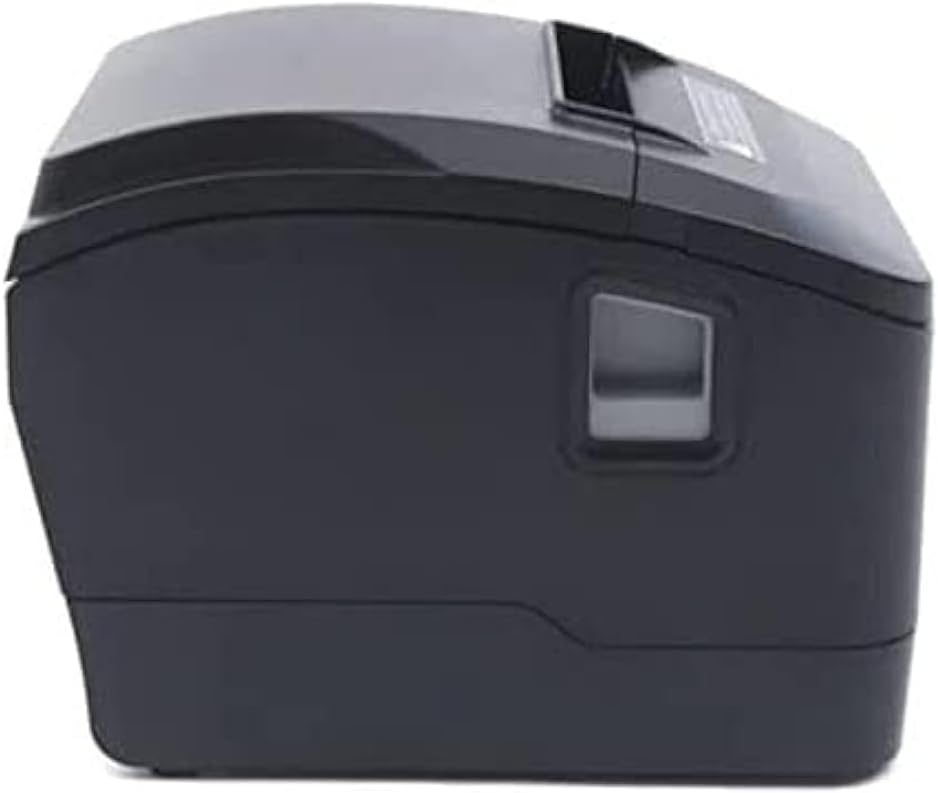
ຮູບທີ 4.2: ຂ້າງ view of the Xprinter XP-D200N Thermal Receipt Printer. This perspective highlights the compact design and the power switch on the right side.

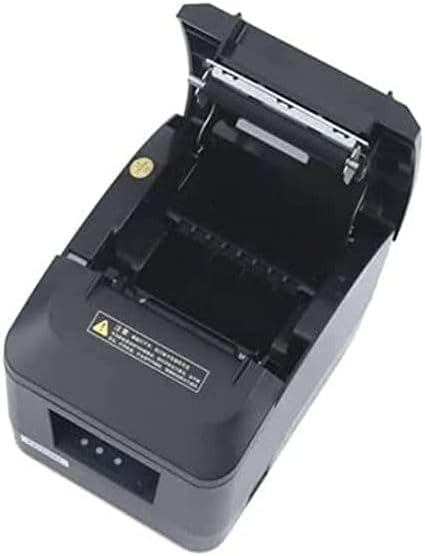
ຮູບທີ 4.3: ເທິງ view of the Xprinter XP-D200N Thermal Receipt Printer with the cover open, revealing the thermal paper roll compartment and the print head mechanism. This view is essential for paper loading and maintenance.
5. ຕັ້ງຄ່າ
5.1 ການເຊື່ອມຕໍ່ພະລັງງານ
- Ensure the printer's power switch is in the OFF position.
- Connect the power adapter to the power input port on the back of the printer.
- Plug the power cord into the power adapter, then into a standard electrical outlet.
5.2 ເຊື່ອມຕໍ່ກັບຄອມພິວເຕີ້
The XP-D200N supports both USB and LAN connectivity.
ການເຊື່ອມຕໍ່ USB:
- Connect one end of the USB cable to the USB port on the printer.
- ເຊື່ອມຕໍ່ສົ້ນອື່ນຂອງສາຍ USB ກັບພອດ USB ທີ່ມີຢູ່ໃນຄອມພິວເຕີຂອງທ່ານ.
ການເຊື່ອມຕໍ່ LAN (Ethernet):
- Connect an Ethernet cable to the LAN port on the printer.
- ເຊື່ອມຕໍ່ປາຍອື່ນຂອງສາຍອີເທີເນັດກັບເຣົາເຕີເຄືອຂ່າຍຂອງທ່ານ ຫຼືສະວິດ.
- Refer to the printer's advanced settings or driver utility for network configuration (e.g., IP address settings).
5.3 ການໂຫຼດເຈ້ຍຄວາມຮ້ອນ
- Open the printer cover by pressing the release button or lifting the cover latch. (Refer to Figure 4.3).
- Insert the thermal paper roll into the compartment with the paper feeding from the bottom and the leading edge extending towards the front of the printer. Ensure the paper is aligned correctly.
- ດຶງເຈ້ຍຈຳນວນໜ້ອຍໜຶ່ງອອກມາຜ່ານເຄື່ອງຕັດ.
- ປິດຝາເຄື່ອງພິມໃຫ້ແໜ້ນ ຈົນກວ່າມັນຈະກົດໃສ່ບ່ອນ.
5.4 ການຕິດຕັ້ງໄດເວີ
After connecting the printer, you will need to install the appropriate drivers on your computer. Drivers are typically provided on a CD included with the printer or can be downloaded from the official Xprinter webເວັບໄຊ. ປະຕິບັດຕາມຄໍາແນະນໍາໃນຫນ້າຈໍໃນລະຫວ່າງການຕິດຕັ້ງ.
6. ຄໍາແນະນໍາການດໍາເນີນງານ
6.1 ການເປີດ/ປິດ
- To power on: Ensure the power cord is connected, then flip the power switch to the ON position. The indicator light will illuminate.
- To power off: Flip the power switch to the OFF position.
6.2 ການພິມພື້ນຖານ
Once the printer is connected and drivers are installed, you can print receipts from your point-of-sale (POS) software or other applications. Select the Xprinter XP-D200N as your default printer in your application's print settings.
6.3 ຕົວຊີ້ວັດສະຖານະ
The printer features indicator lights (usually on the front panel) that provide information about its status:
- ຕົວຊີ້ບອກພະລັງງານ: Solid light indicates the printer is powered on.
- ຕົວຊີ້ບອກຄວາມຜິດພາດ: Flashing or solid light indicates an error (e.g., paper out, cover open, print head overheat). Refer to the troubleshooting section.
- Paper Out Indicator: ຈະສະຫວ່າງຂຶ້ນເມື່ອມ້ວນເຈ້ຍຫວ່າງເປົ່າ ຫຼື ເກືອບໝົດ.
7. ບໍາລຸງຮັກສາ
7.1 ການເຮັດຄວາມສະອາດຫົວພິມ
ການເຮັດຄວາມສະອາດຫົວພິມເປັນປະຈຳຮັບປະກັນຄຸນນະພາບການພິມທີ່ດີທີ່ສຸດ ແລະ ຍືດອາຍຸການໃຊ້ງານຂອງເຄື່ອງພິມ.
- ປິດເຄື່ອງພິມແລະຕັດສາຍໄຟ.
- ເປີດຝາປິດເຄື່ອງພິມ.
- ໃຊ້ຜ້າຝ້າຍເບົາໆ ງampened with isopropyl alcohol (70% or higher) to gently wipe the thermal print head surface. Avoid touching the print head with bare hands.
- Allow the print head to dry completely before closing the cover and reconnecting power (approximately 2-3 minutes).
7.2 ການທໍາຄວາມສະອາດທົ່ວໄປ
ເຊັດດ້ານນອກຂອງເຄື່ອງພິມດ້ວຍຄວາມອ່ອນ, ງamp ຜ້າ. ຢ່າໃຊ້ເຄື່ອງເຮັດຄວາມສະອາດຂັດຫຼືສານລະລາຍ.
7.3 ການປ່ຽນມ້ວນເຈ້ຍ
When the paper out indicator illuminates or print quality degrades, it's time to replace the paper roll. Follow the steps in Section 5.3 "Loading Thermal Paper".
8. ການແກ້ໄຂບັນຫາ
| ບັນຫາ | ສາເຫດທີ່ເປັນໄປໄດ້ | ການແກ້ໄຂ |
|---|---|---|
| ເຄື່ອງພິມບໍ່ເປີດ. | No power, faulty power adapter/cord. | Check power connections. Ensure power switch is ON. Test outlet. |
| ບໍ່ມີການພິມ. | Paper out, cover open, incorrect driver, incorrect printer selected, cable disconnected. | Load paper, close cover, check USB/LAN connection, verify driver installation, select correct printer in software. |
| Poor print quality (faint, blank lines). | Dirty print head, low quality thermal paper, print head damage. | Clean print head (Section 7.1). Replace thermal paper. If problem persists, contact support. |
| ເຈ້ຍຕິດ. | Improper paper loading, foreign object. | Turn off printer, open cover, carefully remove jammed paper. Reload paper correctly. |
| Error indicator light is on/flashing. | General error, paper out, cover open. | Check for paper out, ensure cover is closed. Power cycle the printer. If error persists, consult manufacturer's support. |
9. ຂໍ້ມູນຈໍາເພາະ
| ຍີ່ຫໍ້: | Xprinter |
| ຕົວແບບ: | XP-D200N |
| ປະເພດເຄື່ອງພິມ: | ເຄື່ອງພິມໃບຮັບເງິນຄວາມຮ້ອນ |
| ວິທີການພິມ: | ຄວາມຮ້ອນໂດຍກົງ |
| ຄວາມໄວການພິມ: | 220 mm/sec (as per product description) |
| ຂະໜາດມີເດຍສູງສຸດ: | 8 ຊມ (80 ມມ) |
| ການເຊື່ອມຕໍ່: | USB, LAN (Ethernet) |
| ການປ້ອນຂໍ້ມູນພະລັງງານ: | 24V – 2.5A |
| ຜົນຜະລິດເຄື່ອງພິມ: | ໂມໂນໂຄມ |
| ຄຸນນະສົມບັດພິເສດ: | Sleek, Compact, Lightweight Design, High Print Quality, Durability, Low Noise, Automatic Paper Cutting |
| ຂະໜາດຜະລິດຕະພັນ: | 18.4 x 14 x 13.5 cm |
| ນ້ໍາຫນັກລາຍການ: | 1.63 ກິໂລ |
10. ການຮັບປະກັນແລະການສະຫນັບສະຫນູນ
The Xprinter XP-D200N Thermal Receipt Printer comes with a standard manufacturer's warranty. For specific warranty terms and conditions, please refer to the warranty card included with your product or visit the official Xprinter website. For technical support, driver downloads, or service inquiries, please contact your local dealer or the Xprinter customer support team through their official channels.
ສໍາລັບຂໍ້ມູນຫຼ້າສຸດ ແລະຊັບພະຍາກອນສະຫນັບສະຫນູນ, ກະລຸນາເຂົ້າໄປທີ່: www.xprinter.net


