ແນະນຳ
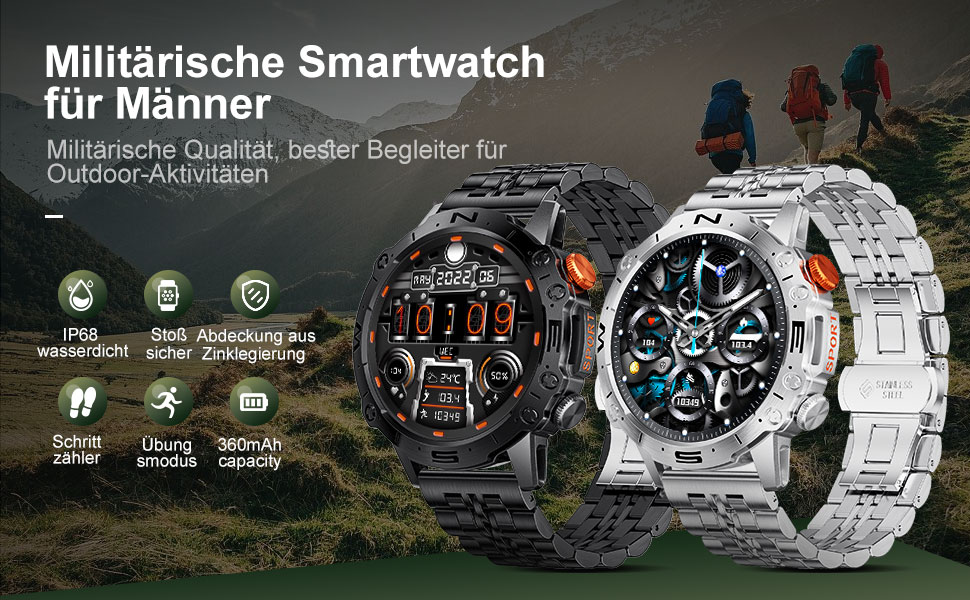
This manual provides detailed instructions for the setup, operation, and maintenance of your LIGE ST19-A Smartwatch. Designed for durability and functionality, this smartwatch features a 1.43-inch AMOLED touchscreen, Bluetooth calling, comprehensive health monitoring, and multiple sports modes. Please read this manual carefully to ensure proper use and to maximize your device's potential.
1. ຕັ້ງຄ່າ
1.1 ການສາກ Smartwatch
Before first use, fully charge your LIGE ST19-A Smartwatch. Use the provided magnetic charging cable.
- Connect the magnetic end of the charging cable to the charging contacts on the back of the smartwatch.
- ເຊື່ອມຕໍ່ປາຍ USB ຂອງສາຍກັບອະແດັບເຕີໄຟ USB ມາດຕະຖານ (5V/1A ແນະນໍາ) ຫຼືພອດ USB ຂອງຄອມພິວເຕີ.
- ໜ້າຈໍໂມງຈະສະແດງສະຖານະການສາກໄຟ. ການສາກໄຟເຕັມໂດຍປົກກະຕິແລ້ວໃຊ້ເວລາ 2-3 ຊົ່ວໂມງ.
- Once fully charged, the watch offers approximately 3-7 days of working time and up to 30 days of standby time.
1.2 ການຕິດຕັ້ງແອັບ ແລະ ການຈັບຄູ່ອຸປະກອນ
ເພື່ອປົດລັອກການເຮັດວຽກຢ່າງເຕັມທີ່ຂອງໂມງອັດສະລິຍະຂອງທ່ານ, ທ່ານຈຳເປັນຕ້ອງຕິດຕັ້ງແອັບພລິເຄຊັນເສີມໃນໂທລະສັບສະຫຼາດຂອງທ່ານ ແລະ ຈັບຄູ່ອຸປະກອນຕ່າງໆ.
- ເປີດໃຊ້ Bluetooth: On your smartphone, go to settings and ensure Bluetooth is turned on.
- ດາວໂຫລດ App ໄດ້: Scan the QR code provided in the watch's packaging or search for "FitCloudPro" in your smartphone's app store (Google Play Store for Android, Apple App Store for iOS). Alternatively, you can visit ລິ້ງນີ້ for download options.
- ຕິດຕັ້ງ ແລະເປີດ: Install the "FitCloudPro" app and open it.
- ເພີ່ມອຸປະກອນ: In the app, navigate to the "Device" or "Add Device" section. The app will search for available devices. Select "ST19-A" from the list to initiate pairing.
- ຢືນຢັນການຈັບຄູ່: Follow the on-screen prompts on both your phone and smartwatch to confirm the pairing request.
- ເປີດໃຊ້ການແຈ້ງເຕືອນ: Grant the necessary permissions for the app to display notifications from your phone on the smartwatch.
- ຟັງຊັນໂທ Bluetooth: After successful connection, you can enable or disable the call function on the watch. If the connection is successful, you can add/answer calls and play music.

2. ຄໍາແນະນໍາການດໍາເນີນງານ
2.1 ການນໍາທາງພື້ນຖານ
- ໜ້າຈໍສຳຜັດ: ປັດຊ້າຍ, ຂວາ, ຂຶ້ນ ຫຼືລົງເພື່ອນຳທາງຜ່ານເມນູ ແລະຄຸນສົມບັດຕ່າງໆ. ແຕະເພື່ອເລືອກ.
- ປຸ່ມຂ້າງ: The smartwatch features physical buttons for quick access to functions or to return to the home screen. Refer to the watch's interface for specific button assignments.
2.2 Bluetooth ໂທ
Once paired with your smartphone, you can make and receive calls directly from your smartwatch.
- ໂທອອກ: Access the dialer on your watch or select a contact from your synced phonebook.
- ຮັບສາຍ: When a call comes in, the watch will display the caller ID. You can answer or decline the call directly from your wrist.
- The watch includes a microphone and speaker for hands-free communication.

2.3 ການແຈ້ງເຕືອນອັດສະລິຍະ
Receive instant notifications for incoming calls, text messages, and alerts from various social media applications directly on your wrist.
- Ensure notification permissions are granted in the "FitCloudPro" app for desired applications.
- Supported apps include Line, Messenger, Facebook, Twitter, Kakao Talk, Skype, and WhatsApp.

2.4 ການຕິດຕາມສຸຂະພາບ
The smartwatch provides 24-hour real-time monitoring of various health metrics.
- ການກວດສອບອັດຕາການເຕັ້ນຫົວໃຈ: ຕິດຕາມອັດຕາການເຕັ້ນຫົວໃຈຂອງທ່ານຢ່າງຕໍ່ເນື່ອງຕະຫຼອດມື້.
- ການວັດແທກຄວາມດັນເລືອດ: ສະຫນອງການອ່ານຄວາມດັນເລືອດ.
- ການຕິດຕາມອົກຊີເຈນໃນເລືອດ (SpO2): ວັດແທກລະດັບຄວາມອີ່ມຕົວຂອງອົກຊີໃນເລືອດຂອງທ່ານ.
- ການຕິດຕາມການນອນ: ວິເຄາະຮູບແບບການນອນຂອງທ່ານ, ລວມທັງການນອນຫລັບເລິກ, ການນອນຫຼັບເບົາ, ແລະເວລາຕື່ນ.
- Pedometer: Counts your daily steps, distance, and estimated calorie burn.
- ການຝຶກອົບຮົມລົມຫາຍໃຈ: ການຝຶກຫາຍໃຈແບບມີການແນະນຳເພື່ອຊ່ວຍຈັດການຄວາມຕຶງຄຽດ.
Note: Health data provided by this device is for reference only and should not be used for medical diagnosis or treatment. Consult a medical professional for health concerns.

2.5 ໂໝດກິລາ
The smartwatch supports over 100 sports modes to track your workout data accurately.
- Select your desired sport mode from the watch's menu to begin tracking.
- The watch records data such as duration, distance, calories burned, and heart rate during your activity.
- Examples of supported activities include walking, running, cycling, swimming, and various gym exercises.

2.6 ຄຸນສົມບັດເພີ່ມເຕີມ
- ການສະແດງສະພາບອາກາດ: Get real-time weather updates directly on your watch face.
- ການຄວບຄຸມດົນຕີ: Control music playback on your smartphone (play, pause, skip tracks) from your wrist.
- ສະແດງຢູ່ສະເໝີ (AOD): The 1.43-inch AMOLED screen supports an Always On Display feature, providing continuous time visibility.
- AI Voice Assistant: Interact with your smartwatch using voice commands for various tasks.


3. ບໍາລຸງຮັກສາ
- ທໍາຄວາມສະອາດ: ເຊັດໜ້າຈໍໂມງ ແລະ ສາຍເປັນປະຈຳດ້ວຍຜ້າອ່ອນໆແຫ້ງ. ຖ້າຈຳເປັນ, ໃຫ້ໃຊ້ຜ້າເຊັດໜ້າໂມງທີ່ແຫ້ງເລັກນ້ອຍ.amp ຜ້າແລະຫຼັງຈາກນັ້ນໃຫ້ແຫ້ງຢ່າງລະອຽດ. ຫຼີກເວັ້ນການສານເຄມີທີ່ຮຸນແຮງຫຼືວັດສະດຸຂັດ.
- ຄວາມຕ້ານທານນ້ໍາ: The LIGE ST19-A Smartwatch is IP68 rated, meaning it is resistant to dust and can withstand immersion in water up to 1.5 meters for 30 minutes. It is suitable for daily use, hand washing, and rain exposure. However, it is not recommended for hot showers, saunas, or diving, as steam and hot water can compromise the seals.
- ການດູແລຫມໍ້ໄຟ: ເພື່ອຍືດອາຍຸແບັດເຕີຣີໃຫ້ດົນ, ຫຼີກລ້ຽງການຖອດໂມງອອກເຕັມທີ່ເລື້ອຍໆ. ສາກໄຟເມື່ອລະດັບແບັດເຕີຣີຕໍ່າ. ເກັບຮັກສາໂມງໄວ້ໃນບ່ອນທີ່ເຢັນ, ແຫ້ງເມື່ອບໍ່ໄດ້ໃຊ້ເປັນເວລາດົນ.
- ຫຼີກລ້ຽງການອຸນຫະພູມທີ່ຮ້າຍແຮງ: ຢ່າເຮັດໃຫ້ໂມງຢູ່ໃນອຸນຫະພູມທີ່ຮ້ອນ ຫຼື ເຢັນຫຼາຍ, ເພາະວ່າອັນນີ້ອາດຈະເຮັດໃຫ້ແບດເຕີຣີ ແລະອົງປະກອບພາຍໃນເສຍຫາຍໄດ້.
4. ການແກ້ໄຂບັນຫາ
| ບັນຫາ | ການແກ້ໄຂທີ່ເປັນໄປໄດ້ |
|---|---|
| ໂມງບໍ່ເປີດ | ກວດໃຫ້ແນ່ໃຈວ່າໂມງຖືກສາກເຕັມແລ້ວ. ເຊື່ອມຕໍ່ມັນກັບເຄື່ອງສາກຢ່າງໜ້ອຍ 30 ນາທີ. |
| ບໍ່ສາມາດຈັບຄູ່ກັບສະມາດໂຟນໄດ້ |
|
| ບໍ່ໄດ້ຮັບການແຈ້ງເຕືອນ |
|
| ຂໍ້ມູນສຸຂະພາບບໍ່ຖືກຕ້ອງ |
|
| ອາຍຸແບັດເຕີຣີສັ້ນ |
|
5. ຂໍ້ມູນຈໍາເພາະ
| ຄຸນສົມບັດ | ລາຍລະອຽດ |
|---|---|
| ຊື່ຕົວແບບ | ST19-A |
| ຍີ່ຫໍ້ | LIGE |
| ຂະໜາດໜ້າຈໍ | 1.43 ນິ້ວ |
| ປະເພດການສະແດງ | ໜ້າຈໍສຳຜັດ AMOLED |
| ເຕັກໂນໂລຊີການເຊື່ອມຕໍ່ | Bluetooth |
| ຄວາມອາດສາມາດຫມໍ້ໄຟ | 360 mAh (Lithium-ion) |
| ເວລາທີ່ໃຊ້ທົ່ວໄປ | 3-7 ມື້ |
| ເວລາສະແຕນບາຍ | ປະມານ. 30 ວັນ |
| ການຕໍ່ຕ້ານນ້ໍາ | IP68 (Dustproof, Water resistant up to 1.5m for 30 min) |
| ຄຸນນະສົມບັດພິເສດ | Voice Call, Music Player, Heart Rate Monitor, Activity Tracker, Blood Pressure Monitor, Blood Oxygen Monitor, Sleep Monitor, GPS (integrated) |
| ຄວາມເຂົ້າກັນໄດ້ | Android, iOS |
| ນ້ຳໜັກ | 290 g |
6. ການຮັບປະກັນແລະການສະຫນັບສະຫນູນ
LIGE prioritizes customer satisfaction. Your LIGE ST19-A Smartwatch comes with the following support:
- ຄືນເງິນພາຍໃນ 30 ມື້: If any issues arise during use, you are eligible for a refund within 30 days of purchase.
- 2-Year Repair Service: A 2-year repair service is provided after the sale for manufacturing defects.
- For any problems or inquiries, please contact LIGE customer support. Your satisfaction is important to us.


