1. ຄໍາແນະນໍາຄວາມປອດໄພ
ກະລຸນາອ່ານຄໍາແນະນໍາດ້ານຄວາມປອດໄພທັງໝົດຢ່າງລະມັດລະວັງກ່ອນທີ່ຈະເປີດເຄື່ອງໃຊ້. ການບໍ່ປະຕິບັດຕາມຄໍາແນະນໍາເຫຼົ່ານີ້ອາດຈະເຮັດໃຫ້ໄຟຟ້າຊ໊ອກ, ໄຟໄຫມ້, ຫຼືການບາດເຈັບ.
- ໃຫ້ແນ່ໃຈວ່າການສະຫນອງພະລັງງານກົງກັບ voltage ລະບຸໄວ້ໃນປ້າຍການຈັດອັນດັບ.
- ຫ້າມໃຊ້ອຸປະກອນທີ່ມີສາຍໄຟ ຫຼືປລັກສຽບເສຍຫາຍ.
- Keep the unit at least 50 cm away from walls or other objects to ensure proper ventilation.
- ຫ້າມເອົາສິ່ງຂອງເຂົ້າໄປໃນຊ່ອງສຽບ ຫຼືທາງອອກຂອງອາກາດ.
- ຫ້າມໃຊ້ເຄື່ອງໃນສະພາບແວດລ້ອມທີ່ປຽກຊຸ່ມ ເຊັ່ນ: ຫ້ອງນ້ຳ ຫຼື ຫ້ອງຊັກລີດ.
- ຖອດປລັກໜ່ວຍອອກກ່ອນທຳຄວາມສະອາດ ຫຼືເຮັດການບຳລຸງຮັກສາ.
- ເຄື່ອງໃຊ້ນີ້ບໍ່ໄດ້ມີຈຸດປະສົງເພື່ອໃຊ້ໂດຍບຸກຄົນ (ລວມທັງເດັກນ້ອຍ) ທີ່ມີຄວາມສາມາດທາງຮ່າງກາຍ, ຄວາມຮູ້ສຶກ ຫຼືຈິດໃຈທີ່ຫຼຸດລົງ, ຫຼືຂາດປະສົບການ ແລະຄວາມຮູ້, ເວັ້ນເສຍແຕ່ວ່າພວກເຂົາໄດ້ຮັບການຊີ້ນໍາ ຫຼືຄໍາແນະນໍາກ່ຽວກັບການນໍາໃຊ້ເຄື່ອງໃຊ້ໂດຍບຸກຄົນທີ່ຮັບຜິດຊອບຄວາມປອດໄພຂອງເຂົາເຈົ້າ.
2. ເນື້ອໃນຊຸດ
Verify that all items listed below are present in the packaging.
- ເຄື່ອງປັບອາກາດແບບພົກພາ
- ການຄວບຄຸມໄລຍະໄກ
- ທໍ່ລະບາຍອາກາດ
- Window Sealing Kit (Adjustable window slider, exhaust hose adapter, window exhaust adapter)
- ລະບາຍ Hose
- ຄູ່ມືຜູ້ໃຊ້

Image: Included accessories for the Mistral MPAC1600R, showing the exhaust hose, window panel kit, and hose adapters.
3. ຜະລິດຕະພັນເກີນview
ດ້ານໜ້າ View

ຮູບພາບ: ທາງຫນ້າ view of the Mistral MPAC1600R portable air conditioner, featuring its sleek black design and top control panel.
ຂ້າງ View

ຮູບພາບ: ຂ້າງ view of the Mistral MPAC1600R portable air conditioner, highlighting its compact profile and side vents.
ຫລັງ View
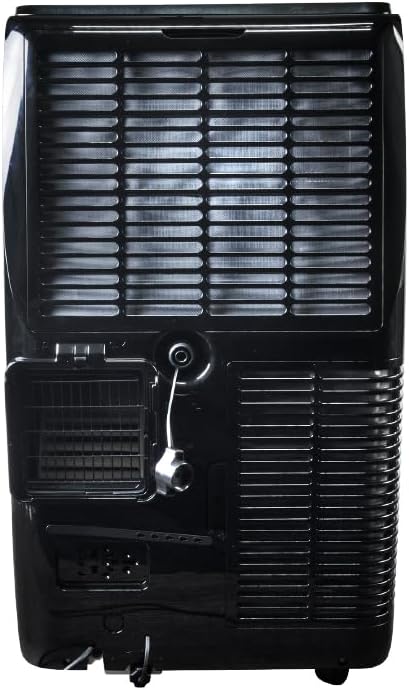
ຮູບພາບ: ດ້ານຫລັງ view of the Mistral MPAC1600R portable air conditioner, detailing the exhaust port, drainage outlet, and power connection.
ຂະໜາດ

Image: Diagram illustrating the dimensions of the Mistral MPAC1600R: 45 cm (width), 39.6 cm (depth), and 74.5 cm (height).
4. ການຕິດຕັ້ງແລະການຕິດຕັ້ງ
4.1 ການຫຸ້ມຫໍ່
Carefully remove the air conditioner and all accessories from the packaging. Retain the packaging for future storage or transport.
4.2 ການຕິດຕັ້ງທໍ່ລະບາຍອາກາດ
- Screw the exhaust hose adapter onto one end of the exhaust hose.
- Attach the window exhaust adapter to the other end of the exhaust hose.
- Insert the exhaust hose adapter into the exhaust outlet on the rear of the air conditioner unit.
4.3 ການຕິດຕັ້ງຊຸດປ່ອງຢ້ຽມ
- ປັບຊຸດຕົວເລື່ອນປ່ອງຢ້ຽມໃຫ້ພໍດີກັບການເປີດປ່ອງຢ້ຽມຂອງທ່ານ.
- Secure the window slider kit in the window frame.
- Insert the window exhaust adapter (attached to the exhaust hose) into the opening of the window slider kit.
- ໃຫ້ແນ່ໃຈວ່າປ່ອງຢ້ຽມຖືກປິດລ້ອມຮອບຊຸດເພື່ອປ້ອງກັນການຮົ່ວໄຫຼຂອງອາກາດ.
4.4 ການພິຈາລະນາການຈັດວາງ
- ວາງ ໜ່ວຍ ບໍລິເວນພື້ນທີ່ຮາບພຽງແລະ ໝັ້ນ ຄົງ.
- Ensure there is at least 50 cm of clear space around the unit for proper airflow.
- Position the unit near a window for easy exhaust hose installation.
- ຫຼີກລ້ຽງການວາງເຄື່ອງຢູ່ໃນບ່ອນຖືກແສງແດດໂດຍກົງ ຫຼືໃກ້ກັບແຫຼ່ງຄວາມຮ້ອນ.
5. ຄໍາແນະນໍາການດໍາເນີນງານ
5.1 ກະດານຄວບຄຸມແລະການຄວບຄຸມໄລຍະໄກ
The unit can be operated via the control panel on top of the unit or the included remote control. The remote control offers full functionality.
- ປຸ່ມເປີດປິດ: ເປີດ ຫຼື ປິດເຄື່ອງ.
- ປຸ່ມໂໝດ: ໝູນວຽນຜ່ານໂໝດເຢັນ, ແຫ້ງ, ແລະພັດລົມ.
- ປຸ່ມຄວາມໄວພັດລົມ: ປັບຄວາມໄວພັດລົມ (ສູງ, ກາງ, ຕ່ຳ).
- ປຸ່ມອຸນຫະພູມຂຶ້ນ/ລົງ: Adjusts the desired temperature (18 to 32 °C).
- ປຸ່ມຈັບເວລາ: ຕັ້ງໂມງຈັບເວລາ ເປີດ/ປິດ 24 ຊົ່ວໂມງ.
- ປຸ່ມໂໝດນອນຫຼັບ: Activates or deactivates Sleep Mode.
- Smart Mode Button: Activates or deactivates Smart Mode.
- Turbo Mode Button: Activates or deactivates Turbo Mode.
- ປຸ່ມລັອກເດັກນ້ອຍ: ລັອກແຜງຄວບຄຸມເພື່ອປ້ອງກັນການປ່ຽນແປງໂດຍບັງເອີນ.
5.2 ຮູບແບບການດໍາເນີນງານ
- ແບບເຢັນ: ໃຫ້ຄວາມເຢັນ. ຕັ້ງອຸນຫະພູມ ແລະ ຄວາມໄວພັດລົມທີ່ຕ້ອງການ.
- ແບບແຫ້ງແລ້ງ: Dehumidifies the room. Fan speed is fixed to low.
- ແບບພັດລົມ: ໝູນວຽນອາກາດໂດຍບໍ່ເຮັດໃຫ້ເຢັນ. ເລືອກຄວາມໄວພັດລົມທີ່ຕ້ອງການ.
- Smart Mode: Automatically selects the optimal operating mode (Cool, Dry, or Fan) based on the room temperature.
- ໂໝດ Turbo: Operates at maximum cooling power and fan speed for rapid cooling.
- ຮູບແບບການນອນ: Gradually increases the set temperature by 1°C per hour for the first two hours, then maintains it, providing quieter operation for comfortable sleep.
5.3 Wi-Fi Connectivity and Smart Home Integration
The MPAC1600R features Wi-Fi connectivity, allowing control via a smartphone app and integration with smart home systems like Alexa and Google Home. Refer to the separate Wi-Fi setup guide for detailed instructions on connecting your device.
5.4 ຟັງຊັນລັອກເດັກ
To activate the Child Lock, press and hold the Child Lock button on the control panel or remote control for 3 seconds. This will disable all other buttons. To deactivate, repeat the process.
6. ບໍາລຸງຮັກສາ
ການບໍາລຸງຮັກສາເປັນປົກກະຕິຮັບປະກັນປະສິດທິພາບທີ່ດີທີ່ສຸດແລະຍືດອາຍຸຂອງເຄື່ອງປັບອາກາດຂອງທ່ານ.
6.1 ການທໍາຄວາມສະອາດເຄື່ອງກອງອາກາດ
ການກັ່ນຕອງອາກາດຄວນເຮັດຄວາມສະອາດທຸກໆສອງອາທິດຫຼືເລື້ອຍໆຂື້ນກັບການນໍາໃຊ້ແລະຄຸນນະພາບຂອງອາກາດ.
- ປິດ ແລະຖອດປລັກໜ່ວຍ.
- Locate the air filter panel (usually on the rear or side).
- ເອົາຕົວກອງອອກ.
- Clean the filter with a vacuum cleaner or wash it with warm, soapy water.
- ລ້າງໃຫ້ສະອາດແລະປ່ອຍໃຫ້ມັນແຫ້ງຫມົດກ່ອນທີ່ຈະຕິດຕັ້ງໃຫມ່.
6.2 ການລະບາຍນ້ໍາ
The unit collects condensation during operation. When the internal water tank is full, the unit will stop and display an error code. Drain the water as follows:
- ປິດ ແລະຖອດປລັກໜ່ວຍ.
- ວາງໝໍ້ຕື້ນ ຫຼື ພາຊະນະໄວ້ໃຕ້ຊ່ອງລະບາຍນ້ຳຢູ່ທາງຫຼັງດ້ານລຸ່ມຂອງຕົວເຄື່ອງ.
- ຖອດທໍ່ລະບາຍນ້ໍາອອກ.
- ປ່ອຍໃຫ້ນ້ໍາທັງຫມົດໄຫຼອອກ.
- ປ່ຽນປລັກທໍ່ລະບາຍນ້ຳໃຫ້ປອດໄພ.
6.3 ການເກັບຮັກສາ
ຖ້າເກັບຮັກສາເຄື່ອງສໍາລັບໄລຍະເວລາຂະຫຍາຍ:
- Drain all water completely.
- ເຮັດຄວາມສະອາດເຄື່ອງກອງອາກາດ.
- ເປີດເຄື່ອງໃນໂໝດພັດລົມເປັນເວລາສອງສາມຊົ່ວໂມງເພື່ອເຮັດໃຫ້ອຸປະກອນພາຍໃນແຫ້ງ.
- ຖອດສາຍໄຟອອກ ແລະ ມ້ວນມັນໃຫ້ສະອາດ.
- ເກັບຮັກສາໄວ້ໃນບ່ອນແຫ້ງ ແລະ ເຢັນ, ດີກວ່າຄວນເກັບໄວ້ໃນກ່ອງບັນຈຸເດີມ.
7. ຄູ່ມືການແກ້ໄຂບັນຫາ
ກ່ອນທີ່ຈະຕິດຕໍ່ຫາຝ່າຍສະໜັບສະໜູນລູກຄ້າ, ໃຫ້ອ້າງອີງຕາຕະລາງຕໍ່ໄປນີ້ສຳລັບບັນຫາ ແລະ ວິທີແກ້ໄຂທົ່ວໄປ.
| ບັນຫາ | ສາເຫດທີ່ເປັນໄປໄດ້ | ການແກ້ໄຂ |
|---|---|---|
| ຫນ່ວຍບໍລິການບໍ່ເປີດ | ບໍ່ມີການສະຫນອງພະລັງງານ ບໍ່ໄດ້ສຽບສາຍໄຟ Internal water tank full | ກວດເບິ່ງປລັກສຽບໄຟ ກວດໃຫ້ແນ່ໃຈວ່າໄດ້ສຽບສາຍໄຟຢ່າງປອດໄພ ລະບາຍນ້ໍາຖັງ |
| ບໍ່ມີການລະບາຍຄວາມຮ້ອນ ຫຼື ການລະບາຍຄວາມຮ້ອນບໍ່ພຽງພໍ | ການກັ່ນຕອງອາກາດອຸດຕັນ ບໍ່ໄດ້ຕິດຕັ້ງທໍ່ລະບາຍອາກາດຢ່າງຖືກຕ້ອງ Window not sealed ຫ້ອງໃຫຍ່ເກີນໄປ ການຕັ້ງຄ່າອຸນຫະພູມສູງເກີນໄປ | ເຮັດຄວາມສະອາດເຄື່ອງກອງອາກາດ Check exhaust hose connection and ensure it's not bent Seal window gaps Ensure unit is appropriate for room size ຫຼຸດອຸນຫະພູມທີ່ຕັ້ງໄວ້ |
| ໜ່ວຍ ງານມີສຽງລົບກວນ | ຫນ່ວຍງານບໍ່ຢູ່ໃນພື້ນທີ່ຮາບພຽງ ການກັ່ນຕອງອາກາດອຸດຕັນ ການຂັດຂວາງໃນພັດລົມ | ວາງຫົວຫນ່ວຍຢູ່ເທິງພື້ນລະດັບ ເຮັດຄວາມສະອາດເຄື່ອງກອງອາກາດ ກວດສອບແລະລົບສິ່ງກີດຂວາງໃດຫນຶ່ງ |
| ນ້ໍາຮົ່ວ | ທໍ່ລະບາຍນ້ໍາອອກ ຫນ່ວຍງານອຽງ ທໍ່ລະບາຍນ້ໍາຖືກສະກັດ | ຮັບປະກັນວ່າປລັກທໍ່ລະບາຍນ້ຳແໜ້ນດີ ວາງຫົວຫນ່ວຍຢູ່ເທິງພື້ນລະດັບ Check and clear any blockages in the drain hose |
8. ຂໍ້ກໍານົດດ້ານວິຊາການ
| ຄຸນສົມບັດ | ຂໍ້ມູນຈໍາເພາະ |
|---|---|
| ຕົວແບບ | MPAC1600R |
| ຄວາມອາດສາມາດເຮັດຄວາມເຢັນ | 16,000 BTU |
| ສະບັບtage | 220 ໂວນ |
| ວັດtage | 1560 ວັດ |
| ລະດັບສຽງ | 51 Decibels |
| ຊ່ວງອຸນຫະພູມຂອງຄວາມເຢັນ | ອຸນຫະພູມ 18-32 ອົງສາ |
| ໂໝດ | Cool, Dry, Fan, Smart, Turbo, Sleep |
| ຄວາມໄວພັດລົມ | ສູງ, ກາງ, ຕໍ່າ |
| ໂມງຈັບເວລາ | 24 ຊົ່ວໂມງ |
| ຄຸນນະສົມບັດພິເສດ | UV Sterilisation, Wi-Fi (Alexa & Google Home compatible), Child Lock |
| ຂະໜາດສິນຄ້າ (L x W x H) | 45 x 39.6 x 74.5 cm |
| ນ້ຳໜັກ | 33.3 ກິໂລ |
| ປັດໄຈແບບຟອມ | ແບບພົກພາ |
9. ການຮັບປະກັນແລະການສະຫນັບສະຫນູນລູກຄ້າ
This Mistral Portable Air Conditioner is covered by a manufacturer's warranty. Please refer to the warranty card included in your package for specific terms and conditions, including the warranty period and coverage details.
For technical assistance, troubleshooting beyond this guide, or warranty claims, please contact Mistral customer support. Contact information can typically be found on the manufacturer's official webເວັບໄຊ ຫຼືຢູ່ໃນໃບຮັບເງິນຊື້ຂອງທ່ານ.
When contacting support, please have your model number (MPAC1600R) and proof of purchase readily available.


