1. ບົດແນະນຳ
Thank you for choosing the Vikye Corded Landline Phone. This manual provides essential information for the proper setup, operation, and maintenance of your new telephone. This device is designed for both home and office environments, featuring Caller ID, call storage, and convenient callback functions.
2. ເນື້ອໃນຊຸດ
- 1 x Vikye Corded Telephone Unit
- 1 x Telephone Cable (RJ-11)
- 1 x Telephone Handset Wire
- 1 x ຄູ່ມືຜູ້ໃຊ້
3. ຕັ້ງຄ່າ
Follow these steps to set up your Vikye Corded Landline Phone:
- ເຊື່ອມຕໍ່ໂທລະສັບມືຖື: Plug one end of the coiled telephone handset wire into the handset and the other end into the designated port on the side of the telephone base.
- Connect to the Telephone Line: Plug one end of the telephone cable (RJ-11) into the port labeled 'LINE' or 'TEL' on the back or side of the telephone base. Plug the other end into your wall telephone jack.
- ການຈັດວາງ: Place the telephone on a stable, flat surface or mount it on a wall using the integrated wall-mount slots (if applicable). Ensure it is away from excessive heat, moisture, and direct sunlight.

Image: The Vikye corded landline phone showing the connected handset and line cables. This illustrates the basic setup for operation.
4. ຄໍາແນະນໍາການດໍາເນີນງານ
4.1 ໂທອອກ
- ຍົກມືຖື.
- ຟັງສຽງໂທອອກ.
- ກົດເບີໂທລະສັບທີ່ຕ້ອງການໂດຍໃຊ້ປຸ່ມກົດ.
- ລໍຖ້າສາຍເພື່ອເຊື່ອມຕໍ່.
4.2 ການຮັບສາຍ
- When the phone rings, lift the handset to answer.
- The Caller ID display will show the incoming number (if available).

Image: The phone's display screen showing an incoming call number, illustrating the Caller ID feature. The keypad is visible below the screen.
4.3 ລະຫັດຜູ້ໂທ ແລະ ປະຫວັດການໂທ
The phone supports FSK/DTMF standard Caller ID. It can store up to 30 groups of incoming call numbers for inquiry.
- To check incoming call information, long press the "CALL IN" ປຸ່ມ.
- The phone also has a built-in 5 group call number and call time query function.

Image: The phone's display showing a stored call number and time, demonstrating the call history and query function.
4.4 Callback and One-Key Replay
- Callback Function: ໃນຂະນະທີ່ viewing a number in the call history, you can initiate a callback directly.
- One-Key Replay: Use the dedicated replay function for quick redialing of the last dialed number.
4.5 ການຄວບຄຸມປະລິມານ
The phone features a two-level volume button on the side for adjusting the ringer volume.
- Locate the volume switch on the side of the telephone base.
- Slide the switch to select the desired volume level (e.g., High or Low).
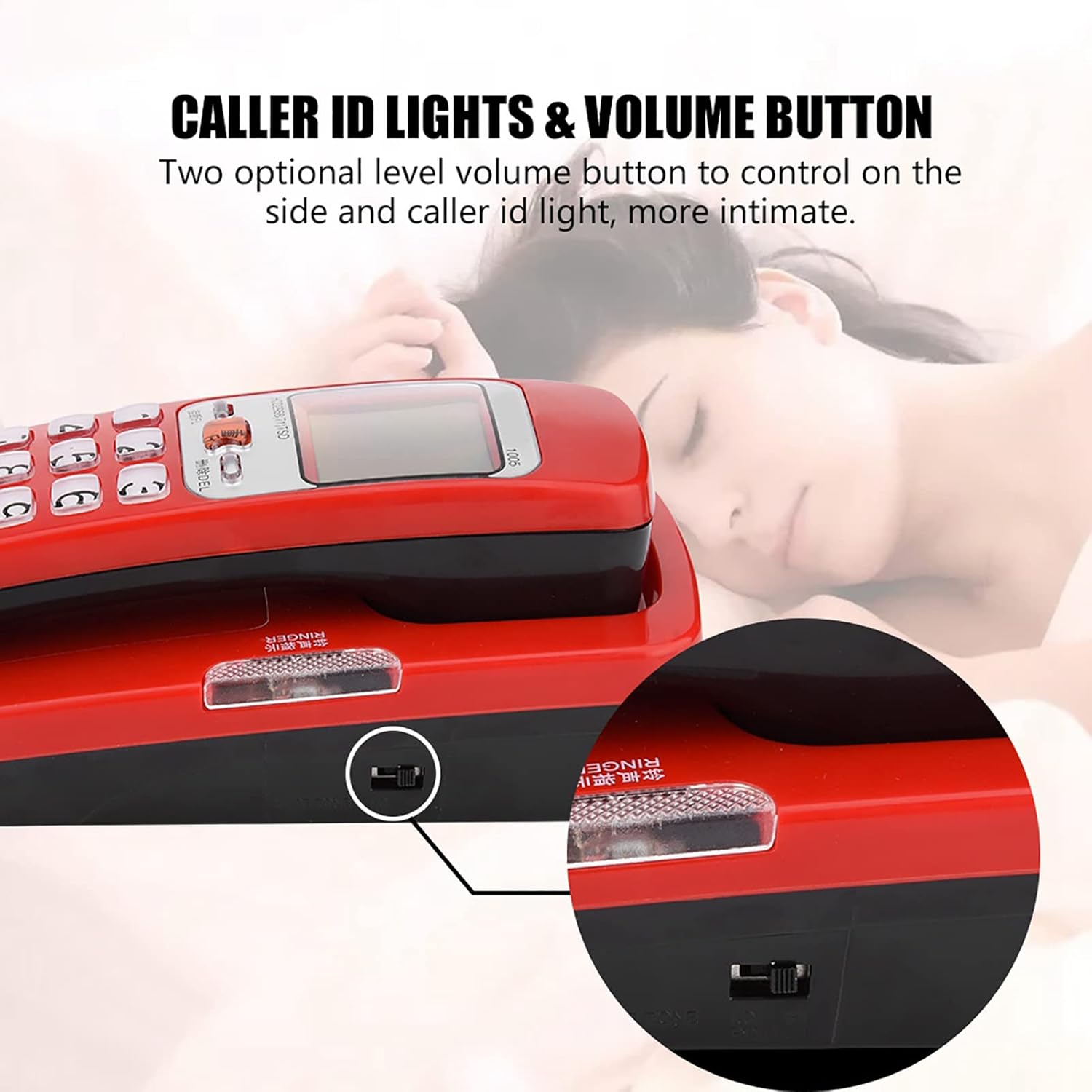
ຮູບພາບ: A close-up view of the side of the phone, highlighting the two-level volume control switch. This switch adjusts the ringer volume.
5. ບໍາລຸງຮັກສາ
To ensure the longevity and optimal performance of your telephone:
- Clean the phone regularly with a soft, dry cloth. Do not use liquid cleaners or aerosol sprays.
- ຫຼີກລ່ຽງການເອົາໂທລະສັບໄປວາງໄວ້ໃນອຸນຫະພູມທີ່ສູງເກີນໄປ, ແສງແດດໂດຍກົງ ຫຼື ຄວາມຊຸ່ມສູງ.
- Do not disassemble the phone. Refer to qualified service personnel for any repairs.
- ຮັກສາໂທລະສັບໃຫ້ຫ່າງຈາກສະຫນາມແມ່ເຫຼັກທີ່ເຂັ້ມແຂງ.
6. ການແກ້ໄຂບັນຫາ
If you encounter issues with your Vikye Corded Landline Phone, refer to the following common problems and solutions:
| ບັນຫາ | ສາເຫດທີ່ເປັນໄປໄດ້ | ການແກ້ໄຂ |
|---|---|---|
| ບໍ່ມີສຽງໂທອອກ | Telephone cable not connected properly or line issue. | Ensure the telephone cable is securely plugged into both the phone and the wall jack. Test with another phone if possible to check the line. |
| ID ຜູ້ໂທບໍ່ສະແດງ | Caller ID service not activated by your service provider or FSK/DTMF mismatch. | Contact your telephone service provider to ensure Caller ID service is active. The phone supports FSK/DTMF standards. |
| ໂທລະສັບບໍ່ດັງ | Ringer volume set to low or off. | Check the volume switch on the side of the phone and adjust it to a higher level. |
| ປຸ່ມບໍ່ຕອບສະໜອງ | ຂໍ້ຜິດພາດຂອງຊອບແວຊົ່ວຄາວ ຫຼື ຄວາມເສຍຫາຍທາງຮ່າງກາຍ. | Disconnect the phone from the line for a few minutes, then reconnect. If the issue persists, contact customer support. |
7. ຂໍ້ມູນຈໍາເພາະ
- ຕົວແບບ: Vikyewcf8rdiy5a-01
- ປະເພດການໂຕ້ຕອບ: RJ-11
- Caller ID Standard: FSK/DTMF
- Call Number Storage: 30 groups (incoming), 5 groups (built-in query)
- ຂະໜາດ: Approximately 18cm (7.09in) x 7.5cm (2.95in) x 6.5cm (2.56in)
- ນ້ຳໜັກ: ປະມານ 295 ກຣາມ (0.65 ປອນ)
- ສີ: ສີແດງ

Image: The phone with key dimensions labeled in centimeters and inches, providing a visual reference for its size.
8. ການຮັບປະກັນແລະການສະຫນັບສະຫນູນ
ສໍາລັບຂໍ້ມູນການຮັບປະກັນແລະການຊ່ວຍເຫຼືອລູກຄ້າ, ກະລຸນາເບິ່ງເອກະສານທີ່ສະຫນອງໃຫ້ໃນເວລາຊື້ຫຼືຕິດຕໍ່ຮ້ານຂາຍຍ່ອຍຂອງທ່ານ. ຮັກສາໃບຮັບເງິນການຊື້ຂອງທ່ານໄວ້ເປັນຫຼັກຖານການຊື້.


