ແນະນຳ
Thank you for choosing the GOBOULT Z60 Wireless Earbuds. This manual provides detailed instructions to help you set up, operate, and maintain your earbuds for an optimal audio experience. Please read this manual thoroughly before use and retain it for future reference.

Image: GOBOULT Z60 Earbuds, illustrating the brand transition from BOULT to GOBOULT, highlighting the new logo and packaging while assuring consistent product performance.
ແມ່ນຫຍັງຢູ່ໃນກ່ອງ
ໃຫ້ແນ່ໃຈວ່າທຸກລາຍການຢູ່ໃນຊຸດ:
- GOBOULT Z60 Wireless Earbuds (Left and Right)
- ກ່ອງສາກ
- ສາຍສາກໄຟ USB Type-C
- Eartips (ຂະຫນາດຕ່າງໆ)
- ຄູ່ມືຜູ້ໃຊ້
- ບັດຮັບປະກັນ

Image: The GOBOULT Z60 Wireless Earbuds and their charging case, showcasing ການອອກແບບຂອງຜະລິດຕະພັນແລະອຸປະກອນເສີມ.
ສິນຄ້າເກີນview
The GOBOULT Z60 earbuds are designed for comfort and high-quality audio. Each earbud features a 13mm bass driver and multiple microphones for clear calls. The charging case provides extended battery life.
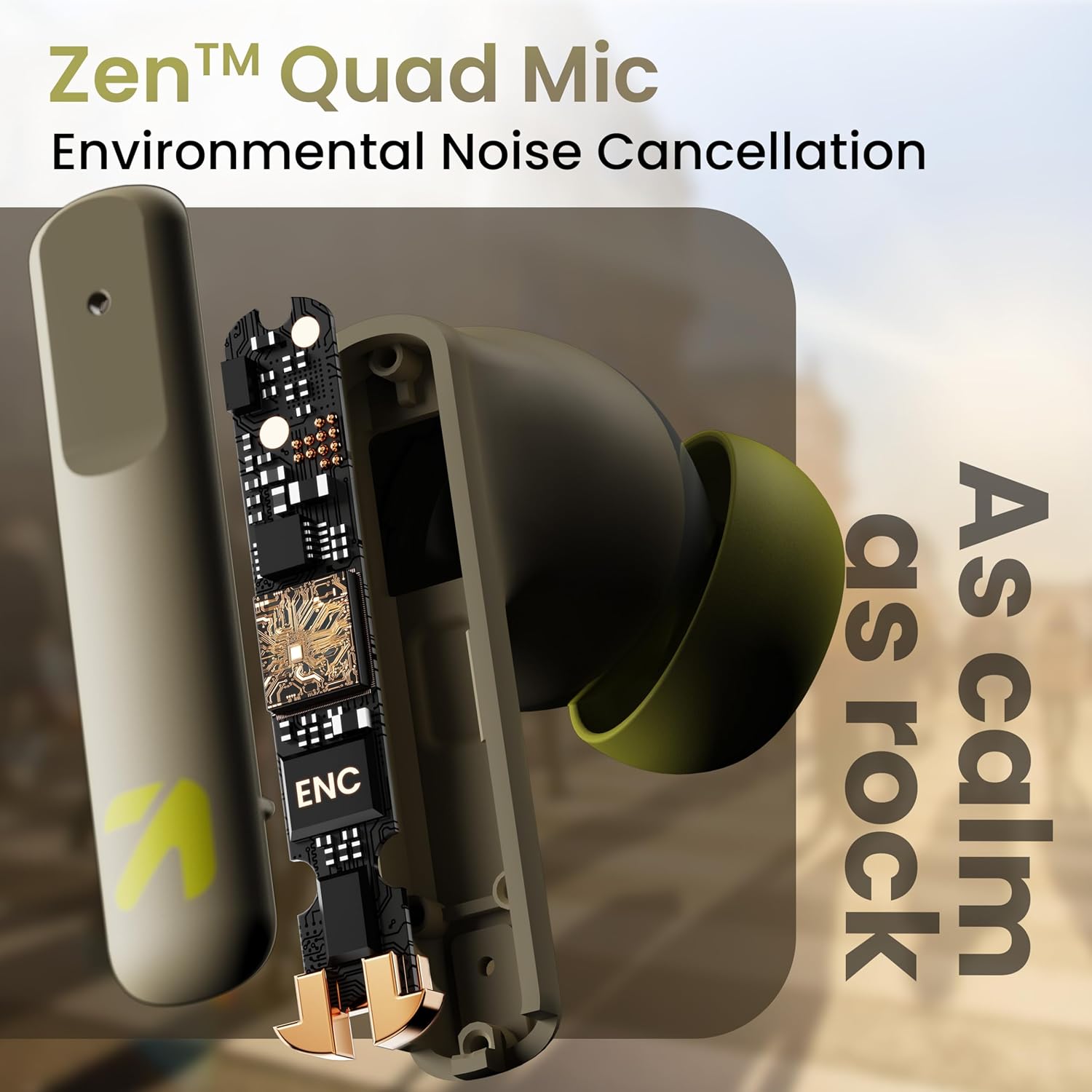
ຮູບພາບ: ພາຍໃນ view of a GOBOULT Z60 earbud, highlighting the Zen Quad Mic Environmental Noise Cancellation (ENC) technology for clear audio.

Image: A close-up of a GOBOULT Z60 earbud, emphasizing the 13mm BoomX Drivers responsible for rich bass and superior sound quality.
ກຳລັງສາກໄຟ
To charge your GOBOULT Z60 earbuds and charging case:
- ວາງຫູຟັງໃສ່ກະເປົ໋າສາກໄຟ. ໃຫ້ແນ່ໃຈວ່າພວກເຂົານັ່ງຢ່າງຖືກຕ້ອງ.
- ເຊື່ອມຕໍ່ສາຍສາກ USB Type-C ກັບຜອດສາກໄຟຢູ່ເຄສ ແລະກັບແຫຼ່ງພະລັງງານ.
- ໄຟ LED ເທິງເຄສຈະສະແດງສະຖານະການສາກໄຟ.
A full charge provides up to 60 hours of total playtime with the charging case. A quick 10-minute charge can provide up to 150 minutes of playtime.

Image: The GOBOULT Z60 charging case connected via a Type-C cable, illustrating the fast charging capability with indicators for 10 minutes charge yielding 150 minutes playtime.

Image: GOBOULT Z60 earbuds in their charging case, highlighting the impressive 60 hours of total playtime and 8 hours of playtime on a single earbud charge.
Setup: Pairing with Your Device
The GOBOULT Z60 earbuds utilize Bluetooth 5.3 for stable and efficient wireless connectivity.
- ການຈັບຄູ່ເບື້ອງຕົ້ນ:
- ເປີດກ່ອງສາກໄຟ. ຫູຟັງເອຍບັດຈະເຂົ້າສູ່ໂໝດຈັບຄູ່ໂດຍອັດຕະໂນມັດ.
- ໃນອຸປະກອນຂອງທ່ານ (ໂທລະສັບສະຫຼາດ, ແທັບເລັດ, ແລັບທັອບ), ເປີດໃຊ້ Bluetooth.
- ຊອກຫາ "GOBOULT Z60" in the list of available Bluetooth devices and select it to connect.
- Once connected, you will hear an audio prompt, and the LED indicator on the case will change.
- ການຈັບຄູ່ຄືນໃໝ່: ຫູຟັງເອຍບັດຈະເຊື່ອມຕໍ່ກັບອຸປະກອນທີ່ຈັບຄູ່ຄັ້ງສຸດທ້າຍໂດຍອັດຕະໂນມັດເມື່ອເອົາອອກຈາກກ່ອງ, ຖ້າເປີດໃຊ້ Bluetooth ຢູ່ໃນອຸປະກອນ.

Image: GOBOULT Z60 earbuds and their open charging case next to a smartphone, illustrating the Bluetooth 5.3 "Blink & Pair" feature for quick and stable connection.
ປະຕິບັດການຫູຟັງຂອງທ່ານ
ແຕະການຄວບຄຸມ
The GOBOULT Z60 earbuds feature intuitive touch controls. The specific functions are:
- ການຫຼິ້ນເພງ:
- ແຕະເທື່ອດຽວ: ຫຼິ້ນ/ຢຸດຊົ່ວຄາວ
- Double tap (Right earbud): Next track
- Double tap (Left earbud): Previous track
- Triple tap (Right earbud): Volume Up
- Triple tap (Left earbud): Volume Down
- ການຄຸ້ມຄອງການໂທ:
- ແຕະເທື່ອດຽວ: ຮັບສາຍ/ວາງສາຍ
- Long press: Reject call
- ຜູ້ຊ່ວຍສຽງ: Long press (either earbud) to activate Google Assistant or Siri.
- ແບບເກມ: Tap 4 times on either earbud to activate/deactivate Combat Gaming Mode (50ms low latency).

Image: A visual guide to the GOBOULT Z60's touch controls, detailing actions for music playback (play/pause, next/back, volume), call management, activating voice assistance, and toggling game/music mode.
ໂໝດເກມ
Activate the 50ms low latency Combat Gaming Mode for a synchronized audio-visual experience during gaming. Tap 4 times on either earbud to switch between gaming and normal modes.

Image: GOBOULT Z60 earbuds in use with a smartphone displaying a racing game, emphasizing the "Combat Gaming Mode" with 50ms ultra-low latency, activated by tapping the earbud 4 times.
ຜູ້ຊ່ວຍສຽງ
Access your device's voice assistant (Google Assistant or Siri) by long-pressing either earbud. This allows for hands-free control of your device.

Image: GOBOULT Z60 earbuds and their charging case, illustrating how to activate voice assistance (Ok Google, Hey Siri) with a long press on an earbud.
ບໍາລຸງຮັກສາ
To ensure the longevity and optimal performance of your GOBOULT Z60 earbuds:
- ທໍາຄວາມສະອາດ: ອະນາໄມຫູຟັງຫູຟັງ ແລະກະເປົ໋າສາກໄຟເປັນປະຈຳດ້ວຍຜ້າປຽກອ່ອນໆ. ຫຼີກເວັ້ນການນໍາໃຊ້ສານເຄມີທີ່ຮຸນແຮງຫຼືວັດສະດຸຂັດ.
- Eartips: Remove and clean the eartips periodically. Ensure they are dry before reattaching.
- ຄວາມຕ້ານທານນ້ໍາ: The earbuds are IPX5 water-resistant, meaning they can withstand sweat and light rain. Do not submerge them in water or expose them to heavy downpours. Ensure the charging port is dry before charging.
- ການເກັບຮັກສາ: ເມື່ອບໍ່ໄດ້ໃຊ້, ໃຫ້ເກັບຫູຟັງເອຍບັດໃສ່ໃນກະເປົ໋າສາກໄຟເພື່ອປົກປ້ອງພວກມັນ ແລະ ສືບຕໍ່ສາກໄຟ.

Image: A GOBOULT Z60 earbud with water droplets on its surface, illustrating its IPX5 water resistance, suitable for protection against sweat, rain, and splashes.
ການແກ້ໄຂບັນຫາ
If you encounter issues with your GOBOULT Z60 earbuds, refer to the following common solutions:
| ບັນຫາ | ການແກ້ໄຂທີ່ເປັນໄປໄດ້ |
|---|---|
| ຫູຟັງບໍ່ຈັບຄູ່ |
|
| ບໍ່ມີສຽງຈາກຫູຟັງອັນໜຶ່ງ |
|
| ຫູຟັງບໍ່ສາກ |
|
| ລະດັບສຽງຕໍ່າ ຫຼືຄຸນນະພາບສຽງບໍ່ດີ |
|
ຂໍ້ມູນຈໍາເພາະ
| ຄຸນສົມບັດ | ລາຍລະອຽດ |
|---|---|
| ຊື່ຕົວແບບ | AirBass (Z60) |
| ເຕັກໂນໂລຊີການເຊື່ອມຕໍ່ | ໄຮ້ສາຍ (Bluetooth) |
| ລຸ້ນ Bluetooth | 5.3 |
| ຊ່ວງ Bluetooth | 10 ແມັດ |
| ຂະໜາດໄດເວີສຽງ | ຂະ ໜາດ 13 ມີລີແມັດ |
| ປະເພດໄດເວີສຽງ | ໄດນາມິກໄດເວີ |
| ອາຍຸແບັດເຕີຣີ (ທັງໝົດ) | ດົນເຖິງ 60 ຊົ່ວໂມງ (ພ້ອມກ່ອງສາກ) |
| ເວລາສາກໄຟ | ປະມານ 90 ນາທີ |
| ການສາກໄວ | ຄ່າບໍລິການ 10 ນາທີ = ເວລາຫຼິ້ນ 150 ນາທີ |
| ພອດສາກໄຟ | ປະເພດ-C |
| ໄມໂຄຣໂຟນ | 4 ENC Mics for Clear Calling |
| ຄວາມຍືດຍຸ່ນສຽງ | 50 ມິນລິວິນາທີ (ໂໝດເກມ) |
| ການຕໍ່ຕ້ານນ້ໍາ | IPX5 (ກັນເຫື່ອ, ກັນຝົນ, ກັນນ້ຳກະເດັນ) |
| ວິທີການຄວບຄຸມ | ແຕະ, ສຽງ |
| ນ້ໍາຫນັກລາຍການ | 41.5 ກຣາມ |
| ປະເທດຕົ້ນກໍາເນີດ | ປະເທດອິນເດຍ |
ການຮັບປະກັນແລະການສະຫນັບສະຫນູນ
Your GOBOULT Z60 Wireless Earbuds come with a ການຮັບປະກັນຂອງຜູ້ຜະລິດ 1 ປີ ຈາກວັນທີ່ຊື້.
For any support, warranty claims, or technical assistance, please refer to the contact information provided on your warranty card or visit the official GOBOULT support webເວັບໄຊ.


