ແນະນຳ
The Turtle Beach REACT-R Wired Game Controller is officially licensed for Xbox Series X, Xbox Series S, Xbox One, and Windows 10|11 PCs. This controller is designed to enhance your gaming experience with quick-access audio controls, mappable buttons, and immersive vibration feedback. Its ergonomic design ensures comfort during extended gaming sessions.

ຮູບ 1: ດ້ານຫນ້າ view of the Turtle Beach REACT-R Wired Game Controller.
ເນື້ອໃນຊຸດ
ໃຫ້ແນ່ໃຈວ່າທຸກລາຍການຢູ່ໃນຊຸດຂອງທ່ານ:
- REACT-R ຄວບຄຸມ
- 8’ / 2.5m USB Cable
- ຄູ່ມືເລີ່ມຕົ້ນດ່ວນ
- ສະຕິກເກີຫາດຊາຍເຕົ່າ

Figure 2: Illustration of the items included in the REACT-R Controller package.
ສິນຄ້າເກີນview
The REACT-R controller integrates several features to enhance your gaming performance and comfort:
- Game-Enhancing Audio Controls: Quick-access audio controls including Superhuman Hearing, game and chat volume balance, and mic mute.
- Superhuman Hearing Sound Setting: Hear every detail, from quiet footsteps to enemy weapon reloads, for a competitive advantage.
- Two Mappable Quick-Action Buttons: Speed up your response with two customizable buttons on the backside of the controller.
- 3.5mm Headset Connection: Utilize Turtle Beach audio functions by plugging in any 3.5mm connected headset.
- ການສັ່ນເຕືອນ: Dual rumble motors in the handles and triggers provide immersive, realistic gameplay.
- Responsive Controls: Textured triggers and bumpers, an accurate 8-way D-pad, and smooth thumbstick movement ensure faster reactions.
- Ergonomic Textured Grips: Comfortable, fatigue-free shape with textured handle surfaces for a firm grip during long gaming sessions.
- Officially Licensed for Xbox: Ensures reliable performance and compatibility with Xbox Series X|S, Xbox One, and Windows 10|11 PCs.

Figure 3: Detail of the integrated audio controls on the REACT-R controller.
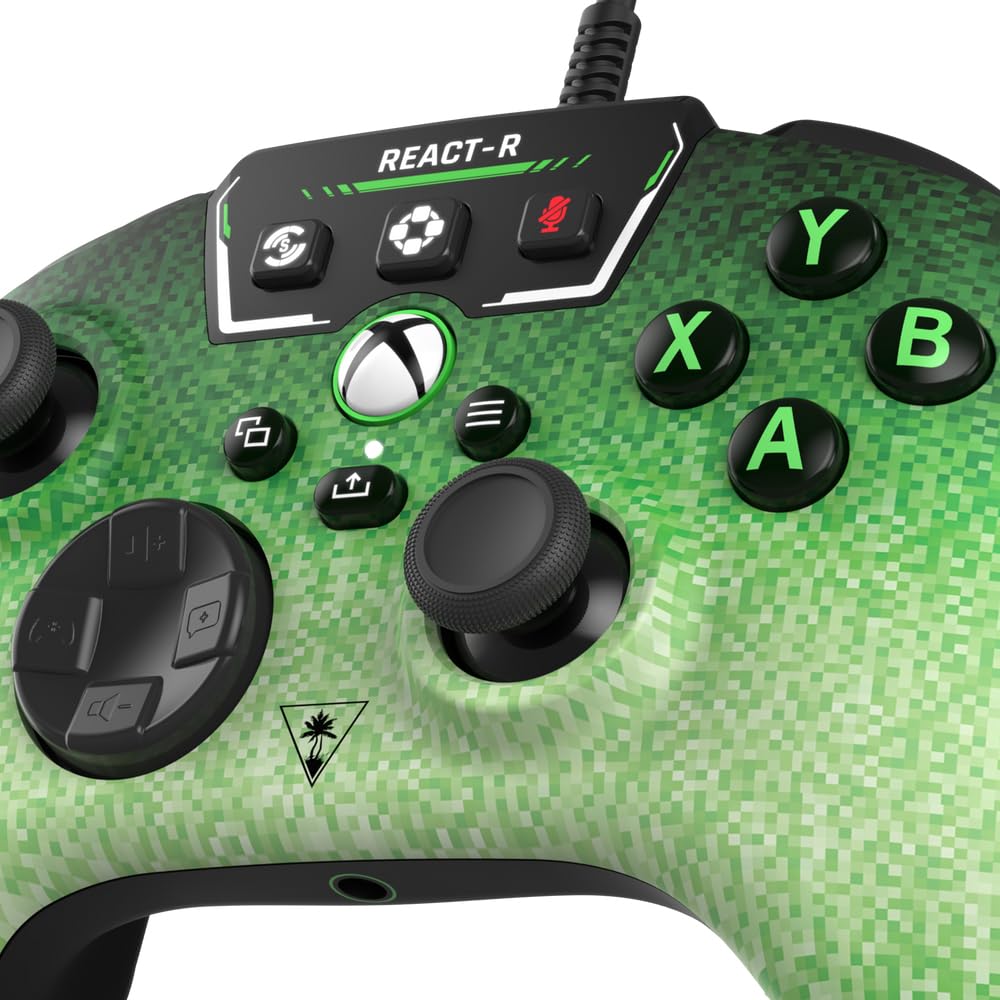
Figure 4: The two mappable quick-action buttons located on the back of the controller.
ຕັ້ງຄ່າ
ການເຊື່ອມຕໍ່ຕົວຄວບຄຸມ
- Locate the 8’ / 2.5m USB-C cable included in the package.
- Connect the USB-C end of the cable to the port on the top of the REACT-R controller.
- Connect the standard USB-A end of the cable to an available USB port on your Xbox console (Series X|S or Xbox One) or Windows 10|11 PC.
- The controller will automatically power on and connect to your device.
ການເຊື່ອມຕໍ່ຊຸດຫູຟັງ
- Plug any 3.5mm wired gaming headset into the 3.5mm headset jack located at the bottom of the controller.
- Once connected, you can use the integrated audio controls on the controller to manage your headset settings.
ຄໍາແນະນໍາການດໍາເນີນງານ
ການຄວບຄຸມສຽງ
The top panel of the controller features dedicated audio controls:
- ປະລິມານ +/-: Adjust the overall game audio volume.
- Chat +/-: Adjust the chat volume relative to the game volume.
- ປິດສຽງໄມ: Toggle your microphone on or off.
- Superhuman ໄດ້ຍິນ: Activate this mode to enhance critical in-game sounds like footsteps and reloads.
Mappable Quick-Action Buttons
The two buttons on the back of the controller (P1, P2) can be programmed to replicate any other controller button for quicker reactions. Refer to the Quick Start Guide for detailed mapping instructions.
ການສັ່ນສະເທືອນ
The dual rumble motors provide tactile feedback for in-game events, enhancing immersion. This feature is active by default.
ບໍາລຸງຮັກສາ
- ຮັກສາຕົວຄວບຄຸມໃຫ້ສະອາດໂດຍການເຊັດມັນດ້ວຍຜ້າອ່ອນແລະແຫ້ງ.
- ຫຼີກເວັ້ນການເປີດເຜີຍຕົວຄວບຄຸມກັບອຸນຫະພູມທີ່ຮຸນແຮງ, ຄວາມຊຸ່ມຊື່ນ, ຫຼືແສງແດດໂດຍກົງ.
- ຢ່າພະຍາຍາມຖອດປະກອບ ຫຼືດັດແປງຕົວຄວບຄຸມ, ເພາະວ່າການຮັບປະກັນຈະໝົດໄປ.
ການແກ້ໄຂບັນຫາ
If you encounter any issues with your REACT-R controller, please try the following:
- Ensure the USB-C cable is securely connected to both the controller and your gaming device.
- Test the controller on a different USB port or a different compatible device to rule out port or device issues.
- If using a headset, ensure it is fully plugged into the 3.5mm jack and that audio settings are correctly configured on your device.
- For further assistance, please refer to the official Turtle Beach support webເວັບໄຊ ຫຼືຕິດຕໍ່ບໍລິການລູກຄ້າ.
ຂໍ້ມູນຈໍາເພາະ
| ໝາຍເລກຕົວແບບ | TBS-0740-05 |
| ຄວາມເຂົ້າກັນໄດ້ | Xbox Series X|S, Xbox One, Windows 10|11 PCs |
| ການເຊື່ອມຕໍ່ | Wired (8’ / 2.5m USB-C to USB-A cable) |
| ສຽງອອກ | Jack ຫູຟັງ 3.5 ມມ |
| ຂະໜາດ | 6.12 x 2.57 x 4.25 ນິ້ວ |
| ນ້ຳໜັກ | 13.3 ອອນ |
| ຜູ້ຜະລິດ | ຫາດຊາຍເຕົ່າ |
ການຮັບປະກັນ & ສະຫນັບສະຫນູນ
This product is covered by a limited warranty. For detailed warranty information, product registration, and technical support, please visit the official Turtle Beach webເວັບໄຊ. ຮັກສາຫຼັກຖານການຊື້ຂອງທ່ານສໍາລັບການຮ້ອງຂໍການຮັບປະກັນ.
Copyright © 2023 Voyetra Turtle Beach, Inc. All rights reserved. Turtle Beach, the palm tree logo, Superhuman Hearing, and Voyetra are registered trademarks and/or trademarks of VTB, Inc. Microsoft, Xbox, Xbox “Sphere” Design, Xbox Series X|S, Xbox One, and Windows are trademarks of the Microsoft group of companies. All other trademarks are the properties of their respective owners.


