ແນະນຳ
This manual provides detailed instructions for the setup, operation, maintenance, and troubleshooting of your Divoom Songbird Karaoke Bluetooth Speaker. Please read this manual thoroughly before using the product to ensure proper function and longevity.

Figure 1: The Divoom Songbird Karaoke Bluetooth Speaker system, including the main speaker unit, two wireless microphones, and their charging base.
ເນື້ອໃນຊຸດ
ກ່ອນທີ່ຈະດໍາເນີນການຕິດຕັ້ງ, ກະລຸນາກວດສອບວ່າອົງປະກອບທັງໝົດມີຢູ່ໃນຊຸດ:
- 1 x SongBird-HQ Speaker Unit
- ໄມໂຄຣໂຟນ 2 x ໄຮ້ສາຍ
- 1 x Microphone Charging Base
- 1 x ຄູ່ມືຜູ້ໃຊ້ (ເອກະສານນີ້)
- ສາຍໄຟສາກແບັດ USB-C 1 x
- 1 x ສາຍ Aux
- 1 x Giftbag (packaging)

Figure 2: All items included in the Divoom Songbird Karaoke Bluetooth Speaker package, showing the speaker, microphones, cables, and manual.
ຕັ້ງຄ່າ
1. ການສາກອຸປະກອນ
The Divoom Songbird speaker and microphones are powered by internal Lithium Ion batteries. For optimal performance, fully charge all components before first use.
- Connect the provided USB-C cable to the charging port on the speaker unit and to a compatible USB power adapter (not included).
- Place the two microphones onto their charging base. Ensure they are seated correctly for charging.
- Charging indicators (LEDs) on the speaker and microphones will illuminate during charging and turn off or change color when fully charged.
2. ການເປີດເຄື່ອງເບື້ອງຕົ້ນ
- To power on the speaker, locate the power button (refer to Figure 3 for control layout) and press and hold it until you hear an audible prompt or see an indicator light.
- To power on the microphones, slide the power switch on each microphone to the 'ON' position.

Figure 3: Top panel of the Divoom Songbird speaker, illustrating the various control knobs and buttons for operation.
ຄໍາແນະນໍາການດໍາເນີນງານ
1. ການເຊື່ອມຕໍ່ບູທູດ
The Divoom Songbird speaker uses Bluetooth for wireless audio streaming.
- Ensure the speaker is powered on and in Bluetooth pairing mode (usually indicated by a blinking LED).
- On your mobile device or computer, navigate to the Bluetooth settings.
- ຊອກຫາ available devices and select "Divoom Songbird" from the list.
- ເມື່ອເຊື່ອມຕໍ່ແລ້ວ, ລຳໂພງຈະໃຫ້ສຽງຢືນຢັນ, ແລະໄຟ LED ຈະສະຫວ່າງຂຶ້ນ.
2. Auxiliary (AUX) Connection
For wired audio playback, use the provided 3.5mm Aux cable.
- Connect one end of the Aux cable to the 3.5mm Aux-in port on the speaker.
- Connect the other end to the headphone jack or audio output of your audio source (e.g., smartphone, MP3 player).
- The speaker will automatically switch to AUX mode or may require manual selection via a mode button.
3. Using the Microphones for Karaoke
The two wireless microphones are designed for karaoke functionality.
- Ensure both the speaker and microphones are powered on.
- The microphones should automatically pair with the speaker. If not, refer to the troubleshooting section.
- Adjust microphone volume and echo effects using the dedicated knobs on the speaker's top panel (refer to Figure 3).
- Sing into the microphone while playing music through the speaker via Bluetooth or AUX.

Figure 4: The two wireless microphones for the Divoom Songbird speaker, shown resting in their charging base.
ບໍາລຸງຮັກສາ
1. ທໍາຄວາມສະອາດ
ເພື່ອຮັກສາຮູບລັກສະນະ ແລະການເຮັດວຽກຂອງລໍາໂພງຂອງທ່ານ:
- ເຊັດພື້ນຜິວພາຍນອກດ້ວຍຜ້າອ່ອນ, ແຫ້ງ ແລະ ບໍ່ມີຂົນ.
- Do not use abrasive cleaners, alcohol, benzene, or other chemical solvents, as these may damage the finish.
- ຫຼີກເວັ້ນການໄດ້ຮັບຄວາມຊຸ່ມຊື່ນເຂົ້າໄປໃນຊ່ອງເປີດໃດໆ.
2. ການເກັບຮັກສາ
ເມື່ອບໍ່ໄດ້ໃຊ້ສໍາລັບໄລຍະເວລາຂະຫຍາຍ:
- Store the speaker and microphones in a cool, dry place, away from direct sunlight and extreme temperatures.
- Ensure the batteries are partially charged (around 50%) before long-term storage to preserve battery health.
3. ການດູແລຫມໍ້ໄຟ
The device contains a built-in rechargeable Lithium Ion battery. To maximize battery lifespan:
- ຫຼີກລ້ຽງການປະຈຸຫມໍ້ໄຟຢ່າງເຕັມທີ່ເລື້ອຍໆ.
- Avoid leaving the device plugged in constantly after it's fully charged.
- ສາກອຸປະກອນຢ່າງໜ້ອຍໜຶ່ງຄັ້ງໃນທຸກໆສາມເດືອນ ຖ້າບໍ່ໄດ້ໃຊ້ປົກກະຕິ.
ການແກ້ໄຂບັນຫາ
If you encounter issues with your Divoom Songbird speaker, refer to the following common problems and solutions:
| ບັນຫາ | ສາເຫດທີ່ເປັນໄປໄດ້ | ການແກ້ໄຂ |
|---|---|---|
| ບໍ່ມີໄຟ/ອຸປະກອນບໍ່ສາມາດເປີດໄດ້ | ແບັດເຕີຣີໝົດ. | Charge the speaker and microphones fully using the provided USB-C cable. |
| ບໍ່ສາມາດເຊື່ອມຕໍ່ຜ່ານ Bluetooth ໄດ້ | ລຳໂພງບໍ່ຢູ່ໃນໂໝດຈັບຄູ່; ອຸປະກອນ Bluetooth ປິດ; ໄກຈາກລໍາໂພງເກີນໄປ. | Ensure speaker is in pairing mode. Turn Bluetooth off and on again on your device. Move closer to the speaker (within 10 meters). Forget the device on your phone and re-pair. |
| ບໍ່ມີສຽງຈາກລຳໂພງ | Volume is too low; incorrect input mode; audio source issue. | Increase volume on both the speaker and your audio source. Ensure the correct input mode (Bluetooth/AUX) is selected. Check if the audio source is playing correctly. |
| ໄມໂຄຣໂຟນບໍ່ເຮັດວຽກ | Microphones are off; not charged; not paired with speaker. | Ensure microphones are powered on and charged. Power cycle both the speaker and microphones. They should automatically pair. |
ຂໍ້ມູນຈໍາເພາະ
Detailed technical specifications for the Divoom Songbird Karaoke Bluetooth Speaker:
- ໝາຍເລກຕົວແບບ: 90100058218
- ຍີ່ຫໍ້: Divoom
- ຂະໜາດຜະລິດຕະພັນ: 28 x 10 x 25 cm
- ນ້ໍາຫນັກລາຍການ: 1.3 ກິໂລ
- ແຫຼ່ງພະລັງງານ: ແບດເຕີຣີ້ໃຊ້ພະລັງງານ (ມີຫມໍ້ໄຟ Lithium Ion 1 ໜ່ວຍ)
- ພະລັງງານສຽງ: 50 ວັດ
- ໄມໂຄຣໂຟນ: Dual Microphone 24bit
- ຊີວິດຫມໍ້ໄຟ: ປະມານ 8 ຊົ່ວໂມງ
- ເຕັກໂນໂລຍີການເຊື່ອມຕໍ່: ຕົວຊ່ວຍ, Bluetooth
- ປະເພດຕົວເຊື່ອມຕໍ່: Jack ຂະ ໜາດ 3.5 ມມ
- ຄຸນນະສົມບັດພິເສດ: Bluetooth, Portable
- ສີ: ສີຂຽວ
- ການນໍາໃຊ້ທີ່ແນະນໍາ: For music players, Karaoke
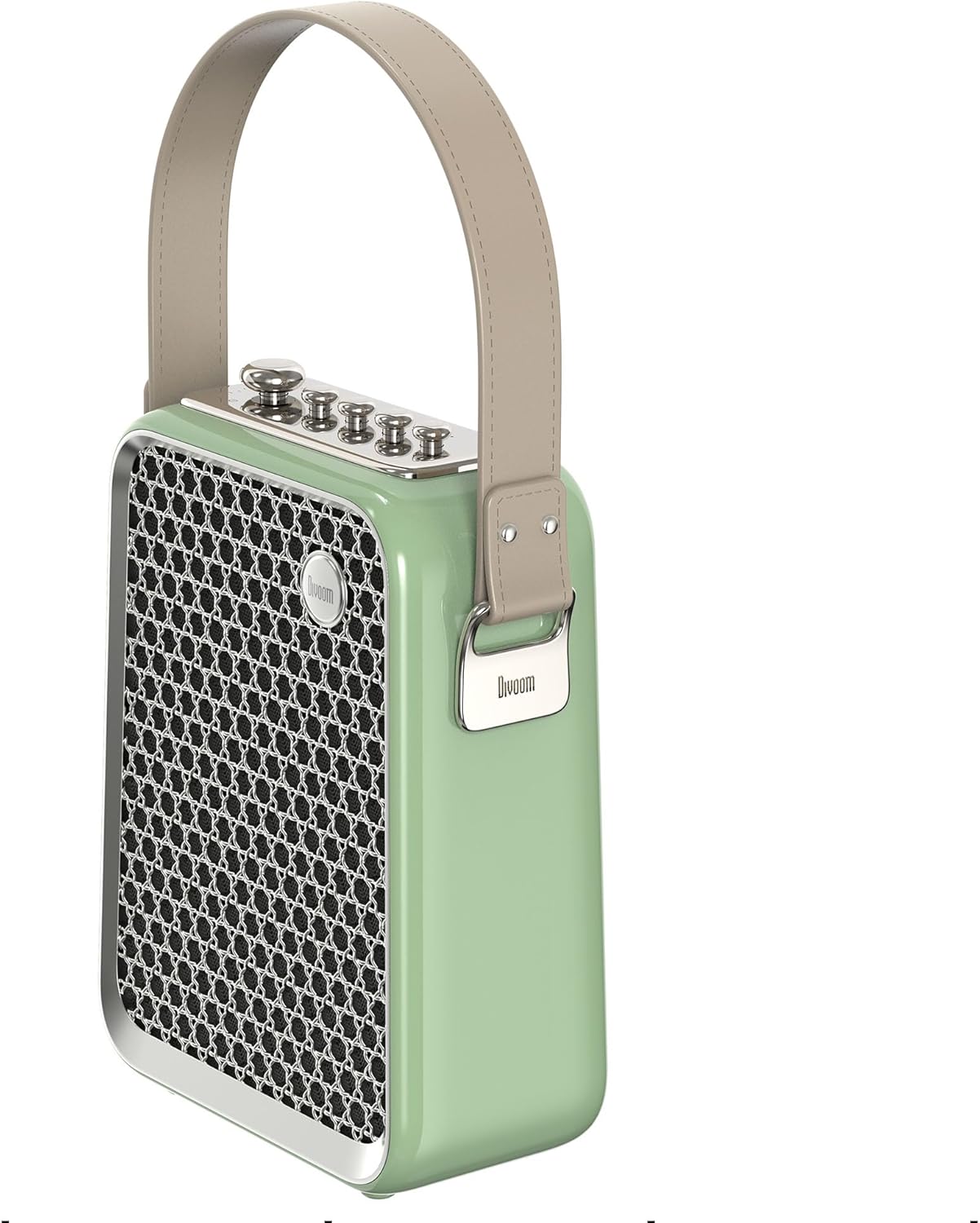
ຮູບ 5: Side profile of the Divoom Songbird speaker, highlighting its compact dimensions and integrated carrying handle.
ການຮັບປະກັນແລະການສະຫນັບສະຫນູນ
ຂໍ້ມູນການຮັບປະກັນ
This product may be eligible for extended warranty plans and accidental damage protection plans. Please refer to your purchase documentation or contact your retailer for specific warranty terms and conditions applicable to your region.
- ແຜນການຮັບປະກັນເພີ່ມເຕີມ 1 ປີ: ມີໃຫ້ສໍາລັບການຊື້.
- ແຜນປ້ອງກັນຄວາມເສຍຫາຍຈາກອຸປະຕິເຫດ 1 ປີ: ມີໃຫ້ສໍາລັບການຊື້.
- ແຜນການຮັບປະກັນເພີ່ມເຕີມ 2 ປີ: ມີໃຫ້ສໍາລັບການຊື້.
ການຊ່ວຍເຫຼືອລູກຄ້າ
For technical assistance, troubleshooting beyond this manual, or warranty claims, please contact Divoom customer support. Visit the official Divoom website for contact information or refer to the support details provided with your product packaging.
ນອກນັ້ນທ່ານຍັງສາມາດໄປຢ້ຽມຢາມໄດ້ Divoom brand page on Amazon ສໍາລັບຂໍ້ມູນເພີ່ມເຕີມ.


