1. ບົດແນະນຳ
The TAUROX gaming mouse is designed to provide precise and responsive control for an enhanced gaming experience. With an impressive sensor resolution of up to 7,200 DPI and customizable features, it adapts to various gaming styles.
ຄຸນນະສົມບັດທີ່ສໍາຄັນ
- High-precision sensor with up to 7,200 DPI for accurate tracking.
- Two integrated DPI switches for on-the-fly sensitivity adjustment.
- 5 configurable buttons for personalized control and macros.
- Lightweight design (135 grams with cable) for comfortable extended use.
- Customizable RGB lighting to personalize your gaming setup.
- Durable fabric-covered cable with 1.8-meter length for flexibility.
- USB-A connection for easy and universal compatibility.

Image: The TAUROX Gaming Mouse showcasing its multi-coloured LED lighting and ergonomic design.
2. ເນື້ອໃນຊຸດ
ກະລຸນາກວດສອບວ່າສິນຄ້າທັງໝົດມີຢູ່ໃນຊຸດ:
- TAUROX Gaming Mouse
- Configuration Software (downloadable or included)

ຮູບພາບ: ທາງຫນ້າ view of the TAUROX Gaming Mouse retail packaging, highlighting key features.
3. ຄູ່ມືການຕິດຕັ້ງ
3.1 ການເຊື່ອມຕໍ່ຫນູ
Connect the USB-A connector of the TAUROX Gaming Mouse to an available USB port on your computer. The mouse is plug-and-play for basic functionality.
3.2 ການຕິດຕັ້ງຊອບແວ
For full utilization of all functions, including macro programming and advanced customization, the installation of the dedicated configuration software is necessary. This software is typically provided via a download link or included on a small disc. Refer to the product packaging or Speedlink's official website for the download location.
Image: Side of the product box indicating the need for configuration software.
4. Operating Your TAUROX Gaming Mouse
4.1 ການປັບ DPI
The TAUROX Gaming Mouse features two integrated DPI switches located behind the scroll wheel. Use these buttons to cycle through different sensitivity levels (up to 7,200 DPI) to match your gaming style or task requirements. The current DPI setting may be indicated by the mouse's LED lighting color, depending on software configuration.

Image: Screenshot of the Speedlink software's 'Performance' tab, showing DPI control settings.
4.2 ປຸ່ມໂປຣແກຣມ
The mouse is equipped with 5 configurable buttons. These buttons can be assigned various functions, including keyboard macros, multimedia controls, or specific in-game actions, using the configuration software. Launch the software and navigate to the 'Button' or 'Macro' section to customize these settings.
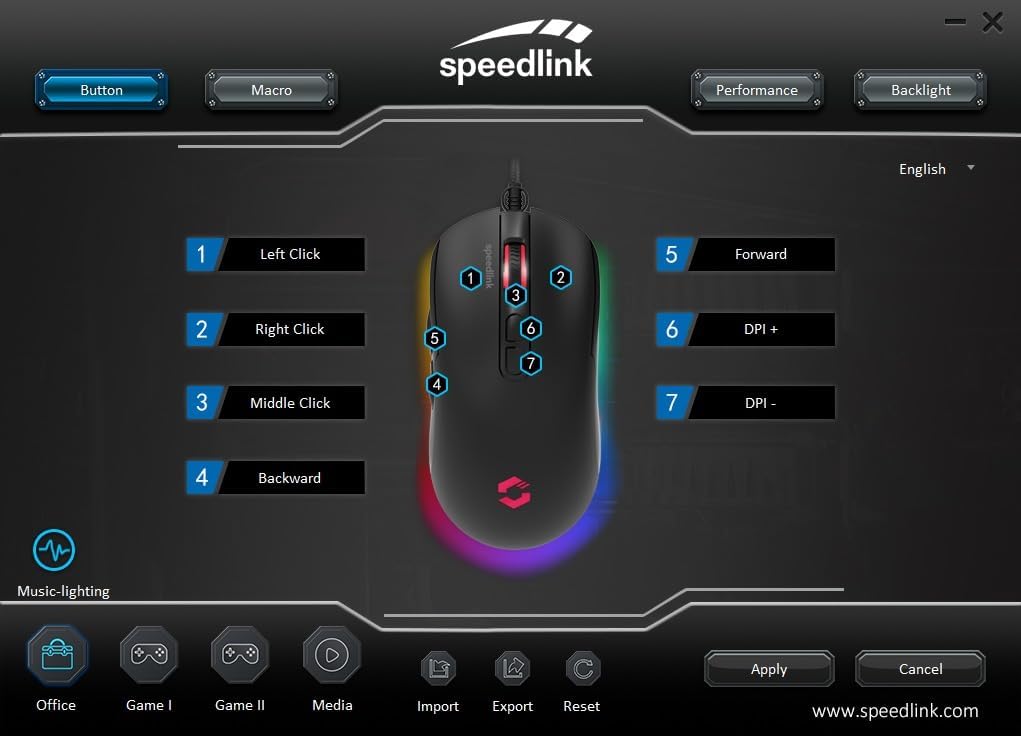
Image: Screenshot of the Speedlink software's 'Button' tab, illustrating the mapping of the mouse's 7 buttons.
4.3 ແສງ RGB
The TAUROX Gaming Mouse features multi-coloured RGB lighting that can be customized through the configuration software. You can select from various lighting effects, colors, and brightness levels to match your personal preference or gaming setup. Access the 'Backlight' section in the software to adjust these settings.

Image: Screenshot of the Speedlink software's 'Backlight' tab, showing options for customizing the mouse's RGB lighting effects.
5. ບໍາລຸງຮັກສາ
To ensure the longevity and optimal performance of your TAUROX Gaming Mouse, follow these maintenance guidelines:
- ທໍາຄວາມສະອາດ: ໃຊ້ຜ້າອ່ອນໆແຫ້ງເພື່ອທຳຄວາມສະອາດໜ້າຜິວຂອງເມົາສ໌. ສຳລັບຝຸ່ນທີ່ຝັງແໜ້ນ, ໃຫ້ເຊັດອອກເລັກນ້ອຍamp cloth can be used, but ensure no liquid enters the mouse. Avoid abrasive cleaners.
- ການດູແລສາຍໄຟ: Avoid sharp bends, kinks, or excessive pulling on the cable. Store the cable neatly when not in use to prevent damage.
- ການບຳລຸງຮັກສາເຊັນເຊີ: ຮັກສາເຊັນເຊີ optical ຢູ່ດ້ານລຸ່ມຂອງຫນູສະອາດແລະບໍ່ມີຝຸ່ນຫຼືສິ່ງເສດເຫຼືອເພື່ອຮັບປະກັນການຕິດຕາມທີ່ຖືກຕ້ອງ.
6. ການແກ້ໄຂບັນຫາ
If you encounter issues with your TAUROX Gaming Mouse, consider the following:
- ເມົາສ໌ບໍ່ຕອບສະໜອງ: Ensure the USB cable is securely connected to your computer. Try plugging the mouse into a different USB port.
- ການຕິດຕາມບໍ່ຖືກຕ້ອງ: Clean the optical sensor on the bottom of the mouse. Ensure you are using the mouse on a suitable surface (e.g., a mouse pad).
- ບັນຫາຊອບແວ: If the configuration software is not functioning correctly, try reinstalling it. Ensure your operating system is up to date.
- ປຸ່ມບໍ່ເຮັດວຽກ: Check the button assignments in the configuration software to ensure they are correctly configured.
- ແສງບໍ່ເຮັດວຽກ: Verify the RGB lighting settings in the configuration software.
For persistent issues, refer to the support section on the Speedlink webເວັບໄຊ.
7. ຂໍ້ກໍານົດດ້ານວິຊາການ
| ຄຸນສົມບັດ | ຂໍ້ມູນຈໍາເພາະ |
|---|---|
| ຂະໜາດສິນຄ້າ | 4.92 x 2.48 x 0.04 inches (125x63x40 mm LxWxH) |
| ນ້ໍາຫນັກລາຍການ | 5.7 ounces (135 grams with cable) |
| ໝາຍເລກຕົວແບບ | SL-680016-BK |
| ຍີ່ຫໍ້ | Speedlink |
| ສີ | ດຳ |
| ເຕັກໂນໂລຊີການເຊື່ອມຕໍ່ | USB-A (ມີສາຍ) |
| ຄຸນນະສົມບັດພິເສດ | Programmable Buttons, Multi-coloured LED Lighting |
| ເຕັກໂນໂລຍີກວດຈັບການເຄື່ອນໄຫວ | Optical |
| ຄວາມລະອຽດ DPI | ສູງສຸດ 7,200 DPI (ປັບໄດ້) |
| ຄວາມຍາວສາຍ | 1.8 ແມັດ |
| ຜູ້ຜະລິດ | Speedlink |
8. Safety Instructions and Compliance
8.1 ຄໍາແນະນໍາຄວາມປອດໄພທີ່ສໍາຄັນ
Please note that the failure to observe these instructions can cause product damage, explosion, fire and/or electric shock!
- ໃຊ້ອຸປະກອນຕາມທີ່ລະບຸໄວ້ໃນຄູ່ມືຜູ້ໃຊ້ເທົ່ານັ້ນ. ຢ່າເປີດຫຼືສ້ອມແປງພວກມັນ.
- ຫ້າມບໍ່ໃຫ້ອຸປະກອນຖືກຂອງແຫຼວ, ຄວາມຮ້ອນ ຫຼື ເຢັນ.
- ຢ່າໃຊ້ອຸປະກອນໃນການໂຄສະນາamp ສະພາບແວດລ້ອມ. ເຮັດຄວາມສະອາດອຸປະກອນດ້ວຍຜ້າແຫ້ງ.
- ຮັກສາອຸປະກອນ ແລະສ່ວນທີ່ວ່າງທັງໝົດໃຫ້ຫ່າງຈາກເດັກນ້ອຍ, ສັດລ້ຽງ ແລະບຸກຄົນທີ່ບໍ່ໄດ້ຮັບອະນຸຍາດ.
- Only use the devices with the appropriate provided accessories.
- Disconnect cables from the devices if they will not be used for a long time. When disconnecting by cables, don't pull on the cord but on the plug.
- Don't use the cables in any way other than mentioned in the user guide. Don't bend, cut, extend, knot or step on them.
- Don't insert any foreign objects into the openings of the device.
- ຖ້າອຸປະກອນເສຍຫາຍໃນທາງໃດກໍ່ຕາມຫຼືຮ້ອນເກີນໄປ, ໃຫ້ຢຸດໃຊ້ທັນທີ.
- Take caution when using devices that emit radio signals if you have a pacemaker or are dependent on other sensitive electronic aids.
ຄໍາແນະນໍາດ້ານຄວາມປອດໄພໃນພາສາເພີ່ມເຕີມ: www.speedlink.com
8.2 Warning Symbols and Markings
Extended use of input devices may cause health problems such as discomfort or pain. As such, take regular breaks and consult a doctor if problems persist.
ຖະແຫຼງການ FCC 8.3
ອຸປະກອນນີ້ໄດ້ຮັບການທົດສອບແລະພົບເຫັນວ່າປະຕິບັດຕາມຂໍ້ຈໍາກັດສໍາລັບອຸປະກອນດິຈິຕອນ B Class B, ອີງຕາມພາກທີ 15 ຂອງກົດລະບຽບ FCC. ຂໍ້ຈໍາກັດເຫຼົ່ານີ້ຖືກອອກແບບມາເພື່ອສະຫນອງການປົກປ້ອງທີ່ສົມເຫດສົມຜົນຕໍ່ການແຊກແຊງທີ່ເປັນອັນຕະລາຍໃນການຕິດຕັ້ງທີ່ຢູ່ອາໄສ. ອຸປະກອນນີ້ສ້າງ, ນຳໃຊ້ ແລະ ສາມາດແຜ່ກະຈາຍພະລັງງານຄວາມຖີ່ວິທະຍຸ ແລະ, ຖ້າຫາກວ່າບໍ່ໄດ້ຕິດຕັ້ງແລະນໍາໃຊ້ຕາມຄໍາແນະນໍາ, ອາດຈະເຮັດໃຫ້ເກີດການແຊກແຊງອັນຕະລາຍກັບການສື່ສານວິທະຍຸ. ຢ່າງໃດກໍ່ຕາມ, ບໍ່ມີການຮັບປະກັນວ່າການແຊກແຊງຈະບໍ່ເກີດຂື້ນໃນການຕິດຕັ້ງໂດຍສະເພາະ. ຖ້າອຸປະກອນນີ້ເຮັດໃຫ້ເກີດການລົບກວນທີ່ເປັນອັນຕະລາຍຕໍ່ການຮັບວິທະຍຸຫຼືໂທລະພາບ, ເຊິ່ງສາມາດຖືກກໍານົດໂດຍການປິດແລະເປີດອຸປະກອນ, ຜູ້ໃຊ້ໄດ້ຖືກຊຸກຍູ້ໃຫ້ພະຍາຍາມແກ້ໄຂການລົບກວນໂດຍຫນຶ່ງຫຼືຫຼາຍມາດຕະການຕໍ່ໄປນີ້:
- Reorient ຫຼືຍ້າຍເສົາອາກາດຮັບ.
- ເພີ່ມການແຍກຕ່າງຫາກລະຫວ່າງອຸປະກອນແລະເຄື່ອງຮັບ.
- ເຊື່ອມຕໍ່ອຸປະກອນກັບເຕົ້າສຽບຢູ່ໃນວົງຈອນທີ່ແຕກຕ່າງຈາກທີ່ເຄື່ອງຮັບແມ່ນເຊື່ອມຕໍ່.
- ປຶກສາຕົວແທນຈໍາໜ່າຍ ຫຼື ຊ່າງວິທະຍຸ/ໂທລະພາບທີ່ມີປະສົບການເພື່ອຂໍຄວາມຊ່ວຍເຫຼືອ.
ອຸປະກອນນີ້ປະຕິບັດຕາມພາກທີ 15 ຂອງກົດລະບຽບ FCC. ການດໍາເນີນງານແມ່ນຂຶ້ນກັບສອງເງື່ອນໄຂຕໍ່ໄປນີ້: (1) ອຸປະກອນນີ້ອາດຈະບໍ່ເຮັດໃຫ້ເກີດການລົບກວນທີ່ເປັນອັນຕະລາຍ, ແລະ (2) ອຸປະກອນນີ້ຕ້ອງຍອມຮັບການແຊກແຊງໃດໆທີ່ໄດ້ຮັບ, ລວມທັງການລົບກວນທີ່ອາດຈະເຮັດໃຫ້ເກີດການເຮັດວຽກທີ່ບໍ່ຕ້ອງການ.
ໝາຍເຫດ: Modifications to this product will void the user's authority to operate this equipment.
8.4 Conformity Notice
ຜູ້ນໍາເຂົ້າ/ຜູ້ຜະລິດ: Zocherl Media GmbH, Im Dorf 5, 29303 Hemslingen, GERMANY
ໂທລະສັບ: +49 4267 9341 0
ລາຍລະອຽດຂອງຜະລິດຕະພັນ:
ປະເພດເລກທີ: SL-680016-BK
ລາຍລະອຽດຜະລິດຕະພັນ: TAUROX Gaming Mouse, ສີດໍາ
ຜະລິດຕະພັນປະຕິບັດຕາມຄໍາແນະນໍາຕໍ່ໄປນີ້:
EMC: 2014/30/EU
RoHS: 2011/65/EU
For a full declaration of conformity, the latest user guide, FAQ or further information, please visit: www.speedlink.com
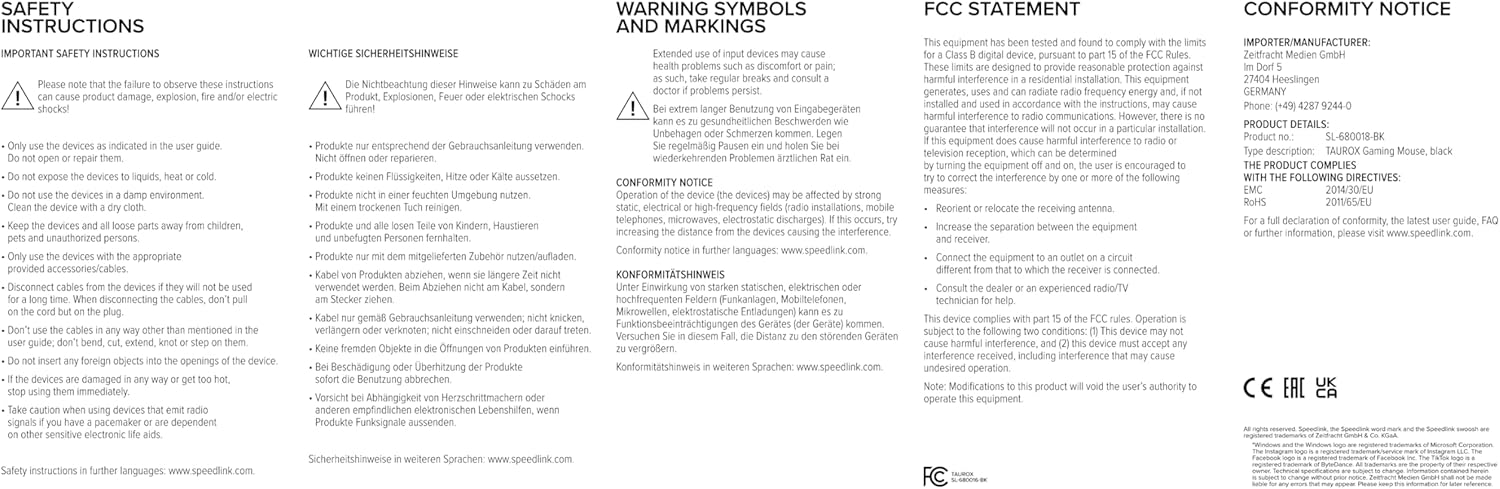
Image: Product packaging displaying various certifications and multilingual product names.
9. ການຮັບປະກັນແລະການສະຫນັບສະຫນູນ
For warranty information, technical support, frequently asked questions (FAQs), and the latest user guides, please visit the official Speedlink webເວັບໄຊ:


