ZEXMTE 5.1 USB Bluetooth Adapter User Manual
ຮູບແບບ: Z03
ແນະນຳ
This manual provides detailed instructions for the ZEXMTE 5.1 USB Bluetooth Adapter, Model Z03. This adapter is designed to add Bluetooth 5.1 connectivity to your Windows PC, offering an extended range, enhanced stability, and multi-device support. Please read this manual carefully before use to ensure optimal performance and proper operation.
ເນື້ອໃນຊຸດ
- 1 x ZEXMTE 5.1 USB Bluetooth Adapter (Model Z03)
ຄໍາແນະນໍາການຕິດຕັ້ງ
1. ການຕິດຕັ້ງໄດເວີ
The ZEXMTE 5.1 USB Bluetooth Adapter supports ສຽບແລະຫຼິ້ນ functionality for Windows 11, Windows 10, and Windows 8. For these operating systems, no manual driver installation is typically required.
For other Windows versions, or if the adapter is not recognized automatically, drivers may be required. Please visit the official ZEXMTE website to download the appropriate drivers for your system.
2. ການເຊື່ອມຕໍ່ອະແດບເຕີ
- ຊອກຫາພອດ USB ທີ່ມີຢູ່ໃນຄອມພິວເຕີຕັ້ງໂຕະ ຫຼື ແລັບທັອບຂອງທ່ານ.
- Insert the ZEXMTE 5.1 USB Bluetooth Adapter firmly into the USB port. A blue LED indicator on the adapter will illuminate when it is successfully connected and powered.
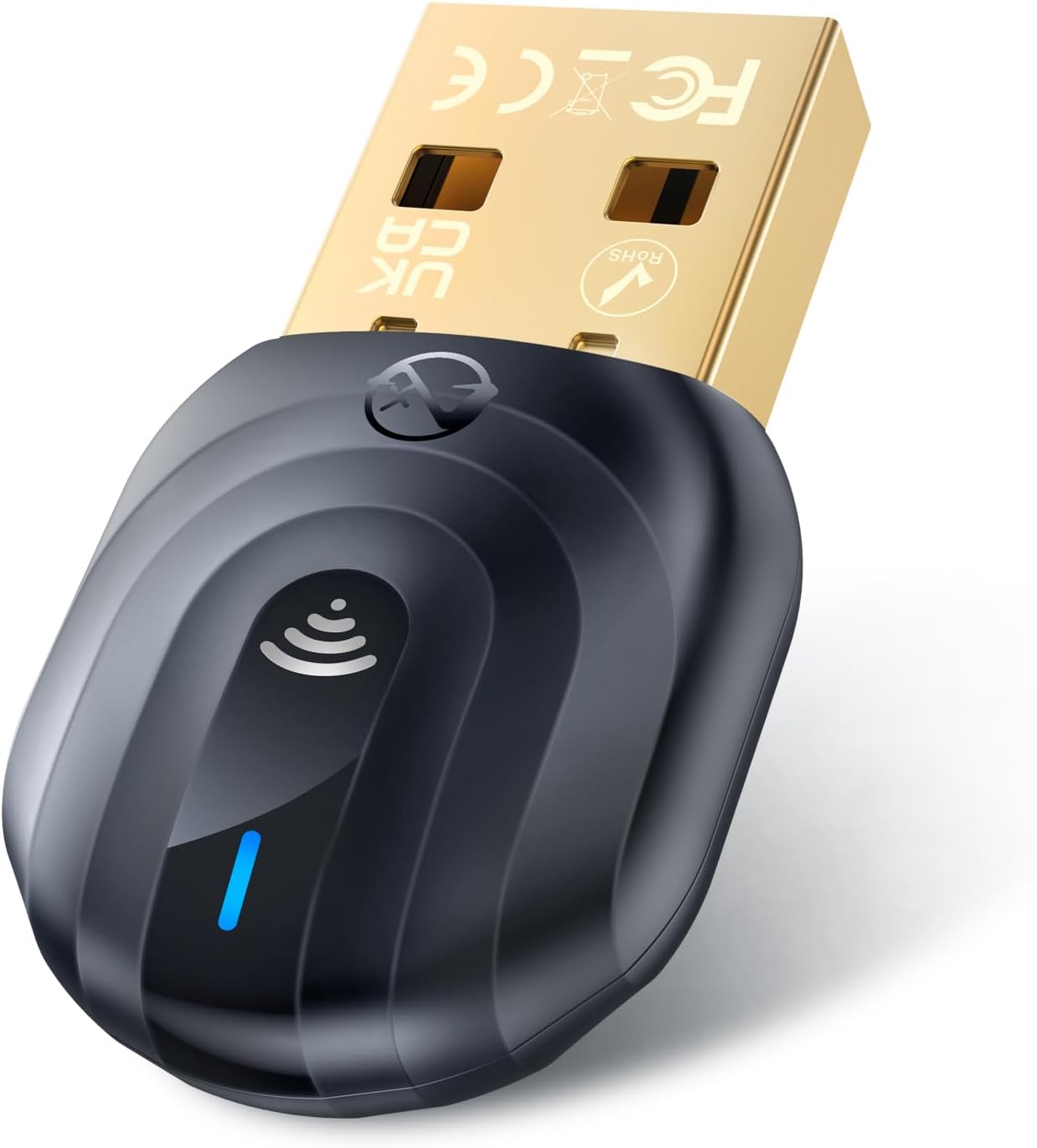
Image: The ZEXMTE 5.1 USB Bluetooth Adapter inserted into a laptop's USB port.

Image: A hand plugging the ZEXMTE 5.1 USB Bluetooth Adapter into a laptop, illustrating the 'Plug & Play' feature.
3. Initial Pairing Process
Once the adapter is connected and recognized by your system, you can begin pairing Bluetooth devices.
Video: This video demonstrates the plug-and-play setup and initial device pairing process for the ZEXMTE USB Bluetooth Adapter on a Windows PC.
ຄໍາແນະນໍາການດໍາເນີນງານ
1. ກຳລັງຈັບຄູ່ອຸປະກອນ Bluetooth
- Ensure your Bluetooth device (e.g., headphones, mouse, keyboard) is in pairing mode. Refer to your device's manual for specific instructions.
- ໃນຄອມພິວເຕີ Windows ຂອງທ່ານ, ໃຫ້ໄປທີ່ ການຕັ້ງຄ່າ > Bluetooth ແລະອຸປະກອນ.
- ໃຫ້ຄລິກໃສ່ 'ເພີ່ມອຸປະກອນ' ແລະເລືອກ 'Bluetooth'.
- Your PC will scan for nearby Bluetooth devices. Select your device from the list and follow any on-screen prompts to complete the pairing.
2. ການເຊື່ອມຕໍ່ຫຼາຍອຸປະກອນ
The ZEXMTE 5.1 USB Bluetooth Adapter supports simultaneous connection with up to 7 Bluetooth devices. This allows you to connect multiple peripherals like speakers, headphones, mice, keyboards, and printers to your PC at the same time.

Image: Illustration of the adapter enabling multi-device connectivity for a laptop, connecting to headphones, a speaker, a phone, a keyboard, and a mouse.
3. File ໂອນ
You can use the Bluetooth adapter to transfer files between your PC and other Bluetooth-enabled devices, such as smartphones or tablets. Once paired, use your operating system's Bluetooth file transfer utility to send or receive files.
Video: This video demonstrates various uses of the ZEXMTE USB Bluetooth Adapter, including file transfer from a phone to a PC and connecting to audio devices.
ຄຸນນະສົມບັດທີ່ສໍາຄັນ
- Extended Signal Coverage: Equipped with a built-in FPC antenna, the adapter provides a connection range of up to 50 meters (164 feet) in open environments. This significantly extends the connection distance and improves signal penetration through obstacles compared to standard adapters.
- ປັບປຸງຄວາມໝັ້ນຄົງ: The combination of a Bluetooth 5.1 chip and FPC antenna improves connection stability and anti-interference capabilities. EDR (Enhanced Data Rate) technology supports transmission speeds up to 3Mbps, reducing interference from 2.4GHz signals.
- ສຽບ ແລະ ຫຼິ້ນ: Offers true driver-free operation on Windows 11, Windows 10, and Windows 8, allowing for quick connection and use.
- ຂະໜາດນ້ອຍ: The compact design of the Bluetooth dongle makes it highly portable and convenient for use with laptops or desktops, without obstructing adjacent USB ports.

Image: A visual representation of the ZEXMTE adapter's 50-meter open environment range, showing coverage across multiple rooms.

ຮູບພາບ: ພາຍໃນ view highlighting the Bluetooth 5.1 chip and FPC antenna, emphasizing stable and efficient Bluetooth transmission.

Image: The ultra-small and portable design of the ZEXMTE Bluetooth adapter, showing its dimensions (35mm x 18mm x 9mm) next to a mouse and a coin for scale.
ຄວາມເຂົ້າກັນໄດ້
The ZEXMTE 5.1 USB Bluetooth Adapter is compatible with:
- ລະບົບປະຕິບັດການ: Windows 11, Windows 10, Windows 8.1, Windows 8, Windows 7.
- Bluetooth Versions: Backwards compatible with Bluetooth V5.0, V4.0, V3.0, V2.0, and V1.1.
- ອຸປະກອນ: Bluetooth speakers, headphones, mice, keyboards, printers, and other Bluetooth-enabled peripherals.
ໝາຍເຫດ: This USB Bluetooth adapter is ບໍ່ເຫມາະສົມ for Mac OS, Linux, TV, car stereo systems, or gaming consoles like Nintendo Switch, PS5, or PS4.

Image: A visual chart detailing the wide compatibility of the ZEXMTE Bluetooth adapter with various devices and Windows operating systems.
ຂໍ້ມູນຈໍາເພາະ
| ຄຸນສົມບັດ | ຂໍ້ມູນຈໍາເພາະ |
|---|---|
| ຍີ່ຫໍ້ | ZEXMTE |
| ໝາຍເລກຕົວແບບ | Z03 |
| ລຸ້ນ Bluetooth | 5.1 |
| ການໂຕ້ຕອບຮາດແວ | ບູທູດ, ບູທູດ 5, USB |
| ອະນຸສັນຍາການເຊື່ອມຕໍ່ຂໍ້ມູນ | Bluetooth, USB |
| ອັດຕາການໂອນຂໍ້ມູນ | 3 ເມກາບິດຕໍ່ວິນາທີ (Mbps) |
| ອຸປະກອນທີ່ເຂົ້າກັນໄດ້ | Desktop, Laptop (Windows 11/10/8.1/8/7) |
| ນ້ໍາຫນັກລາຍການ | 0.704 ອອນສ໌ (0.02 ກິໂລກຣາມ) |
| ຂະໜາດແພັກເກັດ | 3.9 x 3.39 x 0.75 ນິ້ວ |
ການແກ້ໄຂບັນຫາ
1. Driver Conflicts or Connection Issues
If you experience issues with Bluetooth connections or device recognition, especially after Windows updates, consider the following steps:
- Turn off Bluetooth on your computer.
- Unplug the ZEXMTE adapter.
- In Windows Device Manager, select View > Show hidden devices. Uninstall all entries under the 'Bluetooth' group.
- ປິດເປີດຄອມພິວເຕີຂອງທ່ານຄືນໃໝ່.
- If your computer has an integrated Bluetooth adapter, disable it in Device Manager (e.g., 'Realtek Bluetooth Adapter').
- Plug the ZEXMTE adapter into a USB 2.0 port (some users report better stability with USB 2.0 over 3.0 due to potential interference).
- In Device Manager, locate the new 'Generic Bluetooth Radio' entry. Right-click, select ຄຸນສົມບັດ, ໄປທີ່ ການຄຸ້ມຄອງພະລັງງານ tab, and uncheck 'Allow the computer to turn off this device to save power'.
- In Windows Bluetooth settings, select 'More Bluetooth options' ແລະກວດເບິ່ງ 'Allow Bluetooth devices to find this PC'.
- Reboot your computer again.
- Attempt to pair your Bluetooth devices following the standard operating instructions.
2. Audio Quality Issues
While the adapter generally provides good audio quality, occasional distortion may occur with specific computer configurations. This is often related to system-level audio processing or other software conflicts rather than the adapter itself. Ensure your audio drivers are up to date and try adjusting audio settings in your operating system.
3. Linux Compatibility
The adapter is not officially supported on Linux. However, some users have reported success with certain Linux distributions, such as Linux Mint 20, where the adapter was recognized upon insertion. Functionality may vary and is not guaranteed.
ບໍາລຸງຮັກສາ
The ZEXMTE 5.1 USB Bluetooth Adapter requires minimal maintenance. To ensure its longevity and optimal performance:
- Keep the adapter dry and away from liquids.
- ຫຼີກເວັ້ນການເປີດເຜີຍມັນກັບອຸນຫະພູມທີ່ຮຸນແຮງຫຼືແສງແດດໂດຍກົງ.
- Clean the exterior gently with a soft, dry cloth if necessary. Do not use harsh chemicals or abrasive materials.
- Store it in a safe place when not in use to prevent physical damage.
ການຮັບປະກັນແລະການສະຫນັບສະຫນູນ
ZEXMTE is committed to providing quality products and customer satisfaction. For driver downloads, product support, or warranty information, please visit the official ZEXMTE website. You can also find more information and contact details through the ZEXMTE Store on Amazon.