ແນະນຳ
This manual provides instructions for the Srhythm NiceComfort 95 Hybrid Noise Cancelling Headphones. These wireless Bluetooth headphones feature advanced hybrid active noise cancellation, transparency mode, and high-definition sound for an immersive audio experience. Please read this manual thoroughly before using your headphones to ensure proper operation and care.
ແມ່ນຫຍັງຢູ່ໃນກ່ອງ
ກວດສອບວ່າລາຍການທັງຫມົດແມ່ນມີຢູ່ໃນຊຸດຂອງທ່ານ:
- Srhythm NC95 Headphone
- ກໍລະນີປ້ອງກັນ
- ສາຍໄຟແບບ Type-C
- ສາຍສຽງ 3.5 ມມ
- Aircraft Adapter & 3.5mm to 6.35mm Adapter

An image displaying all included accessories: the NC95 headphones, a gift box, a travel case, a 1m Type-C charging cable, a 1.2m 3.5mm audio cable, a quick start guide, and a two-pin airplane adapter.
ສິນຄ້າເກີນview
The Srhythm NiceComfort 95 headphones are designed for comfort and superior audio performance.
ຄຸນນະສົມບັດທີ່ສໍາຄັນ
- ການຕັດສຽງລົບກວນແບບປະສົມປະສານ: Blocks up to 95% of ambient noise in traffic, offices, and schools. Activate by pressing the button for 1.5 seconds.
- ໂໝດຄວາມໂປ່ງໃສ: Stay aware of your surroundings by amplifying environmental sounds for safer walks, quick conversations, or hearing important announcements without removing your headphones.
- Sleek Metal Build & Intuitive Control: Features a multi-function knob for effortless control, polished metal finish, exquisite cutting metal glows, and a shaped headband for a refined exterior.
- ທາງເລືອກການເຊື່ອມຕໍ່ຄູ່: Seamlessly connect via Bluetooth 6.0 for wireless freedom, or use the included 3.5mm audio cable for a zero-latency wired connection.
- Premium Auditory Experience: More efficient new Bluetooth 6.0 version. Ultra-inert cotton, skin-feeling replaceable ear-pads provide pressureless crystal clear sound.
- ອາຍຸແບັດເຕີຣີດົນ ແລະສາກໄວ: Up to 65 hours of playtime on a single full charge. A quick 10-minute charge provides up to 3 hours of power.
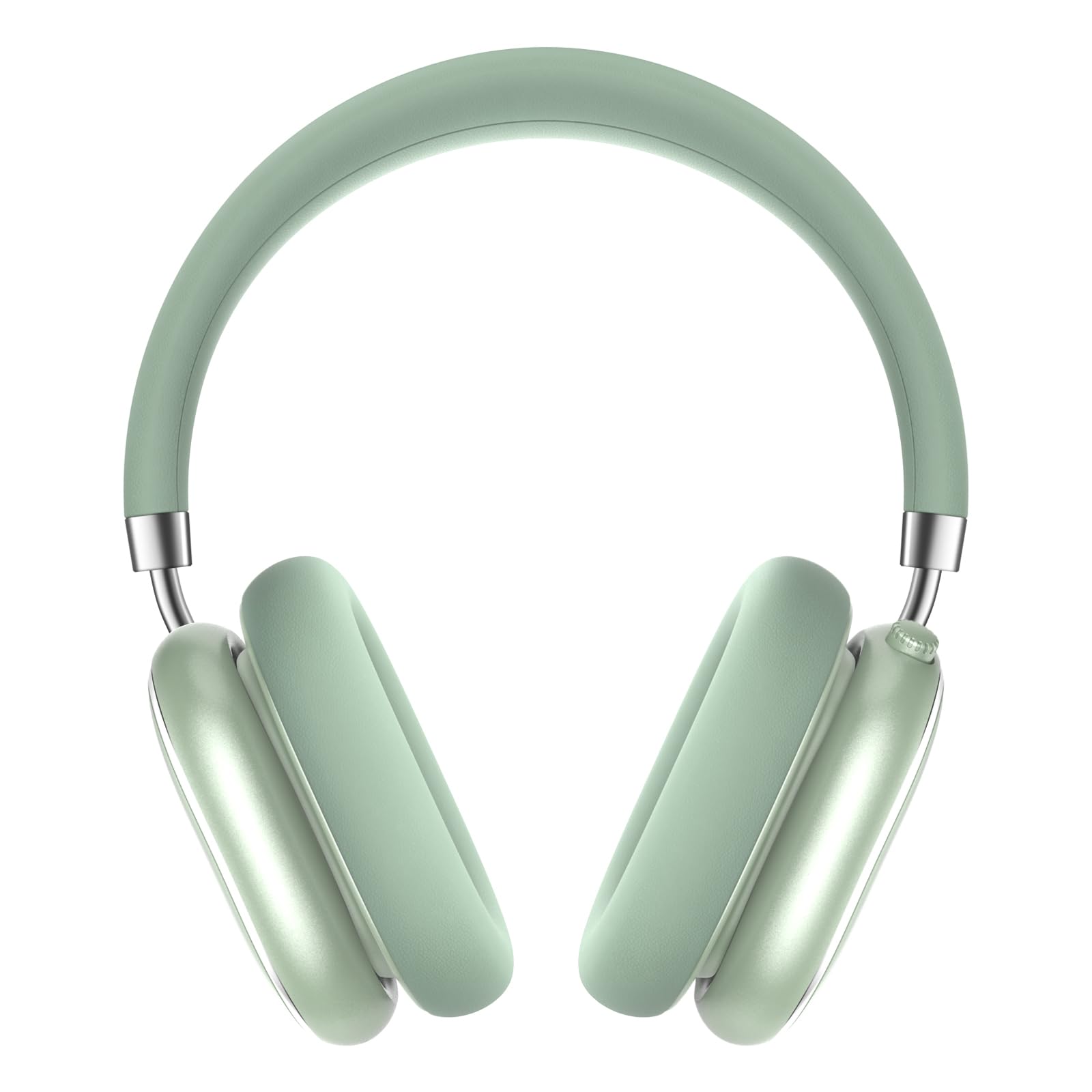
A pair of Srhythm NiceComfort 95 headphones, showcasing their sleek design and mint green color.

A man wearing the headphones, illustrating the hybrid active noise cancelling feature that blocks 95% of external noise.

A woman wearing the headphones in a public setting, demonstrating the transparency mode which amplifies ambient sounds.

ລາຍລະອຽດ view of the headphone's intuitive controls, including the multi-function knob for volume and playback, and buttons for ANC/Bluetooth.

A man using the headphones while relaxing, highlighting the 100-hour ultra-long battery life and quick charge feature.

An internal diagram illustrating the more efficient new Bluetooth 6.0 version technology integrated into the headphones.
ຕັ້ງຄ່າ
ກຳລັງສາກຫູຟັງ
ກ່ອນທີ່ຈະໃຊ້ຄັ້ງທໍາອິດ, ໃຫ້ສາກຫູຟັງຂອງທ່ານໃຫ້ເຕັມ.
- Connect the Type-C charging cable to the charging port on the headphone.
- ເຊື່ອມຕໍ່ອີກສົ້ນຂອງສາຍກັບແຫຼ່ງໄຟ USB (ເຊັ່ນ: ຄອມພິວເຕີ, ອະແດັບເຕີຝາ).
- The LED indicator will show charging status. A full charge provides up to 65 hours of playtime. A 10-minute quick charge offers 3 hours of use.
ເປີດ/ປິດ
ເພື່ອເປີດເຄື່ອງ, ໃຫ້ກົດປຸ່ມເປີດປິດຄ້າງໄວ້ 1.5 ວິນາທີ. ເພື່ອປິດເຄື່ອງ, ໃຫ້ກົດປຸ່ມເປີດປິດຄ້າງໄວ້ 10 ວິນາທີ.
ການຈັບຄູ່ Bluetooth
- ກວດໃຫ້ແນ່ໃຈວ່າປິດຫູຟັງແລ້ວ.
- ກົດປຸ່ມເປີດປິດຄ້າງໄວ້ຈົນກວ່າຕົວຊີ້ LED ຈະກະພິບ, ສະແດງເຖິງໂໝດການຈັບຄູ່.
- On your device (smartphone, tablet, laptop), enable Bluetooth and search for "Srhythm NC95".
- Select "Srhythm NC95" to connect. The LED indicator will show a solid light once connected.
ການເຊື່ອມຕໍ່ສາຍໄຟ
For a wired connection, plug the 3.5mm audio cable into the headphone's audio jack and the other end into your audio device. This provides a zero-latency connection.
ຄໍາແນະນໍາການດໍາເນີນງານ
ການຄວບຄຸມ
The headphones feature a multi-function knob and a dedicated button for various controls:
- ປຸ່ມຫຼາຍຟັງຊັນ:
- Twist up: Increase volume.
- Twist down: Decrease volume.
- ກົດຄັ້ງດຽວ: ຫຼິ້ນ/ຢຸດເພງ, ຮັບສາຍ/ວາງສາຍ.
- ກົດສອງຄັ້ງ: ເພງຕໍ່ໄປ.
- ກົດສາມເທື່ອ: ເພງກ່ອນໜ້ານີ້.
- ANC/Transparency Mode Button:
- Press for 1.5 seconds: Toggle between Hybrid Active Noise Cancelling, Transparency Mode, and Normal Mode.
ໂໝດ
- Hybrid Active Noise Cancelling (ANC): Reduces up to 95% of ambient noise, ideal for noisy environments.
- ໂໝດຄວາມໂປ່ງໃສ: Allows you to hear your surroundings while listening to audio, enhancing safety and convenience.
- ໂໝດປົກກະຕິ: Standard audio playback without noise cancellation or transparency features.
Using the Aircraft Adapter
For in-flight entertainment, use the included aircraft adapter by plugging the 3.5mm audio cable into the adapter, then into the aircraft's audio port.

The Srhythm NiceComfort 95 headphones neatly packed in their protective travel case, alongside charging cables and adapters, ready for travel.
ບໍາລຸງຮັກສາ
To ensure the longevity and optimal performance of your Srhythm NiceComfort 95 headphones, follow these maintenance guidelines:
- ທໍາຄວາມສະອາດ: Do not use corrosive cleaners or oils. Wipe the headphones with a soft, dry cloth.
- ການເກັບຮັກສາ: Store the headphones in the provided protective case when not in use to prevent damage.
- ອຸນຫະພູມ: Avoid charging or operating in extreme temperatures (outside 0°C to 45°C / 32°F to 113°F).
- ການເປີດເຜີຍນ້ໍາ: Do not submerge the headphones in water. They are water-resistant, not waterproof.
- ສາຍໄຟ: Use original or certified cables for charging and wired connections.
ການແກ້ໄຂບັນຫາ
ຖ້າເຈົ້າພົບບັນຫາກັບຫູຟັງຂອງເຈົ້າ, ໃຫ້ລອງເຮັດຕາມຂັ້ນຕອນຕໍ່ໄປນີ້:
- ບໍ່ມີພະລັງງານ: ກວດໃຫ້ແນ່ໃຈວ່າຫູຟັງຖືກສາກເຕັມແລ້ວ.
- ບໍ່ມີສຽງ: Check volume levels on both the headphones and your connected device. Ensure the audio cable is securely connected if using wired mode.
- ບັນຫາການເຊື່ອມຕໍ່ Bluetooth: Ensure Bluetooth is enabled on your device and the headphones are in pairing mode. Try unpairing and re-pairing the device.
- ການຍົກເລີກສຽງລົບກວນບໍ່ເຮັດວຽກ: Verify that ANC mode is activated.
- ສຽງບິດເບືອນ: Check for interference from other devices or try moving closer to your audio source.
ຂໍ້ມູນຈໍາເພາະ
| ຄຸນສົມບັດ | ຂໍ້ມູນຈໍາເພາະ |
|---|---|
| ຊື່ຕົວແບບ | ສະດວກສະບາຍ 95 |
| ການຄວບຄຸມສິ່ງລົບກວນ | Hybrid Noise Cancellation, Transparency Mode |
| ເຕັກໂນໂລຊີການເຊື່ອມຕໍ່ | ມີສາຍ, ໄຮ້ສາຍ (Bluetooth 6.0) |
| ຊ່ວງ Bluetooth | 10 ແມັດ |
| ຊີວິດຫມໍ້ໄຟ | 65 ຊົ່ວໂມງ |
| ເວລາສາກໄຟ | 10 minutes for 3 hours use |
| ຂະໜາດໄດເວີສຽງ | 40 ມິນລິແມັດ |
| ນ້ໍາຫນັກລາຍການ | 264 ກຣາມ (9.3 ອອນສ໌) |
| Jack ຫູຟັງ | Jack ຂະ ໜາດ 3.5 ມມ |
| ລະດັບຄວາມຕ້ານທານນ້ໍາ | ກັນນ້ຳ |
| ວັດສະດຸ | Acrylonitrile Butadiene Styrene (ABS), Leather, Metal, Polycarbonate (PC), Stainless Steel |
ວິດີໂອຜະລິດຕະພັນຢ່າງເປັນທາງການ
ວິດີໂອນີ້ໃຫ້ຫຼາຍກວ່າview of the Srhythm NiceComfort 95 Noise Cancelling Headphones, demonstrating their features and design.
ຂໍ້ມູນຄວາມປອດໄພ
Adhere to the following safety guidelines for proper use and to prevent damage:
- Do not charge or operate headphones in extreme temperatures: 0°C (32°F) - 45°C (113°F).
- Use only original or certified cables to charge.
- ຢ່າໃຊ້ over-voltage ເຄື່ອງສາກ.
- ໃຫ້ຢູ່ຫ່າງຈາກເດັກນ້ອຍເພື່ອຫຼີກເວັ້ນອັນຕະລາຍຈາກການນໍາໃຊ້ທີ່ບໍ່ຖືກຕ້ອງ.
- ຢ່າຈົມຢູ່ໃນນ້ໍາ.
- ຢ່າໃຊ້ເຄື່ອງເຮັດຄວາມສະອາດ/ນໍ້າມັນທີ່ມີການກັດກ່ອນເພື່ອທໍາຄວາມສະອາດຫູຟັງ.
ການຮັບປະກັນແລະການສະຫນັບສະຫນູນ
Each Srhythm product comes with an 18-month after-sales service and 7*24-hour online support. For detailed warranty information or to contact customer service, please refer to the official Srhythm webເວັບໄຊ ຫຼືຂໍ້ມູນການຕິດຕໍ່ທີ່ສະໜອງໃຫ້ຢູ່ໃນການຫຸ້ມຫໍ່ຜະລິດຕະພັນຂອງທ່ານ.


