ແນະນຳ
The Nonstop NSA2-BK Station A is a versatile bedside companion designed to enhance your daily routine. This device integrates a wireless Bluetooth speaker, an alarm clock, and a multi-functional charging station, providing convenience and relaxation in one compact unit. It features soothing soundscapes for improved sleep and multiple charging options for your devices.

ຮູບ 1: ດ້ານຫນ້າ view of the Nonstop NSA2-BK Station A, displaying the digital clock, alarm settings, and charging indicators.
ຄຸນນະສົມບັດທີ່ສໍາຄັນ
- Wireless Bluetooth Speaker: Enjoy enhanced stereo sound for music, videos, and apps from your Bluetooth-enabled devices.
- Relaxation Soundscapes: Improve sleep quality with built-in soothing sounds, including gentle ocean waves, calming rain, and noise-masking ambient sounds.
- Wireless Qi Charging: Conveniently charge Qi-compatible smartphones by simply placing them on the top surface of the unit.
- Dual USB Universal Charging: Equipped with two USB ports to charge a variety of devices, including smartphones, iPads, Kindles, and wireless headphones.

Figure 2: Illustration of the relaxation sound features, showing icons for Gentle Waves, Soothing Rain, and White Noise.
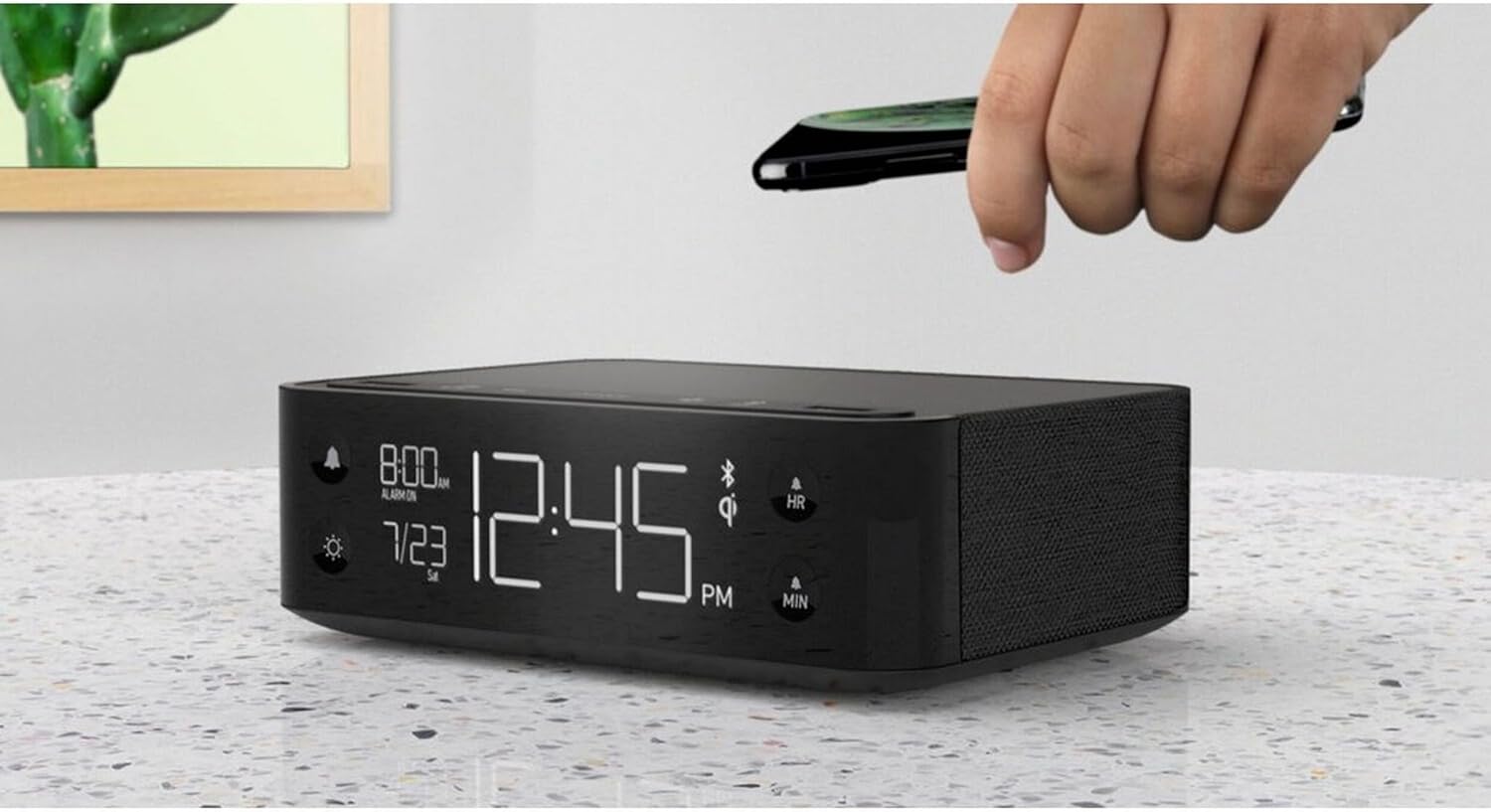
Figure 3: A smartphone being placed on the top surface of the Station A for wireless charging.
ຕັ້ງຄ່າ
1. ການເຊື່ອມຕໍ່ພະລັງງານ
- Unpack the Nonstop NSA2-BK unit and all accessories from the packaging.
- Connect the provided power adapter to the DC input port on the back of the unit.
- Plug the power adapter into a standard electrical outlet. The display will illuminate, indicating the unit is powered on.
2. ການຕັ້ງຄ່າໂມງເບື້ອງຕົ້ນ
Upon first power-up, the clock may display a default time. Refer to the "Operating Instructions" section for detailed steps on setting the current time and date.
3. ການຈັບຄູ່ Bluetooth
- Ensure Bluetooth is enabled on your mobile device (smartphone, tablet, etc.).
- On the Nonstop NSA2-BK, press the Bluetooth pairing button (refer to button layout in "Operating Instructions" if available, otherwise assume a standard Bluetooth icon button). The Bluetooth indicator on the display will flash.
- On your mobile device, search for available Bluetooth devices. Select "Nonstop NSA2-BK" from the list.
- Once paired, the Bluetooth indicator on the unit will become solid, and you will hear an audible confirmation.
4. Wireless Qi Charging Setup
No specific setup is required for wireless charging beyond connecting the unit to power. Simply place your Qi-compatible device on the designated charging pad on top of the unit. Ensure the device is centered for optimal charging.
ຄໍາແນະນໍາການດໍາເນີນງານ
ກໍານົດເວລາແລະວັນທີ
- ກົດຄ້າງໄວ້ ເວລາ ກຳ ນົດ button (or equivalent, often combined with HR/MIN buttons).
- ໃຊ້ HR (ຊົ່ວໂມງ) ແລະ ນາທີ ປຸ່ມ (ນາທີ) ເພື່ອປັບເວລາ.
- ກົດ ເວລາ ກຳ ນົດ button again to confirm and move to date setting (if applicable).
- ໃຊ້ HR ແລະ ນາທີ buttons to adjust the month and day.
- ກົດ ເວລາ ກຳ ນົດ ອອກໄປ.
ການຕັ້ງຄ່າແລະການໃຊ້ສຽງເຕືອນ
- ກົດຄ້າງໄວ້ ຕັ້ງໂມງປຸກ button (bell icon). The alarm time will flash.
- ໃຊ້ HR ແລະ ນາທີ ປຸ່ມເພື່ອຕັ້ງເວລາປຸກທີ່ຕ້ອງການ.
- ກົດ ຕັ້ງໂມງປຸກ ອີກເທື່ອຫນຶ່ງເພື່ອຢືນຢັນ.
- ເພື່ອເປີດໃຊ້ງານ/ປິດການແຈ້ງເຕືອນ, ໃຫ້ກົດປຸ່ມ ເປີດ / ປິດ button (bell icon). An alarm indicator will appear/disappear on the display.
- ເມື່ອສຽງສັນຍານເຕືອນ, ກົດປຸ່ມ ງອກ button (if available, or any button except alarm off) for a temporary pause. Press the ເປີດ / ປິດ button to turn off the alarm completely.
Using Bluetooth Speaker
- Ensure the unit is paired with your device (see "Bluetooth Pairing" in Setup).
- Play audio from your paired device. Sound will be output through the NSA2-BK speaker.
- Adjust volume using the volume controls on your paired device or on the NSA2-BK unit (if available).
Playing Relaxation Sounds
- ກົດ ສຽງ button (or similar, possibly a wave/rain icon).
- Press repeatedly to cycle through available soundscapes (Ocean Waves, Rain, Ambient Sounds).
- ກົດຄ້າງໄວ້ ສຽງ button to turn off the soundscape.
Using Charging Functions
- Wireless Qi Charging: Place your Qi-compatible smartphone centrally on the top charging pad. A charging indicator on the display will illuminate.
- ການສາກ USB: Connect your device's USB charging cable to one of the two USB ports on the back or side of the unit. Charging will begin automatically.
ປັບຄວາມສະຫວ່າງຂອງຈໍສະແດງຜົນ
- ກົດ ດີນ button (sun icon).
- Press repeatedly to cycle through different brightness levels for the display.
ບໍາລຸງຮັກສາ
- ທໍາຄວາມສະອາດ: Disconnect the power before cleaning. Use a soft, dry cloth to wipe the exterior of the unit. Do not use liquid cleaners or abrasive materials.
- ການເກັບຮັກສາ: ຖ້າເກັບຮັກສາເຄື່ອງໄວ້ເປັນເວລາດົນ, ໃຫ້ຖອດສາຍໄຟອອກ ແລະ ເກັບຮັກສາໄວ້ໃນບ່ອນທີ່ເຢັນ ແລະ ແຫ້ງ.
- ຫຼີກລ້ຽງການຂອງແຫຼວ: Keep the unit away from water or excessive moisture.
- ການລະບາຍອາກາດ: ຮັບປະກັນການລະບາຍອາກາດທີ່ເຫມາະສົມຮອບຫນ່ວຍເພື່ອປ້ອງກັນຄວາມຮ້ອນເກີນ. ຫ້າມປິດຊ່ອງລະບາຍອາກາດ.
ການແກ້ໄຂບັນຫາ
| ບັນຫາ | ສາເຫດທີ່ເປັນໄປໄດ້ | ການແກ້ໄຂ |
|---|---|---|
| ຫນ່ວຍບໍລິການບໍ່ເປີດ. | ອະແດັບເຕີໄຟບໍ່ໄດ້ເຊື່ອມຕໍ່ ຫຼືປລັກສຽບໄຟບໍ່ເຮັດວຽກ. | ກວດໃຫ້ແນ່ໃຈວ່າໄດ້ສຽບອະແດັບເຕີໄຟຟ້າເຂົ້າໃສ່ເຄື່ອງຢ່າງປອດໄພ ແລະປລັກສຽບໄຟທີ່ເຮັດວຽກໄດ້. |
| ອຸປະກອນ Bluetooth ບໍ່ສາມາດຈັບຄູ່ໄດ້. | Unit is not in pairing mode; device is too far; another device is already connected. | Ensure the NSA2-BK is in pairing mode. Move device closer. Disconnect any previously paired devices. |
| ການສາກໄຟໄຮ້ສາຍບໍ່ເຮັດວຽກ. | Device is not Qi-compatible; device not centered; foreign objects on pad; thick phone case. | Verify device supports Qi wireless charging. Re-position device centrally. Remove foreign objects or thick phone cases. |
| ການສາກໄຟຜ່ານ USB ບໍ່ເຮັດວຽກ. | Cable is faulty; device is not compatible; unit is overloaded. | Try a different USB cable. Ensure device is compatible. Avoid charging too many high-power devices simultaneously. |
| ໂມງປຸກບໍ່ມີສຽງ. | Alarm is not activated; volume is too low. | Ensure the alarm is set and activated (alarm indicator visible). Increase the unit's volume. |
ຂໍ້ມູນຈໍາເພາະ
- ຍີ່ຫໍ້: ບໍ່ຢຸດ
- ຕົວແບບ: NSA2-BK
- ສີ: Black, Ocean
- ນ້ໍາຫນັກລາຍການ: 3 ປອນ
- ການໂຕ້ຕອບຮາດແວ: USB
- ອຸປະກອນທີ່ເຂົ້າກັນໄດ້: iPad, Smartphones, Kindle, Wireless Headphones (via USB/Qi)
- ພອດ USB ທັງໝົດ: 2
- ວັດtage: 10 watts (for charging)
- UPC: 840148709171
- ASIN: B0C8LDWF57
- ທໍາອິດທີ່ມີຢູ່: ວັນທີ 29 ກໍລະກົດ 2024
ການຮັບປະກັນແລະການສະຫນັບສະຫນູນ
Specific warranty details for the Nonstop NSA2-BK are typically provided with the product packaging or on the manufacturer's official website. Please refer to these sources for comprehensive warranty information.
For technical support, troubleshooting assistance beyond this manual, or inquiries regarding parts and service, please contact Nonstop customer support through their official webເວັບໄຊທ໌ ຫຼື ຂໍ້ມູນຕິດຕໍ່ທີ່ສະໜອງໃຫ້ໃນເອກະສານຕົ້ນສະບັບຂອງຜະລິດຕະພັນຂອງທ່ານ.
ໝາຍເຫດ: ຮັກສາຫຼັກຖານການຊື້ຂອງທ່ານໄວ້ສະເໝີເພື່ອການຮຽກຮ້ອງການຮັບປະກັນ.


