ແນະນຳ
Thank you for choosing the TAB ErasePro H6 Portable Carpet Cleaner. This user manual provides essential information for the safe and efficient operation, maintenance, and troubleshooting of your new appliance. Please read this manual thoroughly before first use and keep it for future reference.
ຂໍ້ມູນຄວາມປອດໄພທີ່ສໍາຄັນ
ປະຕິບັດຕາມຄວາມລະມັດລະວັງດ້ານຄວາມປອດໄພຂັ້ນພື້ນຖານສະເໝີເມື່ອໃຊ້ເຄື່ອງໃຊ້ໄຟຟ້າເພື່ອຫຼຸດຜ່ອນຄວາມສ່ຽງຕໍ່ການເກີດອັກຄີໄພ, ໄຟໄໝ້ ຫຼື ການບາດເຈັບ.
- ອ່ານຄໍາແນະນໍາທັງຫມົດກ່ອນທີ່ຈະໃຊ້ເຄື່ອງໃຊ້.
- ໃຊ້ພຽງແຕ່ຕາມທີ່ອະທິບາຍໄວ້ໃນຄູ່ມືນີ້. ໃຊ້ໄຟລ໌ແນບທີ່ແນະນໍາຂອງຜູ້ຜະລິດເທົ່ານັ້ນ.
- ຫ້າມເອົາເຄື່ອງດັ່ງກ່າວໃສ່ໃນນ້ຳ ຫຼືຂອງແຫຼວອື່ນໆ.
- ຫ້າມໃຊ້ກັບສາຍໄຟ ຫຼືປລັກສຽບທີ່ເສຍຫາຍ. ຖ້າເຄື່ອງໃຊ້ບໍ່ໄດ້ເຮັດວຽກຕາມທີ່ຄວນ, ຖືກຖິ້ມ, ເສຍຫາຍ, ຖືກປະໄວ້ກາງແຈ້ງ, ຫຼືຕົກຢູ່ໃນນໍ້າ, ໃຫ້ສົ່ງກັບສູນບໍລິການ.
- ຫ້າມບໍ່ໃຫ້ໃຊ້ເປັນເຄື່ອງຫຼິ້ນ. ການເອົາໃຈໃສ່ຢ່າງໃກ້ຊິດແມ່ນມີຄວາມຈໍາເປັນໃນເວລາທີ່ນໍາໃຊ້ໂດຍຫຼືຢູ່ໃກ້ກັບເດັກນ້ອຍ.
- Use only non-foaming cleaning solutions specifically designed for carpet cleaners.
- ຮັບປະກັນວ່າຖັງໄດ້ຮັບການຕິດຕັ້ງຢ່າງຖືກຕ້ອງກ່ອນການປະຕິບັດງານ.
- Do not tilt the machine or use it upside down.
ເນື້ອໃນຊຸດ
ກວດສອບວ່າລາຍການທັງຫມົດແມ່ນມີຢູ່ໃນຊຸດຂອງທ່ານ:
- TAB ErasePro H6 Portable Carpet Cleaner Unit
- PowerBrush Attachment
- Extend Hose with cleaning head
- ສາຍໄຟແບບ Type-C

Image: The TAB ErasePro H6 Portable Carpet Cleaner shown with its main unit, PowerBrush, and extendable hose attachment.

Image: Close-up of the extendable hose and its cleaning head, which are included with the cleaner.
ສິນຄ້າເກີນview
Familiarize yourself with the main components of your TAB ErasePro H6:
- ຫົວໜ່ວຍຫຼັກ: Houses the motor, battery, and control panel.
- ຖັງນໍ້າສະອາດ (350 ມລ): Holds fresh water and cleaning solution.
- ຖັງນໍ້າເປື້ອນ (260 ມລ): ເກັບນ້ໍາເປື້ອນແລະຂີ້ເຫຍື້ອ.
- PowerBrush: Integrated brush head for agitating and lifting stains.
- ຂະຫຍາຍທໍ່: For cleaning hard-to-reach areas.
- ຈໍສະແດງຜົນ LED ດິຈິຕອລ: Shows battery level, hose connection status, and brush switch status.

Image: Close-up of the cleaner's LED digital display, indicating battery level, spray function, hose connection, and power brush status.
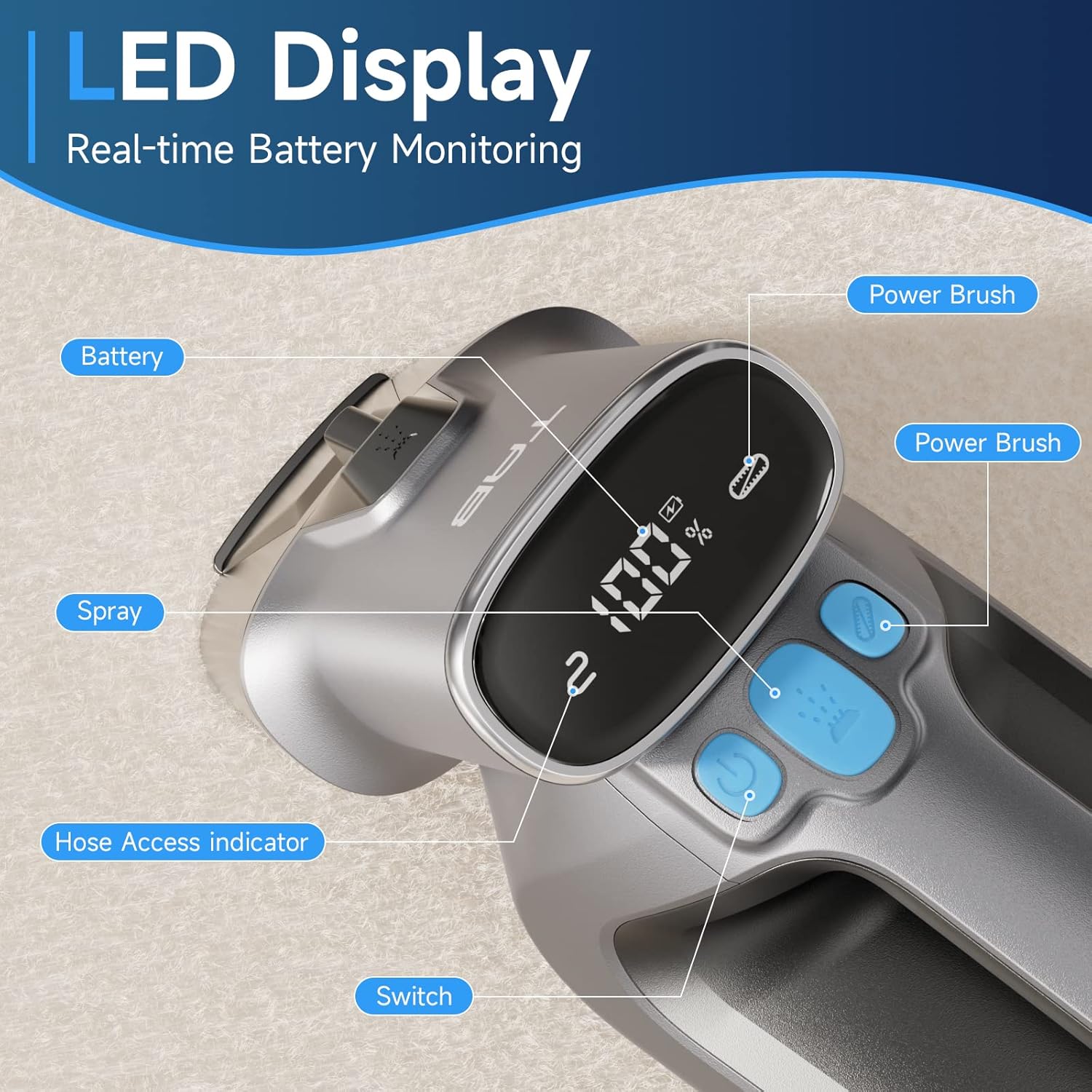
Image: Diagram showing the separate 350ml clean water tank and 260ml dirty water tank, highlighting their removable design.
ຕັ້ງຄ່າ
ກຳລັງສາກແບັດເຕີຣີ
Before first use, fully charge the appliance. The LED display will show the battery percentage.
- Locate the Type-C charging port on the cleaner.
- Connect the provided Type-C charging cable to the port and a 5V/2A adapter (not included).
- The LED display will show charging progress. A full charge provides up to 20 minutes of runtime.

Image: Close-up of the Type-C charging port on the cleaner, with the charging cable connected.
ການຕື່ມໃສ່ຖັງນ້ໍາສະອາດ
- ເອົາຖັງນໍ້າສະອາດອອກຈາກຕົວເຄື່ອງຫຼັກ.
- Open the tank cap and fill with clean water. You may add a non-foaming cleaning solution as recommended by the solution manufacturer. Do not overfill.
- Securely close the cap and reinsert the tank into the cleaner until it clicks into place.
ຄໍາແນະນໍາການດໍາເນີນງານ
ການດໍາເນີນງານທົ່ວໄປ
- Ensure the clean water tank is filled and the dirty water tank is empty and properly installed.
- ກົດປຸ່ມເປີດປິດເພື່ອເປີດເຄື່ອງເຮັດຄວາມສະອາດ.
- To activate the PowerBrush, press the dedicated PowerBrush button. The brush will rotate to agitate stains.
- To spray cleaning solution, press the spray button.
- Move the cleaner slowly over the stained area, allowing the PowerBrush and suction to work.

Image: The PowerBrush mechanism shown in operation, highlighting its high-speed automatic washing action for better cleaning.

Image: The cleaner demonstrating its strong suction power on a carpet, suitable for various fabric surfaces like mattresses and sofas.
ການເຮັດຄວາມສະອາດພື້ນຜິວຕ່າງໆ
- ພົມປູພື້ນ ແລະ ຜ້າປູພື້ນ: Use the main PowerBrush head directly on the carpet. For deep stains, pre-treat the area if necessary.
- Upholstery & Car Interiors: For delicate fabrics or hard-to-reach spots, attach the Extend Hose. Ensure the hose is securely connected; the LED display will indicate proper connection.
- Pet Stains: The PowerBrush is effective for agitating and lifting pet messes. Apply cleaning solution, scrub gently, and then suction up the dirty liquid.

Image: The cleaner being used to remove a pet stain from a carpet, illustrating its effectiveness for quick spot cleaning.

Image: A user demonstrating the use of the extended hose to clean curtains, showcasing its ability to reach various areas.

Image: The cordless cleaner being used to clean a car seat, emphasizing its portability and 20-minute run time for on-the-go cleaning.
Official Product Video: Usage Demonstration
Video: This official product video demonstrates the TAB ErasePro H6 Portable Carpet Cleaner in action, showing its effectiveness on various stains and surfaces, including the PowerBrush and extended hose features. It also illustrates the ease of use and maintenance.
ບໍາລຸງຮັກສາ
Emptying and Cleaning Tanks
For optimal performance and hygiene, empty and clean both water tanks after each use.
- ເອົາຖັງນໍ້າເປື້ອນອອກຈາກໜ່ວຍຫຼັກ.
- Open the tank and dispose of the dirty water. Rinse the tank thoroughly with clean water.
- Remove the clean water tank and rinse it if any cleaning solution residue remains.
- Allow both tanks to air dry completely before reassembling.

Image: A visual representation of the clean and dirty water tanks, indicating their positions on the cleaner for easy removal and cleaning.
ການເຮັດຄວາມສະອາດ PowerBrush
Regularly inspect and clean the PowerBrush to prevent hair and debris buildup.
- Detach the PowerBrush head from the main unit.
- Remove any tangled hair or debris from the brush bristles.
- Rinse the brush under running water.
- Allow the PowerBrush to air dry completely before reattaching.

ຮູບພາບ: A close-up view of the detachable PowerBrush component, showing its bristles for effective cleaning and ease of maintenance.
ການແກ້ໄຂບັນຫາ
If you encounter issues with your TAB ErasePro H6, refer to the table below for common problems and solutions.
| ບັນຫາ | ສາເຫດທີ່ເປັນໄປໄດ້ | ການແກ້ໄຂ |
|---|---|---|
| ເຄື່ອງເຮັດຄວາມສະອາດບໍ່ເປີດ. | ແບັດເຕີຣີເຫຼືອໜ້ອຍ ຫຼືໝົດແລ້ວ. | ໄລ່ແບັດເຕີຣີໃຫ້ເຕັມ. |
| ບໍ່ມີສີດຫຼືສີດອ່ອນໆ. | Clean water tank is empty or improperly installed. Nozzle is clogged. | Refill clean water tank. Reinstall tank correctly. Clean the spray nozzle. |
| ການດູດຊຶມບໍ່ດີ. | Dirty water tank is full. Dirty water tank is improperly installed. Suction nozzle is blocked. | Empty dirty water tank. Reinstall tank correctly. Clear any blockages from the suction nozzle. |
| PowerBrush ບໍ່ໝຸນ. | PowerBrush button not pressed. Brush is jammed by debris. | Press the PowerBrush button. Remove any hair or debris from the brush. |
| Cleaner leaks. | Water tanks are not properly sealed or installed. | Ensure tank caps are securely closed and tanks are correctly seated in the unit. |
ຂໍ້ມູນຈໍາເພາະ
| ຄຸນສົມບັດ | ຂໍ້ມູນຈໍາເພາະ |
|---|---|
| ຍີ່ຫໍ້ | ແຖບ |
| ຊື່ຕົວແບບ | H6-3 |
| ຄຸນນະສົມບັດພິເສດ | ເຄື່ອງເຮັດຄວາມສະອາດຜ້າພົມແບບພົກພາ |
| ປະເພດການກັ່ນຕອງ | ໂຟມ |
| ຄວາມອາດສາມາດຂອງຖັງນໍ້າສະອາດ | 0.35 ລິດ (350ml) |
| ຄວາມອາດສາມາດຂອງຖັງນ້ໍາເປື້ອນ | 0.26 ລິດ (260ml) |
| ຫມໍ້ໄຟວັດtage | 2200 ລ້ານamp_ຊົ່ວໂມງ |
| ເວລາແລ່ນ | ເຖິງ 20 ນາທີ |
| ການນໍາໃຊ້ທີ່ແນະນໍາ | Carpet, Upholstery, Stairs, Car |
| ປັດໄຈແບບຟອມ | ມືຖື |
| ລະດັບສຽງ | 80 dB |
| ນ້ໍາຫນັກລາຍການ | 4.4 ປອນ |
| ຂະໜາດແພັກເກັດ | 17.28 x 13.07 x 6.69 ນິ້ວ |
ການຮັບປະກັນແລະການສະຫນັບສະຫນູນ
Your TAB ErasePro H6 Portable Carpet Cleaner comes with a standard manufacturer's warranty. For detailed warranty information, product support, or to purchase replacement parts, please visit the official TAB webຫຼື ຕິດຕໍ່ບໍລິການລູກຄ້າຜ່ານຜູ້ຂາຍຍ່ອຍຂອງທ່ານ.
ສຳລັບການຊ່ວຍເຫຼືອເພີ່ມເຕີມ, ກະລຸນາອ້າງອີງເຖິງຂໍ້ມູນຕິດຕໍ່ທີ່ສະໜອງໃຫ້ພ້ອມກັບເອກະສານການຊື້ຂອງທ່ານ.


