1. ບົດແນະນຳ
Thank you for choosing the UrbanX Wireless Bluetooth Keyboard and Mouse Combo. This manual provides detailed instructions for setting up, operating, and maintaining your new peripheral devices. Please read this manual thoroughly before use to ensure optimal performance and longevity of your product.
2. ເນື້ອໃນຊຸດ
ກະລຸນາກວດສອບເນື້ອໃນຂອງຊຸດເພື່ອໃຫ້ແນ່ໃຈວ່າລາຍການທັງຫມົດມີຢູ່:
- UrbanX Bluetooth Wireless Keyboard
- UrbanX Wireless Mouse
- Shared USB Receiver (stored in the mouse battery compartment)
- ສາຍສາກ USB
- ຄູ່ມືຜູ້ໃຊ້
3. ຜະລິດຕະພັນເກີນview
The UrbanX Keyboard and Mouse Combo is designed for versatility and comfort, featuring dual-mode connectivity (Bluetooth and 2.4GHz wireless) and long-lasting rechargeable batteries.
3.1 ຄຸນສົມບັດແປ້ນພິມ
- ໂຄງຮ່າງຂະໜາດເຕັມ: Includes a numeric keypad and arrow keys for comprehensive functionality.
- Pro ຕ່ ຳfile ກະແຈ: Designed for a quiet and comfortable typing experience.
- Hotkeys: Dedicated keys for Windows functions such as volume control, playback, and copy/paste.
- ການເຊື່ອມຕໍ່ສອງໂໝດ: Supports Bluetooth (BT1, BT2) and 2.4GHz wireless connection.
- ຮອງຮັບຫຼາຍອຸປະກອນ: Easily switch between up to three connected devices.

Image: The UrbanX keyboard highlighting the BT1, BT2, and 2.4G connection buttons for multi-device pairing.

Image: The UrbanX keyboard and mouse, illustrating the low-profile, scissor-switch keys designed for quiet and comfortable typing.
3.2 ຄຸນສົມບັດຂອງເມົ້າ
- ການອອກແບບ Ergonomic: Shaped to reduce hand strain during extended use.
- DPI Switch: Allows adjustment of cursor speed for precision or rapid movement.
- ການເຊື່ອມຕໍ່ສອງໂໝດ: Supports Bluetooth (BT1, BT2) and 2.4GHz wireless connection.
- ບ່ອນຈັດເກັບຂໍ້ມູນຕົວຮັບ USB: The nano USB receiver is conveniently stored within the mouse.

Image: The underside of the UrbanX mouse, indicating its Bluetooth and 2.4GHz dual-mode wireless capabilities.
4. ຄໍາແນະນໍາການຕິດຕັ້ງ
The UrbanX combo offers two connection methods: 2.4GHz wireless via USB receiver or Bluetooth.
4.1 ການເຊື່ອມຕໍ່ໄຮ້ສາຍ 2.4GHz (ຕົວຮັບ USB)
- Locate the nano USB receiver stored in the battery compartment of the mouse.
- ສຽບຕົວຮັບ USB ເຂົ້າໄປໃນຜອດ USB ທີ່ມີຢູ່ໃນຄອມພິວເຕີ ຫຼືອຸປະກອນຂອງທ່ານ.
- ເປີດແປ້ນພິມ ແລະເມົ້າໂດຍໃຊ້ສະວິດໄຟຕາມລໍາດັບ.
- The devices should connect automatically. No additional drivers are required.
4.2 ການເຊື່ອມຕໍ່ Bluetooth
The keyboard and mouse can connect to up to two Bluetooth devices each (BT1 and BT2 channels).
4.2.1 Keyboard Bluetooth Pairing
- ເປີດແປ້ນພິມ.
- ກົດຄ້າງໄວ້ BT1 or BT2 button for 3-5 seconds until the indicator light flashes, indicating pairing mode.
- On your device (e.g., laptop, tablet, smartphone), go to Bluetooth settings and search for new devices.
- Select "UrbanX Keyboard" from the list of available devices.
- ປະຕິບັດຕາມການເຕືອນໃນຫນ້າຈໍເພື່ອສໍາເລັດການຈັບຄູ່.
- Repeat for a second Bluetooth device using the other BT channel (BT2 if BT1 was used first).
4.2.2 Mouse Bluetooth Pairing
- ເປີດຫນູ.
- ກົດຄ້າງໄວ້ BT1 or BT2 button (usually on the bottom of the mouse) for 3-5 seconds until the indicator light flashes.
- ໃນອຸປະກອນຂອງທ່ານ, ໄປທີ່ການຕັ້ງຄ່າ Bluetooth ແລະຊອກຫາອຸປະກອນໃໝ່.
- Select "UrbanX Mouse" from the list.
- ປະຕິບັດຕາມການເຕືອນໃນຫນ້າຈໍເພື່ອສໍາເລັດການຈັບຄູ່.
- ເຮັດຊ້ຳອີກສຳລັບອຸປະກອນ Bluetooth ທີສອງໂດຍໃຊ້ຊ່ອງ BT ອື່ນ.

Image: An illustration showing the UrbanX keyboard and mouse connected to a tablet (Channel 1), a laptop (Channel 2), and a smartphone (Channel 3), demonstrating multi-device connectivity.
5. ຄໍາແນະນໍາການດໍາເນີນງານ
5.1 ການປ່ຽນລະຫວ່າງອຸປະກອນ
ເພື່ອສະຫຼັບລະຫວ່າງອຸປະກອນທີ່ເຊື່ອມຕໍ່:
- ແປ້ນພິມ: ກົດ BT1, BT2, ຫຼື 2.4ກ button briefly to switch to the corresponding connected device.
- ຫນູ: ກົດ BT1, BT2, ຫຼື 2.4ກ button (usually on the bottom) briefly to switch to the corresponding connected device.
5.2 Keyboard Hotkeys
The keyboard features dedicated hotkeys for quick access to common functions. These are typically located on the F-keys row and activated by pressing the Fn key in combination with the desired F-key, or directly depending on the operating system.
| ການລວມຄີ | ຟັງຊັນ |
|---|---|
| Fn + F1 | Media Player |
| Fn + F2 | ປະລິມານລົງ |
| Fn + F3 | ປະລິມານຂຶ້ນ |
| Fn + F4 | ປິດສຽງ |
| Fn + F5 | ເພງກ່ອນໜ້າ |
| Fn + F6 | ຕິດຕາມຕໍ່ໄປ |
| Fn + F7 | ຫຼິ້ນ/ຢຸດຊົ່ວຄາວ |
| Fn + F8 | ຢຸດ |
| Fn + F9 | ຫນ້າທໍາອິດ |
| Fn + F10 | ຈົດໝາຍ |
| Fn + F11 | ຄອມພິວເຕີຂອງຂ້ອຍ |
| Fn + F12 | ເຄື່ອງຄິດເລກ |
| Fn + Esc | ໜ້າຈໍລັອກ |
Note: Some hotkey functions may vary depending on your operating system (Windows, macOS, Android, iPadOS).
5.3 ການປັບຕົວ DPI ຂອງຫນູ
The mouse features a DPI switch button, usually located near the scroll wheel. Press this button to cycle through different cursor speeds (DPI settings). This allows you to adjust the sensitivity of the mouse to your preference.
6. ຄໍາແນະນໍາການສາກໄຟ
Both the keyboard and mouse are equipped with rechargeable Li-polymer batteries.
- ເຊື່ອມຕໍ່ສາຍສາກໄຟ USB ທີ່ໃຫ້ມາເຂົ້າກັບພອດສາກໄຟໃນແປ້ນພິມ ຫຼື ເມົ້າສ໌.
- ສຽບປາຍອີກດ້ານໜຶ່ງຂອງສາຍ USB ເຂົ້າກັບແຫຼ່ງພະລັງງານ USB (ເຊັ່ນ: ພອດ USB ຂອງຄອມພິວເຕີ, ອະແດບເຕີຕິດຝາ USB).
- An indicator light will typically show the charging status. It will turn off or change color when fully charged.
ຊີວິດຫມໍ້ໄຟ:
- ແປ້ນພິມ: Up to 6 months on a single charge (based on 2 hours of non-stop use per day).
- ຫນູ: Up to 4 months on a single charge (based on 2 hours of non-stop use per day).
- ເວລາສາກໄຟ: ປະມານ 2 ຊົ່ວໂມງສຳລັບການສາກເຕັມ.
- ເວລາສະແຕນບາຍ: Exceeds 2160 hours (90 days).

Image: The UrbanX keyboard and mouse shown connected via USB cables for charging, with indicators for charging time and standby time.
7. ບໍາລຸງຮັກສາ
To ensure the longevity and optimal performance of your UrbanX Keyboard and Mouse Combo:
- ທໍາຄວາມສະອາດ: Use a soft, dry cloth to wipe the surfaces. For stubborn dirt, a slightly damp ຜ້າສາມາດນໍາໃຊ້ໄດ້, ຮັບປະກັນວ່າບໍ່ມີຄວາມຊຸ່ມຊື່ນເຂົ້າໄປໃນອຸປະກອນ.
- ການເກັບຮັກສາ: ເກັບຮັກສາອຸປະກອນໄວ້ໃນບ່ອນທີ່ເຢັນ, ແຫ້ງ, ຫ່າງຈາກແສງແດດໂດຍກົງ ແລະອຸນຫະພູມທີ່ຮຸນແຮງ.
- ຫຼີກລ້ຽງການຂອງແຫຼວ: ຢ່າໃຫ້ອຸປະກອນສຳຜັດກັບນ້ຳ ຫຼື ຂອງແຫຼວອື່ນໆ.
- ຈັດການດ້ວຍຄວາມລະມັດລະວັງ: ຫຼີກເວັ້ນການລຸດລົງ ຫຼື ວາງອຸປະກອນໃຫ້ມີຜົນກະທົບທີ່ເຂັ້ມແຂງ.
8. ການແກ້ໄຂບັນຫາ
If you encounter issues with your UrbanX Keyboard and Mouse Combo, please refer to the following common solutions:
| ບັນຫາ | ການແກ້ໄຂທີ່ເປັນໄປໄດ້ |
|---|---|
| Devices not connecting via 2.4GHz |
|
| Devices not connecting via Bluetooth |
|
| ແປ້ນພິມ/ເມົາສ໌ບໍ່ຕອບສະໜອງ |
|
| ການເຄື່ອນໄຫວຕົວກະພິບແມ່ນຜິດພາດ ຫຼືຊ້າ |
|
9. ຂໍ້ມູນຈໍາເພາະ
| ຄຸນສົມບັດ | ລາຍລະອຽດ |
|---|---|
| ໝາຍເລກຕົວແບບ | UXM030 |
| ເຕັກໂນໂລຊີການເຊື່ອມຕໍ່ | Bluetooth, ໄຮ້ສາຍ 2.4GHz |
| ອຸປະກອນທີ່ເຂົ້າກັນໄດ້ | HP ENVY 17t CG Laptop, Mobile Phone, Tablet, Laptop, Smartphone, PC, Mac (Windows, macOS, iPadOS, Android, Chrome OS) |
| ຄຳອະທິບາຍແປ້ນພິມ | US Layout, Full-Size, Low-Profile, Scissor-Switch |
| ຄຸນນະສົມບັດພິເສດ | Ergonomic, Rechargeable, Multi-Device Switching |
| ແຫຼ່ງພະລັງງານ | Battery Powered (Built-in Li-polymer) |
| ອາຍຸແບັດເຕີຣີຂອງແປ້ນພິມ | Up to 6 months (2 hours/day usage) |
| ຊີວິດຫມໍ້ໄຟຂອງຫນູ | Up to 4 months (2 hours/day usage) |
| ເວລາສາກໄຟ | ປະມານ. 2 ຊົ່ວໂມງ |
| ຊ່ວງການດໍາເນີນງານ | ສູງເຖິງ 33 ຟຸດ (10 ແມັດ) |
| ຂະໜາດຜະລິດຕະພັນ (ຄີບອດ) | 17.1 x 5.1 x 0.7 ນິ້ວ (ໂດຍປະມານ) |
| ຂະໜາດຜະລິດຕະພັນ (ເມົາສ໌) | 4.5 x 2.2 x 1 ນິ້ວ (ໂດຍປະມານ) |
| ນ້ໍາຫນັກລາຍການ | 1.54 ounces (Mouse only, approximate) |
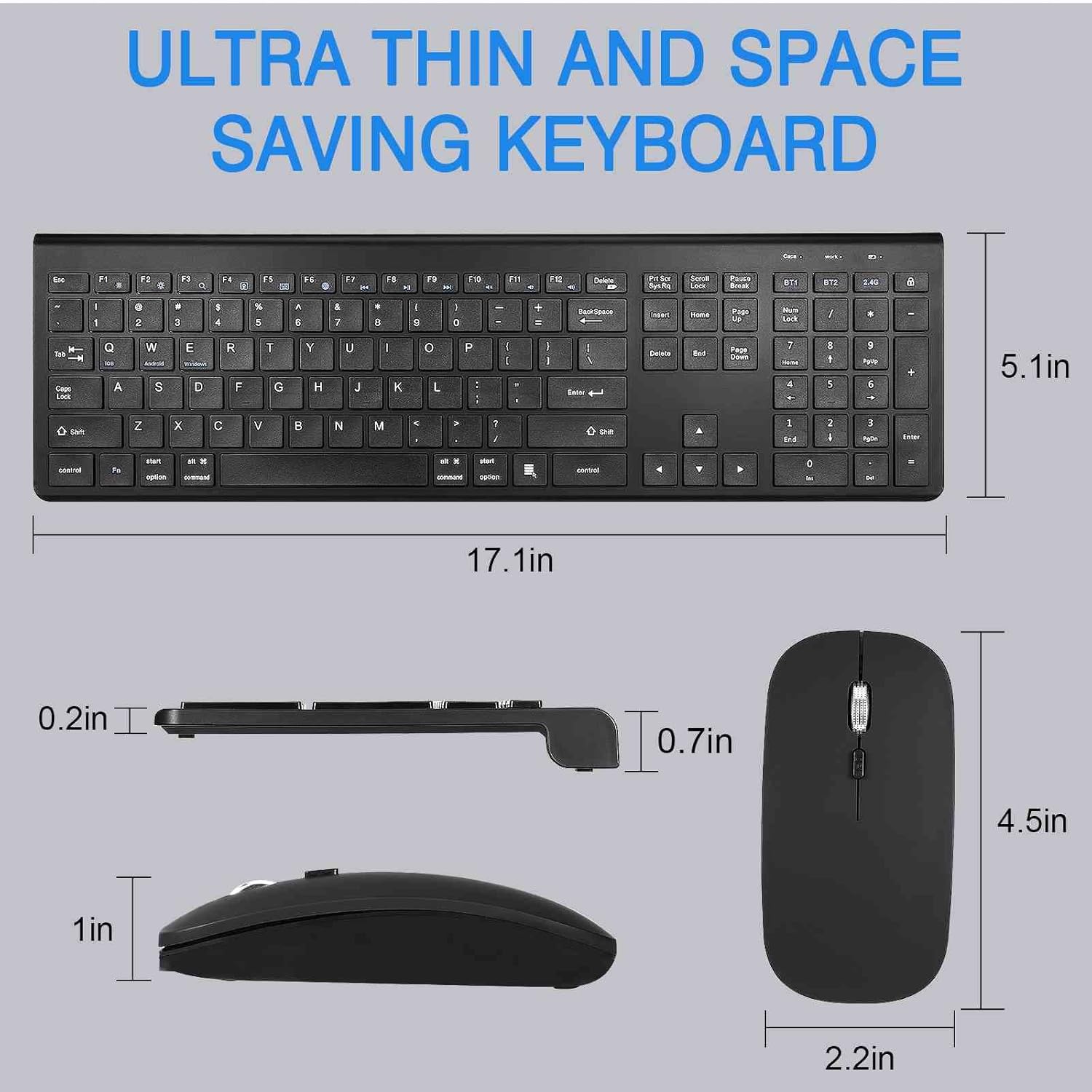
Image: Detailed dimensions of the UrbanX keyboard and mouse, showing their ultra-thin and space-saving design.
10. ການຮັບປະກັນແລະການສະຫນັບສະຫນູນ
The UrbanX Keyboard and Mouse Combo comes with a ຮັບປະກັນ 1 ປີ ຈາກວັນທີ່ຊື້.
For technical support, warranty claims, or any questions regarding your product, please contact UrbanX customer support. Refer to the contact information provided on the product packaging or the UrbanX official webເວັບໄຊ.


