1. ບົດແນະນຳ
This manual provides detailed instructions for the installation, operation, and maintenance of your YuanLey 8 Port 2.5G Unmanaged Desktop Ethernet Switch with 10G SFP. Please read this manual thoroughly before using the device to ensure proper functionality and to prevent damage.
2. ເນື້ອໃນຊຸດ
ກວດສອບວ່າຊຸດຂອງທ່ານມີລາຍການດັ່ງຕໍ່ໄປນີ້:
- 1 x YuanLey 8 Port 2.5G Ethernet Switch
- ສາຍໄຟຟ້າ 1 x
- 1 x ຄູ່ມືຜູ້ໃຊ້
3. ຄຸນລັກສະນະຂອງຜະລິດຕະພັນ
- 9 Port Configuration: Includes 8 x 2.5 Gigabit Ethernet ports and 1 x 10G SFP+ Port.
- ປະສິດທິພາບຄວາມໄວສູງ: Delivers 2.5 times faster network performance than traditional Gigabit switches, with a switching capacity of up to 60Gbps.
- ສຽບ ແລະ ຫຼິ້ນ: Unmanaged design requires no configuration for immediate use.
- Durable and Quiet: Features a metal case with 6KV lightning protection and a fanless design for silent operation.
- ອຸນຫະພູມການດໍາເນີນງານກວ້າງ: Functions reliably in temperatures ranging from -10°C to 50°C.
- ການຈັດວາງທີ່ຫຼາກຫຼາຍ: Supports both wall mount and desktop placement.
4. ຜະລິດຕະພັນເກີນview

Figure 4.1: YuanLey 8 Port 2.5G Unmanaged Desktop Ethernet Switch

ຮູບທີ 4.2: ແຜງດ້ານໜ້າເກີນview with Ports and Indicators
The switch features 8 RJ45 ports supporting 10/100/1000Mbps/2.5G adaptive speeds and 1 SFP+ port for 1G/2.5G/10G fiber connections. LED indicators provide status for power and link activity.
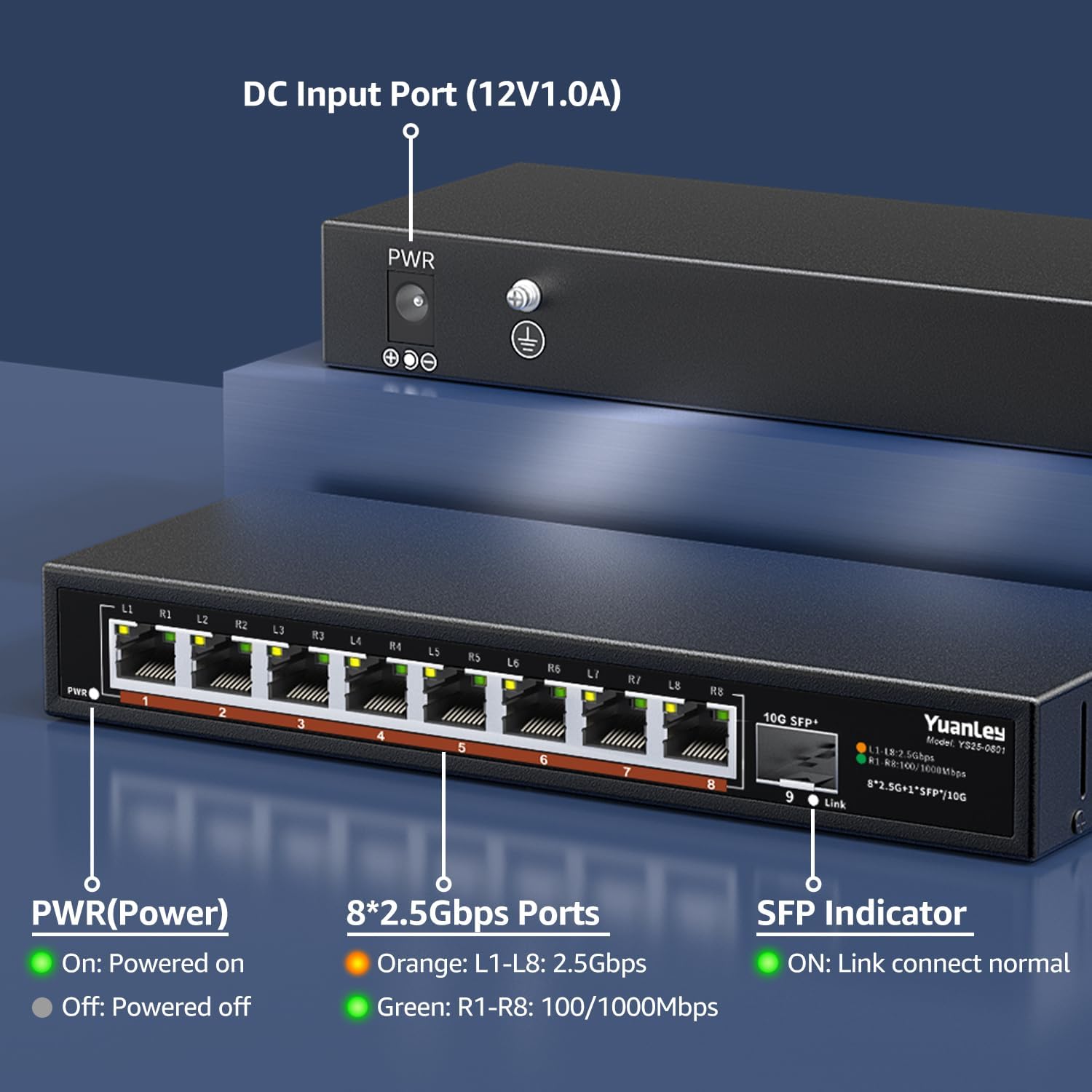
ຮູບ 4.3: ແຜງດ້ານຫຼັງເກີນview with Power Input

ຮູບທີ 4.4: ລາຍລະອຽດ View of Ports and Indicators
The rear panel includes the DC 12V/1.0A power input port and a grounding screw for electrical safety. The front panel LEDs indicate power status, 2.5Gbps link speed (orange), and 100/1000Mbps link speed (green) for RJ45 ports, and link status for the SFP+ port.
5. ຕັ້ງຄ່າ
Follow these steps to set up your YuanLey Ethernet Switch:
- ເຊື່ອມຕໍ່ພະລັງງານ: Plug the provided power adapter into the DC 12V/1.0A input port on the rear of the switch, then plug the adapter into a power outlet. The PWR LED on the front panel will illuminate green.
- ເຊື່ອມຕໍ່ອຸປະກອນອີເທີເນັດ: Connect your network devices (e.g., computers, NAS, WiFi 6 APs, gaming PCs) to the 2.5G Base-T ports (1-8) using standard Ethernet cables (Cat5e or higher recommended for 2.5G speeds). The corresponding port LEDs will light up to indicate a successful connection and speed.
- Connect SFP+ Module (Optional): If using the 10G SFP+ port, insert a compatible 1G/2.5G/10G SFP/SFP+ module (not included) into the SFP+ slot. Then, connect a fiber optic cable or DAC cable to the module. The SFP indicator LED will light up when a link is established.

Figure 5.1: Typical Network Setup with the YuanLey Switch
ຕັ້ງຄ່າວິດີໂອຄູ່ມື
Video 5.1: An official YuanLey video demonstrating the setup and features of the 8 Port 2.5Gbps Switch.
6. ການດໍາເນີນງານຂອງ Switch
The YuanLey 2.5G Unmanaged Ethernet Switch is designed for simple plug-and-play operation. Once powered on and connected to your network devices, it will automatically detect the link speed and establish connections without any further configuration.
- ຕົວຊີ້ວັດ LED: Observe the PWR, L1-L8, and SFP+ Link LEDs to monitor the switch's status and network activity.
- ອັດຕະໂນມັດ MDI/MDIX: The switch supports Auto MDI/MDIX, eliminating the need for crossover cables.
- Adaptive Speed: RJ45 ports automatically adapt to 10/100/1000Mbps or 2.5Gbps.
7. ບໍາລຸງຮັກສາ
To ensure optimal performance and longevity of your switch, consider the following maintenance guidelines:
- ການຈັດວາງ: Place the switch in a well-ventilated area, away from direct sunlight, heat sources, and excessive moisture. The fanless design relies on natural convection for cooling.
- ທໍາຄວາມສະອາດ: ທຳຄວາມສະອາດດ້ານນອກຂອງສະວິດເປັນໄລຍະໆດ້ວຍຜ້າອ່ອນໆແຫ້ງ. ຫຼີກລ່ຽງການໃຊ້ນໍ້າຢາທຳຄວາມສະອາດ ຫຼື ນໍ້າຢາສີດ.
- ການຄຸ້ມຄອງສາຍໄຟ: ຮັບປະກັນວ່າສາຍເຄືອຂ່າຍຖືກຈັດລຽງຢ່າງເປັນລະບຽບ ແລະ ບໍ່ງໍ ຫຼື ເຄັ່ງຕຶງເກີນໄປ.
- ການສະຫນອງພະລັງງານ: Use only the original power adapter provided with the switch.

Figure 7.1: Fanless Design and Environmental Considerations
8. ການແກ້ໄຂບັນຫາ
If you encounter issues with your switch, refer to the following common problems and solutions:
- ບໍ່ມີພະລັງງານ:
- ໃຫ້ແນ່ໃຈວ່າອະແດບເຕີໄຟຟ້າໄດ້ເຊື່ອມຕໍ່ກັບສະວິດຢ່າງແໜ້ນໜາ ແລະ ປລັກໄຟທີ່ໃຊ້ງານໄດ້.
- Check if the PWR LED is illuminated. If not, try a different power outlet.
- ບໍ່ມີການເຊື່ອມຕໍ່/ກິດຈະກຳໃນພອດ:
- Verify that the Ethernet cable is securely connected to both the switch port and the network device.
- ລອງສາຍອີເທີເນັດອື່ນ.
- ໃຫ້ແນ່ໃຈວ່າອຸປະກອນທີ່ເຊື່ອມຕໍ່ນັ້ນເປີດຢູ່ ແລະ ເຮັດວຽກຢ່າງຖືກຕ້ອງ.
- Check the LED indicator for the specific port. If it's off, there might be no link.
- ຄວາມໄວເຄືອຂ່າຍຊ້າ:
- Ensure all devices in the network path (NICs, cables, routers) support 2.5G speeds to achieve maximum performance.
- Use Cat5e or higher-rated Ethernet cables for 2.5G connections.
- Check the color of the port LED: Orange indicates 2.5Gbps, Green indicates 100/1000Mbps.
- SFP+ Port Issues:
- Ensure the SFP/SFP+ module is correctly inserted and compatible with the switch.
- Verify the fiber optic or DAC cable is properly connected and undamaged.
- Check the SFP indicator LED for link status.
9. ຂໍ້ມູນຈໍາເພາະ
| ຄຸນສົມບັດ | ຂໍ້ມູນຈໍາເພາະ |
|---|---|
| ໝາຍເລກຕົວແບບ | 9 Port | 8x2500Mbps+1x10G SFP |
| ຂະໜາດສິນຄ້າ | 7.76"L x 2.87"W x 1.14"H (19.7ຊມ x 7.3ຊມ x 2.9ຊມ) |
| ນ້ໍາຫນັກລາຍການ | 1.36 ປອນ (0.62 ກິໂລກຣາມ) |
| ຈໍານວນພອດ | 8 x 2.5G Base-T, 1 x 10G SFP+ |
| ອັດຕາການໂອນຂໍ້ມູນ | 60 Gigabits ຕໍ່ວິນາທີ (ຄວາມອາດສາມາດສະຫຼັບ) |
| ສະບັບtage | 230 Volts (AC) input to adapter, 12V DC output |
| ວັດສະດຸກໍລະນີ | ໂລຫະ |
| ອຸນຫະພູມປະຕິບັດການ | -10°C ເຖິງ 50°C |
| ປ້ອງກັນຟ້າຜ່າ | 6KV |
| UPC | 790885573743 |
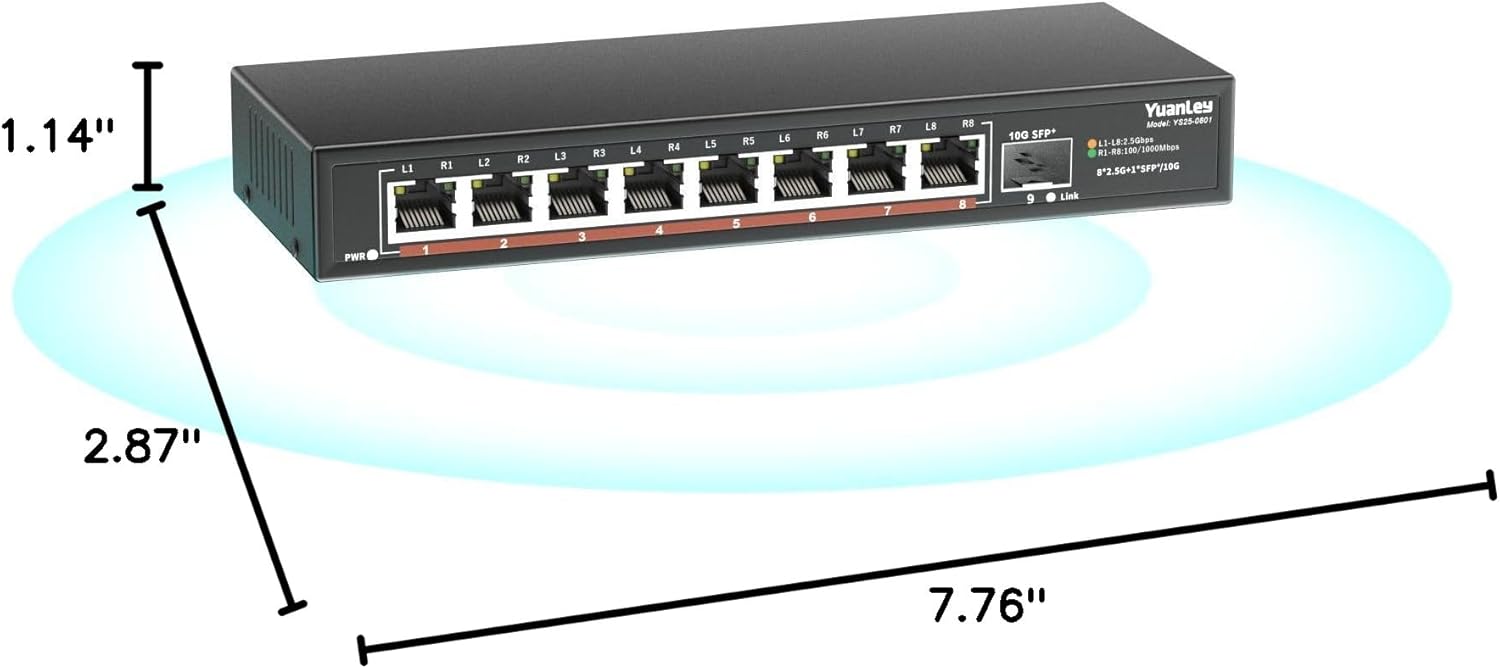
ຮູບທີ 9.1: ຂະໜາດຜະລິດຕະພັນ
10. ການຮັບປະກັນແລະການສະຫນັບສະຫນູນ
YuanLey products are designed for reliability and performance. For warranty information and technical support, please refer to the official YuanLey webເວັບໄຊ ຫຼືຕິດຕໍ່ບໍລິການລູກຄ້າຂອງເຂົາເຈົ້າໂດຍກົງ. ຮັກສາໃບຮັບເງິນການຊື້ຂອງທ່ານສໍາລັບການຮ້ອງຂໍການຮັບປະກັນ.
ສໍາລັບການຊ່ວຍເຫຼືອເພີ່ມເຕີມ, ທ່ານສາມາດໄປຢ້ຽມຢາມໄດ້ YuanLey Store on Amazon.


