1. ບົດແນະນຳ
The EPOS Impact 1060T is a professional double-sided wireless headset designed for PC use, optimized for high-performance communication environments. It features advanced AI Noise Cancellation and Super Wideband Audio to ensure exceptional clarity during calls, even in noisy surroundings. The headset is Microsoft Teams Certified, providing seamless integration and optimal performance for virtual meetings.
Engineered for all-day comfort, the Impact 1060T includes soft memory foam earpads and a lightweight frame. Smart features such as a 360° busylight, mic-tip LED mute alerts, and intuitive boom-arm call control enhance efficiency and focus. This manual provides detailed instructions for setting up, operating, and maintaining your headset to ensure optimal performance and longevity.

Figure 1: EPOS Impact 1060T highlighting key features.
2. ເນື້ອໃນຊຸດ
ກວດສອບວ່າລາຍການທັງຫມົດແມ່ນມີຢູ່ໃນຊຸດຂອງທ່ານ:
- EPOS Impact 1060T Wireless Headset
- ສາຍ USB-C ຫາ USB-C
- ອະແດັບເຕີ USB-C ຫາ USB-A
- Soft Carry Pouch
- ຄູ່ມືຄວາມປອດໄພ
- ເອກະສານການປະຕິບັດຕາມ
- ຄູ່ມືດ່ວນ
- BTD 800a Dongle (for models with dongle)

Figure 2: EPOS Impact 1060T package contents.
3. ຕັ້ງຄ່າ
3.1 ການສາກໄຟເບື້ອງຕົ້ນ
Before first use, fully charge your headset. Connect the provided USB-C to USB-C cable to the headset and a power source. Use the USB-C to USB-A adapter if your power source only has USB-A ports. The headset can also be charged wirelessly if a compatible charging stand is available (charging stand sold separately for some models).
3.2 ການເປີດ/ປິດ
- ເພື່ອເປີດເຄື່ອງ: ກົດປຸ່ມເປີດປິດຄ້າງໄວ້ຈົນກ່ວາໄຟຕົວຊີ້ວັດຈະສະຫວ່າງ.
- ເພື່ອປິດເຄື່ອງ: ກົດປຸ່ມເປີດປິດຄ້າງໄວ້ຈົນກວ່າໄຟຊີ້ບອກຈະປິດ.
3.3 ການເຊື່ອມຕໍ່ກັບອຸປະກອນ
The EPOS Impact 1060T offers versatile connectivity options:
- ການຈັບຄູ່ Bluetooth:
- ຮັບປະກັນຫູຟັງຖືກປິດໃຊ້ງານ.
- ກົດປຸ່ມເປີດປິດຄ້າງໄວ້ປະມານ 4 ວິນາທີ ຈົນກວ່າໄຟ LED ຈະກະພິບສີຟ້າ ແລະສີແດງ, ສະແດງເຖິງໂໝດການຈັບຄູ່.
- On your device (PC, smartphone), go to Bluetooth settings and select "EPOS Impact 1060T" from the list of available devices.
- ເມື່ອເຊື່ອມຕໍ່ແລ້ວ, ຕົວຊີ້ວັດ LED ຈະສະແດງແສງສະຫວ່າງສີຟ້າແຂງ.
- ການເຊື່ອມຕໍ່ແບບມີສາຍ USB-C: Connect the headset directly to your device using the provided USB-C to USB-C cable. The headset will be recognized automatically.
- USB-A Wired Connection: Use the USB-C to USB-A adapter with the USB-C cable to connect to devices with USB-A ports.
- Using the BTD 800a Dongle: For optimal wireless performance and extended range, plug the BTD 800a USB dongle into your PC. The headset will automatically connect to the dongle.
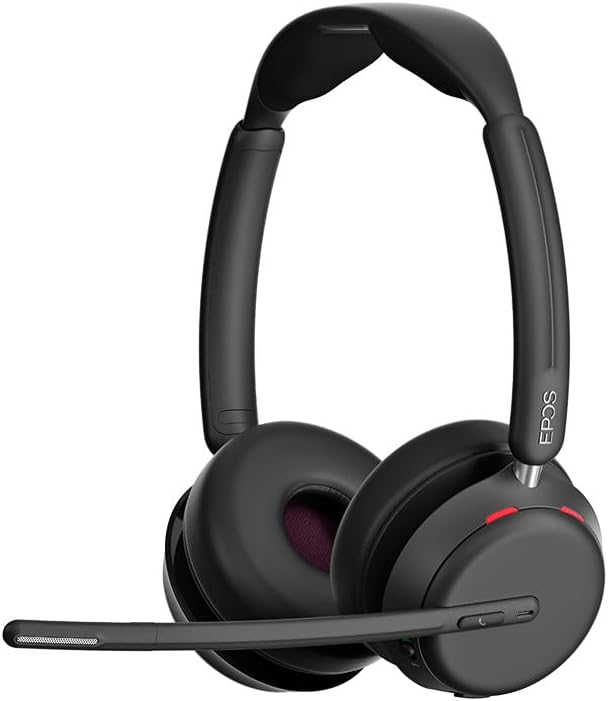
ຮູບ 3: ດ້ານຫນ້າ view of the EPOS Impact 1060T Headset.
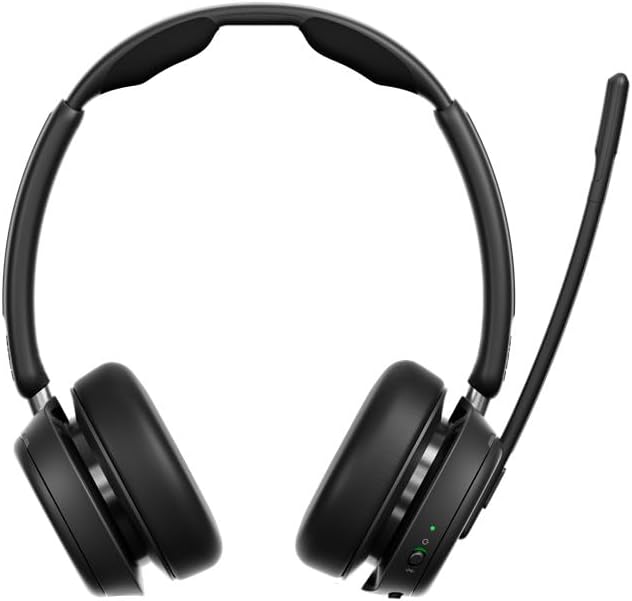
ຮູບ 4: ກັບຄືນໄປບ່ອນ view of the EPOS Impact 1060T Headset.
4. ຄໍາແນະນໍາການດໍາເນີນງານ
4.1 ການໃສ່ຫູຟັງ
Adjust the headband for a comfortable and secure fit. The memory foam earpads are designed for extended wear. The microphone boom arm can be rotated to either side for optimal voice pickup.
4.2 ການຄຸ້ມຄອງການໂທ
- ຮັບ/ສາຍໂທ: Use the intuitive inline controller or the dedicated call button on the earcup.
- ປິດສຽງ/ປິດສຽງໄມໂຄຣໂຟນ:
- Lower the microphone boom arm to unmute and raise it to mute.
- A mic-tip LED will alert you if the microphone is muted.
- Alternatively, use the mute button on the inline controller.
- ການຄວບຄຸມລະດັບສຽງ: Adjust the volume using the dedicated buttons on the inline controller or earcup.
4.3 Noise Cancellation and Audio Features
- AI Noise Cancellation: Three digital beamforming microphones powered by EPOS AI™ actively block out background noise, ensuring your voice is heard clearly.
- ສຽງຄວາມຖີ່ກວ້າງພິເສດ: Provides rich, natural sound for both calls and media.
- BrainAdapt™ Technology: Designed to reduce brain fatigue and enhance focus during long calls.
4.4 ຄຸນສົມບັດອັດສະລິຍະ
- Busylight: A 360° busylight on the headset signals your availability to colleagues, preventing interruptions during calls.
- ທີມງານ Microsoft ໄດ້ຮັບການຢັ້ງຢືນ: Optimized for Microsoft Teams, offering dedicated controls and seamless integration for calls and meetings.

Figure 5: Headset optimized for Unified Communications.
Video 1: "Powerful Sound and Comfort for Your Workday" - An official EPOS video showcasing the features and comfort of the Impact series headsets, including the 1060T.
Video 2: "EPOS IMPACT 860T Microsoft Teams Headset" - An official EPOS video demonstrating features of the similar Impact 860T model, highlighting Microsoft Teams integration and sound quality.
Video 3: "EPOS Impact 860T ANC Headset" - An official EPOS video showcasing the Active Noise Cancellation and design of the similar Impact 860T model.
5. ບໍາລຸງຮັກສາ
- ທໍາຄວາມສະອາດ: ໃຊ້ຜ້າປຽກແຫ້ງເພື່ອເຮັດຄວາມສະອາດຊຸດຫູຟັງ. ຫຼີກເວັ້ນການໃຊ້ຂອງແຫຼວຫຼືເຄື່ອງເຮັດຄວາມສະອາດຂັດ.
- ການເກັບຮັກສາ: When not in use, store the headset in the provided soft carry pouch to protect it from dust and damage.
- ການດູແລຫມໍ້ໄຟ: ເພື່ອຍືດອາຍຸແບັດເຕີລີ, ຫຼີກເວັ້ນການຖອດແບດເຕີລີ່ເຕັມເລື້ອຍໆ. ສາກໄຟເປັນປະຈຳ.
- ອັບເດດຊອບແວ: Integrate with EPOS Manager for device updates and analytics to ensure optimal performance and access to the latest features.
6. ການແກ້ໄຂບັນຫາ
If you experience issues with your EPOS Impact 1060T, refer to the following common solutions:
| ບັນຫາ | ສາເຫດທີ່ເປັນໄປໄດ້ | ການແກ້ໄຂ |
|---|---|---|
| ບໍ່ມີສຽງ/ໄມໂຄຣໂຟນບໍ່ເຮັດວຽກ | Headset not paired/connected, incorrect audio device selected, microphone muted. | Ensure headset is paired/connected. Check device audio settings to select "EPOS Impact 1060T" as input/output. Unmute microphone. |
| Poor audio quality/background noise | Weak Bluetooth signal, environmental interference, microphone not positioned correctly. | Move closer to the connected device. Ensure no obstructions. Adjust microphone boom arm for optimal voice pickup. |
| ຊຸດຫູຟັງບໍ່ໄດ້ສາກ | Cable not connected properly, faulty cable/charger, wireless charging misalignment. | Verify cable connections. Try a different USB port or charger. Ensure headset is correctly placed on the wireless charging pad. |
| Headset randomly restarts/disconnects | Firmware issue, device compatibility, low battery. | Ensure headset firmware is up to date via EPOS Manager. Fully charge the headset. Try connecting to a different device to isolate the issue. |
7. ຂໍ້ມູນຈໍາເພາະ
- ຊື່ຕົວແບບ: IMPACT 1060T
- ເຕັກໂນໂລຍີການເຊື່ອມຕໍ່: ໄຮ້ສາຍ (Bluetooth)
- ລຸ້ນ Bluetooth: 5.0
- ການຄວບຄຸມສິ່ງລົບກວນ: ການຍົກເລີກສິ່ງລົບກວນແບບປັບຕົວ
- ໄມໂຄຣໂຟນ: AI Noise Cancellation with three digital beamforming microphones
- ສຽງ: Super Wideband Audio
- ຮູບຮ່າງຫູຫູ: ສຸດຫູ
- ວັດສະດຸ: Fabric/Silicone
- ນ້ໍາຫນັກລາຍການ: 3.68 ອອນສ໌ (0.23 ປອນ)
- ຂະໜາດຜະລິດຕະພັນ: 19.69 x 19.69 x 11.02 ນິ້ວ
- ແບັດເຕີຣີ: ແບັດເຕີຣີ Lithium Ion 1 ອັນ (ລວມ)
- ຄຸນນະສົມບັດພິເສດ: Adjustable Headband, Lightweight, Noise Cancellation, Volume Control, Wireless Charging
- ຜູ້ຜະລິດ: ບໍລິສັດ Demant Sound Epos Audio A/S
8. ການຮັບປະກັນແລະການສະ ໜັບ ສະ ໜູນ
The EPOS Impact 1060T is built for durability and comes with a ຮັບປະກັນ 3 ປີ. For technical support, warranty claims, or further assistance, please visit the official EPOS webເວັບໄຊ ຫຼືຕິດຕໍ່ບໍລິການລູກຄ້າຂອງເຂົາເຈົ້າ. ຮັກສາຫຼັກຖານການຊື້ຂອງທ່ານສໍາລັບການຮັບປະກັນຄວາມຖືກຕ້ອງ.
ສຳລັບຊັບພະຍາກອນເພີ່ມເຕີມ ແລະ ການອັບເດດຊອບແວ, ເຂົ້າເບິ່ງທີ່ ຮ້ານ EPOS ໃນ Amazon.


