1. ບົດແນະນຳ
Thank you for choosing the HIKMICRO HEIMDAL H4D Digital Night Vision Monocular. This device is designed for observation in low light and complete darkness, featuring a high-resolution sensor and AMOLED display for clear imaging.
ຄຸນນະສົມບັດທີ່ສໍາຄັນ:
- 1.39" AMOLED display with 454 x 454 resolution
- High-resolution 2560 x 1440 sensor
- Integrated 850 nm infrared illuminator with smart IR function
- Day/Night/Auto/Defog modes
- ຄວາມຄົງຕົວຂອງຮູບພາບເອເລັກໂຕຣນິກ (EIS)
- Detection range up to 200 meters
- Replaceable and rechargeable battery with over 4 hours of use
- Compact and portable design, waterproof and dustproof (IP67)
- Integrated 32 GB EMMC for storing recorded videos and photos
- Wireless connection via HIKMICRO Sight app, local album function
ເນື້ອໃນຊຸດ:
- HIKMICRO HEIMDAL H4D Digital Night Vision Monocular
- ແບັດເຕີຣີ
- ຜ້າຂີ້ຝຸ່ນ
- ຖົງປ້ອງກັນ
- ສາຍແຂນ
- ສາຍ USB-C
- ຄູ່ມືດ່ວນ
2. ຜະລິດຕະພັນເກີນview
Familiarize yourself with the components and controls of your HIKMICRO HEIMDAL H4D monocular.
ແຜນຜັງອຸປະກອນ
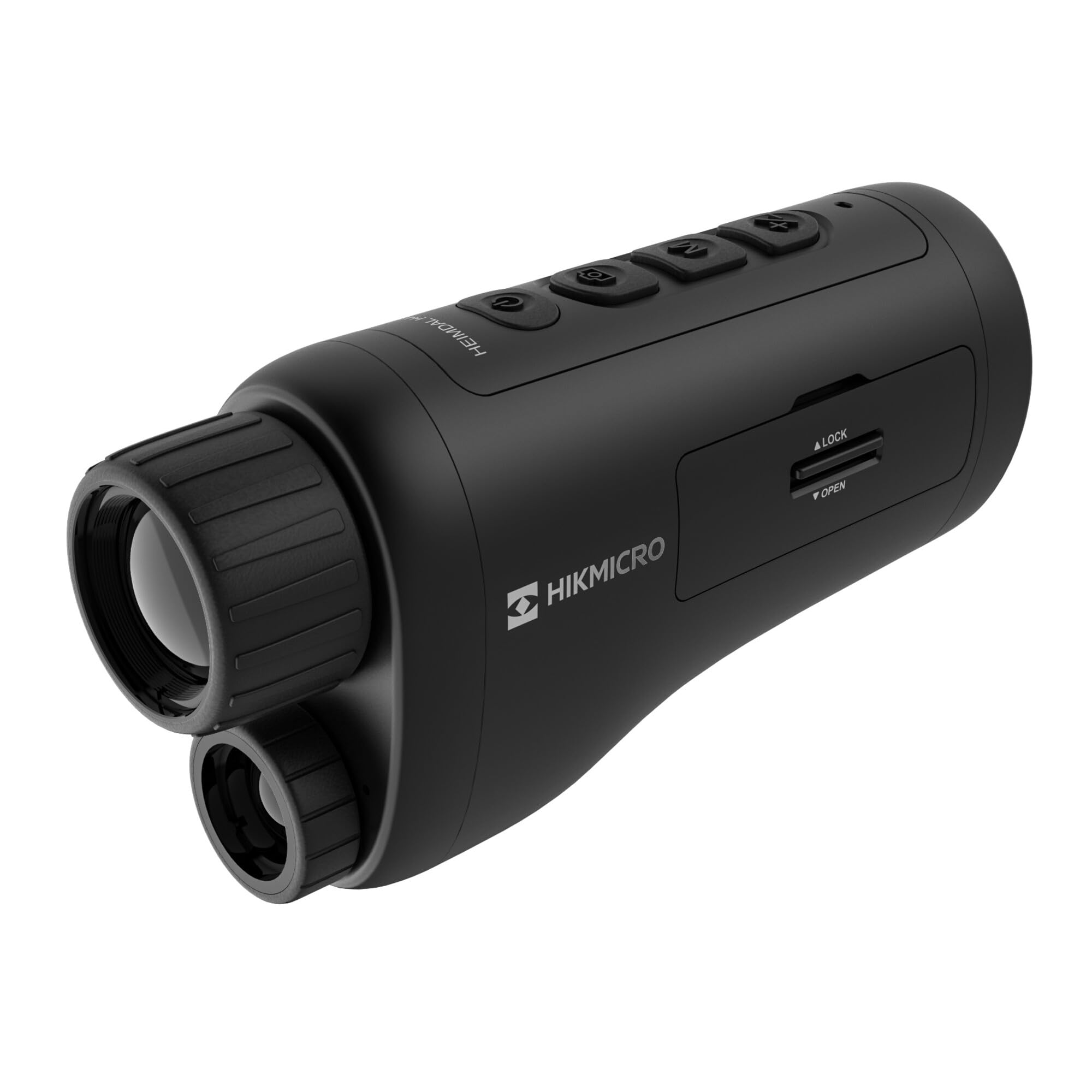
ເປັນມຸມ view of the HIKMICRO HEIMDAL H4D monocular, showing its compact, ergonomic design and the main lens.
ການຄວບຄຸມ ແລະປຸ່ມຕ່າງໆ

ເທິງ view of the monocular showing the power button, photo/video record button, mode button, and zoom/IR adjustment buttons.
Lenses and Focus

ດ້ານໜ້າ view displaying the objective lens and the integrated infrared illuminator.
ຊ່ອງໃສ່ຫມໍ້ໄຟ

ຂ້າງ view showing the battery compartment with 'LOCK' and 'OPEN' indicators.
3. ຕັ້ງຄ່າ
ການຕິດຕັ້ງຫມໍ້ໄຟ
- ຊອກຫາຊ່ອງໃສ່ແບັດເຕີຣີຢູ່ດ້ານຂ້າງຂອງອຸປະກອນ.
- Slide the lock mechanism to the 'OPEN' position.
- ໃສ່ແບັດເຕີຣີທີ່ສາມາດສາກໄດ້, ຮັບປະກັນການຂົ້ວທີ່ຖືກຕ້ອງ.
- Close the compartment and slide the lock mechanism to the 'LOCK' position.
ກຳລັງສາກແບັດເຕີຣີ
Connect the device to a power source using the provided USB-C cable. The charging indicator will show the charging status.
ເປີດເຄື່ອງເບື້ອງຕົ້ນ
Press and hold the power button (usually marked with Ⓘ) until the HIKMICRO logo appears on the display.
4. ຄໍາແນະນໍາການດໍາເນີນງານ
ເປີດ/ປິດ
- ເປີດ: ກົດປຸ່ມເປີດປິດຄ້າງໄວ້ປະມານ 3 ວິນາທີ.
- ປິດພະລັງງານ: Press and hold the power button for approximately 3 seconds until the device shuts down.
ການປັບຈຸດສຸມ
Rotate the focus ring on the objective lens to achieve a clear image of your target.
ການເລືອກໂໝດ
Press the 'M' (Mode) button to cycle through observation modes: Day, Night, Auto, and Defog.
Zoom and IR Adjustment
Use the '+' and '-' buttons to adjust the digital zoom level. These buttons also control the intensity of the infrared illuminator in night mode.
Photo and Video Recording
- ຖ່າຍຮູບ: Press the photo/video button (usually marked with 📷) once to capture an image.
- ບັນທຶກວິດີໂອ: Press and hold the photo/video button to start recording. Press again to stop.
Connecting to HIKMICRO Sight App
Download the HIKMICRO Sight app from your device's app store. Follow the in-app instructions to connect your monocular for live view, remote control, and media management.
5. ບໍາລຸງຮັກສາ
ທໍາຄວາມສະອາດ
- Use the provided dust cloth or a soft, lint-free cloth to clean the lenses.
- For stubborn dirt, use a lens cleaning solution specifically designed for optics.
- Wipe the device body with a soft, damp ຜ້າ. ຢ່າໃຊ້ເຄື່ອງເຮັດຄວາມສະອາດຂັດຫຼືສານລະລາຍ.
ການເກັບຮັກສາ
- Store the monocular in its protective bag in a cool, dry place when not in use.
- ຖອດແບດເຕີຣີອອກຖ້າອຸປະກອນຈະບໍ່ຖືກໃຊ້ເປັນໄລຍະເວລາ.
ການດູແລຫມໍ້ໄຟ
- Charge the battery regularly, even if not in frequent use, to maintain its lifespan.
- ຫຼີກເວັ້ນອຸນຫະພູມທີ່ຮຸນແຮງໃນລະຫວ່າງການສາກໄຟ ແລະບ່ອນເກັບມ້ຽນ.
6. ການແກ້ໄຂບັນຫາ
ບັນຫາທົ່ວໄປແລະການແກ້ໄຂ
| ບັນຫາ | ສາເຫດທີ່ເປັນໄປໄດ້ | ການແກ້ໄຂ |
|---|---|---|
| ອຸປະກອນບໍ່ເປີດ. | ແບັດເຕີຣີໝົດ ຫຼື ຕິດຕັ້ງບໍ່ຖືກຕ້ອງ. | ສາກແບັດເຕີຣີ. ກວດໃຫ້ແນ່ໃຈວ່າໃສ່ແບັດດ້ວຍຂົ້ວທີ່ຖືກຕ້ອງ. |
| ຮູບພາບແມ່ນມົວ. | Focus is not adjusted. | Rotate the focus ring on the objective lens until the image is clear. |
| ຄຸນນະພາບຮູບພາບທີ່ບໍ່ດີໃນຄວາມມືດ. | IR illuminator is off or set to low intensity. | Activate the IR illuminator or increase its intensity using the '+' button. Ensure you are in Night mode. |
| Cannot connect to HIKMICRO Sight app. | Bluetooth/Wi-Fi is off on device or phone, or app is not updated. | Ensure Bluetooth/Wi-Fi is enabled on both devices. Restart the app and monocular. Check for app updates. |
| ອຸປະກອນຄ້າງ ຫຼື ບໍ່ຕອບສະໜອງ. | ຄວາມຜິດພາດຂອງຊອບແວຊົ່ວຄາວ. | Perform a soft reset by holding the power button until the device restarts. If issue persists, contact support. |
7. ຂໍ້ມູນຈໍາເພາະ
| ຄຸນສົມບັດ | ລາຍລະອຽດ |
|---|---|
| Sensor Resolution | 2560 x 1440 |
| ປະເພດການສະແດງ | AMOLED |
| ຄວາມລະອຽດການສະແດງ | 454 x 454 |
| ຂະຫນາດຈໍສະແດງຜົນ | 1.39 ນິ້ວ (3.5 ຊຕມ) |
| ແສງສະຫວ່າງອິນຟາເລດ | Integrated 850 nm |
| ໄລຍະການກວດຫາ | ເຖິງ 200 ແມັດ |
| ການເກັບຮັກສາ | 32 GB EMMC (internal) |
| ຊີວິດຫມໍ້ໄຟ | More than 4 hours (replaceable, rechargeable) |
| ການປະເມີນກັນນ້ໍາ | IP67 |
| ຂະໜາດ | 153 ມມ x 50 ມມ x 80 ມມ (6.02" x 1.97" x 3.15") |
| ນ້ຳໜັກ | 375 ກຣາມ (0.83 ປອນ) |
| ວັດສະດຸ | ພາດສະຕິກ |
| ອຸປະກອນທີ່ເຂົ້າກັນໄດ້ | Rifle, Compound Bow |
| ປະເພດການຕິດຕັ້ງ | Picatinny mount |
| Sport Use | Campໃນ, ຍ່າງປ່າ |
| ສີ | ສີຂາວ |
8. ການຮັບປະກັນແລະການສະຫນັບສະຫນູນ
HIKMICRO products are covered by a limited warranty. For detailed warranty information, please refer to the official HIKMICRO webເວັບໄຊທ໌ຫຼືຕິດຕໍ່ຕົວແທນຈໍາຫນ່າຍທ້ອງຖິ່ນຂອງທ່ານ.
For technical support, troubleshooting assistance, or service inquiries, please visit the official HIKMICRO support page or contact their customer service department.
ທາງການ Webເວັບໄຊ: www.hikmicrotech.com


