1. ຜະລິດຕະພັນເກີນview
The STARTRC 2-in-1 Sun Hood and RC Joystick Protector is designed to enhance your drone flying experience by providing both screen glare reduction and physical protection for your remote controller. This accessory serves as a multi-level adjustable sunshade and a robust cover for the screen, buttons, and joysticks, preventing scratches and dust accumulation during transport and use.
2. ເນື້ອໃນຊຸດ
- 1 x Sun Hood Protector Cover
- 2 x Screws (Note: Be careful not to lose these small screws.)
Note: Drone, remote control, joysticks, and other accessories are not included.
3. ຄວາມເຂົ້າກັນໄດ້
This remote control protector sun hood is specifically designed for the following DJI RC remote controller models:
- DJI Mini 3 Pro RC
- DJI Mini 3 RC
- DJI Air 3S RC
- DJI Mavic 3 Classic RC
- DJI Mavic 3 Pro RC
Important: This product is NOT compatible with DJI RC 2.
4. ຄຸນນະສົມບັດທີ່ສໍາຄັນ
- ການອອກແບບ 2-in-1: Functions as both a protective cover and a sunshade.
- ປັບປຸງການເບິ່ງເຫັນ: Multi-level adjustable sun hood effectively reduces sun glare and light interference, providing a clearer view of the remote controller screen in various lighting conditions (sunny or snowy).
- ການປົກປ້ອງທີ່ສົມບູນແບບ: Guards against scratches, dust, and pressure damage to the screen, buttons, and joysticks. It also secures the joysticks during transport, preventing movement and potential damage.
- ການອອກແບບມຸມ: Allows for shading without obstructing controller operation. Features multiple levels of adjustability for optimal viewມຸມ.
- ການເກັບຮັກສາສະດວກ: Designed for easy storage in a bag. The one-snap-to-close mechanism eliminates the need to repeatedly disassemble and reassemble joysticks and the sun hood when storing the remote control.
- ພໍດີທີ່ຊັດເຈນ: Features precise cutouts for all buttons and ports, ensuring normal use of the DJI RC remote controller. The cover is secured with screws for stability.
- ວັດສະດຸທີ່ໄດ້ຮັບການຍົກລະດັບ: Made with ultra-soft microfiber on the interior to prevent scratching the RC remote control screen.
5. ຄໍາແນະນໍາການຕິດຕັ້ງ
- Unpack ອົງປະກອບ: Carefully remove the sun hood protector cover and the two screws from the packaging.
- ຕໍາແຫນ່ງປົກຫຸ້ມຂອງ: Align the flat base of the sun hood protector with the back of your DJI RC remote controller. Ensure the screw holes on the protector match the corresponding holes on the controller.
- ປອດໄພດ້ວຍ Screws: Insert the two provided screws into the aligned holes. Gently tighten the screws to secure the protector to the controller. Do not overtighten.
- ຢືນຢັນການຕິດຕັ້ງ: Once secured, check that the protector is firmly attached and does not obstruct any buttons or ports on the controller.
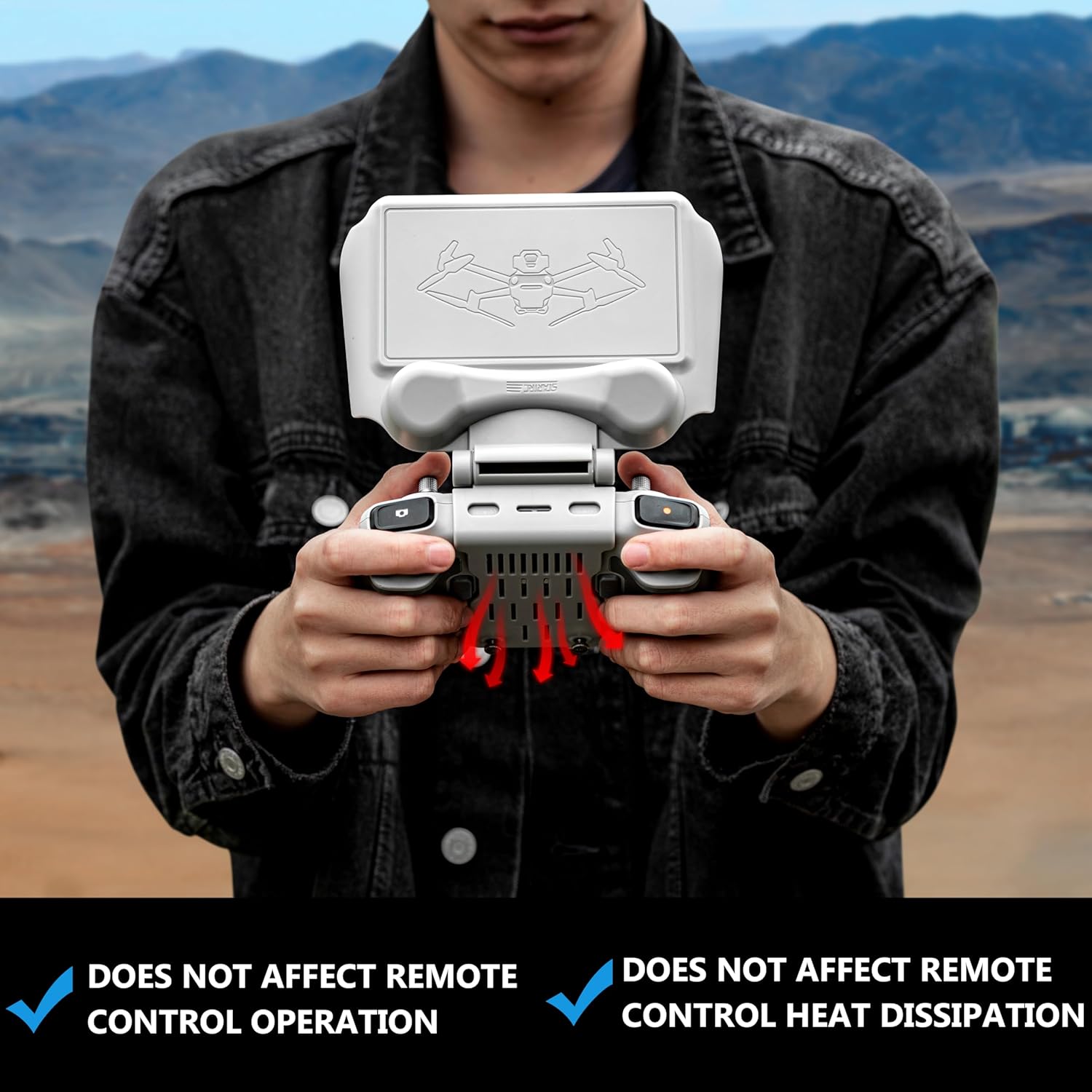
Figure 1: Attaching the sun hood protector to the DJI RC controller using screws.

Figure 2: The ultra-soft microfiber lining ensures screen protection.
6. ຄໍາແນະນໍາການດໍາເນີນງານ
- Using as a Sunshade:
- To deploy the sunshade, gently lift the top flap of the protector.
- The sunshade features multiple adjustable levels (e.g., 90°, 120°, up to 180° rotation) to block direct sunlight and reduce glare on the controller screen. Adjust the angle to your preference for optimal visibility.
- The angled design ensures that the sunshade does not interfere with the operation of the joysticks or buttons.
- Using as a Protective Cover:
- When not in use or during transport, fold the sunshade flap down to fully cover the screen and joysticks.
- The cover will snap into place, providing full protection against scratches, dust, and accidental impacts.
- This design allows for convenient storage of the remote controller without needing to remove the joysticks.

Figure 3: Demonstrating glare reduction with the sun hood in use.
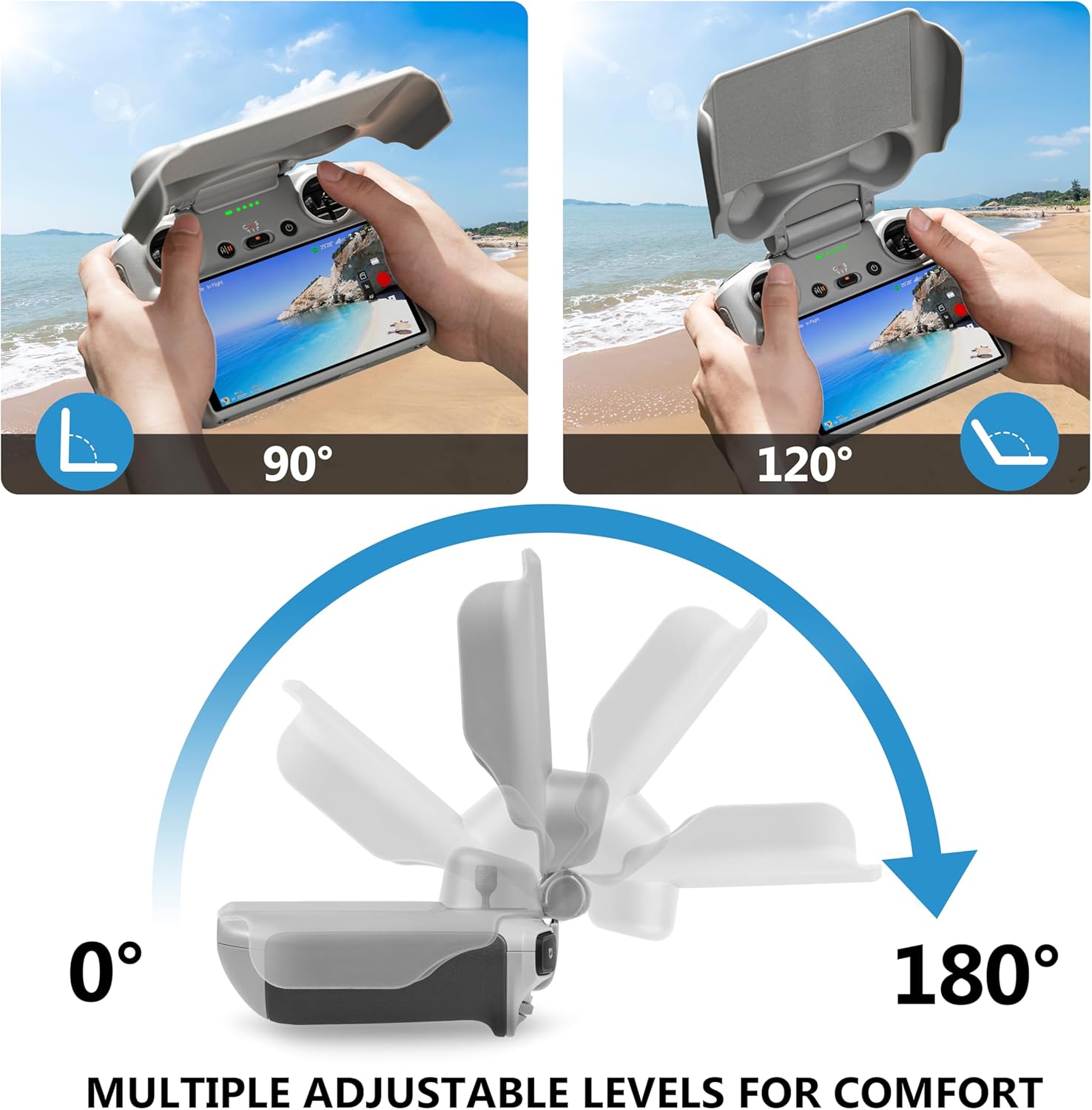
Figure 4: The sun hood offers multiple adjustable angles for comfort and optimal viewing.
7. ບໍາລຸງຮັກສາ
- ທໍາຄວາມສະອາດ: Wipe the exterior of the sun hood with a soft, damp cloth. For the interior microfiber, use a dry, lint-free cloth to gently remove dust. Avoid harsh chemicals or abrasive materials.
- ການເກັບຮັກສາ: Store the sun hood and controller in a cool, dry place away from direct sunlight when not in use.
- ການກວດກາ: Periodically check the screws for tightness and the overall condition of the cover for any signs of wear or damage.
8. ການແກ້ໄຂບັນຫາ
| ບັນຫາ | ສາເຫດທີ່ເປັນໄປໄດ້ | ການແກ້ໄຂ |
|---|---|---|
| Screen glare persists with sun hood deployed. | Incorrect angle adjustment or extreme lighting conditions. | Adjust the sun hood to a different angle. In very bright, low-angle sun, some minimal glare may still occur, but the hood significantly reduces it. Consider your position relative to the sun. |
| Sun hood feels loose or wobbly. | screws ຍັງບໍ່ໄດ້ tightened ພຽງພໍ. | Gently tighten the two securing screws on the back of the controller. Do not overtighten to avoid damaging the controller. |
| Joysticks are not protected when cover is closed. | Cover not properly closed or misaligned. | Ensure the sun hood is fully folded down and snapped into its closed position. The design is intended to secure the joysticks without removal. |
9. ຂໍ້ມູນຈໍາເພາະ
| ຄຸນລັກສະນະ | ລາຍລະອຽດ |
|---|---|
| ຍີ່ຫໍ້ | ບໍລິສັດ STARTRC |
| ໝາຍເລກຕົວແບບ | LV-1116380 |
| ນ້ໍາຫນັກລາຍການ | 2.86 ອອນ |
| ຂະໜາດສິນຄ້າ | 6.8 x 5.39 x 2.16 ນິ້ວ |
| ວັດສະດຸ | Aluminum (Note: Product description mentions plastic, but specifications list Aluminum. Assuming Aluminum for the main structure, with microfiber lining.) |
| ຄຸນນະສົມບັດພິເສດ | 2-in-1 Design (Protective Cover and Sunshade) |
| ອຸປະກອນທີ່ເຂົ້າກັນໄດ້ | DJI Mini 3 Pro RC, DJI Mini 3 RC, DJI Air 3S RC, DJI Mavic 3 Classic RC, DJI Mavic 3 Pro RC |
10. ການຮັບປະກັນແລະການສະຫນັບສະຫນູນ
For warranty information or technical support, please refer to the official STARTRC webເວັບໄຊ ຫຼືຕິດຕໍ່ບໍລິການລູກຄ້າຂອງເຂົາເຈົ້າໂດຍກົງ. ຮັກສາໃບຮັບເງິນການຊື້ຂອງທ່ານໄວ້ເປັນຫຼັກຖານການຊື້ສໍາລັບການຮຽກຮ້ອງການຮັບປະກັນໃດໆ.


