1. ຜະລິດຕະພັນເກີນview
The ChunHee Emergency Call Button System (Model LC05) is a wireless caregiver pager designed to provide timely assistance for elderly individuals, people with disabilities, and pregnant women. This system ensures that help can be summoned quickly and efficiently, enhancing safety and peace of mind for both users and caregivers.

Image: The ChunHee Wireless Caregiver Pager System, highlighting its main components and features like 55 ringtones, 5 volume levels, waterproof design, 500ft working range, expandability, and night light function.
ຄຸນນະສົມບັດທີ່ສໍາຄັນ:
- Emergency Call Function: Allows users to call for help with a simple press of a button.
- Portable Receiver: A battery-powered receiver that can be carried anywhere, ensuring alerts are not missed.
- Adjustable Alerts: Features a receiver with four operating modes (A/B/C/D), bright light, and vibration alerts, suitable for individuals with hearing impairments.
- ໄລຍະຂະຫຍາຍ: Operates effectively up to approximately 45 meters (150 feet) in open areas.
- ການຄວບຄຸມລະດັບສຽງ: Offers 5 adjustable volume levels, from 0 dB to 110 dB, ensuring the alarm is audible throughout the home.
- Waterproof Call Button: The wristband call button is splash-proof (IP55 rated), allowing use in wet environments like kitchens or bathrooms.
2. ເນື້ອໃນຊຸດ
Upon unpacking your ChunHee Emergency Call Button System, please ensure all the following components are present:
- 1 x Receiver Unit (Mains powered)
- 1 x Wearable Call Button (Wristband type)
- 1 x Wearable Call Button (Pendant type with lanyard)
- 1 x ຄູ່ມືຜູ້ໃຊ້
Note: Batteries for the call buttons are typically pre-installed or included separately. Please check the packaging.
3. ຄໍາແນະນໍາການຕິດຕັ້ງ
3.1 ການຕິດຕັ້ງຕົວຮັບ
- Plug the receiver unit into a standard electrical wall socket.
- The receiver will power on and be ready for pairing.
3.2 Pairing Call Buttons (Transmitters)
To pair a call button with the receiver and select a ringtone:
- With the receiver plugged in, press the ສົ່ງຕໍ່ or ຖອຍຫຼັງ button on the receiver to cycle through and select your desired ringtone.
- Once you have selected a ringtone, press and hold the ການຄວບຄຸມປະລິມານ button on the receiver until you hear a "ding-dong" sound. This indicates the receiver is now in pairing mode.
- ທັນທີກົດທີ່ ປຸ່ມໂທ on the transmitter (wristband or pendant). You will hear another "ding-dong" sound from the receiver, confirming that the call button and receiver are successfully paired.
- Repeat this process for any additional call buttons you wish to pair.
Image: Step-by-step visual guide for pairing transmitters and selecting music on the ChunHee Emergency Call Button System.
3.3 Adjusting Volume and Night Light
- ການປັບລະດັບສຽງ: Use the dedicated volume control buttons on the receiver to adjust the alarm loudness from 0 dB to 110 dB across 5 levels.
- ແສງກາງຄືນ: To turn the night light ON or OFF, press and hold the middle (backward) button on the receiver for approximately 5 seconds.
4. ຄໍາແນະນໍາການດໍາເນີນງານ
4.1 Making an Emergency Call
When assistance is needed, simply press the large red call button on your wristband or pendant transmitter. The signal will be sent wirelessly to the receiver.
4.2 Receiver Response
Upon receiving a signal from a call button, the receiver will:
- Sound the selected alarm tone.
- Illuminate with bright LED lights.
- Vibrate (if the vibration mode is selected).
This multi-sensory alert ensures that caregivers are notified promptly, even in noisy environments or if they have hearing difficulties.

Image: An elderly individual wearing the emergency call wristband, demonstrating the product in a home setting with the receiver active.
4.3 ສະຖານະການນຳໃຊ້
The ChunHee Emergency Call Button System is versatile and can be used in various situations:
- Rehabilitation Care: For patients recovering from surgery or injury.
- Night Duty Care: For caregivers monitoring individuals during nighttime hours.
- ການດູແລເຮືອນ: For daily assistance and safety in the home environment.
- Chronic Care: For individuals with long-term health conditions requiring frequent monitoring.

ຮູບພາບ: Visual examples of the ChunHee Emergency Call Button System being used in different care settings.
5. ບໍາລຸງຮັກສາ
5.1 ການທໍາຄວາມສະອາດ
To clean the receiver and call buttons, use a soft, dry cloth. Do not use abrasive cleaners or immerse the units in water. While the call buttons are splash-proof, they are not designed for full submersion.
5.2 Battery Replacement (Call Buttons)
The call buttons are battery-powered. If a call button stops responding or its indicator light does not flash when pressed, the battery may need replacement. Refer to the specific instructions provided with your product for details on how to open the call button and replace its battery (typically a coin cell battery like CR2032).
5.3 ການເກັບຮັກສາ
Store the system components in a cool, dry place away from direct sunlight and extreme temperatures when not in use for extended periods.
6. ການແກ້ໄຂບັນຫາ
- Issue: Receiver does not sound an alarm or light up.
ການແກ້ໄຂ: Ensure the receiver is securely plugged into a working electrical outlet. Check the volume settings on the receiver. Re-pair the call button with the receiver following the instructions in Section 3.2. - Issue: Call button does not trigger the receiver.
ການແກ້ໄຂ: Check if the call button's battery needs replacement (refer to Section 5.2). Ensure the call button is within the operational range of the receiver (approximately 45 meters in open areas). Re-pair the call button with the receiver. - Issue: Receiver loses pairing settings when unplugged.
ການແກ້ໄຂ: This model may require re-pairing call buttons if the receiver is unplugged and moved to a different location. Follow the pairing instructions in Section 3.2 to re-establish the connection. - Issue: Alarm sound is too quiet or too loud.
ການແກ້ໄຂ: Adjust the volume using the dedicated volume control buttons on the receiver. - Issue: Night light is not working.
ການແກ້ໄຂ: Press and hold the middle (backward) button on the receiver for 5 seconds to toggle the night light ON/OFF.
7. ຂໍ້ມູນຈໍາເພາະ
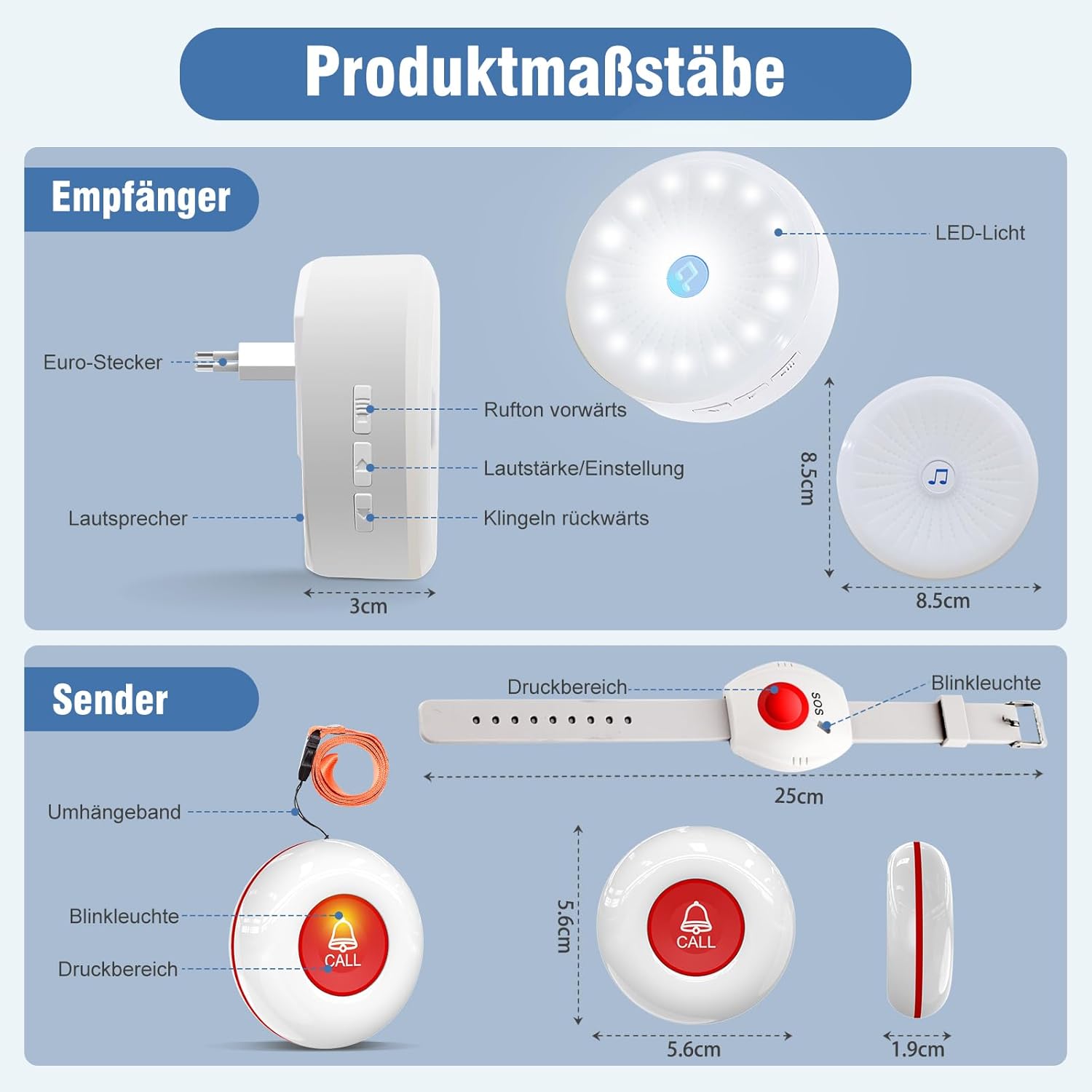
Image: Detailed dimensions of the receiver and call button transmitters.
| ຄຸນສົມບັດ | ຂໍ້ມູນຈໍາເພາະ |
|---|---|
| ໝາຍເລກຕົວແບບ | LC05 |
| ຍີ່ຫໍ້ | ChunHee |
| ວິທີການຄວບຄຸມ | ປຸ່ມກົດ |
| ລະດັບສຽງ | ສູງສຸດ 110 ເດຊີເບວ |
| Receiver Dimensions (L x W x H) | 7.7 x 9.5 x 8.8 cm |
| ນ້ຳໜັກຕົວຮັບ | 200 ກຣາມ |
| Pendant Call Button Dimensions (Diameter x Thickness) | 5.6ຊມ x 1.9ຊມ |
| Wristband Call Button Length | 25 ຊຕມ |
| ແຫຼ່ງພະລັງງານ (ຜູ້ຮັບ) | Electric Cable (Mains powered) |
| Range ໄຮ້ສາຍ | Approx. 45 meters (150 feet) in open areas |
| ລະດັບສຽງ | 5 levels (0 dB to 110 dB) |
| ສຽງເອີ້ນເຂົ້າ | 55 |
| Waterproof Rating (Call Buttons) | IP55 (ກັນນໍ້າກະແຈກກະຈາຍ) |
| ອຸປະກອນທີ່ເຂົ້າກັນໄດ້ | N/A (Standalone system) |
8. ການຮັບປະກັນແລະການສະຫນັບສະຫນູນ
For warranty information and customer support, please refer to the documentation included with your product or contact ChunHee customer service directly. Keep your purchase receipt as proof of purchase for any warranty claims.
ຜູ້ຜະລິດ: ChunHee


