1. ບົດແນະນຳ
This manual provides detailed instructions for the setup, operation, and maintenance of your VYSER F2 Projector. Please read this manual thoroughly before using the projector to ensure proper functionality and to maximize your viewing experience. The VYSER F2 Projector is a versatile device designed for various entertainment and presentation needs, offering high-definition projection with multiple connectivity options.
2. ສິ່ງທີ່ຢູ່ໃນກ່ອງ
Upon unboxing your VYSER F2 Projector, please verify that all the following items are included:
- VYSER F2 Projector
- ການຄວບຄຸມໄລຍະໄກ
- ຄູ່ມືຜູ້ໃຊ້ (ເອກະສານນີ້)
- ສາຍ HDMI
- ສາຍໄຟ
3. ຜະລິດຕະພັນເກີນview
Familiarize yourself with the components and ports of your VYSER F2 Projector.

Figure 3.1: VYSER F2 Projector with key features highlighted.
3.1 ແນວ ໜ້າ View
- ເລນໂຟກັສ: ປັບຄວາມຊັດເຈນຂອງຮູບທີ່ຄາດໄວ້.
- ຕົວຮັບ IR: ໄດ້ຮັບສັນຍານຈາກການຄວບຄຸມຫ່າງໄກສອກຫຼີກ.
3.2 Side and Rear Views (Ports and Controls)
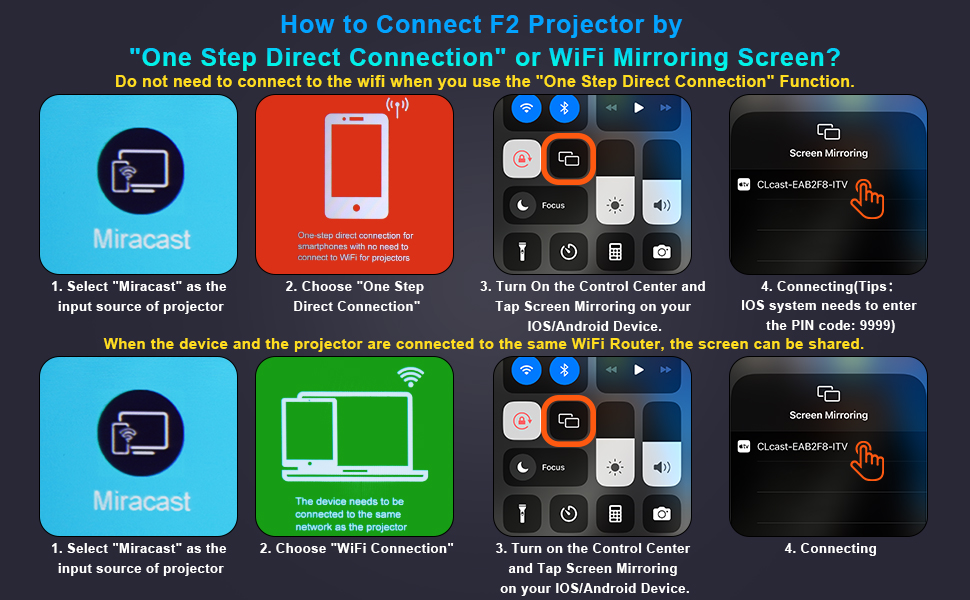
Figure 3.2: Multiple connection options on the VYSER F2 Projector.
- ຜອດ HDMI (x2): Connect to devices like laptops, TV sticks, gaming consoles (e.g., PS5/Xbox).
- ພອດ USB (x2): ເຊື່ອມຕໍ່ USB drives ສໍາລັບການຫຼິ້ນມີເດຍ.
- ພອດ AV: ເຊື່ອມຕໍ່ກັບອຸປະກອນເກົ່າໂດຍໃຊ້ສາຍ AV.
- 3.5mm ສຽງອອກ: ເຊື່ອມຕໍ່ລຳໂພງ ຫຼືຫູຟັງພາຍນອກ.
- ການປ້ອນຂໍ້ມູນພະລັງງານ: ເຊື່ອມຕໍ່ສາຍໄຟ.
- Cooling Windows: ຮັບປະກັນການລະບາຍອາກາດທີ່ເຫມາະສົມສໍາລັບການກະຈາຍຄວາມຮ້ອນ.
- ການຄວບຄຸມເທິງເຮືອ: Buttons for power, menu, input source, and navigation.
3.3 360 Degree View of the Projector
Video 3.1: A comprehensive 360-degree view of the VYSER F2 Projector, showcasing its design and various ports from all angles.
4. ຕັ້ງຄ່າ
Follow these steps to set up your VYSER F2 Projector for the first time.
4.1 ການຈັດວາງ
Place the projector on a stable, flat surface. Ensure there is adequate ventilation around the projector to prevent overheating. The projection distance can range from 5-15 feet, allowing for an adjustable screen size of 50-300 inches.
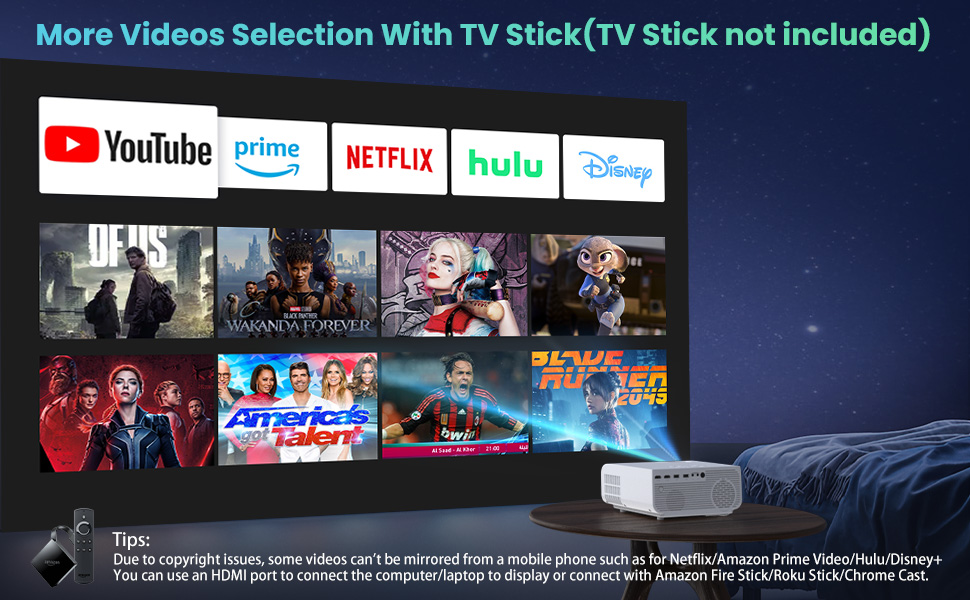
Figure 4.1: Adjustable display size from 50 to 300 inches.
The projector can be placed on a table, mounted on a tripod, or ceiling-mounted. Use the adjustable foot at the bottom of the projector to fine-tune the projection angle if needed.
4.2 ການເຊື່ອມຕໍ່ພະລັງງານ
- Connect the power cable to the Power Input port on the projector.
- ສຽບປາຍອື່ນໆຂອງສາຍໄຟເຂົ້າໄປໃນປລັກສຽບໄຟ.
- ກົດປຸ່ມເປີດ/ປິດເທິງໂປເຈັກເຕີ ຫຼື ຣີໂມດຄອນໂທຣລເພື່ອເປີດມັນ.
4.3 ຈຸດສຸມແລະການແກ້ໄຂ Keystone
- ການປັບຈຸດສຸມ: Rotate the focus lens ring on the front of the projector until the image appears clear and sharp.
- ການແກ້ໄຂ Keystone: Use the keystone correction dial (usually on top or side) to adjust the image shape if it appears trapezoidal. The projector supports ±15° keystone correction.
5. ຄໍາແນະນໍາການດໍາເນີນງານ
Learn how to connect your devices and utilize the various features of your projector.
5.1 ອຸປະກອນເຊື່ອມຕໍ່
The VYSER F2 Projector offers multiple ways to connect your devices:
- HDMI: For high-definition video and audio from laptops, gaming consoles, TV boxes, etc.
- USB: ສໍາລັບການຫຼິ້ນສື່ມວນຊົນ files ໂດຍກົງຈາກ USB flash drive.
- ຂອງ: ສຳລັບການເຊື່ອມຕໍ່ອຸປະກອນເກົ່າທີ່ມີຜົນຜະລິດ AV.
5.2 Wireless Connectivity (Screen Mirroring)
The projector supports 5G/2.4G WiFi for seamless screen mirroring from your smartphone or tablet.
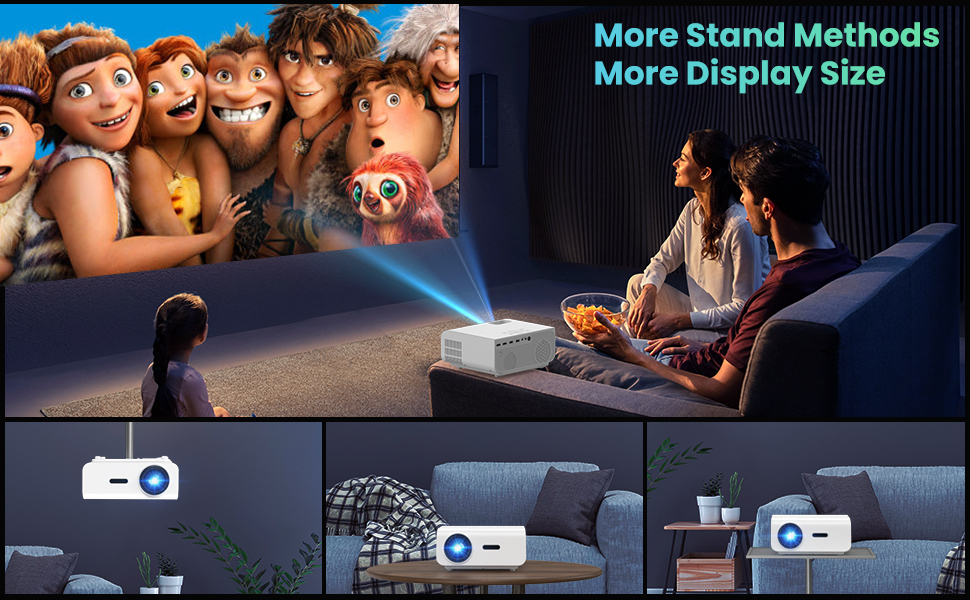
Figure 5.1: 5G/2.4G WiFi Screen Mirroring for various devices.
One-Step Direct Connection: This feature allows direct connection to your phone without needing a WiFi network. Ideal for outdoor use or when a router is unavailable.
Video 5.1: Demonstration of the F2 Projector's One-Step Direct Connection with WiFi and Bluetooth, showing quick setup for phone mirroring.
For detailed steps on screen mirroring, refer to the on-screen instructions by selecting "Miracast" from the input source menu.
Note: Due to copyright restrictions, some streaming services (e.g., Netflix, Amazon Prime Video, Hulu, Disney+) may block screen mirroring. For these services, it is recommended to use an HDMI connection with a compatible device like a Fire TV Stick, Roku Stick, or laptop.
5.3 ການເຊື່ອມຕໍ່ Bluetooth
The projector features Bluetooth 5.1 for connecting to external Bluetooth speakers or headphones, enhancing your audio experience.

Figure 5.2: Bluetooth connection for external audio devices.
To connect: Navigate to the Bluetooth settings on the projector, enable Bluetooth, and select your desired audio device from the list of available devices. (Note: The projector connects to Bluetooth speakers, not directly to smartphones/tablets via Bluetooth for audio input).
5.4 ການ ນຳ ທາງເມນູ
Use the remote control or the on-board buttons to navigate the projector's menu. Options typically include input source selection, picture settings (brightness, contrast, color), sound settings, and system settings.
6. ບໍາລຸງຮັກສາ
ການບໍາລຸງຮັກສາທີ່ເຫມາະສົມຮັບປະກັນອາຍຸຍືນແລະການປະຕິບັດທີ່ດີທີ່ສຸດຂອງໂປເຈັກເຕີຂອງທ່ານ.
- ການອະນາໄມເລນ: ໃຊ້ຜ້າແພທີ່ອ່ອນໆ ແລະບໍ່ມີເສັ້ນດ່າງທີ່ອອກແບບມາສະເພາະສຳລັບແວ່ນຕາເພື່ອທຳຄວາມສະອາດເລນໂປເຈັກເຕີຢ່າງຄ່ອຍໆ. ຫຼີກລ້ຽງການວັດສະດຸຂັດຫຼືສານເຄມີທີ່ຮ້າຍແຮງ.
- ການກຳຈັດຂີ້ຝຸ່ນ: Regularly clean the cooling vents to prevent dust buildup, which can affect performance and lifespan. Use a soft brush or compressed air.
- ການເກັບຮັກສາ: ເມື່ອບໍ່ໄດ້ໃຊ້ເປັນໄລຍະເວລາດົນ, ໃຫ້ເກັບຮັກສາໂປເຈັກເຕີໄວ້ໃນບ່ອນເຢັນ, ແຫ້ງ, ເຫມາະສົມໃນການຫຸ້ມຫໍ່ຕົ້ນສະບັບຫຼືຖົງປ້ອງກັນ.
- ປິດເຄື່ອງຢ່າງຖືກຕ້ອງ: ປິດໂປເຈັກເຕີສະເໝີໂດຍໃຊ້ປຸ່ມເປີດປິດ ແລະ ປ່ອຍໃຫ້ມັນເຢັນລົງກ່ອນທີ່ຈະຖອດປລັກ ຫຼື ຍ້າຍມັນ.
7. ການແກ້ໄຂບັນຫາ
ຖ້າທ່ານພົບບັນຫາກັບໂປເຈັກເຕີຂອງທ່ານ, ໃຫ້ອ້າງອີງເຖິງຂັ້ນຕອນການແກ້ໄຂບັນຫາທົ່ວໄປຕໍ່ໄປນີ້:
| ບັນຫາ | ສາເຫດ / ການແກ້ໄຂທີ່ເປັນໄປໄດ້ |
|---|---|
| ບໍ່ມີຮູບພາບຫຼືຂໍ້ຄວາມ "ບໍ່ມີສັນຍານ". |
|
| ຮູບມົວ |
|
| Trapezoidal image |
|
| ບໍ່ມີສຽງຫຼືສຽງຕໍ່າ |
|
| Screen mirroring issues (e.g., Netflix not working) |
|
| Projector overheating or shutting down |
|
8. ຂໍ້ມູນຈໍາເພາະ
Key technical specifications for the VYSER F2 Projector:
| ຄຸນສົມບັດ | ລາຍລະອຽດ |
|---|---|
| ຍີ່ຫໍ້ | VYSER |
| ຕົວແບບ | ໂປເຈັກເຕີ F2 |
| ຄວາມລະອຽດເດີມ | 1920 x 1080 (1080P ພື້ນເມືອງ) |
| ຄວາມສະຫວ່າງ | 12000 Lux (350 ANSI Lumens) |
| ອັດຕາສ່ວນກົງກັນຂ້າມ | 10000:1 (implied from image comparison) |
| ຂະໜາດການຄາດຄະເນ | 50-300 ນິ້ວ |
| ໄລຍະການຄາດຄະເນ | 5-15 ຟຸດ |
| ເຕັກໂນໂລຊີການເຊື່ອມຕໍ່ | Wireless (5G/2.4G WiFi), Bluetooth 5.1, HDMI (x2), USB (x2), AV, 3.5mm Audio Out |
| ການແກ້ໄຂ Keystone | ±15° ຄູ່ມື |
| ນ້ໍາຫນັກລາຍການ | 4.11 ປອນ |
| ສີ | White-White |
9. ການຮັບປະກັນແລະການສະຫນັບສະຫນູນ
VYSER is committed to providing excellent customer service and technical support for your projector.
- ການບໍລິການລູກຄ້າຕະຫຼອດຊີວິດ: Enjoy lifetime customer service and technical support for your VYSER F2 Projector.
- For any inquiries, technical assistance, or warranty claims, please contact VYSER customer support through the platform where you purchased the product or refer to the official VYSER webເວັບໄຊສໍາລັບຂໍ້ມູນຕິດຕໍ່.


