1. ບົດແນະນຳ
Thank you for choosing the AONIMI 42800mAh Solar Charger Power Bank. This robust and versatile portable charger is designed to keep your devices powered in various environments, especially outdoors. Featuring a massive 42800mAh capacity, multiple output ports, and an integrated LED flashlight, it is an ideal companion for camping, hiking, travel, and daily use. This manual provides essential information on how to safely and effectively use and maintain your power bank.
2. ຂໍ້ມູນຄວາມປອດໄພ
Please read all safety instructions carefully before using the product to ensure safe and optimal performance.
- Do not expose the power bank to extreme temperatures (above 60°C/140°F) or direct sunlight for prolonged periods, as this may damage the battery.
- Avoid dropping, disassembling, or attempting to repair the device yourself. Refer to qualified service personnel for any repairs.
- Keep the power bank away from water, moisture, and flammable materials. While it is IP67 waterproof, prolonged submersion is not recommended.
- The solar charging feature is intended for emergency use only. For daily charging, always use a wall adapter and cable to ensure efficient and complete charging.
- This power bank features a built-in intelligent chip that protects against over-discharge, over-charge, short-circuit, and overheating.
- Use only certified charging cables and adapters to prevent damage to the power bank and connected devices.

Figure 2.1: Superior Safety Protection features of the power bank.
3. ເນື້ອໃນຊຸດ
ກະລຸນາກວດເບິ່ງຊຸດສຳລັບລາຍການຕໍ່ໄປນີ້:
- 1 x AONIMI 42800mAh Solar Charger Power Bank
- ສາຍໄຟສາກແບັດ USB-C 1 x
- 1 x ຄູ່ມືຜູ້ໃຊ້ (ເອກະສານນີ້)

ຮູບທີ 3.1: ເນື້ອໃນລວມຢູ່ໃນຊຸດຜະລິດຕະພັນ.
4. ຜະລິດຕະພັນເກີນview
The AONIMI Solar Charger Power Bank is designed for durability and multi-device compatibility. It features a large solar panel on one side for emergency charging and multiple output ports for various devices.

ຮູບ 4.1: ດ້ານຫນ້າ view of the AONIMI Solar Charger Power Bank.
ອົງປະກອບທີ່ສໍາຄັນ:
- ແຜງແສງອາທິດ: Located on the top surface, used for emergency solar charging.
- ພອດ USB-A ອອກ (x4): Standard USB ports for charging most mobile devices.
- USB-C Input/Output Port (x1): A versatile port for both charging the power bank and charging compatible devices with Power Delivery (PD).
- ຕົວຊີ້ວັດ LED: Display the remaining battery capacity and charging status.
- ໄຟສາຍ LED: Integrated high-brightness flashlight for illumination.
- ປຸ່ມເປີດປິດ: Activates the power bank and controls the flashlight.
5. ຕັ້ງຄ່າ
Before first use, it is crucial to fully charge your AONIMI Solar Charger Power Bank using a wall adapter.
ການສາກໄຟເບື້ອງຕົ້ນ:
- Connect the provided USB-C cable to the USB-C port on the power bank.
- Plug the other end of the USB-C cable into a compatible USB wall adapter (not included).
- ສຽບອະແດບເຕີຝາໃສ່ກັບປລັກສຽບໄຟ.
- The LED indicators will light up, showing the charging progress. All four LEDs will be solid when fully charged.
- Allow the power bank to charge completely before its first use. This ensures optimal battery performance and longevity.

Figure 5.1: Primary charging method via USB wall adapter (left) versus emergency solar charging (right).
6. ຄໍາແນະນໍາການດໍາເນີນງານ
6.1 ການສາກໄຟອຸປະກອນພາຍນອກ
The power bank can charge up to five devices simultaneously using its multiple output ports.
- ເຊື່ອມຕໍ່ສາຍສາກໄຟຂອງອຸປະກອນຂອງທ່ານເຂົ້າກັບໜຶ່ງໃນພອດອອກ USB-A ຫຼື ພອດເຂົ້າ/ອອກ USB-C ໃນພາວເວີແບງ.
- ເຊື່ອມຕໍ່ອີກສົ້ນສາຍຂອງກັບອຸປະກອນມືຖືຂອງເຈົ້າ.
- ທະນາຄານພະລັງງານຈະເລີ່ມສາກໄຟອຸປະກອນຂອງທ່ານໂດຍອັດຕະໂນມັດ. ຕົວຊີ້ວັດ LED ຈະສະແດງລະດັບຫມໍ້ໄຟທີ່ຍັງເຫຼືອ.
- ເພື່ອຢຸດການສາກໄຟ, ພຽງແຕ່ຖອດອຸປະກອນຂອງທ່ານອອກ.
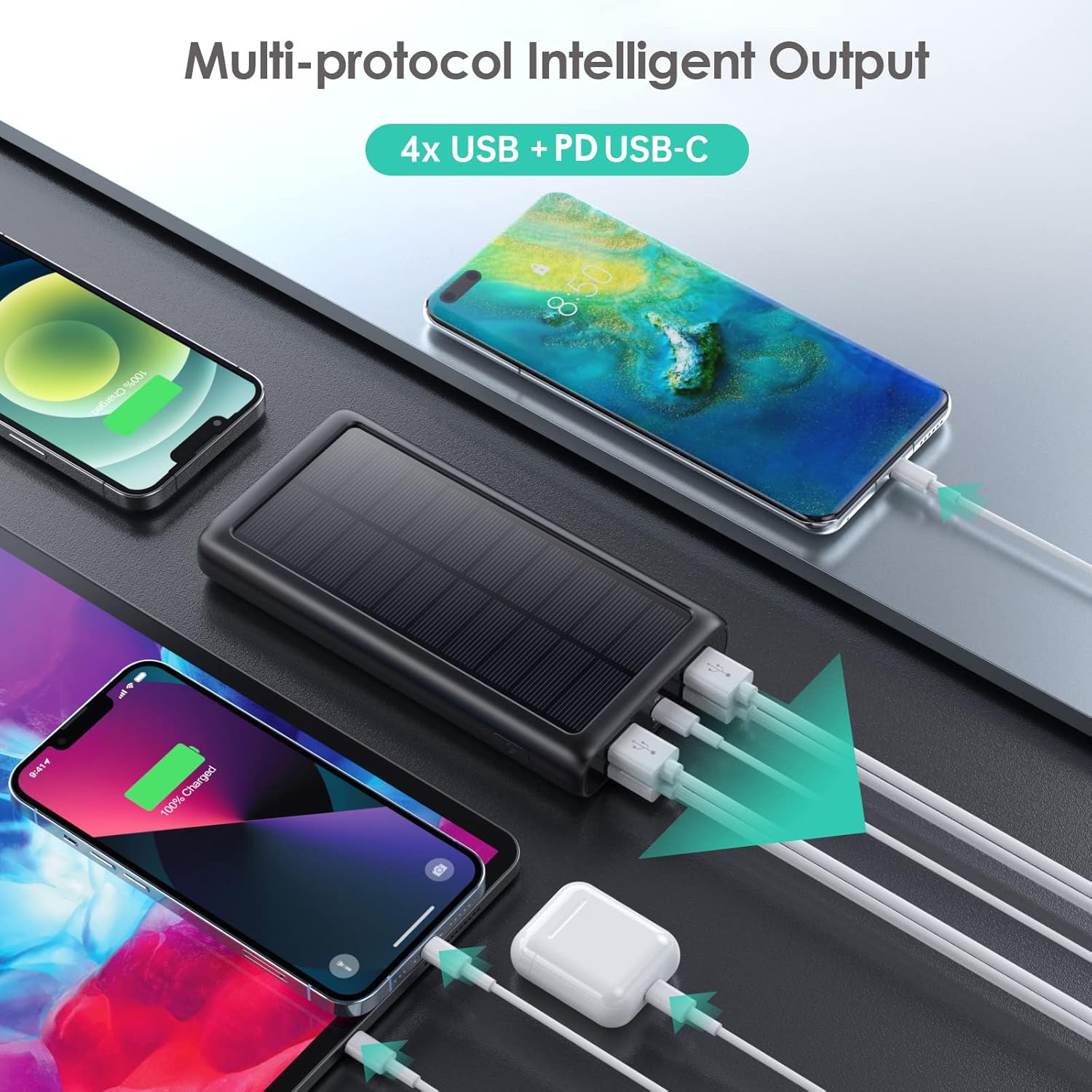
ຮູບທີ 6.1: ການສາກໄຟອຸປະກອນຫຼາຍເຄື່ອງພ້ອມໆກັນ.
6.2 ການສາກ Power Bank ຄືນໃໝ່
There are two ways to recharge your power bank:
A. Via USB-C Wall Adapter (Recommended)
This is the fastest and most efficient way to charge the power bank.
- Connect the USB-C cable to the power bank's USB-C port and a compatible wall adapter.
- The LED indicators will flash to show charging status and become solid when fully charged.
B. Via Solar Panel (Emergency Use Only)
The solar panel is designed for emergency power replenishment when no other power source is available. Due to variations in sunlight intensity and conversion rates, solar charging is significantly slower than wall charging.
- Place the power bank in direct sunlight. Ensure the solar panel is facing the sun.
- A green indicator light will illuminate to confirm solar charging is active.
- The LED battery indicators will show slow charging progress.
6.3 ການນໍາໃຊ້ໄຟ LED
The integrated LED flashlight is a useful feature for outdoor activities or emergencies.
- ເພື່ອເປີດໄຟສາຍ: Double-press the power button quickly.
- ຮອບວຽນຜ່ານໂໝດ: Once the flashlight is on, single-press the power button to switch between Strong Light, SOS, and Strobe modes.
- To turn off the flashlight: ກົດປຸ່ມເປີດປິດສອງເທື່ອໄວໆອີກຄັ້ງ.

Figure 6.2: The LED flashlight in use, demonstrating its various modes.
7. ບໍາລຸງຮັກສາ
ການດູແລ ແລະ ການບຳລຸງຮັກສາທີ່ເໝາະສົມຈະຊ່ວຍຍືດອາຍຸການໃຊ້ງານຂອງພາວເວີແບງຂອງທ່ານ.
- ທໍາຄວາມສະອາດ: Wipe the power bank with a soft, dry cloth. Do not use harsh chemicals or abrasive cleaners.
- ການເກັບຮັກສາ: Store the power bank in a cool, dry place away from direct sunlight and extreme temperatures. If storing for long periods, charge it to about 50-75% capacity every 3 months to prevent battery degradation.
- ຄວາມທົນທານ: The power bank is IP67 rated, meaning it is protected against dust ingress and can withstand immersion in water up to 1 meter for 30 minutes. It is also shockproof. However, avoid intentional abuse or prolonged exposure to harsh conditions.

Figure 7.1: The power bank's IP67 waterproof, dustproof, and shockproof capabilities.
8. ການແກ້ໄຂບັນຫາ
If you encounter issues with your power bank, please refer to the following common problems and solutions:
| ບັນຫາ | ສາເຫດທີ່ເປັນໄປໄດ້ | ການແກ້ໄຂ |
|---|---|---|
| Power bank ບໍ່ໄດ້ສາກໄຟ | Loose cable connection; faulty cable/adapter; power bank fully discharged. | Ensure cables are securely connected. Try a different USB-C cable and wall adapter. If fully discharged, it may take longer to initiate charging. |
| Devices not charging from power bank | Power bank is out of charge; loose cable connection; incompatible device. | Recharge the power bank. Ensure device charging cable is securely connected. Verify device compatibility (most USB/Type-C charged devices are supported). |
| Solar charging is very slow | Solar charging is an emergency feature; low sunlight intensity; panel not in direct sun. | This is normal. Solar charging is significantly slower than wall charging. Ensure the panel is in direct, strong sunlight. Use wall charging for primary power. |
| ໄຟສາຍບໍ່ເຮັດວຽກ | Incorrect operation; power bank is out of charge. | Double-press the power button quickly to activate. Ensure the power bank has sufficient charge. |
9. ຂໍ້ມູນຈໍາເພາະ
| ຄຸນສົມບັດ | ຂໍ້ມູນຈໍາເພາະ |
|---|---|
| ໝາຍເລກຕົວແບບ | HX200K3 |
| ຄວາມອາດສາມາດຫມໍ້ໄຟ | 42800mAh |
| ການປ້ອນຂໍ້ມູນ (ປະເພດ-C) | 5V/3A |
| ການປ້ອນຂໍ້ມູນ (ແຜງແສງອາທິດ) | Emergency power sources only |
| ຜົນຜະລິດ (ປະເພດ-C) | 5V/3A |
| ຜົນຜະລິດ (USB-A x4) | 5V/2.1A (each) |
| ຂະໜາດ | 16 x 8.23 x 2.54 cm (5.91 x 2.95 x 0.6 ນິ້ວ) |
| ນ້ຳໜັກ | 372 g |
| ການປະເມີນກັນນ້ໍາ | IP67 |
| ຄຸນນະສົມບັດພິເສດ | LED Flashlight (Strong, SOS, Strobe), Multi-Protection System |
10. ການຮັບປະກັນແລະການສະຫນັບສະຫນູນ
AONIMI is committed to providing high-quality products and excellent customer service.
- This product comes with lifetime technical support.
- For any questions, concerns, or technical assistance, please contact AONIMI customer service.
- Please refer to your purchase platform or product packaging for specific warranty details and contact information.
