1. ບົດແນະນຳ
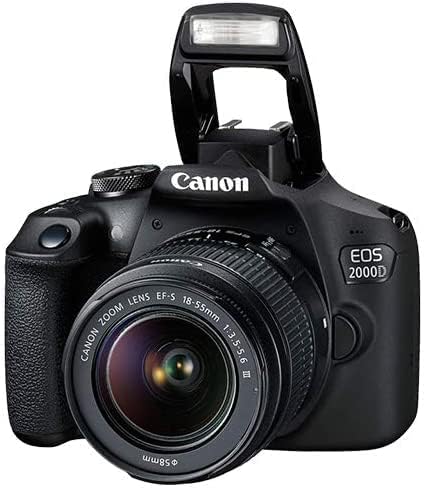
This manual provides essential information for operating your Canon EOS 2000D / Rebel T7 DSLR camera. Designed for both beginners and enthusiasts, this camera offers a 24.1MP APS-C CMOS Sensor, DIGIC 4+ Image Processor, and Full HD 1080p video recording. Familiarize yourself with its features and functions to capture high-quality images and videos.
2. ສິ່ງທີ່ຢູ່ໃນກ່ອງ
Your Canon EOS 2000D / Rebel T7 camera kit typically includes the following items:
- Canon EOS 2000D / Rebel T7 Camera Body
- EF-S 18-55mm f/3.5-5.6 Lens
- ເລນມຸມກວ້າງ
- ເລນ Telephoto
- ກາດໜ່ວຍຄວາມຈຳ 128GB
- Camera Bag/Case
- ຊຸດກອງ
- ໜ່ວຍ Flash
- ຂາຕັ້ງໂຕະ
- ແບັດເຕີຣີ ແລະເຄື່ອງສາກ
- ສາຍຄໍ
- Lens Cap Keeper Holder
- Cleaning Cloth and Solution
3. ອົງປະກອບຂອງກ້ອງຖ່າຍຮູບ ແລະການຄວບຄຸມ
Understand the layout of your camera for efficient operation.
3.1 ແນວ ໜ້າ View

The front of the camera features the lens mount, lens release button, and the grip for comfortable handling.
3.2 ເທິງ View

The top panel includes the mode dial for selecting shooting modes, the power switch, and the hot shoe for external flash units.
3.3 ດ້ານຫຼັງ View

The rear of the camera features the 3.0-inch LCD monitor, viewfinder, and various control buttons for menu navigation, ISO, autofocus, and white balance.
4. ຕັ້ງຄ່າ
4.1 ການຕິດເລນ
- ຖອດຝາປິດກ້ອງຫຼັງ ແລະຝາປິດຕົວກ້ອງອອກ.
- Align the red or white index mark on the lens with the corresponding mark on the camera body.
- ໝຸນເລນຕາມເຂັມໂມງຈົນກວ່າມັນຈະເຂົ້າທີ່.
4.2 ການໃສ່ແບັດເຕີລີ ແລະ ກາດຄວາມຈຳ
- ເປີດຝາປິດຊ່ອງໃສ່ຫມໍ້ໄຟຢູ່ດ້ານລຸ່ມຂອງກ້ອງຖ່າຍຮູບ.
- Insert the battery with the electrical contacts facing the correct direction, then close the cover.
- ເປີດຝາປິດຊ່ອງໃສ່ກາດໜ່ວຍຄວາມຈຳຢູ່ດ້ານຂ້າງຂອງກ້ອງ.
- Insert the SD card with the label facing the front of the camera until it clicks. Close the cover.
4.3 ການຕິດສາຍຄໍ
Thread the ends of the neck strap through the strap lugs on the camera body and secure them as shown in the strap instructions.
The lens cap keeper holder can be attached to your camera strap to prevent losing the lens cap.
5. ການດໍາເນີນງານພື້ນຖານ
5.1 ເປີດ/ປິດ
To turn the camera on or off, use the power switch located near the mode dial.
5.2 ການເລືອກໂໝດຖ່າຍຮູບ
Rotate the mode dial to select your desired shooting mode. Common modes include:
- Scene Intelligent Auto (A+): Fully automatic mode for easy shooting.
- ໂຄງການ AE (P): Camera sets aperture and shutter speed, you control other settings.
- AE ຕາມຄວາມເໝາະສົມຂອງຊັດເຕີ (ໂທລະພາບ): You set shutter speed, camera sets aperture.
- AE ຕາມຮູຮັບແສງ (Av): You set aperture, camera sets shutter speed.
- ຄູ່ມື (M): ທ່ານຄວບຄຸມທັງຮູຮັບແສງ ແລະຄວາມໄວຊັດເຕີ.
5.3 Using Autofocus (AF)
The camera features a 9-point AF system. To focus, half-press the shutter button. The camera will automatically select focus points or allow manual selection depending on the mode.
5.4 ການໃຊ້ແຟຼດໃນຕົວ
In automatic modes, the built-in flash may pop up automatically in low-light conditions. In creative modes, you can manually raise the flash by pressing the flash button.
5.5 Digital Slave Flash

The Digital Slave Flash can be mounted onto the camera's tripod mount using the included bracket. It is activated by optical triggering, syncing with the camera's built-in flash. Ensure the slave flash is in slave mode and the camera's built-in flash is popped up for operation.
6. ຄຸນສົມບັດຂັ້ນສູງ
ການເຊື່ອມຕໍ່ Wi-Fi 6.1 ແລະ NFC
The Canon EOS 2000D / Rebel T7 features built-in Wi-Fi with NFC, allowing you to connect to compatible smartphones or tablets. This enables remote shooting and easy transfer of images and videos for sharing.
6.2 Full HD Video Recording
Record Full HD 1080p videos at 30 frames per second. Select the video recording mode on the mode dial to start capturing motion. The camera's autofocus system also works during video recording.
6.3 Using Additional Lenses
Your kit includes wide-angle and telephoto converter lenses. These attach to your standard 18-55mm lens to expand your photographic capabilities.

The 0.43x wide-angle lens widens the image area, allowing you to capture more of the scene without moving away from your subject.

The 2.2x telephoto converter lens effectively doubles your camera's maximum focal length, bringing distant subjects closer.
7. ການບໍາລຸງຮັກສາແລະການດູແລ
- Keep the camera and lenses clean using a soft, lint-free cloth. Use the provided cleaning solution and cloth for lenses.
- Store the camera in a dry, cool place, preferably in its camera bag, to protect it from dust and moisture.
- ເອົາແບດເຕີຣີອອກຖ້າກ້ອງຖ່າຍຮູບຈະບໍ່ຖືກໃຊ້ເປັນໄລຍະເວລາທີ່ຍາວນານ.
- Avoid exposing the camera to extreme temperatures or direct sunlight for long durations.
8. ການແກ້ໄຂບັນຫາ
If you encounter issues with your camera, consider the following basic troubleshooting steps:
- ກ້ອງບໍ່ເປີດ: ກວດໃຫ້ແນ່ໃຈວ່າໄດ້ສາກແບັດ ແລະໃສ່ຢ່າງຖືກຕ້ອງ.
- ຮູບພາບແມ່ນມົວ: Check focus settings, ensure adequate lighting, or use a tripod.
- Flash ບໍ່ຍິງ: Verify flash settings are enabled and the flash is popped up (if built-in) or properly attached (if external).
- ກາດຄວາມຈໍາຜິດພາດ: Reinsert the memory card, or try a different compatible card.
ສຳລັບການແກ້ໄຂບັນຫາທີ່ລະອຽດກວ່າ, ໃຫ້ອ້າງອີງເຖິງຄູ່ມືຜູ້ໃຊ້ທີ່ຄົບຖ້ວນທີ່ມີຢູ່ໃນຝ່າຍຊ່ວຍເຫຼືອ Canon webເວັບໄຊ.
9. ຂໍ້ມູນຈໍາເພາະ
| ຄຸນສົມບັດ | ຂໍ້ມູນຈໍາເພາະ |
|---|---|
| ປະເພດເຊັນເຊີ | 24.1MP APS-C CMOS |
| ໂປເຊດເຊີຮູບພາບ | ດິຈິກ 4+ |
| ຈໍ LCD | 3.0'' 920k-Dot LCD |
| ການບັນທຶກວິດີໂອ | Full HD 1080p ທີ່ 30 fps |
| ລະບົບໂຟກັສອັດຕະໂນມັດ | 9-point AF System |
| ຊ່ວງ ISO | Extended ISO 12800 |
| ການຍິງຢ່າງຕໍ່ເນື່ອງ | 3 fps |
| ການເຊື່ອມຕໍ່ | Built-In Wi-Fi with NFC, USB |
| ການຕິດຕັ້ງທີ່ເຂົ້າກັນໄດ້ | Canon EF-S |
| Lens Focal Length (Kit) | 18-55ມມ |
| Optical Zoom | 3x |
10. ວິດີໂອຜະລິດຕະພັນຢ່າງເປັນທາງການ
Watch these official videos for additional guidance and demonstrations of your Canon EOS 2000D / Rebel T7 camera.
Canon Rebel T7 Quick Review!
ໄວກວ່າview of the Canon Rebel T7, highlighting its ease of use and key features.
Canon EOS 2000D Overview
ວິດີໂອນີ້ໃຫ້ລາຍລະອຽດສັ້ນໆview of the Canon EOS 2000D camera.
ຊື່ສັດ Review of Canon EOS 2000D Rebel T7 DSLR Camera Bundle
ລາຍລະອຽດ Review of the Canon EOS 2000D Rebel T7 bundle, covering various components and usage.
11. ການຮັບປະກັນແລະການສະຫນັບສະຫນູນ
This Canon EOS 2000D / Rebel T7 camera comes with a ຮັບປະກັນ 90 ມື້ຈໍາກັດ. For warranty claims or technical support, please contact Canon customer service or visit their official support webເວັບໄຊ. ຮັກສາໃບຮັບເງິນການຊື້ຂອງທ່ານໄວ້ເປັນຫຼັກຖານການຊື້.


